Buy anything from 5,000+ international stores. One checkout price. No surprise fees. Join 2M+ shoppers on Desertcart.
Desertcart purchases this item on your behalf and handles shipping, customs, and support to UK.
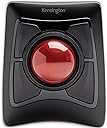
๐ฏ Master your workflow with precision and freedomโtrackball redefined.
The Kensington Expert Mouseยฎ Wireless Trackball combines advanced DiamondEyeโข optical tracking with dual wireless connectivity (Bluetooth LE and 2.4GHz USB receiver) to deliver precise, cable-free control. Designed for both right- and left-handed users, it features a customizable 4-button layout via KensingtonWorksโข software and an ergonomic detachable wrist rest for all-day comfort. With a 12-month battery life and a 3-year warranty, this trackball is engineered for professionals seeking productivity, style, and reliability across Windows, Mac, and PC platforms.


| ASIN | B01936N73I |
| Are Batteries Included? | Yes |
| Are Batteries Required | Yes |
| Battery Average Life | 12 Months |
| Best Sellers Rank | #14,651 in Computers & Accessories ( See Top 100 in Computers & Accessories ) #2 in Trackballs |
| Brand | Kensington |
| Brand Name | Kensington |
| Button Quantity | 4 |
| Colour | Black |
| Compatible Devices | windows,pc,mac |
| Connectivity Technology | wireless |
| Country of Origin | China |
| Customer Reviews | 4.2 out of 5 stars 5,183 Reviews |
| Global Trade Identification Number | 00085896723592, 07802880611214 |
| Hand Orientation | Ambidextrous |
| Hardware Platform | Mac, PC |
| Importer Contact Information | Interface Connectronics Pvt Ltd, # 85, Unit # 3, First Floor V.V.Yoga Saurabha, S.C.Road, Yeshwanthpur, Bangalore, India 560022, Contact: +91-9739952969, [email protected] |
| Item Dimensions L x W | 25.4L x 8.9W Centimeters |
| Item Type Name | Trackball |
| Item Weight Unit of Measure | 1.35 Pounds |
| Manufacturer | ACCO Brands, ACCO Brands Asia Pte Ltd, 2 International Business Park Tower 2 #05-31/32, The Strategy, Singapore 609930, Contact: +65-67760195, [email protected] |
| Manufacturer Contact Information | ACCO Brands Asia Pte Ltd, 2 International Business Park Tower 2 #05-31/32, The Strategy, Singapore 609930, Contact: +65-67760195, [email protected] |
| Manufacturer Part Number | K72359WW |
| Model Number | K72359WW |
| Movement Detection | Trackball |
| Movement Detection Technology | Trackball |
| Network Connectivity Technology | wireless |
| Number of Batteries | 1 A batteries required. (included) |
| Number of Buttons | 4 |
| Operating System | Chrome OS, Mac OS 10.13 High Sierra, Windows 8 |
| Packer Contact Information | Interface Connectronics Pvt Ltd, # 85, Unit # 3, First Floor V.V.Yoga Saurabha, S.C.Road, Yeshwanthpur, Bangalore, India 560022, Contact: +91-9739952969, [email protected] |
| Power Source | usb powered |
| Product Features | Wireless |
| Special Feature | Wireless |
| Style Name | Modern |
| Theme | Video Game |
| UPC | 085896723592 |
| Unit Count | 1 Count |
| Warranty Description | Limited 3 year warranty |
K**N
Best for Music Producer โค๏ธ
Great product after Using it you can't go back for normal mouse
P**.
Great seller
Great product and great seller . Made our exchange possible as well even in the warranty period
A**A
Good trackball, but cheap plastic
Their mac software is useless hence im using steermouse app to program it.. Mouse click feels cheap plastic. I was facing wrist issues with my earlier thumb trackball. So purchase this , even this started to give a bit of pain, but after a while hand got adjusted and pain vanished.
Y**N
A comfortable trackball with many buttons
I enjoy using this trackball every day. It takes up space on my desk, but using this is fun and smooth. You need to get used to the buttons and moving around if you are new to a trackball mouse. There is a learning curve. I don't use all the four buttons yet. You can also assign shortcuts to combination of two buttons. The attached wristrest is also good. My hand doesn't feel tired using this trackball for longer hours.
K**L
Too good
Expensive but good
A**R
No service in India
Try claiming warranty they wont support in India. think twice before ordering
A**M
Works well, but pathetic build
Works like a charm, but the build quality is pathetic. Iโm rather surprised by the cheap plastic construction for a very premium-priced pointing device. The plastic enclosure and inserts have sharp edges, and the scroll ring wobbles and makes a grating noise. The only thing substantial is the trackball itself, and how smooth it feels to operate. Logitech trackballs are of much superior overall quality, and they provide comparable performance.
M**A
Preformance is good. Difficult to carry
Product is very big, Preformance is good . Difficult to carry
A**Z
Perfecto para trabajos de precisiรณn
Desde que lo uso ya no se me cansa la muรฑeca, a pesar de que lo utilizo unas seis horas al dรญa. He ganado en productividad porque, gracias a su gran bola, puedo situar el cursor exactamente donde quiero a gran velocidad. Los cuatro pulsadores de que dispone son grandes, sensibles y cรณmodos para usar. Aunque puede configurarse para que la pulsaciรณn conjunta de dos botones adyacentes sea equivalente a otro botรณn, esto no me resulta prรกctico porque es difรญcil hacer la pulsaciรณn simultรกnea.
D**R
A few flaws, but I'm a trackball convert anyway!
A trackball is nothing I would have considered in the past as most of my PC time is used for gaming and being able to do work has always just been a "bonus" of the platform. However, over the course of the wonderful year of 2020, I had to find solutions to working from home and purchased not just one, but two trackballs. I first started with Logitech's M570 (wireless) and followed it up a couple of months later with the Kensington Expert Wireless. Chances are that if you're seriously considering transitioning to a trackball, you are looking at exactly these two models or their wired siblings. Both solved a very simple problem of making the most of confined space. For my gaming and personal PC, I have a typical desk setup with a brick of a gaming mouse, but for the work laptop I lugged home with me, the idea was that it was a temporary thing and I'd be back in the office with a full desk in no time. Three quarters of a year later and the work machine is growing roots in an old TV table. I managed for a very long time as I was quite comfortable with simply using the built-in trackpad, but when they replaced my machine with a new one, I could no longer work without wanting to throw it out the window. The 'brilliant' minds that designed the new trackpad clearly never used one as they removed the physical buttons that bisected the pad and made the pad itself one giant button that would only right click if you used the very bottom right corner. So now I needed a mouse, but TV trays don't have the runway for effective mouse use. Enter the trackball. Since trackballs stay put, they can sit comfortably in a small space and you still have full use of your cursor. The second thing both trackballs solved was the right-click issue. While the M570 has more traditional placement of buttons like a regular mouse, the Kensington Expert (herein "Expert") has four fairly large buttons that can be tapped easily regardless of what hand position you take. Since the laptop's trackpad cut the right-click distance by 2/3rds and I live and die by context menus, I needed that functionality without feeling the need to break equipment. The above issues are solved by pretty much any trackball device available in the market today, so what it really comes down to aside from general reliability and longevity is preference. First off, while the M570 seems sturdy enough, the Expert feels like a tank. It has a fairly large footprint compared to the relatively mouse-sized M570, but the Expert also has a much larger ball (maybe three times bigger?) and is heavier and kept in place with rubber feet. As mentioned above, it has four large programmable buttons surrounding the trackball and a rubbery ridged wheel that provides you with your scrolling (compared to Kensington's Slimblade which has you twisting the ball in the socket to scroll instead). The Expert uses the bottom left button (by default) for left click and the bottom right for right click. Since the ball is finger operated as opposed to thumb-operated M570, you typically use your thumb and pinky to click and right-click respectively. It takes some getting used to, but it really becomes second nature pretty quickly. On top of that, you get two extra programmable button assignments by clicking the top two or the bottom two buttons together. Despite its wider footprint, the Expert has become my go-to device for work while the M570 has been repurposed for the media machine I have connected to my TV. While it comes with a very sturdy wrist pad to help with your ergonomics, since I sit higher than the Expert instead of level with it, I find it feels better without the pad attached. The larger ball is much easier to manipulate and makes more logistical sense than when using the thumb ball of the M570 and Kensington's software allows you to set up keyboard hotkeys to assist with accuracy. For example, I can hold the Ctrl key to drastically slow down the cursor (this is completely customizable) so I can select specific things or position the cursor with precision. For cleaning, the ball is held in the device by gravity only and can be easily lifted out without having to lift the base unit (and it's kinda fun to do that anyway). Underneath you'll have access to the sensor as well as the three beads or skates that the ball rides on. I don't find that the ball is a dust magnet, but normal use will see crud accumulate either on it or on the skates. It's easy to simply lift the ball and give everything a wipe down. There's only two things that I am nitpicky about when it comes to the Expert. First, the ball has a very high profile (exactly half of it is exposed) and while I find it very comfortable to use throughout the day and experience no wrist strain whatsoever, it would have been nice if the 'horizon' or the plane of the base unit was a bit higher and the ball sunk a bit lower (things addressed in the Slimblade). The second thing is that this thing puts itself to sleep, which is admittedly a good thing. However, you cannot wake it by rolling the ball or scrolling the wheel; you must click one of the buttons to wake the device from sleep, but the click is actually registered with the OS and is not thrown away. Therefore, unless you're expressly positioning your cursor safely when you go idle, then you need to be careful on what button you press to wake your device. Neither are dealbreakers, but I really find the registration of the wake input to be weird. Overall, I am very happy with both of my purchases, but the Expert won out as my day-to-day solution for work. I would never use the device for gaming (at least competitively), but its customizable configuration from speed to keystrokes with Kensington's lightweight software easily make it a power-user's device. It may be unintuitive at first, and I was always first in line to mock these devices, but I have completely turned around on them. I think wherever I go in my professional life, the Expert will come with me.
W**E
Nice but a bit flimsy for the money
It works quite well, but If I compare quality or at least the feel of quality it is not the feel belonging to 100 euro's. I had a logitech before (but problems with my thumb) and if you take that as standard, this kensington has the feel of one of 30 euro's. But maybe the quality is there and it will prove that to me by functioning perfect for the coming 5 years and I can come back for more stars. The software works, but isn't very nicely done. Again, it works so when you have set it, you don't have to do till you take a new computer. Tip for the manufacturer. Don't present a drawing where the dongle had a place in te mouse and then hide it in the cartons :) So for sofar a 4/5 for function and a 2 for the way it looks for that amount of money, making it a 3 stars item. Hope to come back to add stars as the quality is better then it looks at first sight.
H**H
Excellent product.
Love a trackball as itโs much easier to control.
A**M
Good size trackball; very easy use with either hand
Great trackball. Easy to connect; just plug the dongle in, and it's good to go. Really good size of trackball allows me to use three fingers to navigate precisely with my non-dominant hand. Comfortable to use from the couch too. The buttons click nicely and the scroll wheel works well. It's definitely a little bit pricey, but definitely worth it to be able to rest my injured dominant hand but still be able to enjoy good precision when using my home PC. The ball comes out easily to clean, so I wouldn't want to take this loose in my bag into the office, but that isn't really a consideration for me since I've switched this one out for the Orbit Fusion, which I'll take to work instead.
Trustpilot
2 weeks ago
1 week ago