Buy anything from 5,000+ international stores. One checkout price. No surprise fees. Join 2M+ shoppers on Desertcart.
Desertcart purchases this item on your behalf and handles shipping, customs, and support to UK.
🎉 Craft Boldly, Create Instantly, Belong Creatively!
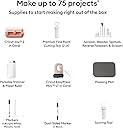
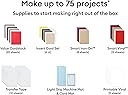
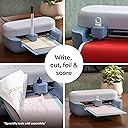
The Joy™ 2 Ultimate Bundle in Coral is an ultra-compact, portable cutting machine with a 4.5-inch cutting width, Bluetooth connectivity, and compatibility with over 75 materials. Designed for quick, everyday projects like cards, stickers, and labels, it includes enough supplies for up to 75 projects and the Cricut EasyPress Mini LT heat press. Perfect for professionals and hobbyists alike, it offers seamless integration with the free Design Space app featuring thousands of images and fonts, making personalized crafting effortless and stylish.


| ASIN | B0GJFGRL3C |
| Active Surface Area | 13.5 square inches |
| Best Sellers Rank | #6,301 in Arts, Crafts & Sewing ( See Top 100 in Arts, Crafts & Sewing ) #7 in Scrapbooking Die-Cut Machines |
| Brand | Cricut |
| Brand Name | Cricut |
| Color | Coral |
| Customer Reviews | 4.0 out of 5 stars 127 Reviews |
| Included Components | Cricut Joy™ 2 + Ultimate Bundle |
| Manufacturer | Cricut |
| Material | Plastic |
| Material Type | Plastic |
| Model | 2012210 |
| Operation Mode | Semi-Automatic |
| Part Number | 2012210 |
| Print media | Card stock |
| UPC | 093573506987 |
| Warranty Description | Limited Warranty |
W**N
Perfect For Beginners and So Much Fun!
I absolutely love my Cricut Joy 2 with the accessories bundle! I’m still pretty new to crafting, but I’ve already made a folder and a couple of shirts—and I’m planning to make a Mother’s Day card next. It’s honestly been such a fun and creative outlet. There was a slight learning curve at the beginning (which I expected). I accidentally loaded my Smart Iron-On upside down the first time—oops 😅—and after my first project, the machine stopped feeding the material. I did a quick reset, and ever since then, it has worked flawlessly. Once you get the hang of it, everything becomes super easy and really enjoyable. The accessories bundle is totally worth it because you have everything you need to get started right away. If you’re on the fence, go for it—you won’t regret it! Perfect for beginners and so satisfying to use. 💖✨
A**Z
Amazing!
LOVE IT! The coral color is perfect for the cricut machine and the mini heat press. Everything came packaged safely and intact. Setup was easy and and so was connecting it to my laptop via bluetooth!
C**G
Small but mighty
This was a very good purchase for me. It had more items in it to start then I thought. This is perfect size for my small craft projects. Small enough to take on trips.
T**Y
Blue tooth does not connect at all. Wasted hours trying
I have had this issue but not like with the joy2. .. it would not connect at all. It connected during the setup, did the sample cut and then would not connect again. I reset and turned off and on both the machine and the laptop, and I I removed and re added the cricut and nothing worked. It was literally just inches away and would not connect AT ALL. I saw in some boards that it has to be plugged in to a wall not an extension, but that did not work either. There are lots of videos online to "fix" connectivity issues which tells me it is an ongoing issue with cricut and they do not offer usb connection. Wasted hours trying g to get it to connect
H**E
Skip the Joy-less 2
Well, this was a waste of time. First it took 3 attempts to get the Bluetooth pairing to work (there is no USB option with the Joyless 2.) Then when I did get it to pair, there's a prompt to do a cricut logo test cut, which I tried. LOL...total fail. First attempt, when you load the material in, you've got to be precise in how it aligns to the feeder. The stock is pulled into the machine via triggering an optical sensor. Well, if you are not a freaking surgeon, or have even mild ADHD, you'll screw it up. Why? There is enough play in the alignment guides that it will yoink in the vinyl off kilter and wrinkle it like a ruffles potato chip. That killed sheet one of Black. Attempt 2. See above. Same thing happened, but got the alignment a little better, but the cutter only cut in the long axis, it made lots of noises like it was cutting horizontally....but nope, only made a messy vertical slit. That borked sheet 2. Attempt 3. Used the gold sheet. It gets the gold medal for being a mess. See pic. Only cut in one direction. It pulled in weirdly, and it also peeled the corners off... Attempt 4. What, you're kidding right? you think I'd try it again? Nope, just dumping it back in the box and sending it back....what a waste of Earth's resources. Also, I think it was missing a bunch of the tools...lame. It gets two stars for being a cute design.
D**L
Small, lightweight and works well
I already have a Cricut maker and I ordered this Cricut to be able to leave it out for card making. I received it quickly. Pros: It is small, lightweight and easy to leave on my desk. It came with a variety of Cricut supplies including paper and smart vinyl. If this is your first cutting machine, you will have plenty of paper and vinyl to work with. Set up is easy and quick Directions are short and to the point An extra cutting blade was included with this bundle as well as 2 long cutting mats as well as a card mat. Cons: It doesn't have a closure to cover the mechanism . I think it might get dirty quickly especially if you keep it near an open window. I made a small cover for it. It's only made to make small things. If you want to make anything larger than 4" wide you would need a bigger machine.
Q**N
Joy
Good investment for such a small item. Minimum space used. The starter packs are awesome
L**I
Me encanta, una de mas mejores marcas.
Me encanta es lo único que puedo escribir. Como nunca he trabajado con este tipo de maquina he tenido que buscar en YouTube como usarla. Pero ya poco a poco he cortado, dibujado y printiado a traves de ella y es muy fácil su programa después que aprendes a hacerlo. Lo bueno también es que como es una marca reconocida hay muchos tutoriales para aprender a usarla.
K**O
Small but mighty
Cricut Joy 2 is excellent compact, fast, and matless cutting makes small biz projects so easy. Perfect for labels, stencils, and cards. If you’re short on space but big on ideas, this is the one.
S**S
Don't Know What All The Hypes About
This machine is very basic. I have done iron-on transfer letters for a t-shirt, a few cards and some decals. I find it to be limited in the projects I can use from Cricut. Most of them need editing and you have to be a software genius to do that. I find most of the tutorials not easy to understand and lose my attention. I would like to see videos starting with "So you bought a Cricut, what next?" There should be a tutorial that one can go to right away to discuss all the design software features and how to use them. I would like to see a more user-friendly format for "Dummies". I would like to see the software do most of the editing conversions. It recognizes that you have the Joy 2, so any card you want to do it edits and converts it for you. Yeah, I'm more than a little disappointed in the software for sure. I found the machine to be noisy when cutting as well. My biggest disappointment is that I can't really do any projects that I want to and I find all the images to be very childish looking as well but I like a more sophisticated look, I guess.
U**A
Defective machine
Machine didn't work at all. It turned on, connected to the app but that was all. Essentially a brick. Returned.
Trustpilot
2 months ago
2 weeks ago