


🖱️ Elevate your workspace with precision and comfort — don’t let wrist pain hold you back!
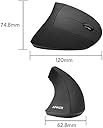
The Anker 2.4G Wireless Vertical Ergonomic Optical Mouse combines advanced ergonomic design with customizable DPI settings (800/1200/1600) and five intuitive buttons, including next/previous for effortless browsing. Its wireless connectivity paired with an 18-month battery life and power-saving mode ensures uninterrupted productivity. Designed for right-handed users, this sleek black mouse reduces wrist strain through a natural handshake grip, making it ideal for professionals seeking comfort and precision in their daily computing.




| ASIN | B00BIFNTMC |
| Antenna Location | Gaming |
| Are Batteries Included? | No |
| Are Batteries Required | Yes |
| Battery Average Life | 18 Months |
| Best Sellers Rank | #305,552 in Computers & Accessories ( See Top 100 in Computers & Accessories ) #2,593 in Mice |
| Brand | Anker |
| Brand Name | Anker |
| Button Quantity | 6 |
| Colour | Black |
| Compatible Devices | Personal Computer |
| Connectivity Technology | USB |
| Customer Reviews | 4.2 out of 5 stars 52,129 Reviews |
| Global Trade Identification Number | 08536692579774 |
| Hand Orientation | Right Hand |
| Hardware Platform | Wireless |
| Item Dimensions L x W | 11.5L x 5.8W Centimeters |
| Item Type Name | mouse |
| Item Weight Unit of Measure | 0.28 Pounds |
| Manufacturer | Anker |
| Manufacturer Part Number | AK-98ANWVM-UBA |
| Model Number | AK-98ANWVM-UBA |
| Mouse Maximum Sensitivity | 1600 Dots per Inch |
| Movement Detection | Optical |
| Movement Detection Technology | Optical |
| Network Connectivity Technology | USB |
| Number of Batteries | 2 AAA batteries required. |
| Number of Buttons | 6 |
| Operating System | Linux, Mac OS X 10.0 Cheetah, Windows 10 |
| Power Source | Aaa Batteries,Corded Electric |
| Product Features | Ergonomic Design |
| Special Feature | Ergonomic Design |
| Style Name | Modern |
| UPC | 848061077438 848061079456 |
S**A
This mouse helped me recover from arm pain.....
For about three months I had severe pain in my right arm due to extensive usage of the mouse. I tried all sorts of positions but did not make any difference. I searched the internet and read about the reviews of this vertical mouse. Purchased it in April 2016 and has been using it since then. The pain in my arm vanished in about two weeks time and now I am very much used to this vertical mouse. It is really a great product. I will certainly recommend to anyone who has been suffering from the pain. It is very reasonably priced. Works very well too. Updated review... 28th Dec 2018... I am still using the same mouse and it is still working without any problem. Further, it also has become a conversation starter!!!!
N**M
A great ergonomic product. Must have
Have been using wired vertical Anker mouse for past 18 months and was waiting for the price to go down for wireless anker mouse. Finally got this product last week and I must say its pretty awesome for 1000 Rs. Feels much better than the wired mouse. I feel the product quality has improved. It feels great in hand. Best part is you can see the indicator for the DPI changes and battery. Battery saver option is awesome. You need to click on the button to re activate the mouse. And 18 months warranty is something great. The only concern here is if in case you lose the mini USB receiver I am not sure if you can get a new one or have to get a new mouse. But over all a great experience
N**Y
Awesome ergonomic mouse I ever used
Awesome ergonomic mouse I ever used. I bought this product for 1,065 INR and now the price has been increased to 6 times :( - not cost effective any more. During Corona I couldn't go to office for more than 2 years and my mouse was lying there itself in office. I had to buy another similar one during that time but I couldn't use it as it was too hard to use. I got my mouse back from office yesterday but not sure to what extent it performs as it performed initially :( There is no doubt about the performance of this product. For sure this is a GO TO ERGONOMIC MOUSE if its affordable. HAPPY BUYING !!!
A**K
great buy
Awesome product .. and great customer support .. after 1 year I found my middle button stopped working .. contacted the customer support and they replaced the unit without any delay .. writing this after using the mouse for over 1 year .. great to use .. it may take you some time to get used to it .. but once you get used to it .. good for your wrist ..
A**T
Best value for money - wrist saver
This is a life saver. I used to have wrist pain due to mouse use for 10 years & had gone to all doctors allopathy, ayurvedic etc. I also had a custom cast made for my wrist support at a rehabilitation center without any success. The pain & discomfort increased & also fingers, neck, shoulder befan painful. Unfortunately, i did not know about such a mouse earlier. While watching a technical video, i saw the person using a different mouse & referred to it as vertical mouse. I started searching for ergonomic, vertical mouse on the internet. I could only find very expensive mouse from companies like microsoft or logitech etc. When i came across this product, i did not know about the anker brand & i thought that this may be some cheap chinese ripoff. However, due to its low cost, i thought of giving it a try. To my pleasant surprise, this is the best mouse i had used. My wrist pain reduced over time & has completely vanished now. I used the product for more than a year till i lost its small USB dongle due to my carelessness. So, this is 2nd mouse i am buying for myself & will be very careful about the dongle. The mouse has a slot to store the usb dongle. Go ahead - buy this without thinking twice, i could not find anything better value for money than this.
B**E
Good mouse for an experiment.
The mouse does take some getting used to. Given that the keys are on the side and not on the "top", you have to change the way it is gripped while switching from the keyboard to the mouse. Initially, I felt some discomfort just over the wrist. Now not so much. One thing I must admit is the time it takes to find a sweet spot to hold it. It seems to be designed for slightly larger hands. However I like the novelty of the product. The one other gripe I have about is the space it occupies in my laptop shoulder (not backpack) bag. It causes a bulge when it is inserted in the mouse pocket because of its shape. Hence I now keep it in the same space as the laptop.
S**S
Great mouse for prolonged use
I'm using the mouse since last 1 year and it's great! Very comfortable to work with. Might need a few weeks in getting used to it but after a while, you'd love it's design. It doesn't hurt your arm/fingers during prolonged use. The only negative aspect is the scroll wheel. It doesn't feel premium while rotating. Also, I wouldn't want to pay more than Rs. 1500 for it. (I bought it for ~1100), so the the current price (3k+) is outrageous. Tip: Use alkaline batteries only, Zinc batteries will last only 1 month of regular use while alkaline will last 5-6 months easy.
J**Y
Used it 6 months & it died
I had this mouse for almost 6 month. It was not via Amazon though. I got used to it and one fine day, it stopped working and changing battery does not help and not much could be done anyway. I won't recommend this as it makes u get used to ergo effects and then changing again to traditional mouse will be painful. Not a great product and life of it is really a thing to worry. On the brighter side, it is an identity for u. Many in office will refer u as "that dude with a weird mouse" lol. Another advantage is it will make your desk took very attractive. Choice is yours and check the money to see if it is worth it for u leave an impression in 3 to 6 months. I feel it deserves more stars... but am clueless for almost 1 month still using laptop mousepad and don't know what will fit me after having used this mouse.
S**I
Anker vs Evoluent. Anker wins hands down!
What a fantastic product! I started looking into the world of vertical mice after experiencing some wrist discomfort from the use of a traditional mouse. Of course, the first search hit was Evoluent Vertical Mouse. They were the first to market with a product like this, plus they have the whole University of California academic cachet behind them. For YEARS Evoluent was the ONLY player on the vertical mouse market without competition. As a result, the technology and finish of their product is still stuck in the past. Think those ugly white Microsoft optical mice we all used in the late 90s when optical mice were a novelty. The Evoluent mice have the exact same feel, and even worse tracking capability! In Evoluent's defense, their product does relieve wrist strain, but so does Anker vertical mouse...... for only $20! So let's compare the two products side by side, Evoluent vs Anker. Note that I am just over 7 inches from my wrist crease to the tip of my middle finger. This puts me right on the border for Evoluent between normal and small versions. If you are in the same boat, go the smaller size with Evoluent, provided you don't opt for the Anker. 1. Size Evoluent (standard size) felt a bit too big for my hands. The cheap plastic is also very slippery, making it difficult to pick up the mouse and move it if you are at the edge of the mouse pad (and you do need a mouse pad with Evoluent). Anker fits my hand perfectly. I simply LOVE holding the mouse. It has a really nice rubbery matte finish that prevents your hand from slipping. 2. Hand Position Both Anker and Evoluent offer the handshake position. I would say that Evoluent hand position is about 80 degrees between table top and your wrist. For comparison, regular mouse would have your wrist at 0 degrees. Anker holds your wrist at about 65 degrees. It is debatable whether 80 or 65 degrees is better. With both mice I felt immediate relief of wrist tension. Going back to 0 degree traditional mouse position feels immediately awkward. It is a toss up between the Anker and Evoluent with a slight edge given to Evoluent, just because they have a bit of science in their product marketing. 3. Usability This is personal, but for me Anker wins hands down in this category. Anker feels intuitive right out the box. You click with left finger and right click with the right. The back/forward thumb buttons were also very intuitive for me. This is similar to most Logitech mice. Mouse buttons on Anker have nice rigidity to them. Evoluent, on the other hand, takes some getting used to. It is a big clunky thing that slips out of your hand. Left finger does the left click. But it is, by default, you pinkie and ring-finger that do the right clicking. You can also reassign right click to the middle mouse button, but somehow it feels awkward and you keep pressing the default right click button anyway. Also, it is EXTREMELY easy to accidentally click on Evoluent. Buttons are cheap and plastic, and the scroll wheel is a complete joke. Granted, Anker's mouse wheel is not stellar, but it works well. I must have the newer batch, as I cannot relate to any of the scroll wheel problems mentioned in review. Don't forget Evoluent's back/forward mouse buttons. They are awkward to use at first, but you get accustomed to the arrangement. Matter of preference here. 4. Tracking Evoluent tracking is ABSOLUTELY TERRIBLE. I have a black Ikea Galant desk. It's not shiny, just wood with black matte veneer. Everything tracks on it....... except the Evoluent mouse. So you HAVE to get a mouse pad. And be careful, you won't get tracking on every mouse pad, even if it is matte black. This is on a $100+ mouse!!! On the other end of the spectrum, Anker tracks on everything except glass. This is a $20 mouse. In summary, there is not much to chose from in the vertical mouse arena. So get the Anker vertical mouse, get rid of wrist strain... and save Evoluent for the fanboys.
B**S
Perfecto
Funciona bien. Es cómodo aunque hay que acostumbrarse al cambio de posición.
A**D
تجربة مميزه
عملي وتجربة مميزه
M**I
Ergonomico, consigliato!
Dopo più di 6 mesi di utilizzo, ritengo che questo mouse verticale è un’ottima scelta per chi cerca comfort ed ergonomia. Anche dopo ore di utilizzo continuo, la mano e il polso non si affaticano, grazie alla sua forma studiata per una presa naturale. Dal punto di vista dell’alimentazione, il mouse richiede due batterie (non incluse), ma non ho ancora dovuto sostituirle a distanza di oltre 6 mesi. Considerando il rapporto qualità-prezzo, è difficile trovare di meglio in questa fascia di prezzo. Se cercate un mouse ergonomico, preciso e con funzioni aggiuntive utili (grazie ai tasti laterali), questo è sicuramente un acquisto consigliato!
K**S
Souris ergonomique et confortable
Je viens faire un retour après 1 mois et demi d'utilisation de ce produit et je peux dire que j'en suis pleinement satisfait, je l'utilise environ 7h par jour (c'est ma souris de travail) et j'envisage même son intégration à la maison. Tout d'abord j’appréhendais un peu le passage souris standard vers souris verticale, et finalement il ne m'a pas fallu plus de quelques heures pour maîtriser la bête. Concernant les douleurs au poignet je dois admettre que je n'en avais pas réellement à la base. J'avais plutôt pris ce produit dans un but préventif, du coup je n'ai pas senti de changement particulier en utilisant cette souris jusqu'à ce que je retourne sur une souris classique et là on sent tout de suite une sorte de gêne au niveau du poignet et de l'avant bras, comme si cette position n'était pas naturelle. J'ai également remarqué qu'on a tendance a renversé la souris, étant donné que la souris n'est plus "plate" on a tendances à la renverser sur le coté, ce n'est pas grave en soit mais ça peut être un peu énervant au début surtout quand on bouge régulièrement ses mains sur le bureau. Concernant les autres aspects de la souris je trouve que les matériaux utilisé donne un rendu de qualité, je ne suis pas expert dans le domaine pour le confirmer mais les plastiques sont "doux" et c'est agréable à utiliser. La souris dispose bien de 5 boutons, aucun problème pour les clics droit / gauche / précédent / suivant par contre le clic de molette a été compliqué au début, il faut je trouve appuyer plus fort que sur une souris classique (certainement dû à la position de la main) mais ce ressenti c'est dissipé aujourd'hui. J'ajouterais aussi qu'il n'y a pas de débrayage de la molette comme sur certaines souris (notamment Logitech pour celles que j'ai pu avoir) cette fonction est bien pratique mais n'est pas pour autant indispensable (surtout à ce prix). Enfin il est possible de régler le nombre de DPI de la souris (800, 1200 ou 1600) j'aurais toutefois aimé avoir un indicateur, par exemple une échelle graduée avec une petit bouton a déplacer comme au dessous de certains autres modèles. Je précise également que les 2 piles AAA ne sont pas fournies, mais sachez que la souris passe en mode veille si vous ne vous en servez pas pendant quelques minutes (on la reveille d'un simple clic) ce qui permettra d'économiser un peu sur la durée de vie de ces piles. En résumé, Points positifs ; - Réduction de la fatigue au niveau du poignet - Prise en main plutôt rapide si on utilise une souris régulièrement - Matériaux qui semble de bonne facture - Un mode "veille" pour éviter de vider les piles trop vite Points Négatifs ; - Piles non fournies - Tombe facilement (voir détails plus haut) - Pourrait être un peu plus large pour un confort optimal (mais variable selon les utilisateurs) - Pas d'indication sur le nombre de dpi Je recommande donc cette souris notamment à ceux qui serait curieux de la chose mais qui ne voudrait pas franchir le pas et puis pour le prix vous ne prenez pas un gros risque.
Trustpilot
2 weeks ago
2 weeks ago