
Buy anything from 5,000+ international stores. One checkout price. No surprise fees. Join 2M+ shoppers on Desertcart.
Desertcart purchases this item on your behalf and handles shipping, customs, and support to UK.
๐ผ Elevate your home office with fail-safe, expandable network storage that keeps your data flowing and your team connected.
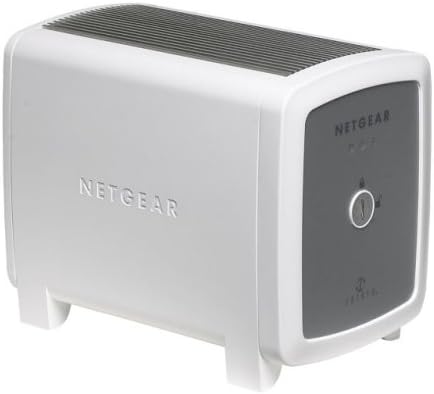
The NETGEAR SC101 Storage Central is a compact network-attached storage device featuring dual 3.5" IDE drive bays, 10/100 Mbps Ethernet connectivity, and automatic drive mirroring for data redundancy. Designed for easy setup and seamless file sharing across multiple PCs, it includes SmartSync Pro backup software and supports dynamic volume allocation via Z-SAN technology. Ideal for professionals seeking affordable, expandable, and secure network storage solutions.
| ASIN | B0009RML8S |
| Best Sellers Rank | #8,076 in Internal Hard Drives #137,856 in Computer Internal Components |
| Brand | NETGEAR |
| Color | White |
| Compatible Devices | Desktop, Laptop |
| Customer Reviews | 3.3 out of 5 stars 40 Reviews |
| EU Spare Part Availability Duration | 1 Years |
| Enclosure Material | Plastic |
| Global Trade Identification Number | 00606449040364, 00840356589718, 10606449040361 |
| Is Assembly Required | No |
| Item Dimensions D x W x H | 6.75"D x 5.66"W x 6.75"H |
| Item Part Number | SC101NA |
| Item Weight | 3 Pounds |
| Manufacturer | Netgear |
| Material | Plastic |
| Mfr Part Number | SC101NA |
| Model Number | SC101NA |
| Mounting Type | Tabletop |
| Product Dimensions | 6.75"D x 5.66"W x 6.75"H |
| Size | 4.25 x 5.66 x 6.75 inches |
| UPC | 840356589718 033584054268 606449040364 |
K**R
Basic NAS
Product works as advertised, easy to setup! It only has a 10/100 MB connection and an IDE interface so don't expect any high speed transfers. I installed two 500GB WD drives and backed up 250GB of data over a two day period without any problems. Finding this product may prove difficult becuase its almost at its end of life and not many stores carry it. I originally ordered mine from Amazon but the seller couldn't fulfill by order which worked out because Circuit City had it on clearance for $24.99.
B**R
Buyer Beware
I like Netgear products. I've owned wireless routers and networking cards from Netgear and they always worked perfectly. As I am trying to create mass storage for my digital music library I thought this would be a great addition to my network. I bought the unit from Amazon and two Seagate ATA/IDE 500Gb drives and was ready to enter the world of network storage. Unfortunately, the product did not install on the first attempt. No big deal, I thought. Looking closely at the install it appeared that the installation software had formatted my disks (more about this later) and sort of assigned network addresses for them but the drives were not visible from the mangement software. The install strongly suggests checking for updates and using the latest version from the web. I tried that - same results only now the operational software version didn't match the management software version and I got a message saying I needed to remove some SATA drivers first. I checked Netgear's online forum and I noticed that not one of the members logged into the SC101 section reported a successful install, even after trying many suggestions from different people. I tried every suggestion listed at least five times and the unit never even came CLOSE to working. I worked on this thing for two months or so with no progess at all. I am a computer professional - programmer, analyst, dba and power PC user with over 25 years experience and this is literally the first product I have ever given up on installing. It turns out that the SC101 formats your disks in some proprietary way that makes them unreadable by windows. Say you archive about twenty thousand of your favorite songs on the SC101 including your entire vinyl collection which takes a couple of hours per record to digitize and the SC101 blows up. Thats right - you cannot pull the disks out and use them in a Window system - your only option is to buy another SC101! Also, MANY people on the SC101 foruim reported that they had lost all their data just using the blasted thing. I gave the SC101 to goodwill with a warning taped on the box. I read a suggestion on the forum that all you need for a NAS device is an old computer stripped down to only Windows XP, a network card and a massive hard drive. Format the hard drive to match your other drives (FAT32,NTFS, whatever) set your sharing privileges and rock out. I guess it comes as no surprise by now that I rate the SC101 as the worst piece of hardware I ever bought. I think that Netgear should recall all of them and give us our noney back.
J**J
Excellent storage system for XP (but not Vista or 7)
This unit would rate 5 stars if only Netgear had decided to provide W-7 drivers. Installation was simple and the units are quite stable (have 2 with 500gb in each). Hooking up to a network is a no-brainer but you will have to install Netgear's propriety drivers and utilities on all your PCs to access and manage the drives. Since installation, I have had no down-time issues and every XP computer works well with the boxes. As we are converting to W-7 units, I may have to excess these boxes but only because Netgear does not have, nor do they plan to release updated drivers.
J**S
It was great for me since I have old type HDD's so ...
It was great for me since I have old type HDD's so I got to use them once again... and I am using the two 500gbs in it so that I can tie it into my Local Home Network and store Pictures from my phone.
C**H
Nice idea, poor execution
Pros: Nice small form factor. Cheap. Can connect 2 hard drives. Seems to handle large hard drives (500GB) OK, which a lot of the other enclosures don't. Quiet. Cons: Throughput is very poor. I mean really bad. In the toilet. I could type the data in faster. OK, maybe not that last one, but I put 2 Hitachi 500GB drives in one and it took 3 days to transfer 250GB of data on to one of the drives. That's less than 1MB/sec. I found a review that did throughput tests and the SC101 really falls on its face with large files, which is mostly what I'm attempting to use it for. The test got down to 0.6MB/sec on large files. I didn't expect this to be a speed demon being a network drive, but I expected better than _this_. If I don't see the data integrity problems that some others have seen, this is my number 1 problem with this device. The SC101 requires their drivers to be loaded on the computer and they only support Windoze boxes. Netgear is mumbling something about having Linux drivers someday, but so far that's vaporware. Software still has some problems, though apparently it's better than it used to be. Installing on a Win2K SP4 machine caused a continuous BSOD->reboot->BSOD->reboot, etc. I think that was happening because the wireless LAN on that machine was getting started after the SC101 utility that connects to the SC101 drives started. Going into safe mode, removing the SC101 utility from startup, and manually starting the utility after the machine is up and running seems to have fixed the problem, but what a pain. WinXP SP2 doesn't seem to have that problem (for me, at least). There's a lot of reports of data corruption and lost files when attemtping to mirror drives, but I haven't tried that. So far, attempting to update the SC101 with the latest firmware fails. No good error messages to help figure out why, it just fails. I haven't tried Netgear support on this issue yet, but by all accounts their support is somewhere between terrible and non-existent. If you go to Netgear's user support forum, apparently the _users_ are left with the burden of figuring out ways around problems and actual support personell are nowhere to be found. Terrible thermal design. I don't know where hard drive case manufacturers get the idea that sealing a drive up in an enclosure with zero ventilation is acceptible, but a lot of them seem to be doing it. It probably comes from the hard drive manufacturers that like the idea of high temperature severly limiting the MTBF of their drives so they can sell more of them. The Hitachi drives I'm using are actually pretty frugal with power usage, so the unit doesn't get overly hot, but some of the more power hungry drives may have issues. Netgear's fix for their awful thermal design is to spin down the drives when idle. This doesn't help if the drives are accessed often and is the equivalent of a band-aid on a big gaping wound. I may cut some slots in their top and bottom "heat sinks" to at least get a little convection cooling going. I wish the box had an internal power supply rather than the external goiter, but that would have made the thermal issues even worse. I wanted something small, low power, accessible by multiple computers, with a lot of storage so I wouldn't have to keep a server powered up all the time. The SC101 is sort of doing that so I'm not giving it 1 star, but with all the problems it has and the pathetic throughput, I can't recommend it. Hopefully Netgear will get its act together and newer firmware can fix some of these problems.
M**Y
It's what I expected
This is an out of date storage hub that Netgear no longer support. It is not Windows 7 compatible nor Windows 8. It is only compatible Windows XP. I used to have this but unlike thousands of disgruntled others, it actually fried due to overheating as there is no internal fan to keep it cooled. I losted one hard drive as well as this hub. But I only bought this so I can recover my datas on one hard drive. You cannot recover the data without the hub!!!! It is formatted using the zetera software and they will not support this either. Put it this way, after they sold thousands of this cool gagdet at the time, they got mad at each other (one sued the other, forget which) and neither will support the products, Do not buy this unless you had one just to get your stuff off and throw it away before it destroys anything new. I am happy that I got stuff off one drive. I might sell this to whomever need it to retrieve data but I haven't lost hope in recovering data on my other drive...
D**B
NetGear SC101 can corrupt your WinXP Media Center Edition computer
There are some compatibility issues with WinXP, Media Center Edition (at least that what Netgear Engineering told me)! Be careful. The data that gets corrupted is not the data on the disks you install in the SC101. It's your computer that gets corrupted. The SC101 is not really compatible with WinXP. You need to install Netgear's software, including there own network drivers. You get the MS warning about not being certified by MS, but Netgear tells you to install anyway. The install goes fine. Problems occur when you create disk partitions on the SC101. Once you do that and reboot your machine, the machine drops to reboot as Windows starts infinitely, before you can do anything (like uninstall). No blue screen, just a reboot. I tried many things to stop this ranging to booting in safe mode, "last known good configuration", etc. I could not uninstall and make machine work again. Finally, I was forced to do a full restore to the day prior to buying this product. "EMC Dantz Retrospect" for backup/restore and, later, during the "please try this" period, "Norton GoBack SafeTry Mode" truly showed their worth! I spoke with Netgear during all this. First, their CS wanted me to install on another machine. I guess they wanted me to relive the experience. When I said "no", they gave me a bad time about not working with them to solve the issue. I got a bit upset and was transferred to Engineering. They told me on the phone, initially, that Win XP, Media Center Edition has had data corruption issues with the SC101, but the engineer working on that problem was not in at the time and would get back to me. Later that day they said Win XP, Media Center Edition was OK. If you insist on buying this product, do the following: install the SW, reboot, create disk partitions, reboot, and transfer a large file to the new partition. If you are happy with the thing, you've been warned. After all, what did I end up doing? I built a small server out of an old computer and the 2 300G drive that I bought for the SC101. I am running Server Elements NASLite+ ( [...] It's great, fast, cost $25, its based on Linux, and works!
R**M
Nice little network Storage System
Had no issue getting it installed. Just popped in an extra 250 gig hard drive I had laying around. I did need to download the latest drivers and firmware. We are able to connect to it from both our XP and Vista PC. My only complaint, while minor, is that its performance is a little slower that I would have expected. However it gets the job done and my family loves being able to store and share their photos, home videos and other files. For the price it's a good deal.
Trustpilot
4 days ago
2 weeks ago