Buy anything from 5,000+ international stores. One checkout price. No surprise fees. Join 2M+ shoppers on Desertcart.
Desertcart purchases this item on your behalf and handles shipping, customs, and support to UK.
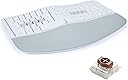
⌨️ Elevate your Mac setup with the mWave: where ergonomic comfort meets mechanical precision.
The KINESIS mWave Ergonomic Keyboard for Mac combines a popular wave layout with premium low-profile mechanical switches, offering both wired USB and dual Bluetooth connectivity. Designed specifically for macOS with dedicated modifiers and hotkeys, it features powerful programmability through a browser-based app, integrated numeric keypad access, and adjustable backlighting to reduce eye strain. Its padded palm support and negative tilt magnetic feet promote a neutral typing posture, making it an ideal choice for professionals seeking comfort, durability, and customization in one sleek white package.


| ASIN | B0DYLB3YBJ |
| Antenna Location | Business, Everyday Use |
| Best Sellers Rank | 25,063 in Computers & Accessories ( See Top 100 in Computers & Accessories ) 362 in Keyboards (Computers & Accessories) |
| Box Contents | 3 Negative Tilt Feet (Magnetic), USB Cable |
| Brand | Kinesis |
| Brand Name | Kinesis |
| Compatible Devices | Laptop, PC, Smartphone, Tablet |
| Compatible Operating System Family | MacOS |
| Compatible Tablet Computer Models | Samsung Galaxy Tab S7 FE 12.4" |
| Compatible devices | Laptop, PC, Smartphone, Tablet |
| Connectivity Technology | Bluetooth, USB-C |
| Connectivity technology | Bluetooth, USB-C |
| Customer Reviews | 4.0 out of 5 stars 104 Reviews |
| Enclosure Material | Plastic |
| Hand Orientation | Ambidextrous |
| Item Dimensions L x W x H | 38.7L x 24.1W x 4.4H centimetres |
| Keyboard Backlighting Color Support | Single Color |
| Keyboard Description | Mechanical |
| Keyboard Layout | QWERTY |
| Keyboard description | Mechanical |
| Manufacturer | Kinesis |
| Mechanical Keyboard Switch Model | gateron_brown |
| Minimum Required Operating System Version | Mac OS 10.12 Sierra |
| Model Name | mWave Mechanical Keyboard for Mac |
| Model Number | KB150M-TAC |
| Power Source | Battery Powered |
| Product Features | Backlit, Ergonomic, Hotkeys and Media Keys, Programmable Keys, Wrist Rest |
| Recommended uses for product | Business, Everyday Use |
| Special feature | Backlit, Ergonomic, Hotkeys and Media Keys , Programmable Keys, Wrist Rest |
| Style Name | Mac (White) |
| Switch Type | Tactile |
| UPC | 607998150047 |
| Unit Count | 1.0 count |
D**Y
Difficult to adjust to with very loud keys
I couldn't get on with this keyboard, the keys are simply too loud and they have very long travel, to the point I would catch other keys when moving across the keyboard. That and the US only layout, which I thought wouldn't be an issue, has just made me go back to my old Microsoft 4000 ergo keyboard. It's built solidly by the keys have an uncomfortable feel about them. Not for me.
X**O
Great for Microsoft Sculpt users
This keyboard is essentially a reprogrammable Microsoft Sculpt with several other quality of life features. The keyboard comes with a usb-a to usb-c cable, batteries, and magnetic legs for the keyboard if you want negative tilt like the Sculpt's magnetic stand. The palm rest is very comfortable, maybe even more than the Sculpt. The surface is much easier to clean as it's less porous, someone else described it as "sculpt feels a bit neoprene/foamy where the mwave feels kind of vinyl and plasticky". Typing on the keyboard will be slightly louder and "clacky" than a Sculpt but not enough to disturb people nearby. The layout is very similar and requires no effort to transition to if you can touch type on the Sculpt. The low profile brown switches feel smooth and tactile. I was afraid the switches would bother me since it theoretically has longer travel than the Sculpt's laptop style keys but in real use the difference is negligible and it was easy to adapt to. The Clique software is browser based (like VIA if you've used a QMK keyboard) and it's easy to use. It allows you to have momentary layer switching (hold a key to switch layers and release to return) and mod-tapping which is really convenient. You also have the option to use ZMK Studio instead if you prefer an offline solution but the UI isn't as convenient. The main downside with the softwares is you can't bind macros (sequence of multiple keypresses) to your keys unless you're willing to make your own ZMK keymap and flash it on your keyboard. That being said, I very much appreciate that I'm not limited to the Clique keymap editor and have the option to use the ZMK studio or flash my own firmware. That along with wired or dual bluetooth connectivity, persistent custom bindings, double AA instead of triple AAA for longer battery life, and the comfortable typing makes this keyboard a huge step up from the Sculpt for me. UPDATE 2026-05-24: 5 months in of daily usage, 2 of the feet pads have rubbed off. The adhesive can be rolled into a glob and easily be rubed off with your fingers. It's unfortunate how cheap they are, I would recommend using a third party feed pads instead. The wrist rest is still comfortable. However, I notice the left side has a very slight raise bump of a few milimeters. I think this may be due to the daily usage causing the rubber to expand and stretch over time. This makes me cautious that this could worsen if I keep resting fully on the wrist pad. Still, I've yet to find a reprogrammable sculpt replacement that lets you bind different functions per left/right spacebar like this keyboard.
J**D
Would be perfect replacement for Microsoft Sculpt if only I could get it in black
I was upset when I accidentally ruined my Microsoft Sculpt keyboard a couple of years ago but positively crushed when I then learned Microsoft was no longer selling them. Proper ergonomics are important for me, but I prefer something that is relatively "standard" rather than any of the truly radical keyboard designs that are out there. I also didn't want to spend hundreds of dollars. After a lot of research, I ended up purchasing the Logitech Ergo K860 (https://www.amazon.com/dp/B07ZWK2TQT) which I liked fine, but not nearly as much as the Sculpt it replaced. Unfortunately the durability on my first K860 wasn't great and I had to replace it only 18 months later. I didn't want to buy from them again, but there just wasn't anything else out there that met my specifications so I moved forward and reordered hoping my first one had just been a dud. Eight months later I was thrilled to learn the mWave had been released and decided to order one despite there being no reviews available yet. I'm glad I did! After a couple weeks of daily usage I've come away very happy with the purchase and feel like this is truly the ideal replacement for the Sculpt. The keyboard feels substantial and I like the negative tilt that can be achieved with the legs it includes. Important to note the tilt angle is "all or nothing" as there are no adjustments possible. A few things really set the keyboard apart from the Sculpt in a good way. The first is the the fact it is mechanical keys rather than the chiclet style. I have become more enamored of the feel and travel of mechanical keyboards in recent years and though I won't claim to be super knowledgable about them this one matches other I own and enjoy in terms of noise level and quality. I have made a point of asking multiple people if they can hear me typing during videoconferences and the answer has always been a no. The keys make noise for sure, as do all mechanical keyboards I'm familiar with, but they are not overly noisy. The next item I love is the backlight. I will often work in a dark room so having the keys lit can be helpful. The lighting has three different levels ranging from dim to pretty bright and the latter is what I'm showing in the picture attached to this review. That picture was taken in a room with a lot of natural daytime light and the backlighting is clearly visible. Frankly, in a dark room it is too bright for my eyes and I go with the medium level. Finally, I love how the keyboard is customizable thanks to what appears to be powerful programming functionality. I have not done more than play around a little with the programming, but it is something I expect to take further advantage of in the weeks ahead. There is only one problem I have with the keyboard and that is I was forced to get it in white since I'm a Mac user. After a few weeks it isn't showing any grime, but I expect that to change over time. They are going to be releasing a kit that will allow you to convert a black Windows keyboard into a Mac keyboard, but that isn't available yet so I decided to just go with the white. If the mWave stands up to extensive usage it will be a great option at what I consider to be a very fair price ($120 as of this writing). If you loved the Sculpt I'm guessing you'll love the mWave
N**E
A True Successor to the Microsoft Sculpt — Modern Ergonomics Done Right
Nick’s Take (The short story) After 6–7 years with the Microsoft Sculpt, the Kinesis mWave feels like a thoughtful, modern evolution of that design. Excellent ergonomics, quiet mechanical keys, flexible connectivity, and smart design choices make this an easy five-star upgrade for anyone seeking long-term comfort and typing health. 1. Context & Why I Bought It I’m coming from the Microsoft Sculpt ergonomic keyboard, which finally started showing signs of wear after 6–7 years of daily, five-day-a-week use. Over that time, I’ve grown to strongly prefer split and tented keyboards for long-term comfort. When it came time to replace it, I did what most people would — read reviews across multiple sites. Two keyboards consistently rose to the top as modern “successors”: The Incase Sculpt (the licensed continuation of the original Microsoft design) The Kinesis mWave, often described as the spiritual successor Both are similarly priced, but I leaned toward the mWave for several reasons: USB-C wired option (which enables backlighting), bluetooth connectivity, and choice of mechanical switch types 2. Switch Feel & Typing Experience I selected the quiet linear mechanical switches, as I wanted to keep typing noise relatively low. Coming from years of low-profile, laptop-style keys, there was definitely a brief adjustment period. That said, the transition was smoother than expected. The keys feel: Responsive Smooth Controlled More of a satisfying clunk than a loud clack Once acclimated, typing feels both accurate and comfortable for long sessions. 3. Ergonomics & Comfort This is where the keyboard truly excels. The split layout and tenting angle immediately felt familiar coming from the Sculpt. Wrist positioning feels natural, forearm tension is reduced, and shoulder posture benefits from the overall layout. The palm materials feel premium and comfortable during extended typing sessions. Kinesis includes three adjustable stands to provide negative tilt options. I experimented both with and without them and currently prefer no tilt for my setup, but I can see how this feature would benefit users with more sensitive wrists. 4. Layout & Daily Workflow I really appreciate the built-in numpad via the Fn layer. While it takes some getting used to, it’s a clever way to preserve desk space and keep the keyboard centered. That said, I still use a separate wireless numpad for heavier numeric entry, which works well with my ergonomic layout: Keyboard → Trackball Mouse → Wireless Numpad This keeps my shoulders relaxed and my arms in a neutral position. 5. Connectivity & Build Quality Bluetooth pairing was painless, and USB-C wired mode works exactly as expected. The backlighting is a nice touch, though I personally don’t work in dark environments often enough for it to be a major factor. Still, it’s a welcome quality-of-life feature. Overall build quality feels well-engineered what I’d expect at this price point. 6. Customization & Software While this keyboard offers deep programmability, I haven’t yet ventured into customization. Out of the box, it already fits my workflow extremely well, so I didn’t feel the need to modify layouts or mappings. That said, power users will likely appreciate the flexibility. 7. Comparisons & Trade-offs Compared to the Microsoft Sculpt: Larger overall footprint (mostly due to solid center structure) Mechanical keys instead of low-profile membrane Far more modern connectivity and features None of these have been negatives for my desk setup. If I had one wishlist item, it would be a detachable wrist pad option to allow even more ergonomic customization. 8. Final Rating Five stars. This feels like a true modern successor to the Microsoft Sculpt — preserving everything that made it great while adding better materials, connectivity, typing feel, and flexibility. If you’re coming from the Sculpt or looking for a serious ergonomic upgrade, the Kinesis mWave is absolutely worth consideration.
M**A
$220 keyboard that does not work for typing
Spacebar did not work properly from the first day. $220 for a keyboard and it does not work. Seller is trying to send me to the manufacturer for the return, very poor product and process
R**I
A true, viable replacement for the Microsoft Sculpt Ergonomic keyboard (finally)
This is a perfect replacement for the microsoft sculpt keyboard. I've been using a microsoft sculpt ergonomic keyboard since 2008, and have bought so many as they all failed time and time again. Now that my last one failed and they're truly out of production, it's been really tough to find a meaningful replacement. There are many tented, ergonomic keyboards available on Amazon, but they always have *SOMETHING* thats off about them- the arrow keys are too small, they swap some of the button positions, they are only bluetooth (which means you can't tap buttons to wake your computer up) - they all have something that's just a bit off that just makes it annoying to use. This keyboard is SO AMAZING (1) All the keys feel like there in near exactly the same position- so immediately I could go back to typing full speed without having to even think about adjusting my finger position (2) The actual mechanical switches do have a tiny bit more travel- but they're silky smooth (and I got the quiet version) and it's really quiet. A very muffled sound of soft pads- no clicks or clacks or thocks on the quiet version. (Not that I dont like the clicky audio experience of keyboard- but I know some people have offices in their bedroom and worry about their partners sleeping) (3) My Microsoft Sculpt keyboards almost always failed because the teeny, tiny function keys at the top would get stuck or smashed, and prevent the keyboard from sending keycommands, even if they weren't pressed. The only change is now you have full sized top buttons, and they're not low quality like the others. (4) Not that I ever used the function toggle at the top of the Sculpt, but the function key on this keyboard works the same way- even though it appears as a button, it's a toggle- on and off- and the light in the middle of the keyboard lights up so that you know when it's on (ensuring you still have a visual indication). (5) Not requiring batteries is excellent- I just plug my macs into the monitor- it's so nice now not having to pair with one laptop then witch to another laptop. Bluetooth is ok if you really need it, but I feel like if you're buying a keyboard it's to use with a relatively stationary set up. The toggle switch in the middle is fine- it's as good as any bluetooth switch for mice to share across computers- but unlike a mouse that needs to move around, having the keyboard plugged in is just a straight up improvement over the Sculpt I wish I could've gotten the quiet Mac one in Black - strange combos available on amazon, but it's okay. I also think the grey keycaps are needless - straight black or straight white would look better. It looks like they keyboard is dirty- but honestly I never even look at the keyboard when I'm typing anyway, so who cares. It's been such a relief to be able to have a viable alternative to the microsoft sculpt, particularly with better construction. The online tool to configure keys is cool- very similar to all the nice mechanical keyboards- works the same way through the web browser. This has never been a particular feature of interest for me, but for folks who really want the Microsoft sculpt layout with solid button reprogrammability to not feel left behind, I think this is a great option. THANK YOU FOR MAKING THIS KEYBOARD!!!
Trustpilot
4 days ago
5 days ago