Buy anything from 5,000+ international stores. One checkout price. No surprise fees. Join 2M+ shoppers on Desertcart.
Desertcart purchases this item on your behalf and handles shipping, customs, and support to UK.
⌨️✨ Elevate your Apple setup with silent power and sleek style!
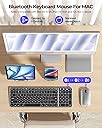
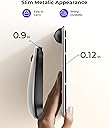
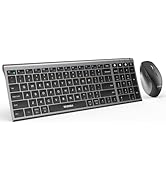
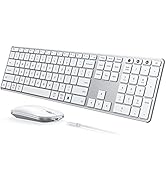
This wireless Bluetooth keyboard and mouse combo is designed specifically for Apple users, featuring a full-size Mac layout and multi-device Bluetooth switching. With a Type-C rechargeable battery offering up to 200 hours standby, whisper-quiet typing and clicking, and an ultra-slim stainless steel design, it combines functionality with premium aesthetics. Compatible with Mac OS 10.12+ and iPad OS 13.0+, it comes backed by a 12-month warranty for reliable performance.


| ASIN | B0DPZXRS6F |
| Are Batteries Required | Yes |
| Brand | Seenda |
| Color | Black Silver |
| Colour | Black Silver |
| Compatible Devices | MacBook Pro, MacBook Air, iMac, iPad, iPhone |
| Compatible devices | MacBook Pro, MacBook Air, iMac, iPad, iPhone |
| Connectivity Technology | Triple Bluetooth |
| Connectivity technology | Triple Bluetooth |
| Customer Reviews | 4.1 out of 5 stars 75 Reviews |
| Item Weight | 0.74 Kilograms |
| Keyboard Description | Slim, Quiet, Metals |
| Keyboard Layout | QWERTY |
| Keyboard description | Slim, Quiet, Metals |
| Manufacturer | seenda |
| Model Number | SKM64-2 |
| Number of Batteries | 1 C batteries required. (included) |
| Operating System | Mac OS 10.12 or above, iOS 13.0 or above, iPad OS 13.0 or above |
| Other Special Features of the Product | Designed for Mac, Rechargeable, Slim, Portable, Quiet |
| Power Source | Battery Powered |
| Special features | Designed for Mac, Rechargeable, Slim, Portable, Quiet |
| Unit Count | 1.0 Count |
T**A
Sleek, Responsive, and Perfect for Multitasking on Apple Devices
I’ve been using the Wireless Bluetooth Keyboard and Mouse for Mac for a few weeks now, and I’m thoroughly impressed with both the design and performance. First off, the stainless steel finish looks and feels premium. It has a solid, sturdy build that gives it a high-end feel, while still being lightweight enough to carry around if I need to work from different spots. The black and silver color scheme complements my MacBook Pro beautifully, making it look like a seamless part of my setup. It’s sleek, minimalist, and definitely eye-catching. Setting up the keyboard and mouse was super simple—connecting via Bluetooth was almost instantaneous, and I was able to start typing right away without dealing with any unnecessary software or setup. The multi-device functionality is a game-changer for me, as I can easily switch between my MacBook, iPad, and iMac with just a couple of key presses. Whether I’m writing emails, navigating spreadsheets, or just browsing the web, everything feels fluid and efficient. The key travel and tactile feedback on the keyboard are spot-on, providing a satisfying typing experience, and the mouse is smooth and precise, which I appreciate when working on design projects. What really seals the deal for me is the rechargeable feature. I don’t have to worry about replacing batteries all the time, and a single charge lasts me quite a while, even with regular use. The battery life is impressive—I've only needed to recharge it once since I got it. The slim, compact design is ideal for those who value both functionality and aesthetics, and it has definitely elevated my work setup. If you’re looking for a wireless keyboard and mouse combo that works seamlessly with Apple devices, I highly recommend this one. It's reliable, comfortable, and a great value for the price!
C**S
Great wireless combo
Great performance on both the mouse and keyboard. Mouse is smooth and the key presses are a joy to use. Smooth, soft touch and not noisy at all. Tested the connectivity on both a windows pc and a tablet, both worked just fine. It came with a silicone cover as well but this makes the keys a bit weird to type with, maybe you need to practice with it a bit. Really if you need a simple lightweight keyboard/mouse wireless combo then this is well worth a look!
S**W
Great Keyboard!
Has worked amazing. Continently connects to three different computers at the push of a button. Battery life has been great. Low profile but comfortable to use.
M**O
Absolutely thrilled with the Wireless Bluetooth Keyboard and Mouse combo!
I am absolutely thrilled with the Wireless Bluetooth Keyboard and Mouse combo! It's so far beyond my expectations for taking on the road for work. The keyboard is incredibly responsive and paper thin—so lightweight and portable, yet durable. It fits easily into my bag, making it perfect for traveling. The mouse tracks smoothly and performs flawlessly, and I love that the whole combo is Type-C rechargeable, which is so convenient. I can use it for hours without worrying about running out of battery, and the battery life is excellent—up to 200 hours of standby time, I've yet to have to recharge it! The auto-sleep mode helps save energy too, which is great for efficiency—it is very responsive coming out of sleep mode. The key typing is whisper-quiet, which is ideal for those times when I'm working in a shared or quiet space like the library. I can type and click away without disturbing anyone, and the keyboard layout is perfect for Mac users, especially with the advanced BT modes for switching between devices seamlessly. Initial connectivity was super easy! Not only is this set incredibly functional, but it also looks great! The slim metallic design gives it a sleek, premium feel. My partner is jealous and is already planning to get one for themselves! If you're looking for a portable, high-quality keyboard and mouse combo, I highly recommend this one.
E**C
No dedicated USB dongle (since it's for Mac), but excellent speed and virtually silent.
Without the silicone cover on the keyboard, the chiclet keys are about average when it comes to noise; but when I put it on, it does an excellent job of silencing the keycaps. Increases the feedback on each press too, so the keys jump right back to their original position, making typing lightning fast. Honestly it's one of the fastest and most comfortable keyboards I've used in a while. The downside is that the silicone cover has a very rubberized texture to it, so dust and debris are difficult to wipe off. You basically have to rinse it each time because my handvacs even have problems vacuuming up all the dust. But it holds to the keys VERY well because the slots are perfectly shaped and barely even increase the cap height. Plus it acts as bonus protection against spills. Love it. As for the mouse, it's pretty cheap I won't lie. It's really the plastic covering that gives it a rather hollow feel; and despite having a slot in the back for a dongle, the set doesn't come with one since it's optimized for Mac. So you're forced to use BT; and when you hit the "on" button, it automatically defaults to channel 1. Mouse clicks are virtually silent though and the tiny rubberized wheel on top has some good tension so it doesn't spin freely. It also makes zero noise, so scrolling won't be heard. Love that they added a dedicated DPI button on the bottom too because all of my ergonomic mice have one. You can essentially change the cursor speed without having to access the computer's settings. As for performance with my iPad, no issues so far. Quite surprised how fast both are using the same BT channel, but I usually keep my tablet less than a foot away from all of my peripherals. Like I said, besides the lateral movement of the mouse on my deskpad (something that can't be helped), both are essentially silent, so I can easily recommend them if noise is your biggest concern. Rebound on the keys is excellent with the silicone cover and the spacing is basically identical to my old keyboard so it didn't affect my typing performance whatsoever. In fact it may have even increased it. Really the only minor gripes besides the cheap mouse are the general keyboard layout, and the fact that there are no foldout feet on the bottom, since the keyboard effectively rests on its long battery. That obviously limits the angle of attack, forcing me closer to the keyboard to maintain optimal comfort. Not a huge fan that they put the left CTRL closer to the spacebar (essentially where the windows button used to be on my PC) and replaced the right one altogether with the direction keys. The left and right arrows are super easy to use, but the up and down....yeah, not great. No page up or down, home or end either. But really, for my iPad, I think this is about the best combo I've used so far. 4/5 stars overall.
Trustpilot
2 weeks ago
1 day ago