Buy anything from 5,000+ international stores. One checkout price. No surprise fees. Join 2M+ shoppers on Desertcart.
Desertcart purchases this item on your behalf and handles shipping, customs, and support to UK.
🔗 Connect. Switch. Dominate your dual-screen workspace.
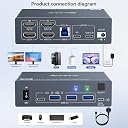
The MLEEDA 2-Monitor KVM Switch lets professionals seamlessly toggle between one laptop and one desktop using dual 4K@60Hz displays. Featuring 4 USB 3.0 ports for ultra-fast peripheral sharing and an 80W USB-C power delivery port, it supports major OS platforms with driver-free setup. The included wired remote and flexible display modes optimize productivity, making it an essential docking station for modern hybrid workstations.


| ASIN | B0DY7RW6RK |
| Actuator Type | Push Button |
| Best Sellers Rank | #107 in KVM Switches |
| Brand | MLEEDA |
| Brand Name | MLEEDA |
| Circuit Type | 2-way |
| Color | silver |
| Connectivity Protocol | Wired |
| Connector Type | Plug In |
| Contact Material | Aluminum |
| Contact Type | Normally Open |
| Control Method | Remote |
| Control Type | Switching and Monitoring |
| Controller Type | Push Button |
| Current Rating | 2 Amps |
| Customer Reviews | 4.1 out of 5 stars 827 Reviews |
| Included Components | 1*KVM switch; 1*USB C Cable;1*USB A-B Cable; 1*Wired Remote; 1*Power adapter. |
| International Protection Rating | IP54 |
| Item Dimensions | 4.61 x 3.54 x 1.3 inches |
| Item Weight | 265 Grams |
| Manufacturer | MLEEDA |
| Material Type | Aluminum |
| Model | 2 Monitors KVM Switch 202CH |
| Mounting Type | Surface Mount |
| Number of Items | 1 |
| Number of Positions | 2 |
| Operating Voltage | 5 Volts |
| Operation Mode | ON-OFF |
| Part Number | KVM Switch 2 monitors 2 computers USB C |
| Specification Met | CE |
| Switch Type | Push Button |
| Terminal | Plug in |
| UPC | 014679211605 |
| Unit Count | 1.0 Count |
| Upper Temperature Rating | 70 Degrees Celsius |
| Wattage | 80 watts |
A**R
Neat, but small issues and no longer use (edit: issue fixed, using 2 of these two now)
(older review: 4 stars, scroll down for my latest update) I work from home and have two monitors. My macbook has an HDMI port, but only one. Since I don't want the two monitors to mirror each other, I can't simply split the HDMI port into two HDMI connections. So I use a USB-C to HDMI cable. This works great on my macbook for personal use. Then I also have my work computer. Previously I was using a second macbook for work, but more recently, since I moved companies, I use a Windows laptop for work. Same issue: only one HDMI port. So I use another USB-C to HDMI cable. In order to swap, I grabbed two LG monitors. The LG monitor in question allows multiple HDMI inputs, and I can use the monitor's settings interface to swap between input sources. This is what I have been doing for a while. I got sick of it, so I did some googling and found out about KVM switches. So I gave this thing a shot. I love the switch thingy. It does add a bunch of wires to my setup, but maybe worth it for the nice switcher which is amazing. Although then I do need to see an LED on all the time, which is kind of annoying since I sleep in the same room. Minor issues at first. Gave this thing a chance for a while. It was working pretty good. One of the first things I noticed is because it swaps both computers at once, I lose the functionality to swap one monitor to my work laptop and one monitor to my personal laptop. I was missing this functionality, but it wasn't too bad. A bigger annoyance, is when switching, it would very often confuse which HDMI is the left screen and which HDMI is the right screen. It was very inconsistent regarding this and became a large issue that was eating a lot of time when I need to work and don't have time to fuss with monitor issues. I need to be able to just turn my monitor on when it's time to work and have the thing work. But instead it would have monitors swapped, and I'd need to swap over, then swap back to fix. Another issue I noticed is that on my personal computer it was began flickering, where it goes black, then comes back to normal again. It would do this a little, then work. Then over time the issue became more prominent where this flickering would go on for longer durations. It could just be the USB-C to HDMI cable. But when I go direct, I don't have this issue. When going direct, I sometimes might see it flicker once, when turning on the screen for the first time, then it's on, and stays on. But when I go through this box thingy, it keeps on flickering, and takes away from the experience I'm used to when using my personal laptop. I'm sure this box has better usages. I know the mouse and keyboard switcher would be great, but since I'm on Mac and on Windows, I don't want to use the same keyboard for both, so I just use it for the monitor swapping. I've read that using an USB-C to HDMI cable can amplify these sort of flickering issues. If laptops only provide one HDMI port, I'm not quite sure how to use this thing correctly without amplifying flickering issues. There's also the monitor confusion issues, where it would frequently confuse the left and right monitors. This might just be due to swapping both HDMI's at once. This doesn't usually happen to me when I swap one monitor at a time when I go direct through the LG input source switcher. Also my whole reason for having a switcher to begin with is to re-use my monitors for both work and personal use, due to limited desk space. And when we add more wires into the equation, along with finding a place to put this box, it takes up more room. I ended up just settling with my current LG HDMI input swapping built-in feature, when going direct. I'm sure there's better ways to achieve my optimal desired setup. But this thing was a fun ride which taught me a lot, and fun while it lasted. It's very possible one of my USB-C to HDMI cables is the real culprit, but I think the final straw for me it was just too many wires, and seeing an LED on all the time is too distracting when I need to focus on my work, and also when I need to sleep. I'm not totally upset or anything, I might give this thing a shot again another time when I want to do some more experimenting. But yeah, I think it was worth the learning experience for me and having something cool like this to play around with. It did mostly work though. Would I recommend this thing? Maybe. Definitely a cool factor about it. I don't think this is optimal setup for me, but I don't think the product is bad or anything, and I can see it being optimal for someone else. === Edit / Update === (newer review: 5 stars) While I encountered a small issue initially, I solved the issue and found out it actually wasn't the KVM's fault. Currently using two of these. I solved the flicker issue. That was because I needed a Mac dongle rather than a more standard general-purpose one. I wound up using Apple USB-C Digital AV Multiport Adapter This allows me to turn the Mac's USB-C into an HDMI, then together with Mac's HDMI port, I'm able to have two HDMI ports to work with for this KVM. I recently swapped out my LG monitors, and grabbed DoubleSight monitors with dual monitor stand. This doesn't have the input switcher, so I'm using the KVM switcher. This is working really well. My small issue now is a Mac issue where it doesn't seem to always remember which is the main monitor and which is the extended monitor. But I realize now that this has nothing to do with the KVM. This thing is really good. And the external wired controller button for swapping between monitors is a game-changer and really makes my setup work for toggling between my work and home computers. Although keep in mind there's a newer version of this product available. You might give that one a shot.
H**Z
Great Product, Works Seamlessly, but make sure you have two hdmi ports and 4 additional hdmi cables.
Have this for one week and working great so far with two monitors. I have a Mac MIni and Beelink Mini PC and is working as expected. Only issue occurs when switching from Mac to PC, switch disconnects external hard drive. I connected directly to Mac Mini and working correctly. My Mac mini only has one HDMI, so had to connect USBC to HDMI adapter to use two monitors. Beelink Mini PC had no issues since it already has 2 HDMI ports. Switches seamlessly between two. Will post if any issues occur later. It comes with 2 hdmi cables, but you need a total of 6 to connect two computers if using 2 monitors. Find good place to hide all the cables.
A**A
Updated: Cable issue resolved with Seller. Poor quality cables and connections on a decent KVM
Updated: the seller has been very responsive. They reached out and helped address the issue with the cable. The KVM now works well. Happy with the service. got the KVM a few weeks ago and was able to set it up easily. It is a decent build product and does what it is expected to do.....However, the quality of cables that came with it and the port quality on the box itself is not up to mark. The cables dont sit snugly in the ports and the connection to the monitors keep cutting in and out which is super annoying and unacceptable. What is the point of a KVM with two monitors when it is a hit and a miss with one of the two monitors...i might as well connect the two PCs separately to the two monitors if only one will work anyways....I will be returning this product.
S**Y
5 Star with serious limitations.
While I gave this a 5 start rating please read the review closely, this will not be the best choice for many people. I use a work computer (HP Laptop) and a custom-built desktop computer with an Nvidia 4060TI card (I like to game). I have an LG 34 inch monitor and a 27 inch 2K res monitor. I required a dual monitor switch that allowed two monitors to be used with two computers. When I set this up the switch/kvm it worked fine, zero issues. The remote switch is a nice feature but feels cheap. I have no idea how you get a replacement switch. The issue with the unit is that it will not work well with most rigs that have a dedicated graphic cards. Most video cards come with only one hdmi port now (there are exceptions). For this to work you need two hdmi ports as there are no displayport connectors on the switch. You can buy an an hdmi to displayport cable but you are limited to 30FPS if you go that route as I did. I can live with the limitations but there are better options out there.
F**4
Not working fully
Worked fine for a few months, now when I switch back and forth my PC gets a error recognizing the keyboard.
D**L
Works most of the time - with Macbook limitations
This is a lower cost switch docking station designed for one laptop and one desktop PC. I use this for my personal MacBook Air (M4) and my windows PC. If you are looking for a switch, make sure you know which ports are needed for each device. For my Macbook, the docking station will accept a USB-C input for data. The magsafe connector on my Mac has a USB-C on one end, and that can be plugged into the powered USB-C port on the docking station for charging the Macbook. Since I routinely take my Macbook and charger with me, I don't bother using the powered USB-C input. The front of the box is where the shared peripherals plug in: 3 USB-A ports and 1 USB-C port. I use the USB-A ports for the shared keyboard, mouse, and wireless headphone dongle. With the remaining USB-C port, I connected it to a port expander to give me more USB-A and C ports. I do not use the wired remote control button because it is redundant with the switch button on the docking station itself. The PC connects to the docking station with USB-B (cable is included) for data and up to 2 HDMI inputs. HDMI is the only PC input and video output with this docking station. It works well most of the time. However, not surprisingly, Macs always seem to have some incompatibility issues with non-Mac devices. One very annoying thing I noticed is that my if I switch over to my PC for a long time, my Macbook will have to be woken manually in order for my connected peripherals to work. Switching to the PC is always flawless, but switching back from the PC to the Macbook does not always work seamlessly. If I put my Macbook to sleep and then wake it up later without switching to the PC, the peripherals work normally. It's strange how switching to PC renders the Macbook unable to wake up the peripherals unless I open the lid of my Macbook or reconnect the USB-C on my Macbook. I can't comment on the dual monitor capability since I currently have only one monitor. It is known that Macbooks require one connection per monitor in order to have two distinct displays. Also, this devices draws a lot of current and gets hot easily. I recommend turning the switch docking station off if you are not using either device for a while
M**A
Solid Performance, even worked with Samsung S21p Smartphone
This is a review for the KCEVE 4K UltraHD USB-C+HD Dual Monitor KVM Switch connecting 2 monitors to 2 input devices (1 PC (2xHDMI, 1x USB) and 1 Laptop (USB-C with PD)] (KCEVE 2x2) After unpacking the device I arranged all the required input cables needing to be plugged into each of the two input devices (1PC and 1Laptop). The (KCEVE 2x2)'s connection for the PC required two separate HDMI inputs (standard size plug), and a supplied USB (type B) cable for the USB input from the PC); then The other connection is designed for a laptop connection using one data/video USB-C input and 1 PD input). You'll need extra HDMI cables to go from your PC (desktop) two video outs to the device input. Then use your existing 2x HDMI cables to run back from the (KCEVE 2x2) to your two external monitors. The two monitors used in my setup were two OLED 15" HDMI/USB-C monitors. I used an HDMI to HDMI-Mini cable from the (KCEVE 2x2) switch. I powered the OLED portable monitors separately using their respective power supply scheme. Everything worked perfectly. I used a Logitech Unifying wireless receiver as my mouse input without any problems. The KVM switch mouse signal switched perfectly to the two connected devices. I even hooked up my Samsung S21p smartphone and was able to obtain a reasonably consistent solid connection using the supplied USB-C cable and my USB-C PD power into the separate PD port for this device. The Samsung S21p switches to DEX automatically, revealing the mirrored DEX (desktop output) to the two monitors. I was also able to use my BlueTooth headphones without having to repair it between the devices. Basically, you pair it with the 1st device, then switch to the other device, then pair it with that 2nd device. Since the KVM switch isolates the two devices some how, my BlueTooth headphones worked on either channel selected, without having to repair. Nice unexpected perk. There were times when the Samsung S21p smartphone started blinking on and off on my two external screens. I determined it was a limitation of the Samsung S21p smartphone's ability to juggle all that video space and a power draw issue. I was able to switch to simple mirror mode as well on my Samsung S21p achieve reasonably good steady results. Lets face it, I was pushing it to get my phone to work with the KVM and 2x monitors! To make sure the PC1 port (USB-C) channel of the KVM switch worked, I setup my Microsoft Surface Pro 8 in place of the phone. I simply used the supplied USB-C single cable to connect my entire SP8 to the KVM switch. It worked flawlessly. So not much more to say here. I decided to keep the 3 channel [1: PC, 2: Laptop (USB-C), and 3: Laptop (USB-C)] to explore having all my readily used devices able to connect as follows: Desktop (2x HDMI) plus (USB (supplied cable) MS Surface Pro 8 (USB-C) Samsung S21p (USB-C) plus USB-C PD I'll post a review of the 3 channel setup at another time. I've included the last final portion of my setup were my MS Surface Pro 8 and Desktop switched and worked perfectly. I've also included a set of photos of the item. Hope this was helpful. (Posted November 18, 2025 00:10 a.m.)
H**7
Worked perfectly until I plugged in second monitor
All my peripherals were working great and the kvm was switching between my pc and laptop however when I tried to plug in my second monitor the system did not recognize the port. I switched cables to make sure it was not a cable issue. Both cables worked in the Monitor A port but not B. I ordered another and had the same issue so I figured it was me. Even though this comes with two hdmi cables, you need four. Two video cables connect to each machine so that there can be two outputs. I needed a dock to connect my laptop since it has only one hdmi and one thunderbolt. It’s a lot of cables, but the ease of switching between my home/work set up and being able to use all the peripherals is worth it to me.
F**H
Einfache Installation - Vielen Dank !
Tut, was es soll. Installation war einfach. Controller lief auf anhieb. Vielen Dank. Liebe Grüße -FLEREXX.de Industries GmbH-
R**O
Excelente Produto
O produto é de excelente qualidade, chegou antes do prazo e com tudo funcionando. Comprei o modelo Hdmi, e veio tudo funcionando. Obs: Caso for utilizar duas telas, tenha dois cabos HDMI sobrando, pois no produto vem apenas 2.
M**O
Perfecto
Es lo que se explica. Admite usar un hub para poder conectar los dos monitores. Es decir, del ordenador al KV. Solo viene con dos cables Hdmi, por lo que si quieres conectar 2 ordenadores a 2 monitores necesitas comprar otros 2 cables. Yo uso un teclado y un ratón que me permite conectarme a varios ordenadores cambiando de uno al otro directamente desde el teclado y ratón, por tanto no he realizado la conexión USB. Estoy contento, funciona bien y el equipo es lo que dice la descripción y enseñan las fotografías.
W**L
Good for my 2 monitor setup on two pcs
Unlike other kvms ive bought, this easily runs off a singlr USB A supply Both a button on the box and connecting cable button makes it easy to use
G**S
Pas adapté
Bof, trop compliqué a installer...
Trustpilot
1 month ago
2 months ago