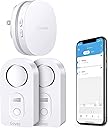
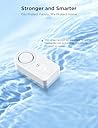
💧 Stay dry, stay ahead—smart leak detection that never sleeps!
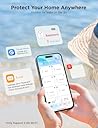
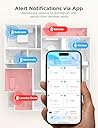
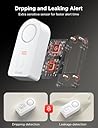
The Govee WiFi Water Sensor 2 Pack offers professional-grade leak detection with instant app and email alerts, a piercing 100dB alarm, and multi-probe sensors for precise drip and leak monitoring. Designed for 2.4GHz WiFi, it supports up to 10 sensors for whole-home coverage and features an IP66 waterproof design for durability in moisture-prone areas. Perfect for proactive homeowners who demand peace of mind and smart home integration.


| ASIN | B095STF6FG |
| Audible Noise | 100 Decibels |
| Brand | Govee |
| Colour | White |
| Compatible Devices | Smartphone |
| Control Method | App |
| Customer Reviews | 4.2 out of 5 stars 1,394 Reviews |
| Item Dimensions L x W x H | 9.3L x 5.6W x 13H Centimeters |
| Manufacturer | Govee |
| Mfr Part Number | B5040109 |
| Model Number | H5040+H5054 |
| Number of Batteries | 4 AAA batteries required. (included) |
| Power Source | Battery Powered |
| Product Dimensions | 9.3L x 5.6W x 13H Centimeters |
| Unit Count | 2.0 Count |
P**E
Your piece of mind is worth this little gadget
I have been struggling with an undiagnosed and intermittent leak from my dishwasher. We are leaving for vacation and I was stressed. What if?! I found this Govee Wifi Water Detector and thought I would give it a try. Installation and Connecting to the Hub: No brainer. Similar to other connected home devices so the process should be familiar to you. Don't over think it and it works great. I downloaded the Govee Home app to my Pixel 6 and it worked as expected. Relatively intuitive. I have no issues with the interface nor the included printed instructions. Functionality: I needed to KNOW that these worked (I got two) so I tested both of them. I even took my phone off of my home wifi network when I tested the alerts. I put a small amount of water under the probes and an alarm sounded. Instantaneously I received an alert on my phone via the mobile network. If I am away from home, good to go! Just don't forget to leave a key for your friend to get in and address the water issue. The audible alarm is plenty loud at the high setting (default). Leave it there. Shuts off temporarily when the button on the face of the device is pushed. Remove it from the water source and dry and no more alarm. Proximity to the hub seems very reasonable. I plugged the hub in closer to my router and there are at least four walls and a floor between the hub and one of the devices. No issue. Price: Well worth it. It is going to cost me several hundred to repair the few flooring planks so this is much cheaper. Things to Consider 1. Get the wifi version with the hub. What is the point if you are not home when the washer hose breaks? 2. To my knowledge this does not integrate with Google Home or Alexa. These connected home devices should really be universal in their integration with at least those platforms. 3. My purchase had two leak detecting units only identifed by their model number and four more digits. I triggered each one individually and saw which was which by the notification. Small inconvenience and easily solved. I renamed them for their location. Overall, super happy.
J**.
Reliable and great Customer Seevice
There are several reviews that are negatively rating the company. They also stated that the product does not working on eero network. 1. Company Customer Service: the company is very prompt with responding to questions. Furthermore, I had a Govee access gateway go defective and the company was prompt with replacing the item. We went through all the typical troubleshooting steps. 2. This product DOES WORK WITH EERO. Somebody made a comment that it does not work on 5 or 6 gHz, but only 2.4 gHz. That much is true. All you have to do is temporarily disable your Eero 5-6 gHz before configring your gateway. 3. Very loud siren. It will wake you from any deep sleep.
E**.
Works with FiOS gigabit service
Anyone that’s gone through water damage will tell you this is definitely worth the time and investment. Time will tell if these devices will work down the road but what I like about this product is that there are alarms on each sensor as well as an app that will trigger email notifications and app notifications. If your Wi-Fi and power is down for some reason, you still have the alarm in each individual sensor as a fallback. As others have pointed out, the initial set up can be a bit of a pain, particularly if you were on 5G so I decided to outline the steps for my process as a Verizon FiOS customer using gigabit service and 5 GHz WiFi. Fios Setup First go to the FiOS app on your iPhone or android. Depending on your app set up, click on Internet (Manage your home network)/Advanced Settings/Self Organizing Network (SON) and disable it. Once you come back out to the Prior menu screen you should see both your 2.4 GHz and 5 GHz networks. In order to set up the Govee, I temporarily disabled my 5 GHz networks to avoid any issues with the device pairing. After I was done setting up the hub and pairing all sensors, I reenabled the 5 gig service. Step-by-step setup Govee Hub Setup: Plug-in Govee hub device so buttons are on the left. Download Govee Home app. Open it and click the plus button to add a new device. Type 5040 or 5041 depending on your model. Create a Govee account with the email you want to be notified when there’s an alarm. With the hub plugged in so the buttons are on the left side, press and hold the top button for three seconds until the blue light starts blinking in a slow steady manner. Click confirm on the Govee app and type in your Wi-Fi password. That should create the Govee gateway in your list of Wi-Fi options, which you will need to select. So go to settings/ Wi-Fi and click the Govee gateway option in your list of Wi-Fi SSIDs. Once your phone connects to the Govee Gateway, go back to the Govee app and continue through any prompts. Make sure your phone is close to the Govee hub and that you’re within range of your router. When the hub is done connecting, you should automatically see the sensors that came in your kit, listed in your Govee app on your phone. From here, you can select the sensor in the app, click the gear icon in the top right corner and rename each individual device with the location where you are putting it. E.g., 5040-T67G (XXXX) can be renamed to dishwasher or washing machine, etc. Pairing Additional Govee Sensors: If you purchased additional sensors, you will need to pair those with the Govee hub individually. At least that’s how I did it so I could keep track of each sensor and rename it appropriately. To pair a new sensor, remove the battery cover from the sensor so that the device is active. With the hub plugged in so the buttons are on the left, press and hold the lower button for three seconds. It should begin to blink red and blue. At this point press and hold the sensor button for three seconds and let go. You should hear a subsequent beep from the sensor within a few seconds of letting go of the button. From here, your device should be added to the app within 30 to 60 seconds and you should be able to see the new sensor number listed the app. You may need to change screens (click on profile then click back to the home button) within the app to see the update. Follow the same steps to rename each sensor as needed. I purchased additional sensors so I needed to identify them individually and decided to use a label maker on each one so that I don’t get them mixed up. Because I had so many sensors, and could not figure out how to identify the individual sensors in the app, I was forced to trigger the alarm (by getting each sensor wet momentarily). This allowed me to see which sensor in the app was triggered and from there I was able to rename it. It also allowed me to test the function of each sensor. Hope this helps those of you in my situation!
S**P
Finding a leak early limits the damage! You will not go wrong by planning ahead!
I would definitely recommend and buy again if in the same position. Bought a set of two and then an expansive set of five for 7 total. That might seem like a lot, but isn't. One for under both bath sink cabinets; one behind both toilets; one for the kitchen sink cabinet; one for the laundry room; and finally one behind the fridge for the water line. We were finishing up a major renovation and something convinced me these might be a good idea. Think about it. How long would it leak under a sink before you would notice? Would the cabinet shelf or bottom get ruined? And behind your fridge? When would you notice that leak? So I bought 7 total. In the 4-5 years since, I have had 5 or 6 alarms. All but one was legit. The one anomaly was notifying that the battery was low. Not all leaks were just water. The first alarm - happened the first day and we were no home - was because the dryer hose had come off and was filling the room with hot moist air. It was enough to set the alarm off. And once, I had a hair spray can spring a leak under.a bathroom sink. How often does that happen? So yes, I would definitely recommend these for anyone. The faster you know about a leak, the faster you can prevent damage. The ability to get a notice on the app when not at home is a must. Alarm is loud and the app notification works well. The battery life is good. I've only replaced once recently after 4-5 years. The app tells you the battery level, so you can plan ahead and check periodically.
R**D
Difficult to connect
Unable to get WiFi connection
Trustpilot
2 weeks ago
2 days ago