Buy anything from 5,000+ international stores. One checkout price. No surprise fees. Join 2M+ shoppers on Desertcart.
Desertcart purchases this item on your behalf and handles shipping, customs, and support to UK.
🚀 Elevate your IoT game with the ultimate touch-powered powerhouse!
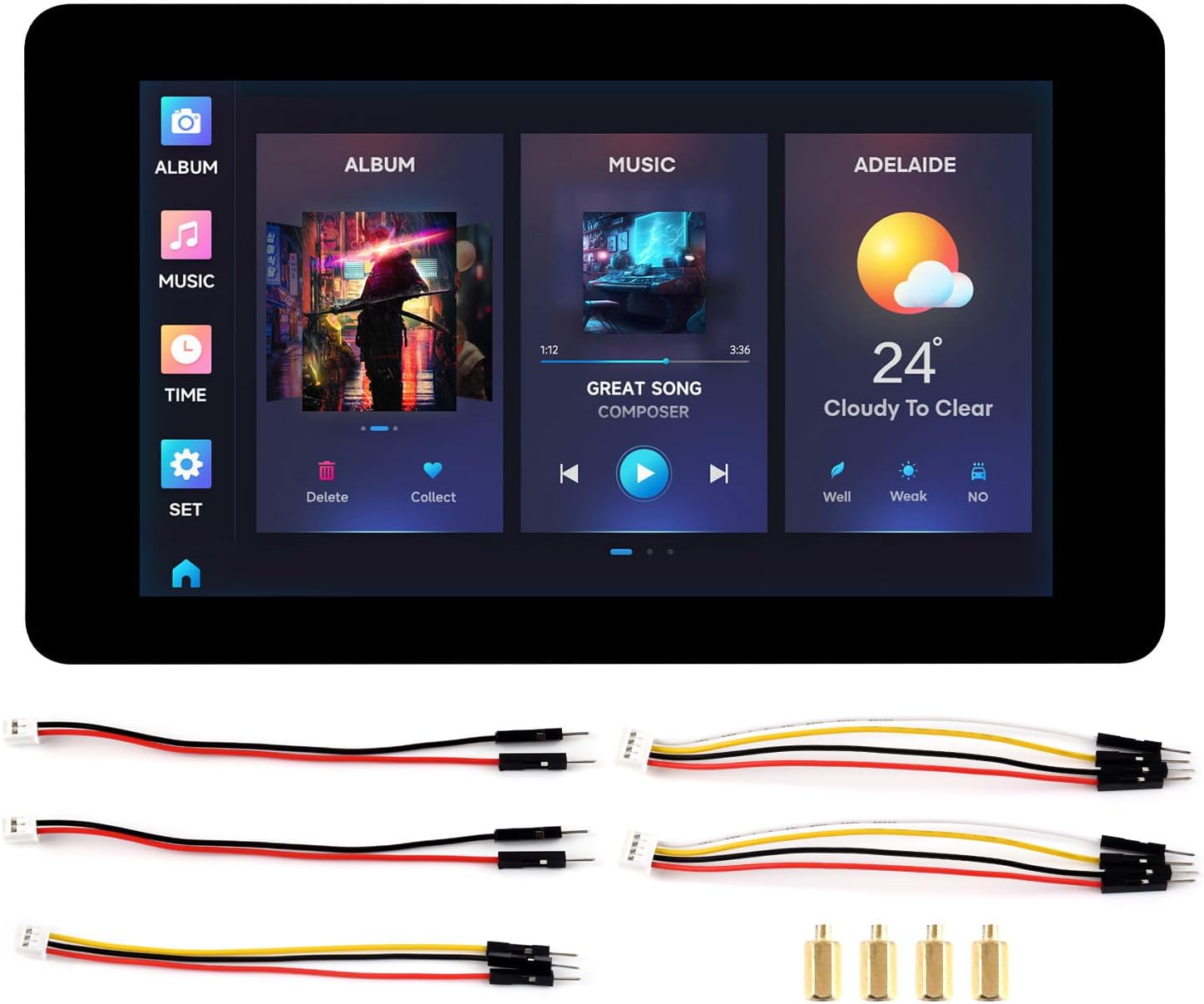
The ESP32-S3 7inch Capacitive Touch LCD Development Board combines a high-speed dual-core 240MHz Xtensa LX7 processor with a vivid 7-inch 800×480 capacitive touch display supporting 5-point touch. Featuring integrated 2.4GHz WiFi and Bluetooth 5 connectivity via onboard antenna, plus extensive memory (512KB SRAM, 384KB ROM, 8MB PSRAM, 8MB Flash), it’s engineered for rapid, versatile development of advanced HMI and IoT applications with low power consumption.


| ASIN | B0D2NMCY7K |
| Best Sellers Rank | #323 in Single Board Computers (Computers & Accessories) |
| Brand | waveshare |
| Built-In Media | ESP32-S3N8R8, 7inch display panel connector, Touch panel connector, TF card slot, USB Type-C port, UART1 Port, UART2 connector, Sensor header, CAN header, I2C header, RS485 header, 3.7V single lithium battery PH2.0 header, CAN terminal resistor selection, RS485 terminal resistor selection, UART selection, BOOT button, RESET button, I2C level selection, DONE indicator, CHG indicator, PWR indicator |
| Compatible Devices | ESP32-S3-Touch-LCD-7 |
| Connectivity Technology | Bluetooth, I2C, Wi-Fi |
| Customer Reviews | 3.7 out of 5 stars 147 Reviews |
| Included Components | ESP32-S3N8R8, 7inch display panel connector, Touch panel connector, TF card slot, USB Type-C port, UART1 Port, UART2 connector, Sensor header, CAN header, I2C header, RS485 header, 3.7V single lithium battery PH2.0 header, CAN terminal resistor selection, RS485 terminal resistor selection, UART selection, BOOT button, RESET button, I2C level selection, DONE indicator, CHG indicator, PWR indicator Included Components ESP32-S3N8R8, 7inch display panel connector, Touch panel connector, TF card slot, USB Type-C port, UART1 Port, UART2 connector, Sensor header, CAN header, I2C header, RS485 header, 3.7V single lithium battery PH2.0 header, CAN terminal resistor selection, RS485 terminal resistor selection, UART selection, BOOT button, RESET button, I2C level selection, DONE indicator, CHG indicator, PWR indicator See more |
| Manufacturer | Waveshare |
| Memory Storage Capacity | 8 MB |
| Mfr Part Number | ESP32-S3-Touch-LCD-7 |
| Model Name | ESP32-S3-Touch-LCD-7 |
| Operating System | Linux |
| Processor Count | 2 |
| RAM Memory Installed | 0.51 MB |
| RAM Memory Technology | ESP32-S3-Touch-LCD-7 |
| Ram Memory Installed Size | 0.51 MB |
| Total Usb Ports | 1 |
| Unit Count | 1.0 Count |
| Wireless Compability | 802.11b |
P**Y
Very nice screen/CPU combo for "maker", Home Assistant monitors/displays or for DIY projects
This is a super useful combo for inventive types - you get all the main connector types you want with a nice touch screen and the resolution is very good. I used it to replace the display on my exercise bike and the new screen is in some ways a lot nicer than the old one. The wiki is full of information and the board has good support in Arduino IDE and VS Code. The build quality is excellent and there a several choices of case that are commercially available or that can be 3D printed. This thing is great, the screen speed is good, the connectivity is excellent, the documentation online and tools support is good. I am very happy with mine.
S**I
Great display, but very weak hardware
Like other reviewers have mentioned, these can be quite tricky to get working...and I'm not a noob to embedded systems programming. My main complaint with them is that the ESP32 simply doesn't have enough internal memory bandwidth to effectively handle a screen of this resolution. Full page LVGL redraws will occur at under 2fps...plus it can't even drive the actual screen at anything close to the spec 60Hz. The ESP32 is incredibly useful for a lot of things, but driving large screens is not one of them. Just because you can doesn't mean you should! An Allwinner V3s with a lean Buildroot config easily beats the socks off this...in both boot time, and GUI performance. But then again, the V3s has closer to 1,600MByte/s DRAM access, compared to the 40MByte/s FLASH access of the ESP32. (ESP32 runs everything from FLASH; the V3s can copy everything to DRAM and run it from there.)
P**R
Incredible for the money
This little device has more interfaces than you can shake a stick at, making it useful for all sorts of purposes. The screen is clear and fairly bright, and the touch seems to work well. That said, this is NOT the place to start for beginners. I've done a lot of ESP32 development in the past, and yet it was still very frustrating to get this working with Squareline Studio and PlatformIO. Available instructions and documentation is very fragmented with huge holes;. expect to be very frustrated. But if you develop the right skills and persist, the result can be very impressive.
M**Y
I love this thing. Buy one! You won't regret buying one from Waveshare.
Another high quality product from the Waveshare folks. This thing has lots of interface. I myself could use more IO bits, but then again most of the interface will be over RF, so no big deal. Very clear LCD display, lots of information out there on it too. This is a very nice item. The only thing is the LCD sticks out from the PCB. Not a problem when you mount it, but before that it's a bit fragile. But this is a user thing, not a Waveshare thing. But yeah. I like it! And I like Waveshare. I like the amount of information they put out there on their products. Yep, I'll end up buying some more I'm sure. But like the others, you need to know what you're doing with it.
G**S
Try another supplier. This one isn't worth the effort.
I am a reasonably experienced amateur coder for embedded devices, but this was impossible, even with Grok's and Chat GPT's help. Grok literally said "Quit wasting your time and go with a more reliable board" Chat GPT was a little more optimistic, but in the end the unit ended up useless. The company documentation is poor, with little explanation how to use their demo programs. Neither Grok or ChatGPT could get them running.
N**K
Really nice esp32 s3/lcd device, well designed.
I bought this to build a replacement electronic unit for my broken elliptical machine. Really nice device that uses the LVGL graphics library. For Mac you have to load a device driver for the serial link for programming etc. which comes from a non-English language website that will give your IT people a heart attack but seems to work OK. Not much I/O left over after the needs of the LCD means no brightness control (unless you add wires to the PCB) and you have to share the I2c with the touch panel which uses the old I2c driver and no mutex. Overall fantastic for my application.
G**G
Excellent display for home dashboards.
The size and build of this display is perfect for creating home dashboards. Great compliment to Home Assistant and an excellent value. The Waveshare Wiki outlines everything you need to know about the configuration options. You will need some knowledge of ESP programming and LVGL design.
S**T
Steep learning curve
I've been a professional C/C++ developer for a long time. I'm several days into this project, and just barely managed to get lv_example_get_started_1() from LVGL working. I just finished up another project that uses an ESP32-S3 with a 4" resistive touch screen. I naively thought it would be easier to get this product to work since Waveshare provides preconfigured libraries (or so I thought), and because I wouldn't have to breadboard anything. NOPE. When I bought package, I thought Waveshare provided libraries that were preconfigured for the hardware. I guess that's too much to ask. Waveshare maintains a Wiki page for this board, and they even provide a zip file with LVGL, ESP32_Display_Panel, and ESP_IO_Expander. Unfortunately, there's still a bunch of stuff that needs to be modified in those headers to make them work with the hardware, and that's in addition to the ESP-IDF menuconfig settings that are needed. Look up iamfaraz/Waveshare_ST7262_LVGL on Github. That project has header files with the correct settings. I'd still be fumbling around without it. You'll also need to use ESP-IDF 5.3. Using 5.4 results in header file conflicts. Using Waveshare's libraries, you'll be stuck on LVGL 8.3, and as well as old versions of the other libraries. I haven't tried to use any newer versions, so I have no idea how fun I'm in for when I finally do. There are some required menuconfig settings listed on the Wiki. The only problem is that menuconfig didn't expose all of them for me, and I'm not sure why. For example, the 80M was the fastest SPIRAM speed it offered, even after enabling experimental features. Also, PlatformIO doesn't have support for this board yet. After fumbling around a bit, I ended up just using the ESP-IDF SDK with Espressif's VSCode plugin. The setup is a pain, but it works surprisingly well. A very nice surprise was having the Espressif plugin automatically drop me into GDB on processor exceptions. (You'll need to enable the GDB stub in menuconfig for that to work.) Getting GDB working with my last project took considerable effort. I think I'm going to be happy with this product in the long run, but Waveshare could have made the initial configuration much, MUCH easier. That just feels like a huge waste of my time.
T**M
Good quality, high learning curve non developers, medium learning curve non c++ dev
Received as advertised, for the price I think it’s a great start if you are interested in esp32 combination with lcd and touch. My advice from my journey sofar: - start with the docs waveshare have on their website - dev environment: visual studio code ide + isp-edf extension - get the code from the demo preinstalled on your esp32 (see docs) - this will give you a good starting point for playing around with lvgl and custom integrations.
W**I
Konflikt martycy RGB LED z Wi-Fi
Niedopracowany produkt. Nie da się w żaden sposób użyć Wi-Fi i wyświetlacza jednocześnie na wbudowanej pamięci. Wi-Fi zakłóca ekran nawet na najmniejszej mocy. Na tym ekranie uruchomisz swój projekt pod warunkiem, że nie korzysta z Wi-Fi. Z tym problemem nie poradził sobie żaden AI. Gotowe biblioteki nie radzą sobie z ttm problemem, ręczne zmiany również nie dają wyraźnej poprawy. Jak można sprzedawać tak niedopracowany produkt?
B**X
Bon produit
Bon produit, fonctionne bien sur esphome/home assistant
F**O
buon prodotto ma con librerie ancora in sviluppo.
Prodotto di buon livello anche se leggermente obsoleto (ci sono schede Waveshare a risoluzione superiore). Richiede una discreta esperienza per l'uso, io uso l'ambiente Arduino e qualunque programma dipende da varie librerie per i componenti della scheda e non sempre sono allineate con le demo, il mio consiglio è di usare le demo solo come linea guida, utilizzando le versioni aggiornate delle librerie da Github per provare le funzioni separatamente prima di lanciarsi su una HCI con LVGL.
G**D
Super Display für eine Haussteuerung
Ich habe dieses Display zur Haussteuerung ins Wohnzimmer gehängt. Bis es mal gelaufen ist, haben ich schon einige Stunden Zeit verbracht. Display ausschalten funktioniert nur, wenn man den Pin selber verlötet. Sollte für Techniker aber kein Problem sein. Hinten habe ich eine "Raspberry Pi LCD-Touchscreen-Hülle" hier von Amazon verwendet und die Erhöhung abgeschnitten. Wichtig: In der Arduino IDE den Eintrag PSRAM auf Enable stellen, damit man was am Bild sieht. Das Display schaut gut aus und funktioniert einwandfrei. Ideal für jeden der sich eine Haussteuerung selber machen möchte.
Trustpilot
1 week ago
4 days ago