

Desertcart purchases this item on your behalf and handles shipping, customs, and support to UK.
🚀 Dock, Swap, and Speed Up Your Data Game!
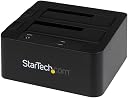
The StarTech.com SDOCK2U33EB is a professional-grade dual-bay hard drive docking station supporting 2.5" and 3.5" SATA I/II/III HDDs and SSDs. It delivers ultra-fast data transfers up to 6 Gbps via eSATA and 5 Gbps with USB 3.0 enhanced by UASP for up to 70% faster speeds. Featuring tool-free, hot-swappable bays with independent eject buttons, it’s designed for seamless multitasking and maximum durability. Compatible across all major operating systems, this dock is the go-to solution for IT professionals and power users seeking efficient, reliable drive access and backup.


| ASIN | B00KILQOG0 |
| Best Sellers Rank | #62 in Hard Drive Docking Stations |
| Brand | StarTech.com |
| Built-In Media | External Hard Drives |
| Color | Black |
| Compatible Devices | Compatible with USB and eSATA enabled computer systems such as EliteBook 8470p and 2.5in or 3.5in SATA solid-state Drives and hard drives |
| Connectivity Technology | USB |
| Customer Reviews | 4.0 out of 5 stars 203 Reviews |
| Data Transfer Rate | 5 gigabits_per_second |
| EU Spare Part Availability Duration | 2 years |
| Enclosure Material | Plastic |
| Global Trade Identification Number | 00065030855891 |
| Hard Disk Form Factor | 2.5 inches |
| Hardware Interface | USB 3.0 |
| Hardware Platform | Mac |
| Item Dimensions L x W x H | 5.6"L x 5.2"W x 2.8"H |
| Item Weight | 0.49 kg |
| Manufacturer | StarTech.com |
| Material | Plastic |
| Memory Storage Capacity | 4 TB |
| Mfr Part Number | SDOCK2U33EB |
| Model Number | SDOCK2U33EB |
| Number of Items | 1 |
| Product Dimensions | 5.6"L x 5.2"W x 2.8"H |
| Supported Devices Quantity | 2 |
| UPC | 065030855891 012303763193 012300419581 013862113306 133400621213 011411222738 954491413712 723856592665 650308558910 758399107359 |
| Warranty Description | 2 Years |
H**1
nice SATA III external enclosure.
I have several already but they are SATA II This one is III. That is double the Data Transfer Speed from 300 to 600 MB/s. Loving it, have Installed, Booted and ran several Linux Distros from an 2.5 SSD and runs af it were running directly from the onboard mboard SATA ports. copy data between drives. To install, test or run newer Linux Distros temporarily and not disturb the m.2 internal permanent distros, like Manjaro,OpenSuse, Fedora, Debian and ArchLinux based-like distros. I wish I had bought this one before the pandemic, price has increased but still worth it. I take SATA over USB hands down.
R**O
Great tool to have!
I use this all the time. I have quite a few “naked” hard drives and this works great to mount them. I had a drive that just stopped working. Totally dead. I took it apart and unscrewed the data interface and power connection and inserted it into this little contraption and drive was fine. Yes, I could have bought a new enclosure but this has two slots and I can use it on a number of drives that don’t have enclosures. I’ve had no problems with this at all. I’ll let others do benchmarks on it but it seems to work plenty fast enough. I’d buy again.
S**Y
Exactly what I needed
Works really well, but I was hoping for a little more. I would buy again. Here are a few things you should know: 1. It has USB3 and eSATA capabilities; however, you can only connect ONE cable at a time or it refuses to mount drives. 2. If you want to connect two drives simultaneously, then you have to use USB because it only has one eSATA port which cannot be split. 3. If you use eSATA cables, you can use either slot to insert a drive, but know only one drive can be mounted to your OS. 4. If you want blistering speeds, make sure to pair this with USB3.0 (UASP) controller. If you have a desktop, just buy StarTech's USB3.0 expansion card with UASP or another brand with UASP. Just make sure your PCIe expansion port on the MoBo supports fast transfer rates. 5. It does not have power saving mode. Drives will spin forever until you unmount them. 6. Tested a disk-to-disk cloning job with Acronis Imager. Worked perfectly and drives never got hot.
T**K
SSD eSATA Tests: HWiNFO & Crystal DiskMark on old computer
I have a 13 year old computer with USB 2.0 (ugh) so the data transfer speeds are pretty poor. But it does have eSATA, and I thought I could pick up a hard drive to put in this docking station (A.K.A. "toaster") to take advantage of the eSATA speeds. I really wanted to like this StarTech docking station, but I feel like it's just not that reliable in eSATA mode. Using the USB cable, it's perfect, but that's not why I bought this model. The docking station did not always connect when I used eSATA. Using Disk Management on Windows 10, I could see the drive when using USB 2.0, but not always with eSATA. This was the start of my discomfort with the docking station. So USB 2.0 connections worked 100% of the time. In other words, if I plugged in the docking station (with hard drive mounted before I plugged in the cable, obviously) and used the USB cable, my old computer could see it and transfer files at the data cap allowed by USB 2.0. Same on newer computers using USB 3.0, this docking station is great. But as for eSATA... 1st Screenshot: HWiNFO But when I used eSATA, sometimes the computer recognized the docking station, sometimes it didn't. I tried two different SSDs, both simultaneously in the docking station and separately (just one drive at a time). They were both the same model: 1TB SanDisk Ultra III solid state drives. You can see it in the first screenshot, where I used HWiNFO to figure everything out. 2nd Screenshot: Crystal DiskMark When my computer recognized the drives while using eSATA, they worked at the advertised speed. See 2nd screenshot of Crystal DiskMark. It was satisfying to see this old computer move so (relatively) fast. But as I mentioned, sometimes my computer did not recognize the toaster (and therefore, the SSDs mounted in it). I tried to be as forgiving as possible, plugging the SSD in the docking station, then plugging the power on, then plugging the eSATA cable into the computer, THEN turning the computer on. Needless to say, there was MUCH powering on/off of my old computer. But it was still spotty. There was even one instance when the toaster disconnected from my computer MID-TRANSFER. Because it did this in the middle of moving files, that SSD became corrupted and I had to format. Luckily there was nothing important on there, but that's the main reason I returned the Star Tech Docking Station. But was it the old computer, or the station? Even though eSATA isn't as fast as USB 3.1, it's still better than USB 2.0. But the inconsistent recognition was no good. The thing is, I'm not sure if was my old computer, or the docking station that was the problem. I don't have any other computers old enough to still have eSATA ports, so there's no way to tell. I'm hesitant to blame StarTech, so I'm just trying to recount my experience using this old computer. I will say that it works just fine in USB 3.0 mode on a new computer. If you are looking for a docking station that can do that, buy the more recent StarTech models (without eSATA). But if you are looking at this model, chances are you are like me. Just keep this in mind if you are looking for a way to make use of your eSATA ports on your (probably very old) computer. Happy Shopping!
P**E
Very fast.
I have this device connected via eSATA to a SATA card plugged into the PC motherboard. That card is a dual port eSATA card and it does support port multiplier, because of this Win11 on my PC does in fact see both drives. This is a good configuration for me. This device is an excellent match with the eSATA/SATA card I am using which is PEXESAT3221. Of course it is for a PCIe motherboard slot. If you are thinking of doing this make sure you have an open PCIe slot on your motherboard and if so get both. They will work perfectly and in this configuration they support RAID zero, which is what I was looking for. I hope this helps you.
S**R
Only first disk visible over eSata
Update 2017-Jan-16 reduced to 1 star Here I am on vacation again and I had a power outtage. Guess what isn't working today? Yup... my backups because this thing requires a human to hit a power button. I will be throwing this in the trash for its stupid design and get a new one. Update 2016-August-15 reduced to 2 stars This is an update to a previous review. I use this unit as a backup to my NAS. I have all of my gear on UPS's and configured to recover on power failure. This dock is configured no differently. Recently after a long enough power failure for the UPS's to run out of juice, I discovered another reason to not like this unit. It does not come back on after a power failure and there doesn't appear to be a way to configure it to turn on after a power failure. The disks do not power on until you hit the little on button. This just doesn't work for any lengthy time away from our home. Since it does work on USB only (SATA only works for the first disk) and does work when you're there to press the button after power failure, I give it two stars but I sure want to give this one star since I will find something else and throw this in the trash. It's worthless to me, but it does.. sorta.. work so 2 stars it is. Original review: 3 stars I am using this for backup with my Synology DS1010+. The USB works with my Synology but when using the eSata only the first disk appears in DSM 5.2. Since other units work with multiple disks using eSata I am assuming the is a eSata bridge/replicator (whatever it's called) chipset issue that isn't universally supported. I don't know if this is a driver issue on the Synology, or an incompatibility in the way the eSata chip works in this hard drive dock. Either way, this didn't meet my intended needs but it does work over USB which is slower.
E**R
Serious Product-Design Flaw If Power Is Important To You
I had high hopes for enjoying this unit after conducting a lot of research on such eSATA/USB hard-drive docking adapters. This one has an eSATA port on the back as well as a USB 3.0 port. However, it's got one FATAL FLAW: If the unit ever loses power for whatever reason--and this includes a momentary power flicker, such as can occur during a storm--then the unit will turn off and won't power back on by itself. This is because the StarTech engineers, in their infinite wisdom, decided to use a soft power switch on this unit--a switch that interacts with firmware and one that defaults to the "off" position. Thus, the only way to get the unit back on it to have someone press the power button. Yes, you read that right. So here's what can happen: You add this docking device to your machine and then you use remote desktop, TeamViewer, LogMeIn, etc., to access your machine while you are physically away from it. Then there is a loss of power to the remote machine. When power returns, your computer and all of your peripherals come back on (most modern computer BIOSes let you configure the computer to turn on after a power loss or to restore the power state of the computer before power was lost)--yet your external StarTech dock will not come back on. And because you're working remotely, there is absolutely no way you're going to be able to get power back on unless you have someone visit your home/office and press the power button. If the hard drive(s) attached to the StarTech docking device have data that you need to access, you're simply going to be out of luck until someone can physically walk up to the StarTech docking device and press its power button... As far as I'm concerned, this is a huge deal-breaker. Not only that, but a rep from StarTech wrote to me and explained that as far as he knows, ALL StarTech docks operate the same way. So he said that there is no alternative within the StarTech product line for anyone who wants to retain or restore power between power cycles. (To his credit, he apologized for any inconvenience this design decision has caused...) Now I realize that I can hook-up the unit to a UPS, but power outages in my area can last for hours. Furthermore, I see no reason why the product engineers couldn't have offered a hard power button that you physically flip to an on or off position so that when you turn the unit on it stays on and returns to the "on" state should power ever be lost. I can't think of any good reason why a device such as this would employ a soft power switch that defaults to the "off" position. If power loss isn't a risk factor for you, then the unit does what it was designed to do--and for that reason I gave it 2 stars versus 1 star. And despite the fact that I am extremely disappointed in StarTech, the company website does offer a 24-hour chat feature. While I'm sure they would assist when possible, in my case all they could do is offer apologies and reassurances that they would pass along my observations to the products team.
S**G
Very Fast
I had a dock that was very old and decided to upgrade. This was an excellent purchase. I have an esata expansion card in my computer but decided I would hook this one up to the USB 3.0 port and the results were very impressive. Acronis backed up my C drive; 76.1 GB in 9 minutes 39 sec. to the drive. I two drive in the dock and they respond seamlessly. Nice product.
P**N
It works well with Reolink CCTV via esata connection and cable supplied
Works well with my Reolink CCTV
M**S
Great eSata/USB external drive for Asustor NAS
Bought this about 18 months ago, and it's a great dock for my ASUSTOR NAS which has both USB 3.0 and eSata. Much cheaper and more compact than the ASUSTOR expansion device. I bought this specifically for the eSata connection, which I find is generally more reliable and stable than USB 3.0, especially for large file transfers. Anyone using this with an ASUSTOR NAS should note it's not listed as a compatible product by ASUSTOR, although it works perfectly well with my AS6204T NAS. There is a sequence to get the eSata connection to be recognised by the NAS. Both the USB and eSata cables need to be connected to the NAS upon power up. After that, disconnect USB cable then eSata works fine. May take a little experimentation, but once you work out the initialisation sequence it works perfectly, no drop outs or disconnections. After power down or restart, the NAS will automatically recognise the eSata connection. Note: The NAS will recognise both drives as eSata1 an eSata2 (or USB1 or USB2 if using USB 3.0 connection). Hope this is helps anyone looking for a compatible eSata dock becuase I know there aren't many options out there.
C**A
Muy sencillo
Funciona a la perfección con 2 HDD de 4TB y conectado a mi ordenador. Lo estoy utilizando como NAS conectado a mi router. La única pega es que no permite cambiar el firmware para que sea compatible com mas productos. En mi caso esto no es un problema. Materiales y acabados bastante sólidos y de buena calidad.
D**.
Excellent rapport qualité/prix
Fonctionne parfaitement, idéal pour la surveillance vidéo.
J**E
5 stars
Excellent product
Trustpilot
4 days ago
2 weeks ago