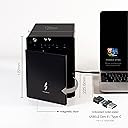
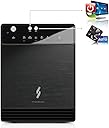
๐ผ Elevate your data game with speed, space, and style.
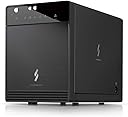
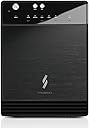
The Mediasonic HF7-SU31C is a premium 4-bay 3.5โ SATA hard drive enclosure featuring USB 3.2 Gen 2 Type-C connectivity for blazing 10Gbps transfer speeds. Supporting up to 120TB total storage with SATA III 6.0Gbps drives, it includes a smart fan with thermal sensor and an innovative air intake front door for optimal cooling. Compatible with Windows, Mac, and Linux, this metal enclosure is designed for professionals demanding high capacity, speed, and reliable thermal management.
| ASIN | B07KY73BNQ |
| Best Sellers Rank | #417 in Enclosures |
| Brand | Mediasonic |
| Built-In Media | Main Unit + Accessory |
| Color | Black |
| Compatible Devices | Desktop, Laptop |
| Connectivity Technology | SATA |
| Customer Reviews | 3.3 out of 5 stars 178 Reviews |
| Data Transfer Rate | 10 gigabits_per_second |
| Enclosure Material | Metal |
| Hard Disk Form Factor | 3.5 inches |
| Hardware Interface | USB 3.2 Gen 2, USB Type C |
| Hardware Platform | Linux, Mac, PC |
| Item Dimensions L x W x H | 6.8"L x 4.9"W x 9"H |
| Item Weight | 3.8 pounds |
| Manufacturer | Mediasonic |
| Material | Metal |
| Memory Storage Capacity | 30 TB |
| Mfr Part Number | HFR7-SU31CH |
| Model Number | 4 Bay Raid USB 3.1 Type C |
| Number of Items | 1 |
| Product Dimensions | 6.8"L x 4.9"W x 9"H |
| Supported Devices Quantity | 4 |
| UPC | 629329002030 |
| Warranty Description | 1 Year Warranty from Mediasonic Store |
V**R
Mediasonic 4x RAID with USB Hub Enclosure (HFR7-SU31CH) โ Fast, reliable, and great value
The Mediasonic 4x RAID with USB Hub Enclosure (HFR7-SU31CH) is a very solid four-bay enclosure with excellent performance once itโs set up correctly. Initial configuration can be a little tricky, especially if youโre using mixed SSD brands, but itโs absolutely worth the effort. I set mine up with two 2TB SSDs in RAID 0. Although the drives were similar in specs, they were different brands, and the enclosure initially refused to create the RAID. After fully wiping both drives using macOS Disk Utility, the RAID built successfully and has been stable ever since. Performance is outstanding. Iโm seeing sustained transfer speeds of around 830 MB/s, which is a huge upgrade from traditional HDDs. I installed macOS Tahoe on it as a secondary boot drive, and it works beautifully. Itโs now my everyday storage drive, and the lack of spin-up time compared to hard drives makes everything feel instant. Build quality is excellent, and the enclosure offers a strong feature set, including four bays and a built-in USB hub for added flexibility. Reliability has been solid. There is no need to spend more money on higher-priced alternatives like the OWC Gemini. This Mediasonic enclosure delivers speed, capacity, and reliability at a much better value. Highly recommended if you want a fast, well-built, multi-bay RAID enclosure without overpaying.
H**K
README!
As a four decade tech I have been using Mediasonic gear with great success for many years, still working today without a single failure. Reliable and dependable. I own different models made by them. I purchased this RAID enclosure for the first time to serve a specific functional purpose but I'm more than disappointed in this product. It did not work out-of-the-box like all the others, and it should. Glad I tested it before the return/refund period ran out. Some reviews point out issues, mine was fairly simple. Once the box was connected the computer only saw (reported) the enclosure as a USB drive, not a hard drive RAID enclosure. The computer wouldn't recognize the hard drives for partitioning/formatting. Found the suggested troubleshooting steps for this issue and tried them all, such as using a different USB port, ensuring the USB power management was turned off (providing continuous port power), even using another computer but all failed. This is the first time I used one of their enclosures which could only be connected by a USB type C connector. All my other enclosures use a USB type A to B. Needless to say, this baby is headed back which brings me to my final comment. Typically, I have no issues with Amazon returns. I typically get a printed return label, slap it on the packaged box, and drop it in a drop box downtown, and wait for the refund to go through but, in this case I got a QR coded printout and have to drive 30+ miles to the nearest UPS store to drop this thing off. That sorta bites! It might have smoothed things over a bit if Amazon offered to replace the box with another item (such as one I had previously purchased and trusted) and applied my refund to that one, but the only other option other than replacing it with the same item was the refund so, refund or bust. Mediasonic takes a loss on this one because I'll be using a spare RAID enclosure as a work around. Maybe this box will work for you, maybe not, consider wisely. I'll be taking my wife to lunch 30+ miles down the road, not a total loss.
A**R
Affordable, works great, runs hot
MODEL: HFR7-SU31CH Pros: Stylish Works Well Affordable Cons: Poor Documentation and Support Runs HOT Not super quiet This unit works as advertised. The limited RAID functionality relies on a well tested/supported chipset and seems to function as expected. The unit itself looks nice but that is hampered by the necessity for removal of the front door to allow for proper airflow. With datacenter grade drives spinning and active, temperatures can quickly rise to over 60C when working as designed. Removal of the front door easily solves this issue, allowing the natural airflow to maintain acceptable operating temperatures. I believe that if MediaSonic simply skeletonized the door replacing the metal plate with a screen, the problem would be resolved. This unit is not for you if you need silence, especially with the door removed. Datacenter grade drives are not typically quiet, but thats a reasonable trade for reliability. I'd have rated this higher if the manual (or any online documentation) contained clear technical details related to the functionality of the unit. While many of the details are included in the manual, it is not clear on many intricacies of the functionality beyond initial configuration. The included cable USB Type C to Type C is good quality. I tried replacing it with a 10Gb (USB 3.2) Type A to Type C of questionable origin/quality, and there were numerous intermittent problems with the OS and volume availability. Putting back the original cable before data corruption was permanent cleared up these issues. So be careful on choosing QUALITY replacement cables if needed.
K**N
Excellent Enclosure That Ticks All the Boxes!
This is a fantastic hard drive enclosure that has all the essential features I was looking for. After trying several other models, this is the only one that met all my needs. 1. RAID Support: While I don't personally use a RAID setup, it's a great feature to have included, adding to its versatility for future use. 2. S.M.A.R.T. Status: It supports S.M.A.R.T. monitoring, which is crucial for checking the health of your drives. This is an absolute must-have if you're storing important data. 3. Performance: The read and write speeds are excellent and meet my expectations. I was able to get the maximum performance that my hard drives are capable of. 4. Auto-Sleep & Low Power Consumption: The sleep function works perfectly. The enclosure goes to sleep when my computer does. The power consumption is very impressive. I measured it with a smart plug, and with two drives running, it consumed just over 15W. I estimate it would only be around 25W with four drives installed. While my smart plug might not be perfectly accurate or able to measure peak wattage, the overall power draw is ideally low. This is a significant advantage that will save a lot on the electricity bill, especially if you live somewhere with high energy costs like California. 5. Smart Fan & Noise: The intelligent fan is great. It's whisper-quiet when the drives are idle. I use drives that are inherently noisy, so during heavy read/write operations, I can still hear them spinning. However, it's important to note that this noise comes from the drives themselves, not from the enclosure's fan, which remains quiet. Long-term durability remains to be seen, but so far, everything has been working perfectly. Considering its features, performance, and low power usage, I think it offers excellent value for the price. Highly recommended!
E**L
VERT DANGEROUS - CAN CAUSE UNRECOVERABLE DATA LOSS.
I have a previous version of this unit. It has the same name as this. It trashed 2 of my drives so that the data was not recoverable by Data Rescue and similar programs. ON my unit, there is text on the drive door saying not to change the order/sequence of the drives in the slots after assembly. Any change will lead to data corruption. IT DID. I used this as JPOD for a few years without problem. But one day I took a drive out and then put it back in another slot and could not recover the data. I did not realize it was the units fault and moved another drive into a different slot and lost all the data on that one. It happens almost instantly when you do it. The current version, advertised here on Amazon, does not have the same warning so I contacted tech support and asked them if this new version still had the same restriction - that you cannot change the order of the drives or even move one into an empty slot. so BUYERS BEWARE. one of my drives was 18 tb and the other 5 and both are gone. it's taken me over a month to try and recover my files. Normally I would use an app like Data rescue which can read corrupted drives, but what this unit does to the drive is so serious that Mac's Disk Utility can't see the drive at all nor can Data Rescue recover the files. although it does show the list of the files. It cannot recover any of them. So I have to say this is the worst enclosure you could possibly get unless you are very very very certain that you remember never to change the position of the drives, even with it is not any type of RAID. Tech support did tell me that it JOBD was at risk the same as if it were a raid. He said they do have another setting which sees all the drives separately and that one may not corrupt the drives if the order is changed. But I forget the name of it and also if he was SURE of this. Other than that, It was a reliable unit. It buzzed a bit on myshelf, from very slight vibration, but the fan was OK.
R**N
Decent enclosure but with caveats
On the fence about this enclosure. I was ready to return it after 2 day of frustration at how quickly it falls asleep. This behavior was constantly breaking apps and producing errors in Windows. I decided to go to the Mediastore website looking for answers only to find no Support section. Huge red flag. No user manuals either, something they give you only on an included CD. Pathetic. Last night, I enabled the Ultra Performance mode power scheme away from the default Balanced mode. I then manually turned off power saving mode on the USB entries for this enclosure in Device Manager, and then changed time to sleep hard drive to 0 instead of the 10 min default. After these changes the enclosure is now staying on with all drives readily accessible and functioning as expected. If this drive fails me one more time it's getting returned. Looking back I should have gone with a more reputable company that actually has a support section on their website. This company does not seem to care one bit about customer support, so I would use caution when considering buying one of their products.
P**W
READ DOCUMENTATION BEFORE PURCHASE! Does exactly what is says. I'm getting @ 3.33 Gbps real world
So my intent was to add two of these to my Mac Pro 5,1 using a Sonnet Allegro USB-C 4-Port PCIe (USB3C-4PM-E) card. The cables that came with this were too short to reach my tower so I purchased a different one's. I filled these with 8 Toshiba N300 12TB Hard drives. I did the research first so that I understood that these were divided into two separate 2 drive raid arrays, not all 4!! This is a common negative response for these bays and therefore the bay itself is getting negative reviews for people NOT reading all the information before purchase. I put the Sonnet card in my Mac Pro, The 8 HHD into the two Enclosures, and booted up one at a time. The drives were all picked up and I formatted two raid arrays giving me two 24TB on each Enclosure. So far so good. My Mac Pro is showing four 24TB Drives. I began transferring data from my three Mediasonic H8R2-SU3S2 ProRaid 8 Bay External Hard Drive Enclosure's using Carbon Copy Cloner software. This is when things became interesting. My 8 Bay Enclosures are connected to my Mac Pro using a Sonnet Allegro Pro USB 3.1 Type A PCIe Card (Four SuperSpeed 10Gbps USB Connectors). I began receiving "Disc Not Ejected Properly" warnings. The new Enclousures just kept unmounting. After some research I ordered different cables, This time making sure they matched the " E-Mark IC cable" description that Mediasonic used in the box. I ordered these from Amazon:(https://www.amazon.com/gp/product/B07TP9R88Z/ref=ppx_yo_dt_b_search_asin_title?ie=UTF8&psc=1) Once I connected these cables I had no disconnecting errors. I was transferring data at the speed of about 1.5 TB per hour (Aprox 420 MBs / 3.33 Gbps). My 8 Bay Enclosures using USB 3.0 were transferring at about 1TB per hour (Aprox 275 MBs / 2.22 Gbps) so this proves that the Enclosure interface is much faster. Having each enclosure set up to have 24TB data and a 24TB clone I am running 48TB of data 24hrs a day and so far I have had very few issues, none that don't occur with any other setup that I have had before so I am very pleased. NOTE: Fans run great and quiet keeping these massive 12TB drives running pretty cool. I have yet to notice the fans turn on high for any reason. My room does stays a consistent 67 degrees to help my electronics. My Set Up: 2010 Mac Pro 5,1 running High Sierra Sonnet USB C x 4 PCIe Card Two of these Mediasonic Enclosures (running one connection per PCIe card driver) Eight 12TB Toshiba N300 HHD Two UNIDOPRO 6ft USB C Cables Real World Average Speed: 1.5 TB per Hour, 3.33 Gbps, 420 MBs
S**E
Bought in July 2024 and fan died Nov 2024 (UPDATE Jan 2025)
I have purchased several Mediasonic Raid/SATA enclosures in the past and have been quite satisfied with the quality and performance. But the last 2 Mediasonic RAID enclosures I purchased have both failed due to the cooling fans failing prematurely (grinding & rattling The latest one had fan noise from the day 1 and I should have returned it ASAP, but thought maybe these just have noisy fans. I suspect Mediasonic must have received a bad batch of fans.........Maybe not!! The fan specs are; Model AD08012HX207000 DC 12v 0.15a Hydro bearing (Not Ball Bearing). Hydro bearing fans in my experience have a short life, Ball Bearing fans last much longer but are a little noisier than Hydro bearing. So, this box lasted a little over a year and now here we are. I am reluctant to purchase another Mediasonic RAID enclosure at this point. Maybe I got a bad one.......again! Unfortunately, quality control is lacking in Electronics these days. Hope Mediasonic upgrades the cooling fan to Ball Bearing and fixes this issue. Really like their products and features but, I am on the fence at this point! I do however recommend their products. UPDATE - So this morning the Mediasonic RAID box is not recognized by Windows, after power cycling the box it was still not recognized by the OS. Power cycled PC and still no go. Disc management app does not see the RAID array, looks like possibly bad cable. Changed out USB-C cable with no change. Swapped out USB cable to eSATA cable but no change. I have replaced 2 other Mediasonic Raid boxes due to same issue, but the boxes lasted 3 to 4 years!! Ok, so sorry Mediasonic but it is time to try another brand. Just lost 30Tb of data.........I am not happy Mediasonic!!!!!
R**.
Good Box
Installation was easy, except that you need their special adapter for 2.5" drives so that the connectors are at the bottom right instead of in the middle, so don't order other ones. Luckily I ended up using 3.5" drives anyway and it has been working great with good transfers speeds to my computer connected on a USB3.1 Gen 2 port. Sits on my desk and is reasonably quiet.
R**D
Absolutely the only way to go if you have multiple hard drives
Absolutely the only way to go if you have multiple hard drives. brilliant! i have 3 of them.
F**I
Doesn't work with single drives
Sending this product back tomorrow. Almost all of stated issues from reviews were about RAID combability. So I figured single drive function works, i was very wrong. The case itself is what I expected however I'm surprised they made the bay door plastic and not Metal. It was so light it keep closing on me every time I removed a drive. The drive setup not very user friendly, the handles they provide doesn't really work as handles, the bay is very tight and if you don't have small hands be prepared to struggle if your having issues. Popped in 4 drives following the directions provided (its one page and not complicated). Immediately Windows 10 issues with a non-compatible device. Spend 2 hours testing each drive individually (I have 6, not all the same band or size). Tested on laptop and PC. Tested on 3.1 SS10 ports as well because my laptop has them. Nothing tested yielded any positive result. Even formatted some drives between Fat32 and NTFS just incase it was a compatibility issue with the controller in the Unit. Pull drives in different external enclosure, all booted with zero issues. Wasting all that time is why there is one star. If I could give zero stars I would just because the manufactures website offers no blog, reviews, support of any kind. Most of the link run to dead pages, so I have zero confidence the manufacture is going to be able to provide any real support for this unit. Something to be aware off. I won't be a customer again.
R**Y
Mediasonic Raid 4 Bay 3.5" SATA Hard Drive Enclosure
Item as described, set up was easy and straight forward, would recommend.
N**O
Reliable
After 3 years of daily use, it still works flawlessly. Very happy with it.
Trustpilot
2 months ago
1 week ago