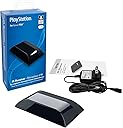


🎯 Master your PS4 universe with one remote—because multitasking pros deserve seamless control.
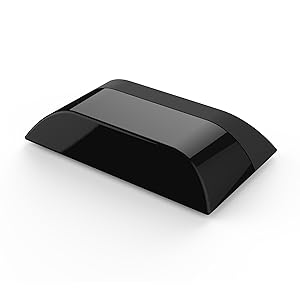
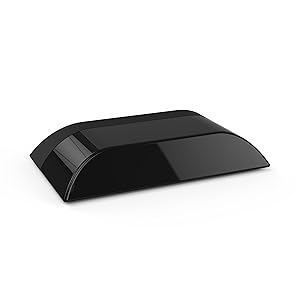
The PDP Gaming IR Receiver is an officially licensed Sony accessory designed to enable Logitech Harmony remotes to fully control PS4 systems, including powering on/off, navigating media, and launching apps. Its plug-and-play design ensures quick setup, while compatibility with smart home hubs like Alexa allows for voice-activated gaming and integrated home theater automation.

| ASIN | B01K3VMBM0 |
| Customer Reviews | 4.0 4.0 out of 5 stars (206) |
| Date First Available | August 5, 2016 |
| Item Weight | 7.5 ounces |
| Item model number | 051-068-NA |
| Manufacturer | PDP |
| Product Dimensions | 1.97 x 3.74 x 8.23 inches; 7.52 ounces |
| Release date | November 21, 2017 |
| Type of item | Video Game |
Z**E
Works exactly as expected
This was the only solution I had for turning on my PS4 with my voice using Harmony Hub and Alexa. The interface for the PS4 changes frequently based on what apps you use most, so it's hard to setup activities on the PS4 to do something simple like "Launch Netflix" without additional 3rd party solutions beyond this and the hub and the Echo dot. Setup is super simple, it's plug and play. 1 power connection, and that's it. It connects over bluetooth to the PS4, and receives IR signals from whatever, pretends to be a full fledged controller, not just a Blu-Ray/Media remote. Which means you can do any button the PS4 can understand from the Harmony app. I set up an activity to dim my Hues lights and set the TV to the correct input and turn on the PS4 all at once. When I come home from work I generally walk in to the room and say "Alexa, start PS4" and the magic happens.
J**.
Great Item, Use it for putting the PS4 to rest and waking up
Works great so I can add it to my Harmony Elite remote's activities to power it on and off with the rest of the home theater gear. While this doesn't officially support power controls with a direct command you can still do it in this way. Edit the Start Sequence for the Activity to have command for the PS button on the PDP Device (Will wake from rest) Edit the End Sequence to have the following: Direction Up, Direction Right (Put this in 10 times), Enter, Enter. As long as you always go to the home screen before hitting power off on your harmony remote, this will go up to the top menu items and all the way over to power (as that is the max number of times it could take to go all the way right, it will save your last place you were at in the top menu however, the menu does not wrap so we enter the max to always make sure we land on power) It will then Enter Power menu and Put the PS4 to rest. Hopefully this helps some looking to automate your entertainment system more.
D**S
Finally!!!
I have 2 of these adapters (2 PS4's). History: I had 2 PS3's with the Logitech adapter for the PS3 which worked fantastic. FYI The PS3 adapter DOES NOT WORK with the PS4. The powers that be at SONY in their infinite wisdom decided to go non-standard bluetooth for the PS4... WHY???!!!! No reason at all is the answer. Moving Along: This adaptor works well assuming you are well versed with the Logitech Harmony configuration software for your remote. Since I have 4 Logitech Harmony One remotes in my house and have setup 10+ others for friends/fam/customers I am well versed in the config tool for the remote, which I admit is not the best for the inexperienced or less than tech savy people. I am currently using a Logitech Harmony One (have 4 of them as I like them so much). Physical Installation of the adapter was simple and easy to add/link to PS4. Location: One of our PS4's is in a closet and use an IR repeater. I placed the IR transmitter in the middle-front of the adaptor, seems to be working well. I tried to use a powerful flashlight to see exactly where the IR eye is on the adapter itself but could not tell. The second PS4 is out in the open directly under the TV. Once Harmony remote configurations are done, you will probably have to tweak here and there for your own taste. Be prepared for an hour of programming and tweaking of your Logitech remote. You WILL be able to use the numbers on the remote (after assigning the numbers to the keypad via the Harmony config tool), which was nice. Assuming you have a lock code once your PS4 boots up, just punch in your 4 digit pin on the number pad on your remote!! I also had to the PS button to the power up Harmony activity routine to turn on the PS4. Installation of the adapter was simple. Side note: I do have to power cycle the closet installed adapter every 3 or 4 months, sometimes it stops responding. The second adapter (out in the open) I have does not do this. Interesting. I would purchase again since watching TV/Hulu/etc with a PS4 remote is.... well painful. Chaulk one up for "First-World" problems hahahah.
D**K
Need to tweak some settings to get it working right.
The Harmony remote did not automatically add start up and shutdown functions. I needed to use the app to add the commands. Trouble shoot the power function, select separate power on and power off. Set "PS" as the Power ON action. Set the "PS for 2 seconds", "X", "X" for power off. Be sure to setup the Quick action menu on the PS4 to match the power off actions. Finally the most import part. Make the activity. I hit an issue where I made the activity than added the power functionality. Everything looked right but the on/off didn't work. Had to delete the activity and create a new activity to get the on/off functioning.
T**N
Yes, it can turn it on, but maybe not off?
I bought this so I could finally retire my PS3 from my entertainment center. I kept it around for about a year after buying a PS4 because we used to use it for streaming services including Vue and for Blu-Ray playing. Everything I read said that nothing but a Dualshock 4 can turn the PS4 on/off. I am pleased to report that this is only half true! I can turn my PS4 Pro on with my Harmony 900 remote, just can't turn it off, at least not automatically. I can by using the crossbar menus or the quick menu, then using the power button on the remote to power down the rest of the system How this works:. You will change your device in your PS4 activity from the PS4 itself to a "PDP IR Receiver for PS4" (game console). This way your remote interacts with the device itself to deliver signals via Bluetooth to the PS 4 once paired. It took a lot of programing of both the soft and hard buttons to make it functional, but it works well in the end. I took away one star because of this. I mean the default settings for the directionals did stupid things like change channels on my TV. However, a PS button is an option and thus how I can turn on the PS4. This does not work however if I last put it in rest mode by using a Dualshock 4. I cannot turn it off however because the Harmony 900 does not allow me to program a long enough sequence to make a macro to do it. Other harmonys may have better luck. Finally, I also took away a star since this is a seeming Sony licenced product and they should just include simple on/off functionality in thier console so this is not such an issue. Also just including a simple it port on the console like Xbox still does would be nice. Overall this functions as advertised and can pretty confidently turn on the system at least. It just shouldn't be nessesarily.
P**9
Finally, an OPTIONS button!
It's worked extremely well for me, no button lag or anything like that. Other than powering off the PS4, every command I need is available. Couple tips: 1. If you were hesitant because there was no OPTIONS button, it recently showed up in the Harmony menus. Huzzah! 2. Not only is there a PS HOME button, but if you hold it down on the Harmony remote, it behaves just like on the controller. 3. For the power on to work properly, go to "Activities >> Customize This Activity" and add a "PS" command at the end of the sequence. (see pic) 4. In a few places it will assign generic DVD player-type commands ("Rewind", "Skip Forward", "Exit", etc). They generally work fine, but I'd recommend changing them to the true controller commands ("L2", "R1", "Circle", etc). I find that it's just a little bit more responsive. 5. Definitely change your remote's OK button. Instead of the assigned "Enter" command, change it to "Cross". For me, that stopped the occasional "mis-click".
X**E
Frustrating and unresponsive
Purchased this to get rid of the frustration trying to use the regular ps4 controller for blurays and streaming. Hate the bright blue light, it's too easy to accidentally bump l2 or r2 and skip what's playing, you either drain your battery or you get popups saying the controller turned off... for all the great media capabilities of the ps4 the actually controls really lacked common sense. The pdp ir adapter seemed to be the best solution. Add it to your harmony and you can control everything at once. Great! Not annoying lights, no accidental button presses, no annoying on screen popups, and easier to keep your controllers charge. What took so long? Sadly it just opens a new world of frustrations. I can get past the delay when pushing the button since the ir is converted to blutooth. it's not even long, a 1/2 second or less, but the problem come in with the unit constantly missing the signal. So you press it, wait, nothing happens, press again, wait, nothing happens, press again and again and now it reads all commands at once. Is it the remote? The 2 tvs, cable box, receiver, and HTPC all work flawlessly. Can't be the remote. After reading some other reviews someone pointed out light sensitivity. I took notice that during the day with the sun out the unit was less responsive than at night when it was darker. The room it's in isn't even bright. I re-positioned the unit towards the back of the media stand where less light hits it and it's responsiveness increased. Still not 100% during the day but at least to a point where if you're patient it works. After the horrible pdp media remote for the ps4 (i broke it out of frustration) i wasn't expecting much from this and sadly it couldn't even meet those low expectations. It's sad sony would allow something so poor to dilute the great media capabilities of the ps4. At this point in it's life cycle i think it's unlikely a reliable product will come out.
A**.
Be prepared for some manual detective work and hopefully better future support...
So far I'm not impressed. I have the Harmony Elite with Hub and this device came with zero instructions except on how to pair with the PS4 and how to add it as a Harmony device. So far I cannot get it to turn on or turn off the PS4 (See update below) and the instructions and/or Harmony apps are of zero help. Once you are in the PS4 everything is fine but the power feature needs to be setup but there is no guidance anywhere. For now I still have to use the Harmony Hubs Bluetooth connection to the PS4 to turn it off, which I didn't need this for... Save you money if you already have a Harmony Hub unless you really need Plex or other video app support... Hopefully proper instructions will show up somewhere but be prepared to be frustrated with this. On top of this going to their website (both pdp.com and support.pdp.com) doesn't even list this product so there is no support their either. If only this was as good and easy to use as the old Logitech PS3 module... Final verdict: For now steer clear until there is proper support and documentation. Updated to two stars, getting there but not quite there yet: To have it turn on the PS4 you can do this: Add a "Manual Step" in the "startup activity" in the harmony app of pressing the PS button at the end of the startup activity, this will automate the powering on of the PS4 most of the time. Too bad you can't have it at the beginning automatically (Maybe Harmony will implement this down the road as well as the same shutdown steps they use on the Bluetooth connection... one can only hope and this would become at least a four star product). So it will turn on the PS4 for you if you add that manual step but it still will not turn off the PS4. I tried to emulate turning off the PS4 using the below steps but it doesn't work as it either sends the commands too quickly and misses a few (Like the up and rights, it misses the up and it only goes right four times on the PS4 before pressing X) or it takes forever if you insert a pause after each command... (I've found it takes a 2 second pause for it to register each command successfully so you are talking about 38-40 seconds to complete the shutdown whereas the harmony Bluetooth steps are about 3-4 seconds) Press PS Button to get to the Home Screen (if the PS4 is on the home screen already it just resets the selection to the first entry on the App Ribbon, so not a big deal, unless you are on the currently launched app in which cases it reopens the app...) Press Up once to get to the System Ribbon (where Friends, Party, etc etc are) Press Right at least 11 times to Power (if it presses it more then 11 times it won't matter, it stops at Power no matter what) Press X Press Down at least 3 times (if it presses it more then 3 times it won't matter, it stops at Power Options no matter what) Press X Press X (Enter Rest Mode)
J**L
Funciona bien con Logitech Harmony
Lo compre para poder prender el PS4 con el control remoto Logitech Harmony, ya que el control no lo puede prender por el solo. Funciona de maravilla, ahora puedo prender el PS4 directamente del control o de la aplicación. Es importante que el dispositivo lo usen únicamente para encender el PS4 y todas las demás funciones las utilicen con la configuración normal de su actividad.
P**L
Works with my Harmony One remote!
Works flawlessly with my Harmony One remote for controlling my PS4. I previously used the Harmony Adapter for PS3 to control my PS3 for many years, but once I upgraded to a PS4, unfortunately the Adapter would not pair with the PS4. I didn't want to upgrade to the more expensive Harmony Hub and/or replace my venerable Harmony One remote just to control the PS4 so I was very pleased to find the PDP IR Receiver. Although the Harmony One remote is not listed on the box as a 'compatible' Logitech Harmony remote, I can confirm it works perfectly. BTW, the Harmony One is fully supported by the My Harmony software. The PDP IR Receiver can turn the PS4 on (via the PS button command), but it can't turn it off unless you setup a programmed button sequence. For $39.99 I think is it's well worth it for something I use everyday.
S**D
Easy Setup!
It works when PS4 is on, but still trying to figure out how to turn on/ off my PS4 from my Harmony remote. All Oher functions work.
G**S
WORKS FOR PS5
This thing is a life saver for my PS5. Full control just like PS4 and the only issue is the power off sequence we're all aware of. Straight up, the media remote sucks ass, especially for any UHD playback, so this thing is the one you want for your Harmony One like mine, or other Harmony remotes.
C**N
Good product! Thank you!
It work!
Trustpilot
1 week ago
2 weeks ago