![GRAUGEAR 3.5 Inch Front Panel USB C Hub, SD/microSD Internal Card Reader, 20Gbps USB 3.2 Gen 2x2, USB3.2 Type-E Key-A 20-Pin Header & USB3.0 Header & 15-Pin SATA Power Connection Required [G-MP01CR]](https://m.media-amazon.com/images/I/61hmiqWx4pL._AC_SL3840_.jpg)




Buy anything from 5,000+ international stores. One checkout price. No surprise fees. Join 2M+ shoppers on Desertcart.
Desertcart purchases this item on your behalf and handles shipping, customs, and support to UK.
🚀 Upgrade your desktop’s front panel with next-gen speed & style!
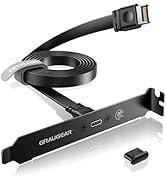
The GRAUGEAR 3.5 Inch Front Panel USB C Hub converts your floppy drive bay into a powerhouse expansion unit featuring a 20Gbps USB 3.2 Gen 2x2 USB-C port, two USB 3.0 ports, and integrated SD/microSD card readers. Designed for Windows PCs, it requires SATA power and dual USB headers for installation, delivering fast, stable data transfers with built-in safety protections and a durable build.


| ASIN | B09QXGVM8Y |
| Additional Features | Fast Data Transfer, Plug and Play, Powered |
| Best Sellers Rank | #383 in USB Hubs |
| Brand | GRAUGEAR |
| Built-In Media | 1 package |
| Color | Black |
| Compatible Devices | Card Readers, Desktops |
| Customer Reviews | 4.2 out of 5 stars 812 Reviews |
| Data Transfer Rate | 10000 Megabits Per Second |
| Enclosure Material | Metal, Plastic |
| Hardware Interface | MicroSD, USB, USB 3.0, USB Type C |
| Item Dimensions L x W x H | 4.02"L x 4.02"W x 0.98"H |
| Item Type Name | Front Panel USB Hub with Internal Card Reader |
| Item Weight | 170 Grams |
| Manufacturer | CHAB GmbH |
| Mfr Part Number | G-MP01CR |
| Minimum Required Operating System Version | Windows 7 |
| Model Number | G-MP01CR |
| Number of Ports | 6 |
| Operating System | Windows |
| Special Feature | Fast Data Transfer, Plug and Play, Powered |
| Total USB Ports | 4 |
| Total Usb Ports | 4 |
| Unit Count | 1.0 Count |
| Warranty Description | 2 Year Limited Warranty |
O**W
Works great. Quality product. Five-star product all the way
Bought this to add more usb ports to front of pc case. Would have liked it to be 5.25" wide for case bay, but I had to buy an adapter tray for it from Silverstone to fit their SETA D1 case and that solved issue. Adapter is stamped aluminum which is much stronger than the plastic one I bought first which had a real sloppy fit between the Graugear frame and adapter frame. As for use, this is great. usb 3.0 ports work great and nice to have a 20Gbps and 5Gbps usb-c port. I purchased Xiwai 20Gbps USB 3.2x2 adaptor for my empty m.2 header on my ROG X399E-gaming MB. Nice to have the SD/Micro SD card slots. No need for the small card reader anymore. Back to the pc storage box for old things pc. After a couple days of use, the transfer speeds are very good, and I am getting consistent connections with the m.2 slot am3242 based adapter card. Have transferred data between all of the ports and they all work well. As expected, depending on the type of media you have connected to panel will make a difference in transfer speeds. Also turn over the usb`c cable and see if speeds change on your system. Surprised me so just try it. Still very good investment. This is a quality product because the two interface cables are round and shielded so there is no need to worry about noise affecting signal transfers between MB or within the panel when transferring between SD and usb. Flat ribbon cables really are something I do not like to see on usb 3.0 and above. They are susceptible to noise. Wish Graugear included a 3.5" to 5.25" adapter or had one listed for their product on website. If they do have one, I must have missed it. Definitely recommend and would buy again if needed and will recommend to others to get this if they need more usb options.
E**E
Very usable front panel USB hub. Don't forget the 5.25 to 3.5 mounting bracket!
Convenient way of getting more USB ports. The device has (as shown) two connectors. One is a standard 19 pin USB 3.0 cable that serves 2 USB A sockets, a lower speed USBC socket, and a very handy SD card and micro SD card reader. The second cable brings out a USB Gen 3.2 2X2 connection from your motherboard, providing a 20 Gbps connection. Everything works as designed, and cables were long enough for easy connection to the motherboard. You need to provide power with a SATA type power connector from your power supply. The web page shows you what kind of connectors to look for on your mobo, which was quite helpful in making a purchase decision The unit fits directly into a floppy drive bay. ***Note that you will need to have or purchase a 5.25 to 3.5 front bay mounting bracket if mounting the USB hub into an optical drive slot.***
J**9
One SSD port non-working
This is a very reliable product as far as USB is concerned. I have read horror stories in the reviews concerning USB C charging issues, and have not done so very often since I don't use USB C to C that much. I have however encountered a problem with the micro SSD card reader conking out on me when I used it to transfer data files to the larger SSD card reader used in the same device. This trick worked a couple of times and I was able to transfer files. Now the micro SSD card reader won't work, but the larger SSD card reader is still good. Other than that, the Graugear USB hub is still an okay product for the price, being all metal and sturdy with at least one SSD reader still going after a year.
B**R
Best front panel USB hub & card reader I've ever owned bar none
This unit is heads and tails above all the other front panel USB hub & card readers I've owned over the years. First, it's far more solidly built with the front bezel being solid metal so no chance of breaking those awful plastic tabs that most other units come with, being a part of the case itself which is also very sturdy and well-made. Second, perhaps earlier versions of this required you to insert the MicroSD card upside down, but I must have a newer version where they're inserted facing up. Also and more importantly, the faster of the two USB-C ports on the one I got was USB 3.2 Gen 2x2 so it goes up to 20Gbs, not 10Gbs as in the product page description and datasheet. This of course depends on your motherboard's capabilities and what you insert into it. Finally, it's fast. Not quite as fast as my X570S motherboard built-in ports, but just a hair slower. For example using CrystalDiskMark my Samsung 256GB USB-C flash drive tested at 433/118Mbs read/write on the MB's rear USB-C 3.2 Gen 2x2 port, and 399/118 on the Graugear's 5Gbs USB-C 3.2 Gen 2 port and 403/119 on its 20Gbs USB-C 3.2 Gen 2x2 port. That's close enough for me. Installation took longer and was more difficult than I expected, but that was entirely because of the way that my PC is set up with cables, connections and such. But the device itself is very simple and easy to install if you know your way inside a PC. I can't attest to long-term regular use as I only got it a few weeks ago and haven't been using it much, but on build, performance and even looks, it's a winner. A bit more expensive than what I've usually paid for such devices in the past but justified by its much higher quality.
S**E
Utterly useless.
I cannot stand the look of most of the front USB panels available on the market. I don't need 35 different obscure card readers built in, I don't need 16 USB ports. This design is as close to perfect as I can find. Unfortunately it's absolute trash. I saw other reviews commenting on the slow transfer speed, I hoped they were mistaken, or maybe received a defective product. No such luck. Mine maxes out at 2 MBps, and it only sees that in intermittent spikes. I tested transfer speed with all four USB ports and the full size SD card reader - I don't have a micro SD handy to test that, but it's irrelevant anyway. All five tests show identical transfer speeds. I even tried transferring from different sources; internal HDD, internal NVMe SSD, and between thumb drives plugged into the two USB-A ports on this adapter. No difference in speed for any situation. All four ports are useless, as is the SD card reader - meaning the entire thing is useless from the ground up. Additionally, if you have a large ATX case, the cables could stand to be a bit longer. Mounting this in my top 5.25 bay, with USB connectors along the bottom of my motherboard, I can only just run the cable directly there, with no extra length available to leave any flexibility for clean routing. Otherwise pretty easy to install, the SATA power adapter seems to fall off a little too easily, but I think that's minor (assuming it's actually making contact, maybe that's why it's sloth mode?)
H**Y
Good way to modernize and old case
I have a 10 year old Corsair case that is of the generation that had a front opening for three 5.25 inch devices. I love the case and have used it through multiple motherboards. But the drawback is that the built in ports of the case only support USB 2.0. With my latest build I wanted to expose the USB 3 type-C ports but not lose my CD drive or my hot swappable drive bay. I was skeptical of buying this because I had bought one previously that was the same form factor and looked similar but once installed I found that I couldn't read the SD memory cards while also using the USB ports. When I received this one from GRAUGEAR, I was happily surprised that all ports work simultaneously. I can read a SD card, connect a game controller to the USB Type-A ports, and an external hard drive to the USB Type-C ports. All work in parallel and at full speed. I did have to get an adapter to make the 3.5 inch format fit into the 5.25 inch slot of the case, but that was expected from the start. It looks nice and is fully functional.
I**D
Recommended device for consolidating USB connections.
Installed simply enough. I've tested it on Linux (and Windows) and it is working well. It is really nice having all of the USB connections near each other at the front of my case. As it is a 3.5" form factor I used a 5.25" tray adapter. This is important -- it REQUIRES a SATA power connection to power the USB-A, microSD, and SD card slots. This is a physically small device with the SATA power connector near the front so its power connector will likely be farther away from your P/S and from the position of the SATA power connectors for your other devices. I used a SATA power splitter (like https://www.amazon.com/dp/B0BZ8RYD59) and used a couple of them to provide plenty of cable length to reach the front of this device and still reach my other SATA devices.
J**F
Great for short burst of speed
PROS: - Transfer speeds are pretty fast. I'm not measuring them with software or data, but it does transfer faster through this device than with other USB Ports on my system. - It fits nicely on my front panel where an optical drive could go. nice extension for plugging things in temporarily. - Looks good with my system CONS: Seems if you transfer data for prolong periods, the drive will start to time out. I needed to backup an 18TB drive to a new 24TB drive. Transfer speeds were fast for a few hours until it would lock up. System says device is at 100% usage, but no data is transferring. I believe its heat related. At those speeds for prolong time, the chips probably get hot and save themself. but they don't recover. I would have to disconnect the drive then reconnect. its been 5 days trying to transfer the data and barely 50% done. I switched to a slower USB and its been transferring steadily but slowly.. OVERALL: I would buy again and recommend to others. I think adding a heat sink to the chips for extended data transfer would be wise. I don't think hours of extreme data transfers was the intended job of this device, so its hard to blame manufacturer. It does transfer really fast for first few hours.
L**E
Works
Upgraded an old (dusty) case that had just gotten a new motherboard with a extra USB3.2 & USB-E headers to have some USB-C and USB-A. Ordered with a 5.25" to 3.5" disk plate so the dust stayed out of the case and mounted in a unused 5.25" bay. Easy install apart from the usual fun of getting around the innumerable cables for the power supplies and the HDD raid disks.
K**I
Kvalitet
Leveransen uppfyllde mina förväntningar, enkel att installera.
A**E
Idéal pour les configurations PC
Ce panneau avant GRAUGEAR G-MP01CR offre des vitesses de transfert élevées avec son port USB 3.2 Gen2x2 Type-C à 20 Gbit/s et deux ports USB-A à 5 Gbit/s, ce qui rend les transferts rapides et efficaces. Il s'adapte parfaitement aux baies standards 3,5", avec un lecteur de cartes SD/Micro SD pratique à l'avant pour un accès direct. La façade en métal est robuste et protège bien les ports, l'installation est simple. Idéal pour les configurations PC des passionnés.
C**B
made in ... germany, so partly rubbish
I could not find a likewise product from far-east makers so bought one from a german maker..... and of course that's asking for troubles: memorycard reader= not functioning but usb-3 and usb-c are working; so 2 of 3 are working, not bad for a german-made item ....
X**N
Satisfa
Produit ok. Pas de soucis.
Trustpilot
1 month ago
3 days ago