





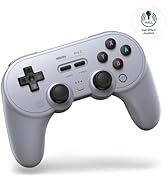
8Bitdo Ultimate C Wired Controller for Windows PC, Android, Steam Deck & Raspberry Pi (Lilac Purple)
Product ID: 527533416
⚡1.8m wired connection
🎮Multi-platform compatibility
🔄Upgradeable firmware
🎮 Wired for Victory: Ultimate Control, Zero Lag, All the Thrills!
The 8Bitdo Ultimate C Wired Controller in Lilac Purple delivers premium gaming performance across Windows, Android, Steam Deck, and Raspberry Pi. Featuring a reliable 1.8m wired connection, analog triggers, turbo mode, rumble vibration, and an ergonomic anti-slip design, it’s built for serious gamers who demand precision and comfort. Upgradeable firmware keeps your controller future-ready, making it a top-tier choice for professional and casual players alike.







| ASIN | B0C2TXM992 |
| Additional Features | Ergonomic, Rumble, Wireless |
| Best Sellers Rank | #1,018 in Video Games ( See Top 100 in Video Games ) #253 in PC Gamepads & Standard Controllers |
| Brand Name | 8Bitdo |
| Button Quantity | 16 |
| Color | Lilac Purple |
| Compatible Devices | Windows |
| Compatible Video Game Console Models | Valve Steam Deck |
| Connectivity Technology | USB |
| Controller Type | Gamepad |
| Customer Reviews | 4.3 4.3 out of 5 stars (1,332) |
| Hardware Platform | PC |
| Item Weight | 0.3 Kilograms |
| Manufacturer | 8BitDo |
| Manufacturer Part Number | 82CB |
| Model Name | 6922621503668 |
| Model Number | 82CB |
| Package Quantity | 1 |
| Power Source | Corded Electric |
A**N
Wired Budget King
This is my first 8bitdo product purchase. Although I’ve known about the company for awhile and how they’ve developed into a reputable company for third party accessories and peripherals. This wired controller is an amazing value. I got this for my brother as his old wired 360 controller finally kicked the bucket after nearly a decade or so of use (cable was falling apart and noticeable drift developed in the left stick). This 8bitdo pad is well built and feels like sturdy/quality plastics have been used in the construction. The sticks and buttons feel good and responsive, plus it has enough weight to it where it feels good in hand. Plus it basically mimics the Xbox pad layout which is nice too. A tad disappointed in the limited color options, but the lilac at least looks nice in person. Also it’s plug and play, my younger brother has a PC with a Ryzen processor and Windows 10 Pro OS, and it worked without needing to install external software or drivers which is cool. Side note for some reason it has keyboard macros attached to the buttons when steam input is enabled so I’d turn that off to avoid some technical headaches. Overall great value, I might pick one up myself one day as a wired option since I already have a Wireless Xbox One pad that’s still going strong. P.S. I wouldn’t use this in a living room set up since the cable is only 6ft long, but in a desktop setting where you’re close to the monitor this is perfect.
E**O
Well-built, feature-packed gamepad which also works flawlessly in Linux
Feel: The game pad feels very solid in its body, and all of the buttons feel sturdy but light weight. All of the buttons and triggers have great tactile feedback. All the buttons have nice clicks, including the D-pad. Features: This game pad has rumble which does a nice job providing different "textures" for different actions in games. You can switch it between X and D input modes by holding down the X or B buttons while plugging it into USB. This version of the controller allows you to remap all of the buttons in hardware, using the controller itself, if you wish to do so. It also has a turbo feature for those who want that. The "hall effect" joysticks have zero dead zones, I couldn't push the stick even the tiniest distance without seeing the movement register on-screen. However, the "hall effect" triggers do have small dead zones when starting to pull them back, but that's actually an improvement over other 8bitdo controllers. When they're too sensitive, and start operating upon the slightest movement, you often accidentally press them while just resting your fingers on the triggers, so I'm glad they fixed this problem with the Ultimate 2C. The game pad uses a USB-C port instead of the hard-wired Ultimate C controller, allowing you to change out the cable at any point in case your cable gets damaged. It comes with a C-to-A cable, so you could also replace it with a C-to-C cable if you wanted to, which you can't do with the Ultimate C. OS Compatibility: In Linux, unlike the Ultimate C controller which had a few buttons that needed to be remapped no matter if in X or D modes, at least in the games I tried, this one had all the buttons mapped perfectly out-of-the-box while in the default X mode. The rumble feature and everything else also all work flawlessly in games out-of-the-box, so I would guess if you have some other OS that it should work equally as well there too. Conclusion: This Ultimate 2C controller is a great update to the Ultimate C with little enhancements all over that make it even more awesome. Without factoring in the price, this is an excellent controller which I'd rank among the best out there, even better than most of them for me because most of them have no wired and battery-less options like this does. But after factoring in the price as well, this controller beats everything else easily, so I absolutely have no choice but to give it 5/5 stars. The only way to make it better is additional color options, but I do like the ones they have so far. 8bitdo has done an excellent job with this game pad!
K**Y
Cheap isn't always cheap
The saying "You get what you pay for" isn't always true. I love this! I had a friend who kept telling me, it's not going to be good, you're gonna need something better. True, I'm sure I will. But on my price budget and from controllers I've had in the past. I think this 1 is nicer tbh. So I'm happy with it. Sometimes you can find a gem for cheap. So happy I found this. And it's so pretty! I do wish they had a pink 1 to match my mouse, but again, it's so pretty and the fact that it works great. I really can't complain.
P**D
Great wired controller for a great price!
I have enough wireless stuff needing charged as it is. Decided to get a wired controller, but didn't want to spend an arm and a leg for over hyped big name brand (looking at you Xbox) controller. This has been an awesome experience using the 8bit brand. It's on par with the big brands. I love the look, color, the hand feel, the response, rumble, cable length---all of it. 8bit is doing everything right when it comes to controllers. I'm even contemplating buying some of their more vintage remake models just for the heck of it.
A**R
Connection problems are difficult to resolve, documentation is poor.
At this point my star rating is _only_ for the install experience. I am mostly leaving this review to help others who might experience the same problem. I wasted _hours_ trying to get this to work with my SER5 Max (Ryzen-based) Windows 11 machine. I finally got it working a response from support when I emailed them directly as a final resort (I was way past the return window, and if I hadn't been, I'd probably just have sent it back). The TL;DR: if the wired 8bitdo controller is not recognized by your Windows install (you get an "Error 43: Device Not Recognized" error in Device Manager when connecting it), try plugging in a USB hub (even unpowered is fine!), and then plug the controller into the hub. In my case, using a small usb-c hub allowed it to be recognized. I believe the instructions everywhere say "try using a powered hub" or the like (or maybe I simply assumed that it had to be powered, because I couldn't imagine how an unpowered hub changes things -- at this point I'm still not sure, but I imagine it is because something is "wrong" or "weird" with the drivers for my "actual" onboard hub -- or the controller -- and going through a "generic" hub allows the controller to be recognized (or trick? windows 11 into thinking it is a legit xbox controller?). I wish this tip had been more prominently displayed, because I spent a lot of time first plugging and unplugging the controller in holding down various buttons, I also spent a lot of time trying to upgrade the firmware using my SER5 Max (which won't work at all if it's not recognized), specifically because the firmware release notes mention a fix for Windows recognition. I _did_ update the firmware all the way (which might have been necessary) but I was unable to do it from the SER5 Max, I had to do it on another machine that recognized the controller natively. I also spent time trying the "try this if your USB doesn't work" steps that include changing power settings all over the place. Anyways, it was pretty annoying and frustrating, and making it clearer that a quick fix is trying ANY usb hub (e.g. saying something like "Try a USB hub -- it can even be unpowered! -- and see if the controller can connect", and then including an explanation of WHY that might work) probably would have saved me all that time. In the end I probably spent more of my time on it than the controller was worth -- I would have come out ahead if I immediately just threw the controller in the trash (at the same time how can one put a price on the hard-won USB wisdom I've now acquired?) anyways, for my other machine I've bought Xbox One controllers which are wireless and connect natively via bluetooth with no problems whatsoever. I'd probably recommend this route for most people, it's not much more money when they're on sale and for my casual usage the experience is 100% better.
G**!
Can't believe it's $20
I'll update this is if I have issues. Fits the hand well in traditional and underhand grip, making it possible to comfortably use the dpad as your primary directional control should you so choose I've been playing Gran Turismo 2 in an emulator on my phone going through a usb-a to c adapter and haven't detected any input latency, so you should be fine on that no matter your application and should be suited for FPS games. Connected straight away with no issues and performs well. Triggers have medium strength springs that are linear, there are better triggers out there but they aren't attached to a $20 controller. The textured grip works/feels very good in the hand but doesn't feel like it would become bothersome. The sticks feel akin to Xbox 360 sticks, no complaints but this is a $20 controller so my #1 concern is how long it will take before I begin to experience stick drift. I'll update this if that begins to occur. I would say this controller feels like it should cost at least $35. I'm very happy with it so far $1 bill included for scale, and I do have medium-large hands. The only gripe I have is that 8bitdo are selling a USB controller that's called the "Ultimate C", the name could be a little confusing as it would be easy to mistake the name and believe the controller has a USB-C connector. It does not, it has a standard USB-A termination.
M**D
Needed usb-a 2.0 adapter to work on older laptop. Random Disconnects.
8bitdo's Ultimate C Wired Controller feels well made. The case, buttons, triggers, joysticks and dpad feel higher quality than controllers at the $20 price point. (The buttons feel better to me than the Logitech F310.) The only issue with the controller is its compatability. I needed to use a Female to Male USB-a 2.0 for a Windows 10 laptop to even recognize it. Even then, the controller is only recognized half the time. Holding the X while pluggin in dosen't always work. It Just blinks. The controller has compatibility issues with Amazon Fire 10 tablet as well. Holding B button dosen't always work. The wired 8bitdo ultimate c controller also randomly stops working mid game. Firmware update didn't correct the issues with said devices . The official 8bitdo ultimate software dosen't even recognize this controller at times. Controller is not recommended for older hardware.
A**D
Really Good For The Price!
8bitdo releases decent products. This controller is no exception. I have average sized hands and the controller feels fairly good to me, sans a couple issues that I'll get into momentarily. Not only is the layout similar to an Xbox One controller, the ergonomics are somewhat similar too. Unfortunately, that's where I deduct half a star and begin speaking about the cons for this controller. Let me explain: Just like the Xbox One controller, I find the bumpers are a bit awkward to engage when holding this 8bitdo controller in the natural position of resting your index fingers on the triggers. I loved the ergonomics of the Xbox 360 controller because touching the bumpers was effortless from the natural position. For some reason when Xbox One controllers came out they changed that, and this controller mimics that awkward feeling. I almost have to pivot my whole grip in order to reach them. Maybe that's because my fingers aren't as flexible as the should be? I'm not sure. All I know is I find it awkward and a bit uncomfortable. The second issue I have is that the dpad is a bit too stiff. I won't deduct any stars for that because it may loosen over time, but I'm used to the dpad on the SN30 Pro (original, not plus) and that dpad feels much nicer to use. Although the dpad on this controller looks similar, the actuation of the membrane takes quite a bit more force making it uncomfortable to use for long periods with 2D games, for example. And while I'm talking about 2D games, the awkward bumpers come into the conversion once again. This is because when playing games such as Super Metroid, for example, it was normal (at least for me) to rest your index fingers on the L R buttons of the SNES giving quick access to those button functions. Doing that with this controller while simultaneously trying to use the dpad is just plain uncomfortable because of the bumper position. Therefore, I don't use this controller for emulation, but thought I'd point it out for others who might consider it. I've deducted another half of a star for the obnoxious light that encircles the menu button. It's far too bright and I find it very distracting, especially when the turbo function is enabled since that light blinks to indicate turbo is on. I almost deducted a full star for this, but since you can only rate with whole stars on Amazon I decided to keep my review at 4 stars vs 3. I'm currently looking into different methods for diffusing the light. Another issue that people might run into is the short cord length. Make sure that you won't need something longer before purchasing. This works well with my laptop, since it sits right in front of me, meaning the USB ports are very accessible. Other than those nit-pics, it's a well performing controller. As for things that I really like, especially for the price point, here are some pros: The inclusion of a turbo function is much appreciated. As I age I find it harder and harder to "button mash" and I often avoid games, such as vertical or horizontal shooters, which require continually pressing a button to rapidly fire a weapon. Turbo allows me to enjoy those games without developing carpel tunnel. The analog triggers are very sensitive and have a nice linear actuation and the software response is appropriate. For example, some controllers will register no input for the first 10-20% of actuation on the trigger, and then have a smaller threshold to detect actuation level making it harder to control the threshold. In other words, if you want the trigger to register at 50% actuation in the software, it's hard to find and maintain that physical actuation position with some controllers. This is important for racing games, for instance, where controlling the throttle is important. But, I'm happy to report that this isn't an issue for this controller. Detection of the trigger actuation starts immediately and, as I said above, has a nice linear representation all the way to 100% when bottoming the triggers. Therefore, when holding the triggers at 50% physical actuation, you know that the software representation of that will be close to that. I tested this using Windows' built in controller properties tool which visually represents button presses. Some users complained that their controller wasn't working or detected, but I'm happy to report that I had no such issues. I'm using the latest build (at the time of this writing, obviously) of Windows 10. I simply plugged the controller into my Lenovo Legion 5 laptop and it worked without a hitch. Steam recognizes it as an Xbox controller and lets me know which games are compatible with it. I'll update this review if any of my thoughts change over time. But for the time being, I'd recommend this controller as a primary or a backup option. Really good value for the price and performance.
H**E
Lilac Purple & Gaming Perfection
This controller is an absolute gem! The lilac purple finish is gorgeous and unique — it adds a pop of color to my setup without feeling childish. The design is sleek, lightweight, and very comfortable to hold, even during long gaming sessions. The buttons and joysticks feel precise and responsive, with no input lag. The triggers have a nice resistance, and the D-pad is excellent for retro-style games. It really feels like a high-quality controller at a very reasonable price point. I’ve tested it across devices — Windows PC, Steam Deck, and Android — and it works seamlessly. Plug-and-play is effortless, and the compatibility makes it versatile enough to be my go-to for nearly everything. The wired connection is rock-solid with no dropouts, and the cable length is generous enough for couch gaming. Plus, it’s great not having to worry about batteries or charging. Overall, the 8Bitdo Ultimate C Wired Controller is stylish, reliable, and incredibly comfortable. Whether you’re gaming on PC, handheld, or emulators, this controller delivers smooth performance and a premium feel. Highly recommended!
W**L
Only for USB 3
Does not work on every USB port for the rest it is good
K**E
Conforto e Desempenho de Alta Qualidade!
Este controle superou minhas expectativas em todos os aspectos! A ergonomia é excelente: ele se encaixa confortavelmente nas mãos, mesmo em sessões de jogo prolongadas, sem causar cansaço. A precisão dos analógicos é fantástica, com movimentos suaves e bem calibrados, o que faz muita diferença em jogos que exigem controle fino. Os botões têm um tempo de resposta imediato e um toque muito agradável, transmitindo durabilidade e qualidade. Outro ponto positivo é a compatibilidade com o PC; foi muito fácil de configurar, e ele foi reconhecido pelo sistema sem problemas. A vibração também é bem ajustada, adicionando uma camada extra de imersão aos jogos.
T**Q
Also works with Windows 7
I wanted some good but not too expensive controllers for some retro gaming pc's. I couldn't find if they also would work with Windows 7 so I just tried. And yes they do work, they are recognised as Xbox 360 controllers. They work fine and feel ok but are not the same quality and feel als a Xbox 360 controller. The thumbsticks are a bit too smooth and give less grip, the pedals at the back for gas and brake don't have any feeling at all. The last thing they can improve is to make the handles a little bit bigger so it is comfortable for people with big hands. But for the price I paid this is a great deal and recommendable for everyone who wants something not too expensive.
C**N
Manette de qualité, mais non compatible avec Recalbox.
On a une sensation de très bonne qualité. Malheureusement elle n'est pas compatible avec Recalbox.
Trustpilot
3 days ago
2 weeks ago