


๐ Elevate your workspace with speed, style, and seamless storage!
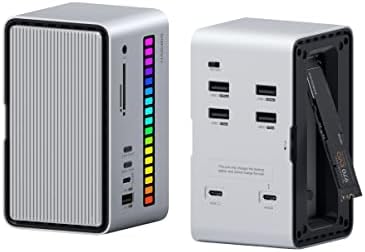
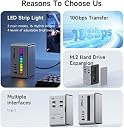
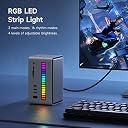
The Hagibis USB C Docking Station U100 Lite combines a high-speed 10Gbps USB 3.2 Gen 2 hub with an M.2 NVMe/SATA SSD enclosure and customizable RGB LED strip lighting. Designed for professionals using MacBook Pro, iPad Pro, and other USB-C/Thunderbolt devices, it offers versatile connectivity, rapid data transfer, and a unique ambient lighting experience that syncs with your environment or disk activity.




| ASIN | B0BZR4MF45 |
| Best Sellers Rank | #91,807 in Computers & Accessories ( See Top 100 in Computers & Accessories ) #185 in Docking Stations |
| Box Contents | M.2 NVMe SATA SSD Enclosure |
| Brand | Hagibis |
| Brand Name | Hagibis |
| Colour | Grey |
| Compatible Devices | MacBook Pro |
| Customer Reviews | 4.0 out of 5 stars 28 Reviews |
| Hardware Interface | USB |
| Item Dimensions L x W x H | 12L x 7W x 6.8H Centimeters |
| Item Weight Unit of Measure | 20 Ounces |
| Manufacturer | Shanghai Xinxie Industrial Co., Ltd |
| Manufacturer Part Number | U100 Lite |
| Model Number | U100 Lite |
| Number of Items | 1 |
| Number of Packs | 1 |
| Number of Ports | 10 |
| Product Dimensions | 12L x 7W x 6.8H Centimeters |
| Total USB Ports | 3 |
| Unit Count | 1.00 Count |
| Warranty Description | 1 Year |
| Wattage | 100 Watts |
D**R
Bringing it all within reach
Back in 'the old days' there were many types of input and output ports for connecting devices to a microomputer. There were parallel ports for connecting to dot-matrix printers, and serial ports for connecing to 'letter quality' printers. Keyboards required a diffeent port type. The serial port could also be used for mice (if you had an application that could use one), bar code scanners, and of ourse that absolutely requied device - a dial-up modem for connecting to bulletin board systems or other computers. This was all pre-internet. There were SCSI (Small Computer System Interface) which let you attach a hard disk, or a ZIP drive, or a really good flat-bed scanner. This was all pre-Internet. If fyou had multiple devices which needed the same port, you might need an "A/B" switch to manually select the device. There were cables all over the place. And more often than not you had to go into the equivalent of SETTINGS to make adjustments because the needs of the devices were different. Windows 95 attempted to change some of that - introducing "Plug and Play". It helped. But it also got renamed "Plug and Pray". Somewhere between Windows 95 and WIndows 98 the USB (Universal Serial Bus) techmology was introduced. It changed everything. If you were lucky you had perhaps 4 ports on a desktop, and perhaps 2 on a notebook. But the need for more, especially when a notebook might be used at an office with more needs, butt taken home for simpler use it became apparent that the office site might need a 'docking station'. These were often designed for specific models of notebooks. Just snap it onto the back of the notebook and you had your connections at hand. I have so many things attached to my desktop computer that I had various nubs hanging off the back - out of convenient reach. This docking statipon by HAGiBiS addresses that problem. It is implemented at USB 3 level which can send or recieve data at considerbly faster rates than USB 1.1 and 2, yet is backwards comapatible if needed. It has bullt-in ports fo the mix that I need and doesn't require so many cables running to the back of themachine. Although it may be aragetted towrds the Mac world (whose machines are deinitely short on ports) it will work with Windows machines just nicely, thank you. By the way - the two cables provided are 'armored' braided. One is USB A to USB C, the other is USB-C to USB-C. The dock is clearly marked and points out that one port is used for charging the docking station, but can not charge the host. And last but not least, who doesn't enjoy a little light show indicating that something is happening. One doesn't really expect this of that something which is essentially 'infrasctructure', but HAGiSiS has added a little 'flash'. Thank you.
O**R
Combined external storage and USB hub
Works well as nvme storage, SD transfer and USB hub. Has an animated led display and microphone, though I am not sure what use this feature has.
S**N
Disappointed.
Usb ports work fine. Lights are a nice touch. M.2 port worked twice then stopped. Keep looking if you're planning on using the m.2.
J**N
This is an odd little device. Surprisingly cool.
Okay so let me describe this to you. To me it's much more like a USB hub that also has a memory card reader and also for some reason has memory card storage slots along with an NVMe reader, and on top of it all it has a really cool RGB disco light thing going on. It's like they took a couple different inventions and kind of meshed them all together which is actually kind of convenient. Honestly I really did like the RGB lights I thought they were pretty cool... I also really liked how the side panels come off easily with pull, and they pop back on with magnetic closures. It does take two wires to plug it into your computer but luckily those wires were provided. It is funny how two of the ports are USB 3.1 and two of the ports are USB 2.0 but then on the other side that port is USB 3.0. there is also a USB-C port and then the buttons that control the lighting. There is no obvious way to clone data. There seems to be a headphone jack on it but I don't have any devices that need a headphone jack I was wondering what that's even for, I'm wondering if we can play mp3s off of a memory card or something.
N**N
Horrible documentation/drive enclosure doesnโt work
Documentation is unreadable and unhelpful at its best. Nice selection of input and output ports and pretty lights.
Trustpilot
2 weeks ago
1 week ago