Buy anything from 5,000+ international stores. One checkout price. No surprise fees. Join 2M+ shoppers on Desertcart.
Desertcart purchases this item on your behalf and handles shipping, customs, and support to UK.
🚀 Elevate your workspace: Power, speed, and clarity in one sleek dock!
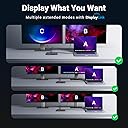
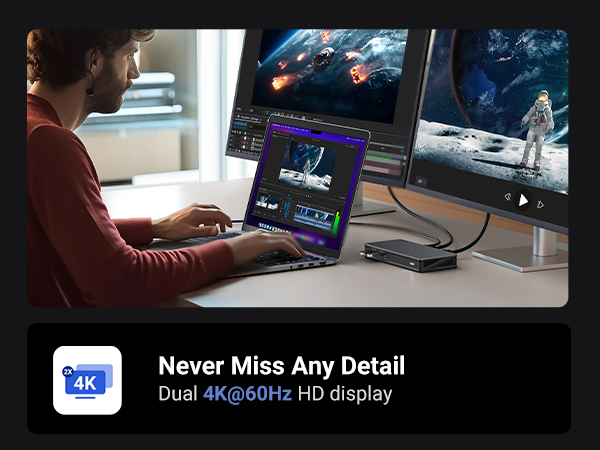
The UGREEN USB C Docking Station Revodok Pro 209 is a premium 9-in-1 hub designed for professionals seeking ultimate productivity. It supports dual 4K@60Hz monitors via 2 DisplayPort and 2 HDMI ports, offers ultra-fast 10Gbps USB-C and USB-A data transfer, and delivers 100W Power Delivery charging. Compatible with MacBook and Windows laptops, it also includes Gigabit Ethernet for stable networking. Its compact design and extensive connectivity make it an essential tool for multitasking managers and creatives alike.


| ASIN | B0BLNCNCMZ |
| Best Sellers Rank | #14,078 in Electronics ( See Top 100 in Electronics ) #202 in Laptop Docking Stations |
| Brand | UGREEN |
| Built-In Media | 1x 9 in 1 USB C Docking Station, 1x Installation Device, 1x Manual, 1x USB-C to USB-C Cable |
| Color | Black |
| Compatible Devices | MacBook Pro, Macbook Air, Dell XPS, Surface Pro, and more |
| Customer Reviews | 4.0 out of 5 stars 888 Reviews |
| Global Trade Identification Number | 06957303899128 |
| Hardware Interface | USB 3.2 Gen 2 |
| Item Dimensions L x W x H | 6"L x 3"W x 0.9"H |
| Item Weight | 510 Grams |
| Manufacturer | Ugreen Group Limited |
| Mfr Part Number | 90912 |
| Model Number | 90912 |
| Number of Ports | 9 |
| Product Dimensions | 6"L x 3"W x 0.9"H |
| Smart Home Compatibility | Not Smart Home Compatible |
| Total Number of HDMI Ports | 2 |
| Total USB Ports | 4 |
| Total Usb Ports | 4 |
| Warranty Description | 24 months |
| Wattage | 100 watts |
U**D
Easy to setup, works as advertised
I'm not using this device exactly as intended, I have a somewhat different scenario so I thought I would share my success in case it helps anyone. I have an LG 5K monitor and an ultrawide, and a Caldigit Thunderbolt dock. The 5K has to be connected via Thunderbolt, there are no other options for connecting this monitor. For the M1 Air, you have two Thunderbolt/USB-C ports so you can connect the 5K directly in one port, and then this device (UGREEN's DisplayLink adapter) can go in the second port and then you can connect the monitor to that, and it would work fine (I tested this). However as you can see from my images above I wanted one cable to connect and disconnect my peripherals. So my setup has the thunderbolt wire connecting to the laptop providing power, and data. That wire goes to my Thunderbolt Dock. From there, the passthrough Thunderbolt goes to the LG 5K (on the right). The USB-C port on the Thunderbolt Dock goes to this UGREEN DisplayLink adapter. Then my second monitor connects to this DisplayLink adapter. I've connected it with both HDMI and DisplayPort and both work without issue. However I'm using DisplayPort just because I feel it provides the best picture. Steps: 1. Plug in Adapter 2. Click "OK" when MacOS asks if you are fine with using this accessory 3. Find the folder in Finder or on your desktop that has the driver (see 3rd image) 4. Install driver 5. Second display should work (without restarting it). Huge disadvantage as pointed out by another user: Playing movies and TV shows from protected sources will NOT work. For example, AppleTV app, Netflix on a browser, Vudu on a browser, they will all not show any visuals anymore. I imagine this is because all that software is design to prevent people from ripping the media and this DisplayLink software probably gets flagged by its protection scheme, but I'm not sure. It didn't matter if I moved the video over to my 5K monitor which is connected via Thunderbolt, because the DisplayLink is turned on, the visuals don't work. Now what's nice is, if I do want to watch a movie, I can simply hit the power button on this UGREEN DisplayLink adapter and it turns off the device, and then the movies work. So if you watch a lot of movies and TV from legit sources, then this will not help unless you're willing to turn it off and just have one monitor work, which is possible in my setup because the first monitor doesn't connect through this device. It may not work for you.
A**E
Great form factor
This is not a PNP device. It requires a driver for the Synaptics chipset. If you're on enterprise IT YMMV. Love the form factor. Lightweight, small and portable. Really like the USBC pass thru power arrangement. Works 100% with my company M2 Max and my personal Win 11 laptops. Tested rock solid for Powerpoint presentation situations for feeding dual outputs. Probably going to buy a few more for work!
B**H
Revodok Pro 209 Does Not Work With MacBook Air
UGREEN Revodok Pro 209 USB C Docking Station does not work with my MacBook Air. I downloaded the DisplayLink software, checked all cables, rebooted the computer and the docking station. The docking station connects properly with the computer as it indicates charging taking place on the Mac, but there is no keyboard, mouse, or monitor activity detected on my Mac. I appreciate there could be some technical issue that customer support could help me resolve, but they have been totally unresponsive to my requests for help. I WOULD NOT RECOMMEND THIS PRODUCT for a Mac. I'm returning the product.
M**.
Works with the base m1-3 chips and works great.
I have a macbook pro m2 chip. Unfortunately the base m2 chip only supports one monitor natively. I've seen a bunch of reviews on displaylink saying its buggy so I was a little worried because one of my monitors is set up vertically so I wasn't sure if it was going to work. Setting up the dock was super easy, when you first connect it to your computer a drive pops up named 'driver' and it includes the link to the download for displaylink. Once you download it, it launches and works without further setup. Since I have a vertical monitor I had to change the rotation in the settings, I first tried the macbook display settings but I couldn't get it to work. I turned to the displaylink manager but I couldn't get the application to open, it was just running in the background. So if you want to access the UI its at the top right hand side you'll see the little icon, I didn't know this at first. My experience so far using it for a few days it's been working fantastic I'm not experiencing much glitchyness or lag or delay at all and it's been working well. As for the dock itself the build quality is good and it performs well, however as according to other reviews as well it runs pretty hot which does hinder performance. What I did is I got a little desk fan and I have it pointed down at the dock and it works perfectly the dock doesn't get hot at all and everything is at optimal performance. The only thing is I wish it had more usb ports there's only 2 at the front for me to plug in my mouse and webcam, I had to connect my keyboard with bluetooth and I have the fan plugged into my pc so a few more ports would have been nice. I'm probably going to get a usb c hub to plug into the usb c port to get a few more usb ports. This saved me a lot of money because the only other way you can use 2 monitors with a macbook natively is by getting the newer pro or max chips and I don't want to upgrade to the m4 yet since my m2 is running strong.
D**C
Solid Device for 2019 MacBook Pro to 4k@60hz
Struggled like crazy to get my mac to output full 4k@60hz through this, but buried in the release notes of DisplayLink software was the trick for getting my MacBook Pro 2019 running Ventura MacOS 13.2. Had to hold Option key while selecting the Display resolution to get a full list of possibilities. There I could select full 4k and it worked great at 60hz. "The list of available resolutions and the default resolution for 4K displays depends on the type of connection (HDMI or DisplayPort). To see a more complete list of resolutions follow these steps: - Open the Displays preference in System Preferences - Go to the preferences panel for the DisplayLink screen - While keeping the option (alt) key pressed, select the "Scaled" option for the list of resolutions."
A**J
Fails on high-GPU usage with macOS
If all you need is a basic dock to run two displays for simple office work, it'll work fine. However, due to how DisplayLink works, if your GPU gets bogged down, as it will during gameplay, heavy rendering, etc, this dock will not work whatsoever, and will simply cut your displays off and put the Mac to sleep. ONLY get this if your only use case for your Mac is something that will barely stress the GPU.
M**.
You have to buy a power adapter separately.
My work uses these for connecting multiple monitors in the office, so I purchased it for home. I purchased the 100 watt Anker USB-C power adapter (no power adapter included) because I am just an Anker fan, but this setup is amazing. My monitors have the Digital Video connectors and the 4k video is amazing through this dock. I would absolutely recommend this product.
A**R
Dual screen for M1 macbook pro 2020
Work perfect on dual screen for 2020 macbook pro M1 just follow the instructions to download the driver required and you will be fine.
I**O
Macbookair 2022 M2 トリプルモニターにて(自身の設定ミスでしばらく作動せず)
システム設定の画面収録の許可を聞かれた時にOFFにしてしまったことで 作動しておりませんでした 手順などの説明の補足注意事項、正確な名称、そしてこのサイトにドライバーリンクなど貼ってほしいと思います 以下遠回りしましたが現在順調に作動中です ドライバーDisplayLink Manager(このサイトや説明書では名称が違うので分かりずらいし探せない) を検索で時間がかかりながらインストールとりあえず再起動 その後 機器を繋ぐとデスクトップにドライバーのリンクが現れた そちらからドライバーを入れ直そうとしても(これより新しいものがインストールされているからと)入らず 気持ち悪さが残るが 気を取り直し何も起こらない状況で設定画面など探してみる システム設定のディスプレイのタブには何も変化がなくそれでおしまい 開始から2時間経過の時点で 地面に叩き付ける快感を味わうことを選択しようと思たが システム設定の画面収録の許可の部分に気が付き 作動開始
T**H
Başarılı ürün
UGREEN markasının neredeyse tüm ürünlerini kullanmaktayım bu üründe beni yanıltmadı gayet başarılı bir ürün yazılım kullanarak monitörü extend etmesi bir sorun teşkil etmez kafanızda soru işareti kalmasın gayet stabil çalışıyor tavsiye ederim.
R**H
PERFECTO
Me ha solucionado perfectamente poner dos pantallas a mi Apple M1 y con salida de 10 g para disco duro. Botones de encendido y carga a la vez el ordenador. Material de aluminio y perfecto. Espero que dure tiempo
R**L
Very good for two high screens and lots of harddrives
It was simple to install. Works instantly. Absolutely hazzle free.
A**A
Excellent displaylink dock. Works great with M1 Macbook Pro
I have an M1 Macbook pro ( the one with the ill fated touch bar) and while I love it for most use cases, it has the annoying limitiation of only supporting one external monitor. Fortunately DisplayLink software comes to the rescue and allows me to plug in up to three monitors with a DisplayLink dock. I had bought another brand dock before and this Ugreen dock was to replace it after it burned out. I couldn't be happier and this feels like a huge upgrade. My other dock didn't support full 4K resolution on output and the ports were also not as good. This one has all multiple USB C ports and a dedicated USB C for powering my mac so I really don't lose any conectity by using this on one of my ports.
Trustpilot
1 week ago
2 months ago