Desertcart purchases this item on your behalf and handles shipping, customs, and support to UK.
🚀 Elevate your home Wi-Fi game—speed, coverage, and security all in one sleek system!
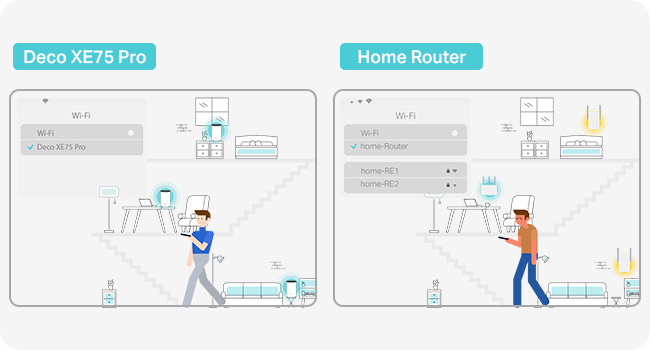
The TP-Link Deco XE75 Pro (3-pack) is a cutting-edge Wi-Fi 6E tri-band mesh system designed to cover up to 7,200 square feet with ultra-fast speeds up to 5,400 Mbps. Featuring a new 6 GHz band, AI-driven seamless roaming, and advanced HomeShield security, it supports over 200 devices simultaneously. Compatible with all ISPs and easy to set up, this system future-proofs your home network with robust performance and protection.


| ASIN | B0BF5GK7TD |
| Antenna Location | Business, Home |
| Antenna Type | Fixed |
| Best Sellers Rank | 1,326 in Computers & Accessories ( See Top 100 in Computers & Accessories ) 7 in Whole Home & Mesh Wi-Fi Systems |
| Box Contents | 1 Quick Installation Guide, 1 RJ45 Ethernet cable, 3 Power adapters, Deco XE75 Pro(3-pack) |
| Brand | TP-Link |
| Brand Name | TP-Link |
| Colour | white |
| Compatible Devices | Laptop, Personal Computer, Smart Television, Tablet |
| Compatible devices | Laptop, Personal Computer, Smart Television, Tablet |
| Connectivity Protocol | Wi-Fi |
| Connectivity Range | 7200 Square Feet |
| Connectivity Technology | Ethernet, Wi-Fi |
| Control Method | App |
| Controller Type | Switch |
| Country of Origin | China |
| Coverage | 7200 square feet |
| Customer Reviews | 4.5 out of 5 stars 3,554 Reviews |
| Data Transfer Rate | 5400 Megabits Per Second |
| Frequency | 6 GHz |
| Frequency Band Class | Tri-Band |
| Frequency band class | Tri-Band |
| Has Internet Connectivity | Yes |
| Has Security Updates | Yes |
| Is Modem Compatible | No |
| Item Dimensions L x W x H | 10.5L x 10.5W x 16.9H centimetres |
| Item Highlight | 2.5Gbps Ports, AI-Roaming WiFi Router Extender Booster, IoT WiFi, HomeShield, VPN, Gaming & 4K, Easy Setup, Alexa&Google |
| Item Weight | 2.65 Kilograms |
| LAN Port Bandwidth | 1000 Mbps |
| Manufacturer | TP-Link |
| Manufacturer Part Number | Deco XE75 Pro(3-pack) |
| Maximum Upstream Data Transfer Rate | 2402 Megabits Per Second |
| Model Name | DECO XE75 PRO |
| Model Number | Deco XE75 Pro(3-pack) |
| Model name | DECO XE75 PRO |
| Number of Antennas | 9 |
| Number of Items | 3 |
| Number of Packs | 3 |
| Number of Ports | 3 |
| Operating System | TP-Link OS |
| Other Special Features of the Product | Alexa Compatible |
| Product Warranty | 1 Year Manufacturer |
| Router Firewall Security Level | Advanced |
| Router Network Type | wireless |
| Security Protocol | WPA3 |
| Special feature | Alexa Compatible |
| Unit Count | 1.0 count |
| Wi-Fi Generation | Wi-Fi 6 |
| Wireless Compability | 802.11ax |
| Wireless communication standard | 802.11ax |
J**E
RESULT!!!! Don’t hesitate .. buy it!
I don’t usually write a review but my goodness I need to this time! I was having real trouble with WiFi coverage in my home and having moved to a “mobile dead area” I rely heavily on it! The WiFi wouldn’t reach up to 2 bedrooms, nor would it reach to the garden. I really wanted to sit outside to work a little during the summer and just have not been able to as there is no signal. Took the plunge and went for this! Set up took about 10 minutes, super easy. RESULT: went right to the back of my garden and wifi was full bars and so fast! I am thrilled! Worth every penny! Bought the 3 pair, 2 downstairs and one upstairs! The true test is when my son goes into his computer to play with his friends - that has to wait until he is home! The units are quite BIG but I really do not care!!! The app is great and lets you see who is online. I also think you can put some guard rails on it so kids cannot get online at night! Could be wrong though! BUY IT! (Candle in photo for perspective!)
S**E
Fantastic kit, when used with equipment outdoors (ring cameras etc) probably need the three pack
Replaced my BT router with these as I have fibre to the home, you take the smart hub 2 away and power off the little modem and connect one of your Deco units to it. Setup was surprisingly simple, set it to PPPoE and entered the default username and password ([email protected] and bt) and bosh it was connected. Hard wired two together via the 2.5gb ports to local switches one up and one downstairs and put one in the garage to cover the back garden and cameras that are at the edge of the property (4 bed house with detached garage). I had put the third one in other positions but the WiFi was so weak I had to experiment a bit. The garage one is connected via WiFi to the other hard wired ones. I kept my username and password the same and most of my devices connected straight away, though I had to forget and re learn on a number of devices to get the maximum speed of my connection. The app is very user friendly and works great, my connection (at time of writing) is strong throughout the house, my hard wired devices are running at 1gb (I have some TP link 2.5gb switches on order to replace my gigabit ones) and my internet connection is the same (FTTP). The WiFi in my sons room is around 400Mb which is perfectly adequate for any gaming or needs he will have. I only have one WiFi 6E compatible device my Amazon Fire Cube 4k (the new version) and this can see the 6GHz additional network (can't remember what speed it's running at). My 2nd old Fire Cube cannot see the 6GHz network, nor can our iphones 13 and 14. It seems that 6E isn't compatible with older WiFi 6 hardware, they cannot see it at all. I was expecting anything WiFi 6 to be able to use the higher speed band, but this doesn't seem to be the case. I have switched the 6GHz range to back haul and usable connection (there are only two options, one for back haul and one for combined). I have soooo many Philips hue lights inside and out and many BG smart sockets, the coverage for these looks good and the 2.4GHz WiFi that these use seems strong everywhere I go. This system is a bit pricey, but I feel that it is going to be great in the future as more and more devices support the newer band. I'm very glad that I chose the three piece kit as I wouldn't have got the coverage where I needed it with the two kit. If you want the coverage to extend to stuff outside your home deffo go for the three.
S**T
Great outdoor access point with high performance.
Superb outdoor router. Running two, one ppoe from main non deco router and another wirelessly to the first one. Getting close to 500mbps in the garden now on iPhone Air, and cameras are pretty much instant. Super simple install. Will upgrade to Deco mesh indoors soon and will look forward to while home performance like this.
B**T
One of the Best Purchases We Have Ever Made for Our Network!
TP-Link Deco X50-Outdoor/Indoor Whole Home Mesh WiFi 6 (AX3000) We purchased the Deco X50 primarily for indoor use near a window, and it has exceeded expectations. Setup was refreshingly simple. Within minutes, we had our home network running smoothly, with clear and reliable guidance from TP-Link’s app and documentation. Performance-wise, this unit delivers. The AX3000 dual-band Wi-Fi 6 helps provide blazing-fast speeds (coupled with a strong network signal), and streaming in 4K has been seamless across multiple devices. We especially appreciate that it integrates VPN coverage at the network level, so we don’t always need to configure VPNs individually on each device (though it’s still an option when needed). This feature alone adds a layer of convenience and peace of mind. The build quality and look is excellent- solid, modern, and clearly designed to last. While ours is used indoors, it’s reassuring to know that the unit is IP65-rated for dust and water resistance, so it can handle outdoor conditions if ever needed. Multiple mounting options (pole, wall, or table or shelf top) make it adaptable to different setups, and the included Power-over-Ethernet support simplifies placement by reducing cable clutter. The dual gigabit Ethernet ports are another welcome addition for those who prefer wired stability. At around €118, it feels like a fair price given the performance, reliability, and features. It integrates seamlessly with other Deco units for a flexible mesh network, and TP-Link’s HomeShield provides added network protection and parental controls. If the price were slightly lower, I'd probably bump it up to being a 5-star product. In short, this is a high-quality, reliable, and well-thought-out mesh WiFi solution. We’re very happy with it and would absolutely purchase again if we needed to expand or replace our setup.
D**Y
An extra 200mbps and now need less deco units to cover the house
Great bit of kit. Solid connection and was able to remove two deco units around the house and just keep the be68 and an x60. Easy to set up and signal is great all over the house. You do need a mobile phone to setup the unit but expect that's not an issue if purchasing something like this Highly recommended for easy setup. Fast speed and great coverage. I gained an extra 200mbps from my gigabit broadband
R**R
Just brilliant
NOTE:- I do NOT work for TP Link, and have NOT received any promotional incentives. This is my honest personal review from a tech savvy retired telecom engineer, who has a lot of TP Link kit because for me it strikes a sweet spot between price, capability and ease of use. I have gear from other providers in a house where we game, stream and have a high reliability on our braodband life.... Anyway on with the story. I had a 2 unit Deco M9 (Wifi 5) mesh for around 7 years with pretty good reliability - but it struggled reaching smart tech at the far end of my garden. Last year I upgraded my router to a TP Link BE9300 for the wifi7 and 2.5g wired connection (it was on a cheap special offer at a UK retailer who used to sell everything from a printed catalogue :-) - (Amazon normally price match) ..... It is solid kit and has run faultlessly for 6 months. As the M9's were 7 years old and (particularly in bad weather) my garden tech struggled I decided to take the plunge.. After deliberating about a wifi 7 mesh, decided they are too expensive (and my issue wasn't speed it was range /coverage), so the 3 unit XE75Pro hit the sweet spot. When it was on a new year special, and with myChristmas Amazon vouchers in hand, I dived in. Yes setup was via the Android phone app (isn't everything theses days ?). IT die hards will moan because they want to do everything in Windows and a big screen dashboard, but I have no issues with using my phone. It is handy to be in a cupboard with your phone torch on whilst placing the mesh units and checking on the app. I run dual networks (The one from my main router which is placed next to my incoming broadband line and ONT - Brsk 500mbps fibre). My existing Dec0 M9''s are in access point mode with a wired backhaul to the main router which does give more range and flexibility.... This allows for easy checks for connection issues (Is it the mesh or something else that is playing up scenario) ... yes more complex, but caters for my telecom engineer way of working. My worry was that removing the M9's and inserting these XE75 Pro units would be troublesome .... It wasn't. The Deco app worked a treat. The 3 XE75 Pros dropped in just fine. I shuffled round the main unit position on the app to the new 3 point setup. The M9's were removed and BOOM - a transformation in coverage and smoothness. A week in and not one dropout - even when we have heavy rain, wind and typical northern UK winter weather. I have no regrets whatsoever going for the XE75 Pros over eye wateringly expensive tri band wifi7. The wifi 6e on the XE75 is a full tri-band implementation (unlike the cheaper dual wifi7 kit)... and the XE75 Pro does have a 2.5gb wired connection for backhaul. Highly recommended
A**R
18 Months On: Rock-Solid WiFi to Outdoor Gate Intercom with Zero Dropouts
After 18 months of daily use, I can confidently say this has been one of the most reliable and worthwhile networking upgrades I’ve made. I bought the TP-Link Deco X50 (Outdoor/Indoor) specifically to solve a tricky problem: getting stable Wi-Fi to a gate intercom located roughly 20 metres from the house. Running cables wasn’t practical, and previous Wi-Fi solutions were inconsistent at best. This unit completely solved it. Installation was straightforward. I mounted the outdoor unit in a un-sheltered position and connected it via Ethernet to a TP-Link PoE switch, which made powering and networking it incredibly clean—just a single cable doing everything. The PoE setup has been rock solid with zero dropouts. Performance-wise, it’s been excellent. The signal strength at the gate is now consistently strong, and the intercom connects instantly every time. Video and audio streams are stable with no lag or buffering, which was a major issue before. Even in bad weather—heavy rain, frost, and summer heat—the unit hasn’t skipped a beat. What’s impressed me most is the long-term reliability. Over the full 18 months: * No random disconnects * No need for reboots * Firmware updates have been smooth and uneventful * Seamless integration with the rest of my Deco mesh network Build quality feels premium and properly designed for outdoor use. It still looks and performs like new despite being exposed to the elements. If you’re trying to extend Wi-Fi to an outbuilding, gate, or any awkward outdoor location, especially with PoE available, I wouldn’t hesitate to recommend this. It’s been a “fit and forget” solution for me. 5 stars without question.
B**N
Great "wife-approved" wifi-system, but lacks even basic features
The Deco devices look great and fit into a home very well. They aren't large and you can turn the powerful LED off on a schedule, so even if you need to place a unit in a bedroom, it won't annoy anyone sleeping there. Connectivity between the mesh units is great and it provides good coverage and high speed between units and devices. As a mesh system for a complete novice, who just wants something that works, I can see the appeal of this system. As Access Points (i.e. a way for devices to use WiFi to get onto your local network) they are great. But the router, firewall, DHCP and DNS functionality of this system is beyond appalling. If you have no idea what I'm talking about, you might not be bothered by this and then, by all accounts, buy this system, which works very well and looks good in the home. If you do know at least a little of what I mean with these terms, the Decos will frustrate you to no end. Port forwarding sucks (you can, for example, see which ports uPnP has opened), the DHCP & DNS forwarder is atrocious (for example, local devices can only be accessed by IP, not their name, as the DHCP server doesn't names in the DNS forwarder). The Deco router/firewall is absolute hot garbage and TP-Link's forums for the Deco is littered with "we will forward to the product team", yet nothing seems to be added, ever. You can, which is where I ended up, switch the Deco system into Access Point mode, and then run a router/firewall yourself, but them you're pointing towards OPNSense/pfSense/Tomato/DD-Wrt options and they definitely are a step up in terms of knowledge. To be fair to TP-Link, if you switch them into AP mode, they work very, very well. I've never had their mesh fail and their forwarding of traffic into my OPNsense router fail. In summary, buy only if you have no requirements for your network other than "I want to connect to the internet" or you really know what you're doing with networks.
C**E
Great product!
Great extender, essential to who has a multi-storey house, extends the signal very well.
A**R
Można brać :)
Łączony przewodowo I bezprzewodowo. Daje radę!
G**Y
X75pro
Déçu! J'ai reçu mon colis ce jour et bingo, les prises secteurs sont en version américaine et pas possible à utiliser depuis la Belgique... Retour du colis chez Amazon et je l'ai commandé par un autre fournisseur.
J**H
Parfait
Facile à configurer
T**L
So easy if you are upgrading from a lesser Deco model
Well that was easy. I already had an earlier model Deco Mesh. When this arrived, in the deco app you can just select Replace Main Unit and place the new unit next to the old one then Bam it says "new main unit activated, unplug old unit" Thats it, all decives continue to connect with no reporgramming and now my speed in the further corners of my house have doubled.
Trustpilot
2 days ago
4 days ago