🖱️ Elevate your workflow with the MX Master 3S — where precision meets peace.
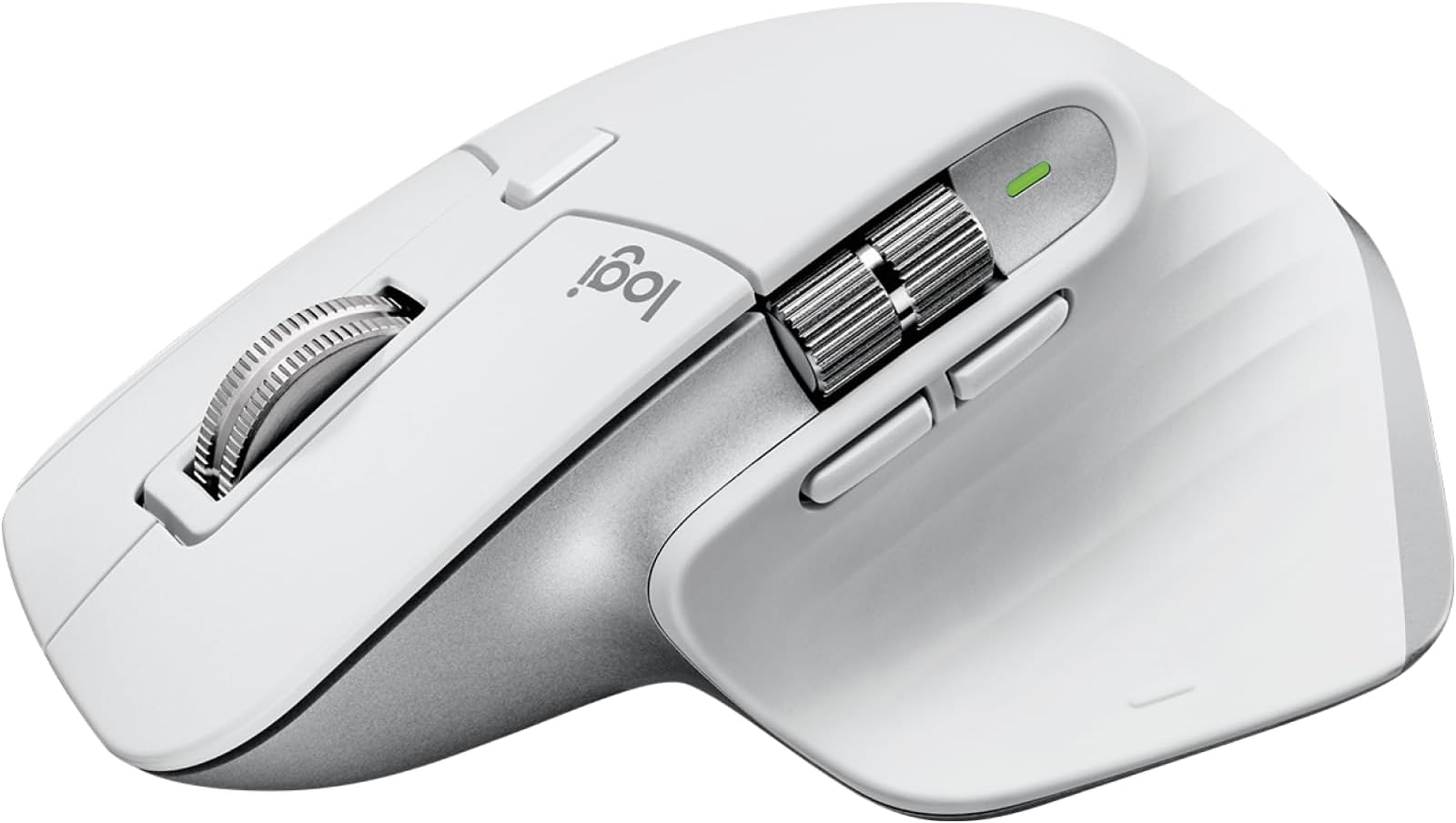
The Logitech MX Master 3S is a premium wireless mouse designed for professionals seeking unmatched precision and comfort. Featuring an 8000 DPI sensor that tracks flawlessly on any surface including glass, ultra-fast MagSpeed scrolling that’s 90% faster and quieter, and Quiet Click technology reducing click noise by 90%, it ensures distraction-free productivity. Its ergonomic design supports natural wrist posture, while multi-device Bluetooth and USB-C connectivity plus Logitech FLOW enable seamless control across multiple computers. Crafted with recycled plastics and backed by a 2-year warranty, it’s the ultimate tool for millennial managers who demand efficiency, style, and sustainability.


| ASIN | B07W4DGFSM |
| Antenna Location | Office, General Computer Work, Graphic Design, Programming |
| Are Batteries Included? | Yes |
| Are Batteries Required | Yes |
| Battery Average Life | 70 days |
| Best Sellers Rank | 2,518 in Computers & Accessories ( See Top 100 in Computers & Accessories ) 366 in Mice |
| Box Contents | 1 product |
| Brand | Logitech |
| Brand Name | Logitech |
| Button Quantity | 5 |
| Colour | White |
| Compatible Devices | Tablet, Personal Computer, Smartphone |
| Connectivity technology | Radio Frequency |
| Customer Reviews | 4.4 out of 5 stars 2,520 Reviews |
| Embellishment Feature | LED |
| Enclosure Material | Plastic |
| Global Trade Identification Number | 05099206103733 |
| Hand Orientation | Right |
| Hardware Platform | Mac, PC, iPad on iPadOS 14 or later |
| Item Dimensions L x W | 12.5L x 8.4W centimetres |
| Item Part Number | 910-006560 |
| Item Type Name | Wireless Mouse |
| Item Weight | 312 Grams |
| Manufacturer | Logitech |
| Manufacturer Part Number | 910-006560 |
| Minimum Required Operating System Version | ChromeOs 134, Mac OS 10.12 Sierra, Ubuntu 16.04 Xenial Xerus, Windows 10, iPadOS 13 |
| Model Name | Logitech MX Master 3S Performance Wireless Mouse |
| Model Number | MX Master 3S |
| Mouse Maximum Sensitivity | 8000 Dots per Inch |
| Movement Detection | Optical |
| Movement detection technology | Optical |
| Network Connectivity Technology | Radio Frequency |
| Number of Batteries | 1 Lithium Polymer batteries required. (included) |
| Number of buttons | 5 |
| Operating System | iOS 14 or higher, iPadOS 15 or higher |
| Pattern | MX Master 3S |
| Power Source | Battery Powered |
| Product Features | 8K DPI, Flow - Cross computer control, Magspeed scrolling, Soundless, Tracks on glass |
| Product Finish Type | Matte |
| Product Warranty | 2 year manufacturer |
| Range | 10 meters |
| Special feature | 8K DPI, Flow - Cross computer control, Magspeed scrolling , Soundless, Tracks on glass |
| Style Name | MX Master 3s |
| Theme | Productivity, Comfort |
| Unit Count | 1.0 count |
B**Z
The Logitech MX Master 3S is a true masterpiece
The Logitech MX Master 3S is a true masterpiece in the realm of wireless performance mice. As a user who spends countless hours at the computer—whether for work, creative endeavour's, or entertainment—I've come to appreciate the meticulous engineering that goes into a high-quality device, and this mouse is no exception. Its array of features makes it a standout choice for professionals and enthusiasts alike, and here’s why. First and foremost, the ergonomic design of the MX Master 3S is unparalleled. Crafted to fit comfortably in your hand, it minimizes strain during extended use, making it an ideal companion for long work sessions. The sculpted shape and strategically placed buttons reduce fatigue, allowing for smoother navigation and more precise control. This ergonomic focus not only enhances comfort but also boosts productivity, as you can work longer without discomfort. One of the most impressive aspects of the MX Master 3S is its ultra-fast scrolling capability. The mouse features a hyper-fast scroll wheel that effortlessly glides through long documents, web pages, and spreadsheets. Whether you're reviewing extensive reports or browsing the internet, the ultra-fast scrolling feature saves precious time and provides a seamless experience that’s hard to match with conventional mice. The 8K DPI sensor paired with advanced glass tracking technology ensures that every movement is captured with incredible accuracy. This high resolution is particularly beneficial for tasks that require precision, such as photo editing, graphic design, and detailed spreadsheet work. With such a high DPI setting, even the slightest movements are translated into smooth cursor control, giving you the confidence to tackle any project with precision. Another noteworthy feature is the silent click mechanism. The quiet, nearly noiseless clicks of the MX Master 3S make it an excellent choice for open office environments or any workspace where noise can be a distraction. This silent operation enhances focus and allows for discreet use during meetings or while working in shared spaces. Connectivity options are another area where this mouse truly excels. Equipped with USB-C charging and Bluetooth compatibility, the MX Master 3S seamlessly integrates with multiple operating systems including Windows, Linux, and Chrome OS. This versatility means that regardless of your preferred platform, you can enjoy a consistent, high-performance experience. The wireless connection is robust and reliable, ensuring that there are no interruptions during critical tasks. The thoughtful design extends to its customizable buttons. With programmable functions accessible via Logitech’s software, you can tailor the mouse to your specific workflow. Whether you need shortcuts for design software, quick access to commonly used commands, or enhanced navigation features, the customization options empower you to work smarter, not harder. Battery life is another strong suit of the MX Master 3S. With a long-lasting rechargeable battery and efficient power management, you can rely on this mouse for days on end without frequent recharges. The USB-C charging capability further simplifies the process, ensuring that you’re always ready to dive back into your work. In conclusion, the Logitech MX Master 3S is more than just a wireless mouse—it’s a powerful tool engineered for efficiency, precision, and comfort. Its ultra-fast scrolling, 8K DPI sensor with glass tracking, silent clicks, and multi-platform connectivity make it an indispensable accessory for anyone looking to enhance their productivity and elevate their computer experience. Whether you're a creative professional, a data analyst, or simply a user who values comfort and performance, the MX Master 3S delivers on every front. This is a premium device that truly redefines what you can expect from a performance mouse.
G**O
Feels perfect
I'm quite pleased with my recent acquisition, the Logitech MX Master 3S - Wireless Performance Mouse. It has become such an essential tool for my work that I even bought another one to use at home. This mouse is a game-changer in terms of productivity and comfort. The ultra-fast scrolling feature is a standout. It makes navigating through long documents and web pages a breeze. The ergonomics of the mouse are well-designed, providing a comfortable grip even during extended usage. The 8K DPI (dots per inch) sensor ensures precise and responsive tracking, which is a must for any task, especially in my line of work. Furthermore, the wireless connectivity is reliable, and the battery life is impressive. It's great to have a mouse that you can count on throughout the day without worrying about constant recharging. The build quality is solid, and it exudes a professional look and feel. In summary, the Logitech MX Master 3S is a top-notch wireless mouse that combines performance, ergonomics, and durability. It's an excellent choice for those who value efficiency and comfort in their work setup, and I highly recommend it. A bit over priced.
A**R
The quality is great!
Customization options is great. Buttons are smooth. I only charged it once and I am still using it so far it has long battery life. Size is perfect ergonomic. It is expensive but it feels amazing to use
R**N
The perfect mouse.
Absolutely perfect! Will be buying another for my wife!
M**S
Nice Upgrade with Great Features - Beware of Discolouration
Just upgraded to this mouse, and from the beginning I am impressed. It's a fantastic mouse overall, its ergonomic design and colours pair beautifully with my MX Keys keyboard, making my set up seem clean and sleek. The material of the mouse feels soft and comfortable, and I also love the multiple programmable buttons on the mouse which you can easily change on the Logi Options+ app on my Mac. It was easy to connect, and It's especially useful because now, I can use it simultaneously with my Windows PC. However, I bought this from Amazon Warehouse, and like other reviews have mentioned, the mouse arrived with noticeable discolouration on the sides which can be seen in my photos. I've tried cleaning it, but to no avail. It is disappointing and would make my set up seem 'dirty' although I clean multiple times a day. Unlike my predecessor mouse, the Apple Magic Mouse, the hints of metal on this mouse is actually plastic so It doesn't seem as premium and is very light, however I assume that adds to the ergonomic aspect of it. Functionality wise, the mouse is great and is for anyone wanting a minimalist, clean set up that can help them be productive for work. I've tried a bunch from Razer to cheap mouses, and I'm sick of rainbow lights and dull colours so this mouse is a nice addition. Overall 4/5 stars from me, for the price of £65 which I paid it's okay, I definitely wouldn't spend £120 brand new for it tough.
D**Z
Amazed by the functionality
I recently purchased the Logitech MX Master 3 mouse after reading mixed reviews online. Initially, I was hesitant due to concerns raised by users on Reddit. However, I decided to give it a try and am glad I did. Upon using it out of the box, I encountered some performance issues. However, as per the instructions, I downloaded and installed the Logitech Options software. This was a game-changer. After configuring the software, I immediately noticed a significant improvement in the mouse's response and precision. The negative reviews I had read seemed to stem from a lack of proper configuration. Compared to the Magic Mouse, the MX Master 3 offers a superior and more customizable experience. Its ergonomic design provides excellent comfort, and the programmable buttons allow for quick access to commonly used functions. I was so impressed with the MX Master 3 that I ordered a second one for my office desktop. It has significantly improved my productivity and overall user experience. **Conclusion** While the MX Master 3 may not be perfect out of the box, its full potential is unlocked through proper configuration via the Logitech Options software. It offers a far superior alternative to the Magic Mouse and comes highly recommended. I wholeheartedly endorse it as a reliable and efficient accessory for both personal and professional use.
T**R
Great ergonomics, atrocious materials
Won't even go into my opinion of the mouse functionality itself, as it's completely ruined by the atrocious choice of materials for the main body of the mouse - a very nice and premium 'soft' feel rubber texture which just after 2 months of use has already covered in large greyish greasy looking marks - had I owned and used it for a year, fair enough. But this kind of wear after TWO MONTHS?! ridiculous. As it's a very light-coloured product, I've been very wary from the start, avoiding ANY use while eating food etc, and keeping religiously clean hands (I also regularly use hand sanitiser at my desk). I've also been wiping down with alcohol wipes every 3 or 4 days. For a product in this price bracket, this is completely unacceptable. I've previously only bought Logitech's budget-level products (which I've always been very happy with) - It seems they should perhaps stick with the entry level, or at least understand that we expect much higher standards along with the increase cost. If I could award less than one start, I surely would.
R**I
The Logitech MX Master 3S: The Mouse That Launched a Thousand Clicks
Alright, strap in folks, because I'm about to gush over this clicky comrade, the Logitech MX Master 3S. I've had my hands on some fancy mice – you know, the kind that cost more than a decent meal at a Michelin-starred joint. But THIS one? It's like it was handcrafted by the tech gods themselves. The weight? Imagine Thor's hammer, but if Thor were a computer nerd who liked ergonomic design. And the scroll wheel – oh, the scroll wheel! It's smoother than a jazz solo on a lazy Sunday. I'm telling you, scrolling through spreadsheets feels borderline indecent. Dive into YouTube, and it's like a love letter to this mouse. "Not great?" Never heard of her. This is the king of Clickville, the sultan of Scroll, the emperor of Ergo! Now, the Mac connectivity... Let's say it's like trying to tango with two left feet. It works, but it's clunky. Like trying to fit a square peg in a round Apple ecosystem. It’s like the mouse and the Mac are on a first date, and it's super awkward. So maybe I'm now saving pennies for that Apple mouse, the one you charge from the bottom – because why not make it inconvenient, right? Until then, I'll bask in the glory of my Master 3S, the little mouse that could (and did) outshine them all.
K**D
Great Mouse
This is one of best mice I got for my PC, it’s connected smoothly by Bluetooth and I think can be connected to 3 devices, also has usb connection if u don’t have Bluetooth and best thing also it’s rechargeable battery with usb C and cable, grip and use and buttons all perfect
M**I
Logitech MX Master 3S Maus – Hochwertige Qualität und beeindruckende Funktionen
Die Logitech MX Master 3S ist eine Maus von höchster Qualität. Das horizontale Scrollen fühlt sich an wie das Steuern eines Joysticks in einem Raumschiff – es ist unglaublich weich und präzise. Das vertikale Scrollen (das Haupt-Scrollrad) funktioniert ebenfalls hervorragend. Ich habe die weiße Version gekauft, und ich muss sagen, sie sieht fantastisch aus: ein mattes Weiß mit silbernen Akzenten. Die Maus kann gleichzeitig mit bis zu drei Geräten verbunden werden und ermöglicht ein nahtloses Wechseln zwischen ihnen. Sie kann sowohl mit dem mitgelieferten Dongle als auch ohne ihn (über Bluetooth) verwendet werden. Außerdem wird sie über USB-C aufgeladen. Ein Ladegerät ist nicht im Lieferumfang enthalten, aber ein USB-C-Kabel liegt bei. Der benötigte Adapter sollte 5 Volt und 500 Milliampere liefern. Wenn Sie ein gutes Ladegerät verwenden, wird dies wahrscheinlich die letzte Maus sein, die Sie jemals kaufen müssen, da sie wirklich langlebig und von ausgezeichneter Qualität ist. Die Maus wurde auf allen möglichen Oberflächen getestet und funktioniert einwandfrei. Ich kann sie nur wärmstens empfehlen – ein echter Kaufempfehlung!
S**8
Comment faire mieux ?
Quelle magnifique souris polyvalente, large molette debrayable aussi extra que sur les G502. Revetement très confortable, position naturelle de la main, clic vraiment doux et d'un silence absolu. Dongle installable sur un port du boitier sans interférences. Logiciel leger et allant à l'essentiel. Pour une utilisation web et windows, comment faire mieux ? Curieux de voir arriver la 4S ! Sinon, sur un ecran QHD 165hz, testé en jeu sur Horizon Forbidden West, sa passe très bien. Une souris dite "gaming" sera plus à l'aise oui, mais jouer à des RTS par exemple, parfaitement envisageable. Sinon pour tout autre usage, c'est un bonheur. La glisse est très bonne. Autonomie ? sincèrement gigantesque. La recharge est rapide. Très bon matos, attendez la bonne occaz pour l'acheter, il faut surveiller les prix, mais ce sera un investissement sans regrets.
A**F
جميل بس اللون الابيض بيتغير وبيبقى مش حلو
بعد فترة اللون الابيض بيتغير وبيبقى شكله مش حلو لكن كاداة وقيمة مقابل سعر جميل جدا لاانصح باللون الابيض
J**O
The best mouse in the world
It replaces for me the MX 3 that got a bit dirty. This one is of a lighter shade of grey. It works so well that I cannot use any other mouse. The battery is likely made of plutonium or something alien: it lasts for weeks without end.
Trustpilot
1 month ago
3 weeks ago