


🎮 Dominate the game with precision and style — your ultimate RGB weapon awaits!
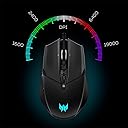
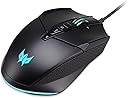
The Acer Predator Cestus 335 is a high-performance wired gaming mouse featuring the advanced PixArt 3370 optical sensor with up to 19,000 DPI, 10 programmable buttons, and 5 adjustable DPI settings for versatile gameplay. It boasts 16.8 million customizable RGB lighting options controlled via Predator QuarterMaster software, ergonomic design with thumb rest, and a long USB cable for unrestricted movement. Ideal for gamers seeking precision, customization, and immersive aesthetics in one sleek package.




| ASIN | B09FTZLX9D |
| Additional Features | Not_Performance_Used |
| Antenna Location | Gaming |
| Are Batteries Included | No |
| Are Batteries Required | No |
| Battery Average Life | 6 months |
| Best Sellers Rank | #7,967 in Video Games ( See Top 100 in Video Games ) #349 in PC Gaming Mice |
| Brand | Acer |
| Built-In Media | Mouse, Scroll Wheel |
| Button Quantity | 10 |
| Color | Cestus 335 |
| Compatible Devices | Personal Computer |
| Connectivity Technology | USB |
| Customer Reviews | 3.9 out of 5 stars 19 Reviews |
| Embellishment Feature | LED |
| Enclosure Material | Plastic |
| Finish | Smooth |
| Hand Orientation | Ambidextrous |
| Hardware Platform | PC |
| Manufacturer | Acer |
| Mfr Part Number | GP.MCE11.01Q |
| Model Name | GP.MCE11.01Q |
| Model Number | GP.MCE11.01Q |
| Mouse Maximum Sensitivity | 19000 Dots per Inch |
| Movement Detection | Optical |
| Movement Detection Technology | Optical |
| Number of Buttons | 10 |
| Operating System | Windows, macOS |
| Power Source | Battery Powered |
| Range | 5.0 meters |
| Special Feature | Not_Performance_Used |
| Style Name | Cestus 335 |
| Theme | Gaming |
| UPC | 195133108508 |
| Unit Count | 1.0 Count |
| Warranty Description | 1 year parts & labor warranty |
J**S
Fairly nice gaming mouse
UPDATE: This mouse drives me crazy from a few design issues, so I'm dropping a star from the rating. I do not like how the scroll wheel isn't the center click button like almost every other mouse. If you accidentally click the scroll wheel it switches between freewheeling and clicky scroll. Well, at least it's supposed to, but sometimes, it doesn't change modes. The other annoyance, is that the mouse won't turn on when I power on my laptop. I have to unplug the mouse and plug it back in, once the computer has booted up. I've never experienced that with any mouse! ------------------- I was in the market for a new mouse, so I decided to go with this gaming mouse. The specs of the Acer Predator Cestus 335 are impressive, and the DPI performance and functionality of the mouse is good, but not great. It's a good looking mouse and the LED lighting and button customization functionality of the mouse is pretty good. The scroll wheel changes from infinity scrolling to clicky scrolling by pressing down on the scroll wheel. While a neat function, it seems to interfere with actually using the scroll wheel button. The software to configure the mouse only appears to be available for Windows, and if you follow the URL listed in the product manual, it downloads a version of software which didn't recognize the mouse on my 64bit Win10 system! I had to uninstall it, and go to the support section of the Acer website in order to find the version for my OS, and that one worked. I use Linux as my primary operating system 98 percent of the time, and there unfortunately doesn't appear to be a utility provided by Acer to support my preferred OS. The software itself offers a lot of features, but it clunky in the way it works with the set number of presets. I thought it was okay, until my son had me compare the setup software for his Logitech gaming mouse, and the Logitech software was much nicer. I then compared the Acer Predator Cestus 335 to my son's Logitech G502 gaming mouse. First off, the Logitech just feels better, as if the plastic has a nicer texture. The scroll wheel lock on his mouse has a separate button, which I like much better than the Acer, as it doesn't interfere with the click function. The weight of the G502 seems nicer and more balanced then the Cestus 335. What surprised me after using the Cestus 335 for a while, is that it is slight too wide for my big hands (size XL gloves). Although I didn't realize it at first, the extra width was annoying, and would be even worse for someone with smaller hands. As I mentioned earlier, the Acer setup software is just a bit clunky. It lets you set all of the features (if you're running Windows), but the Logitech software was much easier to use. I do like the braided USB cord of the Cestus 335 mouse, and the plug seemed pretty beefy. I guess that I'm not a gamer, as I see no need for the ridiculous high DPI of the mouse. I asked my son, who is a gamer to use the mouse for a bit, and he immediately customized all of the DPI values to be below 1000. I asked why you would need the high DPI values, and he said he doesn't. He said the mouse seemed nice, but he preferred his Logitech G502.
J**E
Really happy with this thing so far...
I have used Razer mice exclusively for years. I was a die hard fan of their brand. However, the last 3 mice from them were riddled with problems. Yeah, the colors were pretty. I really liked how I could customize the way they lit up and have them match the keyboard and everything. However, pretty lights just aren’t enough. I needed a mouse that works. Something that actually does what I expect it to do. Enter this acer mouse....a brand that I previously never would have considered. They have clearly been coming up in the world. This mouse is vastly superior to the Razer mice in every way other than the custom lighting. It’s functionality is great. Honestly, the colors aren’t bad either. It’s pretty too. You can change the colors and make it pretty...just not in the same SUPER custom way as Razer. Still, it looks nice. I was even able to get it to light up in a way that looks nice with the keyboard lighting that I have going. This mouse is good enough that I will even consider a keyboard from this brand when my current keyboard from Razer finally dies.
I**R
Good gaming and multiple use mouse
Acer's Predator Cestus 335 Gaming Mouse is a good solid piece of gaming gear, with software allowing access to all the presets you'll ever need and a polling rate that is double that of most of the competition. If you want to move a pixel over, this is designed for you. That said, I've used this as a day to day mouse and it's actually pretty good for that. The on-the-fly DPI adjustment presets are quite good from going from immaculate detail to just general swiping, and the forward and back side buttons for web browsing are something you get used to with any higher end mouse as a basic function. I really do like the wheel here too; the option to push it down for non-clicky (aka faster) scrolling is a neat touch. 4 stars only because Amazon Basic's mouse does 90% of this (slightly lower DPI) at 40% of the price; unless you're seriously gaming, the price premium here is reasonable for a gaming mouse, but overall you're probably better off buying something else if you're not only going to game with it.
C**A
Terrible Mouse! Scroll wheel broke during first use
This mouse has a lot of potential but its riddled with QC issues. My scroll wheel broke during first use. Infinite scroll is a nightmare to use (no control). Right clicking produces a weird noise. Comfort and grip is great but its way too heavy for me. I believe its for regular/medium sized hands but it fits fine with my small hands. Sensor accuracy is excellent and I'm able to pick my shots accurately in FPS games. Overall, this is a hard pass for me due to the infinite scroll function, heavy weight, and QC issues. SENSOR -PixArt 3370 Optical Sensor. The sensor is pretty good and responsive. Works well with FPS titles like Rainbow Six Siege. I'm able to pick my shots accurately. SHAPE & COMFORT -The mouse is very comfortable to use and the shape is good even for small hands. The sides are textured so grip is no problem. WEIGHT -Heavy mouse. Not ideal for FPS gaming. CLICKS, BUTTONS, and RGB -Mouse clicks are fine but they are a bit too loud to my liking and there's a weird noise produced when right clicking. -Mouse comes with extra buttons like 'Fire' button (shoots 3 times) and a dedicated 'Middle button' instead of the scroll wheel. -Standard DPI, Forward, and Backward button is available . -There is a dedicated 'RGB button' for RGB selection. The RGB lights are decent. SCROLL WHEEL -Absolutely terrible. Its flimsy, wiggles around, and creates noise. -Infinite Scroll - The wheel spins freely as you scroll up or down. Terrible for FPS games (Switching weapons accurately via scroll wheel). It also makes an audible noise when spinning freely. -The Middle button is a separate button and NOT on the scroll wheel. -Pushing the scroll wheel down (simulating a middle button click), BROKE the scroll wheel and now its very light to scroll up and down and lost its precision. Lifting and slightly tilting the mouse causes it to scroll (nightmare for FPS since it causes undesired weapon switch).
M**H
Clunky, bad software
Review for: Acer Predator Cestus 335 Gaming Mouse with PixArt 3370 Sensor, Adjustable DPI Settings & 16.8 Million RGB Color Lighting Combinations It's not often I flame something but first it's really wide vs. the Razors that I've been using for gaming. It's obscenly wide. I had my daughter try it and she's ok with it but as a gamer myself, I'd never use a mouse that wide. Two the manual says go to a link to download the software. You download and then it DOESN'T recognize the mouse at all. So then you go to their website directly and they want you to enter a 50 digit (sarcasm) code for the item. Instead I just entered the model and number 335. I then have to download the same exact program again but this time it's an updated one that actually recognizes the mouse. So you get past that nightmare and run the software. It's the absolute worst mouse software I've ever seen. It has 5 buttons for games you can program mouse settings per game. You click another button and it flashes a line about "updating" that never completes. I don't think it's actually updating anything. There's no easy or recognizable way to turn off the flashing light show on the mouse which would be super annoying in the same room at night when you're trying to sleep. Otherwise the mouse is functional but certainly wouldn't recommend it at that price vs. a Razor or Logitech.
J**E
Good looking and functional mouse, software not working unfortunately
This is definitely a step up from my previous, but older logitech mouse. It feels comfortable in my hand and is a good size for gaming. The on device DPI adjustment is a great feature I have never had on a mouse, but now that I have, I will not be using a mouse without it again. With a few button presses I can go from very fine adjustments, all the way up to I twitch and it moves. So if its a great mouse, why 3 stars? Well, one of the big sellers for me was the programmable buttons. Unfortunately the software fails to recognize the mouse! The device itself did not come with software, but the instruction manual has a link to download the software from, if you enter it, you aren't take to a landing page of any sort, it just auto begins to download a software bundle. So based on that I have to assume its the correct software for this mouse. It installs fine, I have a higher end system with no known issues, but when I run the software I just get a screen stating "Device can not be found, plug it in" So no button programming for me. If that is not something you care about though, this mouse is great.
J**E
Good ambidextrous mouse
I've got a brother who is left handed and needed a new mouse. While Acer is more known for their PC hardware than accessories, I wanted to give this a go. Using it as a righty felt perfectly fine, as most medium-small wireless mice do, though it gave me typical hand-aches after a while but thats pretty normal as I have large hands. My left-handed brother really enjoyed this, and that is where my review is mainly aimed. He games righty but would like to have a lefty mouse at times as well. This made him quite happy. I've got really no complaints at all with this mouse. It does what its supposed to and does it more than competently. He feels that this style of mouse from Acer will be a good choice for other ambidextrous people!
D**S
Infinite scroll functions terribly, also it pinches your finger
I love mice with infinite scroll but this one just doesn't function properly. If you do big long scrolls that's fine, but small scrolls it's unusable which means you'd have to switch between the two modes rather than leave it on smooth scrolling all the time (which is what I prefer). It's not functional because when you scroll it moves the page in a very incremental way, rather than smoothly. That on it's own wouldn't be horrible but clearly something isn't right because if you scroll up a little, it might scroll the page up one tick just to scroll back down five ticks (and vice versa). On top of that ridiculousness, sometimes the scroll ticks just keep going, kind of like a wheel of fortune wheel that just won't stop. So overall - the infinite scroll experience is hot garbage (video to show what I mean). The second unforgivable problem this mouse has is that when I scroll it pinches my finger where the scroll meets the housing. That part of the plastic is oddly sharp for some reason so it scrapes at my finger and has made it raw. So not only is the scroll functioning poorly, it also hurts your finger to use it. A mouse without a usable scroll is not an acceptable mouse in 2022. Other notes: the shape is comfortable for my palm and fingertip grip (I use both). The materials feel kind of cheap also.
Trustpilot
1 day ago
2 months ago