Buy anything from 5,000+ international stores. One checkout price. No surprise fees. Join 2M+ shoppers on Desertcart.
Desertcart purchases this item on your behalf and handles shipping, customs, and support to UK.
🚀 Scan smarter, organize faster, and never miss a page!
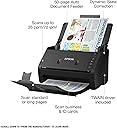
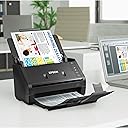
The Epson WorkForce ES-400 is a high-speed, duplex document scanner designed for professionals who demand efficiency and reliability. Featuring a 50-page Auto Document Feeder, 35 ppm/70 ipm scanning speed, and advanced OCR capabilities, it effortlessly digitizes diverse documents—from business cards to long, creased papers. Compatible with Windows and Mac, and integrated with Epson ScanSmart software, it supports seamless cloud uploads and ensures jam-free operation with ultrasonic double-feed detection. Compact yet powerful, it’s the ultimate tool to declutter your workspace and future-proof your documents.


| ASIN | B01M4NANZ6 |
| Best Sellers Rank | #229,664 in Office Products ( See Top 100 in Office Products ) #220 in Document Scanners |
| Brand | Epson |
| Built-In Media | AC adapter and power cable, ES-400 Document Scanner, Start Here poster, SuperSpeed USB cable |
| Color Depth | 24 bits |
| Connection Type | USB |
| Connectivity Technology | USB |
| Customer Reviews | 4.6 out of 5 stars 1,464 Reviews |
| Global Trade Identification Number | 00010343920309 |
| Greyscale Depth | 16-bit input/8-bit output |
| Item Dimensions D x W x H | 12.6"D x 11.6"W x 12.3"H |
| Item Type Name | Epson WorkForce ES-400 Color Duplex Document Scanner for PC and Mac, Auto Document Feeder (ADF) |
| Item Weight | 3670 Grams |
| Manufacturer | Epson |
| Media Type | Photo ; Receipt ; Business Card ; Paper |
| Minimum System Requirements | Windows 2000 Professional |
| Model Name | WorkForce ES-400 |
| Optical Sensor Technology | CCD |
| Product Dimensions | 12.6"D x 11.6"W x 12.3"H |
| Resolution | 1200 |
| Scanner Type | Document |
| Standard Sheet Capacity | 50 |
| UPC | 010343920309 |
| Unit Count | 1.0 Count |
| Warranty Description | What Is Covered: Epson America, Inc. (“Epson”) warrants to the original retail purchaser that the Epson product covered by this limited warranty statement, if purchased and operated only in the United States, Canada, or Puerto Rico, will be free from defects in workmanship and materials for a period of one (1) year from the date of original purchase. For warranty service, you must provide proof of… |
| Wattage | 17 watts |
V**S
Lifesaver
I have hundreds if not thousands of papers in boxes and folios all throughout the house that I want to digitize and organize somewhere and throw away (recycle/shred) the physical papers that take up space. My HP all in one printer has autofeeding scan capability but it sucks. A lot. Papers constantly getting jammed and can't handle folded paper which most of what needs scanning is... But the Epson ES-400 is perfect for my needs. Scans everything quickly, from super long carbon paper lease forms to a stack of paper with heavy creases. If there's a jam or "double feed" it just stops, and you press a button to re-adjust the paper in the tray and you're done. It also does a really good job separating each sheet, and some of the stuff I put in there had a lot of wrinkles/folds/was pretty questionable. It's super easy, fast, efficient and I had a huge tote with 15-20 hanging folders completely digitized within a few hours. Getting it setup was almost easy as can be. I had one issue where after following the instructions completely it was saying the scanner was "busy" or unavailable, but after restarting the scanner/computer and trying a few more times I got everything working. As others have mentioned the software is ok, but not the greatest. There is a lot of manual clicking and naming after you scan something but in all honesty, for my needs, that was actually preferred. Load a document / stack of documents, hit the scan button, rotate or re-arrange the order, delete any blank pages, type a name, and it saves/sends to a location. For me I just set that location to be the dropbox folder on my computer and now they're in the cloud forever. If you want to speed things up... load the document, hit the scan button, then just hit enter twice, type a name, enter again and it's sent to your last save location. It's really not that bad and certainly a mammoth upgrade over what I had been doing previously (fighting with my all in one printer, scanning a ton of files, then having to manually open and rename each one based on what was in the file). Desk is clean, the scanner is all folded up back into its space saving storage configuration, and I'm a happy camper. Thanks Epson!
A**R
Can't praise this scanner enough
I ordered this scanner for a project: Scanning hundreds of letters my grandfather wrote my grandmother from WWII. Needless to say, the quality of the letters varied greatly, as did the paper used, pencil or pen used and size. In other words, this was going to be a challenge for any scanner with a document feeder. This scanner handled every page flawlessly, with one exception and I knew it was going to be an issue but tried it anyways. It made my project go so much faster, scanning both sides simultaneously, and the quality was fantastic. The software was simple to manage and I never had 1 issue with the scanner. The straight paper path made it simple and care free. Overall, I scanned 1700 pages of letters and now have letters 76 years old saved forever. This scanner far surpassed my expectations and it deserves this positive review.
T**A
Simple easy batch rcpt scanner set up profiles love it!
I created 4 Job profiles in Document Capture Pro (simplex single and multi page plus duplex single 2pg plus duplex multi page and it works great. The profiles save to a designated folder (u can set diff profiles for diff clients if u like) and since I have a handful of clients this little machine is great for me. Great compact size, scans easily, folds closed nicely to keep dust out. Im used to using the infamous fuji scan snap that most everyone knows and loves tho I didn't want to pay that much so, for me so far, this es-400 epson is proving to be great. I simply scan large batches of rcpts (I have the main button set to single multi since receipts are most common) then code them after (even when a prog pulls info like Neat rcpts etc I found I always had to correct things anyway) so I simply enter the info in the file name and its searchable just fine in windows. My format as follows in case it helps any of u: Bank Last4acct YRMODY Amt Store ExpType cnb1234 200630 50.21 target fd pers I have my own system been doing books for years. Awesome value for a great scanner. Epson for the win yet again!
H**X
Fabulous scanner
I have used this scanner now for 2 1/2 years and it's held up extraordinarily well with zero issues. It scans quickly with 100% accuracy and what I like the best about this is if there is a staple or bad fold that jams while scanning, it stops, allows you to fix/remove the sheet of paper in question, and then continues on where it left off. I also very much like that it produces pdf files in readable / searchable text, preserving the color of the pages and scanning both sides at the same time. If one side is blank, it "knows" this, and the blank page isn't part of the scanned file. In the past 2 1/2 years, I have scanned thousands upon thousands of documents, all with ZERO issues. I have no hesitation recommending this scanner.
J**8
Good scanner for photos and especially for documents
I bought this item to replace a Fujitsu ix500 scanner. That scanner was WONDERFUL in all respects, until -- literally overnight -- the rubber rollers went from "working perfectly" to "too soft and gummy to work at all." This was after 5.5 years and tens of thousands of scans. Since the ix500 is no longer available, I first considered the ix1500. The reviews on that model often compared it unfavorably to the ix1500, and so I was reluctant to buy it. I chose this ES400 instead, since it seemed similar to the ix500 in many ways. It was also less expensive. The hardware seems very similar, and it performs reasonably well. In comparison to the ix500, though, the software is noticeably deficient in many ways. Primarily: (a) more user interaction is needed. For the ix500, you just open the lid -- and that rapidly turns the device on and makes it ready to scan. Here, though, you must open the lid, press and power button, then wait a LONG TIME before the PC says it's ready to scan. (If you insert paper before this time, you'll generate an error that is tedious to clear.) Once the scan is complete, an extra step is needed in order to save your result. (b) The software seems slow to start: once you press the scan button, a lengthy delay occurs. (Five seconds?) (c) The scanning is extremely slow if select a resolution higher than 300 dpi. (On the ix500, you can select "auto resolution" and it does a good job of optimizing what resolution is needed. Higher resolution scans are somewhat slower but nowhere near as slow is the ES400 scans. Consequently, I use 300 dpi for most everything. Plus side: scanning multiple pages is very fast once it starts -- seems comparable to ix500. Overall, the ES400 seems like a capable sheet-fed scanner at a good price. It would be nice if they improved the software.
G**R
Device is wonderful but software is horrid!
First of all I do love this unit. It works beautifully and I'm very happy with it. That being said, the software was awful. Epson will only allow you to download the bundled software that includes drivers. It would not install. Kept freezing up and could not find the scanner. Going to Device Manager I discovered that the driver was not being installed even though the downloaded software said it was. I simply could not find a stand alone driver for the unit on the Epson website. I ended up having to go through a third party program that has stand alone drivers. Using that app, I was able to get the driver and using device manager install the driver. After that was done, the unit now works beautifully. Spent hours trying to get it to work before I was able to get a driver to make it work. I'm now very happy with the unit. It is also not very big so it fits on my desk very well without taking up a lot of space. I do recommend this scanner and think I will be very happy with it. Just buyer beware when it comes to installing the software!
M**L
Easy Set-Up and Use with Windows 10
I've had this scanner for a few weeks now and have used it heavily for most of that time. I found it easy to set up and download the software. I agree with another reviewer that the instructions in the box aren't comprehensive, but if you've attached anything to use with your pc, it's self explanatory. The documentation that comes with the software download is comprehensive. As for speed and quality of scanning, I've been very pleased with this product. For the relatively small space it takes, it scans dozens of pages, front and back, quickly and smoothly. I've had surprisingly few jams and the few that did happen were due to problems with the documents themselves - they were very wrinkled, made of far too heavy materials, or user error - not setting the guides correctly for an odd-size paper. But 99% of the time, I can load a stack of documents and the scanner does its job with great speed and great quality images.
V**C
Blows my old Neat system away!
This thing is fantastic! I've been using a Neat Scanner for the past few years at home and in my small eye care practice. That system used to blow me away but this new Epson makes it seem like a flatbed. I actually haven't been a huge fan of Epson "All-in-one" products I've had before but the ES-400 has saved company face. The Neat could be very glitchy at times, it required a lot of sign-in steps and customizing file destinations (or tracking down the actual source document library) was next to impossible. With the Epson, I just turn it on, load the material, and press the "scan to" button (or seamlessly import into whatever application I'm using) and it's there; in whatever freakin' destination folder I want! Take that remote Neat destination folders! The Epson is faster than the Neat as well. I set both up on side -by-side computers and scanned an identical document simultaneously just to see. After I started the scan, I actually saw the Epson get up from the desk, go to the kitchen and get a sandwich and come back and it still completed the process first. (OK, I may be embellishing a bit). The bottom line is that I have found the Epson ES-400 to be easier and faster than the Neat system and I don't know how that highly rated Fujitsu could be much better. I'm thrilled with my purchase (so far, check back in a couple of months).
W**M
Es Increible!!!!!
Excelente escáner, realiza una de una manera muy eficiente su trabajo, muy nítido y muy rápido. excelente calidad, sumamente recomendado. además que su uso es muy fácil.
D**M
TOP
Uma mão na roda. Tem umas chaturinhas mas acho que nada é perfeito né ? Tipo mesmo com detecção automática de folha branca acaba scaneando muitas folhas brancas. Tem determinadas folhas também, tipo, por exemplo , uma folha que já é um scanner, quando é scaneada de novo fica MUITO escura. Tirando essas coisinhas é uma evolução grande em comparação com qualquer outra forma de scannear qualquer documento.
J**N
Great accurate scanner
This is awesome. Not too hard to set up, but once it is you can scan very very fast. If you have an estate or law case that needs large quantities of paperwork scanning, on both sides, in color, then get this. It has not missed a page yet, and the software can name files for you. Easy to change the quality so you can save space. Not wireless but that's ok because it works really fast. I reccomend this!
T**S
Extremamente rápida!
Produto excelente. Sou advogado e ajudou MUITO na digitalização de documentos. A velocidade também é impressionante. É um investimento que com certeza vai ajudar a produtividade do seu trabalho. Em breve comprarei outra!
L**.
Fabulous Product.
This Scan is so easy to use. It also produce great scan at an impressive speed. I fully recommand this product. My note : A+
Trustpilot
1 month ago
2 months ago