Buy anything from 5,000+ international stores. One checkout price. No surprise fees. Join 2M+ shoppers on Desertcart.
Desertcart purchases this item on your behalf and handles shipping, customs, and support to UK.
⌨️ Elevate your workspace — type smarter, work longer, and stay effortlessly connected!
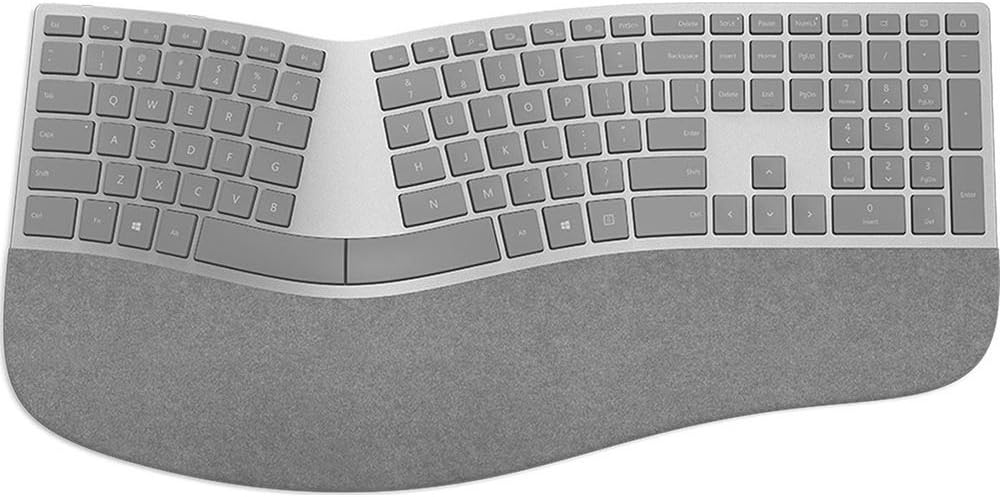
The Microsoft 3RA-00022 Surface Ergonomic Wireless Keyboard combines advanced Bluetooth 4.0 connectivity with a durable mechanical design rated for 10 million keystrokes. Its natural ergonomic curve and double-cushioned Alcantara palm rest provide premium comfort for extended use. Compatible with Surface Pro 4, Surface Book, Surface Studio, and Windows 10 PCs, it offers a sleek gray finish and a slim profile that fits perfectly in modern professional environments. Designed for power users, it features a Function Lock key and dedicated arrow keys to enhance productivity and multitasking.


| ASIN | B01MFCTRZM |
| Additional Features | Bluetooth |
| Antenna Location | Office |
| Best Sellers Rank | #568 in Computer Keyboards |
| Brand | Microsoft |
| Built-In Media | Keyboard, batteries, quick start guide, warranty guide |
| Button Quantity | 78 |
| Color | Gray |
| Compatible Devices | PC |
| Compatible Operating System Family | Windows |
| Compatible Tablet Computer Models | Microsoft Surface Pro 4 |
| Connectivity Technology | Wireless |
| Customer Reviews | 4.2 out of 5 stars 1,030 Reviews |
| Enclosure Material | Alcantara |
| Generation | 1st Generation |
| Global Trade Identification Number | 00889842160284 |
| Hand Orientation | Ambidextrous |
| Item Dimensions L x W x H | 18.11"L x 9.02"W x 1.36"H |
| Item Type Name | Microsoft Surface Ergonomic Keyboard |
| Item Weight | 2.23 Pounds |
| Keyboard Backlighting Color Support | Single Color |
| Keyboard Description | Ergonomic, QWERTY |
| Keyboard Layout | QWERTY |
| Manufacturer | Microsoft Surface Accessories - PC |
| Mfr Part Number | 3RA-00022 |
| Model Name | Ergonomic Keyboard |
| Model Number | 3RA-00022 |
| Number of Batteries Required | 2 |
| Number of Keys | 104 |
| Number of Sections | 1 |
| Power Source | Battery Powered |
| Recommended Uses For Product | Office |
| Special Feature | Bluetooth |
| Style Name | Contemporary |
| Switch Type | Mechanical |
| Theme | Office |
| UPC | 889842160284 |
| Warranty Description | 1-year manufacturer warranty |
D**E
Easily the best looking ergonomic keyboard
This just arrived, so my review only consists of first impressions right now. I'll update this later after I use it for a while. I bought this keyboard for use with the new MacBook Pro w/ touch bar. Although I hate to admit it, Microsoft is known for making good ergonomic keyboards. This keyboard is no exception. It feels solid and seems to respond well. It paired easily with the Mac and many of the special keys work as expected (volume, brightness, etc). Of course one of the reasons I bought this particular one is that it looks visually similar to the Apple brushed aluminium look. It is fairly close, but it is obviously plastic rather than metal. It still looks great. TL;DR: It looks as good in person as it looks online and pairs easily with a Mac over Bluetooth. UPDATE: It has been a week now and I have some additional feedback to share.. First of all, I'd like to respond to the reports of lost keystrokes. I have not experienced anything like what the other reviewers have described. When typing on the keyboard connected to my Mac, I have not experienced any lost keystrokes. What I *have* experienced is a sluggish power saving mode that I suspect occurs even on Windows. What I mean by this is that eventually the keyboard will go into some kind of sleep mode to save power. At this point, if you start to type nothing will transmit - even after it "wakes up", it will not send these keystrokes. This means that if you walk away and come back later, you may need to tap a key and wait a moment for it to start working again. This is a little inconvenient but it is not like the middle of words will be lost. Hopefully there will be some kind of firmware update that will correct this. It would be very nice if it would send the keystrokes even if there was a slight lag. Apart from the power savings mode, I have a couple other things to report. My biggest gripe is the lack of spacing between the right control key and the arrow keys. There is no noticeable gap. I don't look at the keyboard much when I use the keyboard, so I'm having to learn to feel for the up arrow to center my hand to use the arrows and Insert/Home/End/etc. There is a bump on the down key, but I haven't had much luck picking it up quickly. Next up is the 6 key being mapped to the left hand while I've spent the last year training myself to use my right hand. This is a bit quicker to transition to, so not that big of a deal for me. Finally, I'm not quite sure if I like using the Fn key to trigger the function keys. I'd almost rather use it to trigger the media keys instead. I'm sure I'll get used to this, but one week in and it's still bugging me. Bottom line is I'm still quite happy with this keyboard and can definitely recommend it for Mac users. As others have mentioned, you do need to have support for Bluetooth 4.0, which the 2016 MBP has. I'll consider updating this again after another month of use.
J**Y
Premium Keyboard with odd issues/design (why?)
Update: Here's what I do not like: No dedicated multimedia/volume keys. Because I constantly use function keys while working and listen to things in the background of varying volume sources. Switching would not be as cumbersome if the Function Lock key lit up properly to reflect its current state. The Function Lock key light is does not always reflect the state of the function keys. You always have to look at it to keep switching between F2/F3 and volume up/down. Pressing the Function Lock key sometimes requires two presses to indicate its status. The print on the function keys is tiny so I had to put stickers on them to see them by simple glance during work flow. There is no standard back lighting: only num lock, scroll lock and the flaky function lock. Given the price and manufacturer, I'd expect this thing to work better. I'm giving protoarc keyboards a chance for my next keyboard simply because of backlighting and dedicated volume keys. ========================================================================================== Kinda pricey but it's an older item so they jack up the price to double the original msrp: used to be ~$100, now it's $199. Here's my take: It's a very sleek, thin keyboard and looks great on the desk. Keys are thin, soft-touch and provide just a little resistance. Quiet. There is some heft or weight to it also as the body appears to be made of aluminum. The fabric on the wrist-rest is smooth and firm but also a little bit cushion. The keyboard is no thicker than a pen. For the price, this is a premium-feeling and premium-featured keyboard. So far as functionality is concerned, there's a bt-sync button on the bottom for connectivity. This kbd is 100% bt-only, no dongle and uses 2-double A batteries. Also there is a Function-Lock key on it for access to the dual functionality of the FKeys. This is great for devs who constantly use F5, F6, F10, F11 for building, debugging and stepping through code. The arrow keys are highly convenient for those pesky times when you have to meticulously edit a series of sql commands: the dedicated arrow keys and num keys are great for such instances although ai can do a lot of that much faster than anyone can type. Oftentimes when I return to my desk and the screen is locked, there's a slight delay because the device likely went into sleep mode: there's a half-second blip while you type the first character that wakes up the kbd and initiates the re-handshake to the target machine. No big deal really. Standard typing flows well as there are no blips or delays while typing. If you're looking for a cheap alternative ~$50 instead of slinging two hard-earned bills at this premium solution, check out the "Incase Ergonomic Keyboard – Designed by Microsoft – Refined Ergonomic Design, Built-in Shortcuts Keys, Layered Palm Rest for Elevated Wrist Support, Integrated Number Pad – Black". Both the Incase and the MS 3RA-00022 models are the successors to the MS Natural 4000 it seems - I could be wrong though. Fairly certain you will like this kbd. For me, anything better would have to be built from the ground up and easily cost just as much.
D**N
maybe the best keyboard I've used... with a few nearly deal breaking issues
Update 2020/05/23 Three years now and I love these keyboards. I have three of them now. I'm writing this on a Sculpt though and I wish I had a Surface. I love the keys on the Surface they almost feel mechanical, but not overly so. The Sculpt keys feel decidedly mushy in comparison, not to mention the ridiculous issue with the Sculpt where you can throw the keyboard away if you lose the dongle. I still don't have any issues with connectivity or lagging anymore. I'm still 100% on Linux computers. Sometimes it takes an extra tap to wake it up but it's only when I've been away. Battery life is good. I don't remember the last time I changed the batteries and I use rechargeables. The only thing I don't like about these keyboards is the wear on the palm rest. I have to wipe it down every day with cleaner or it starts to get gross. Invariably, over time, there's nothing you can do and it will never look good again. Oh, and some of the keys have worn off the oldest one (the f, g and h), but I don't really need letters on my keys anyway. Update: 2019/01/15 After nearly two years with this keyboard, I'm a fan. I ended up buying a second one that I needed for a second location. The second one is slightly nicer. The keys are slightly more clicky. This is the best keyboard I've used. The disconnection issues are gone. I don't know what the problem was. The stuck keys issue is gone. It's just perfect... except on OSX where it still doesn't show up as a keyboard but it can be worked around. It's definitely hard to keep clean... just about impossible. I wish it came in black. On Linux is works perfectly. And that's fine since I upgraded my MacBook Pro to Linux. ------------------------ So, bittersweet. Way back when, when my fingers were constantly numb from typing at a non-ergonomic keyboard, I found the original Microsoft Natural keyboard and it was revolutionary. Within 30 days my fingers went back to normal and I was saved. Never again could I type for long periods at a flat keyboard. I have to admit, there are some things that Microsoft does well. Though even then, there are frustrating issues that stain perfection. I've had a number of sculpt keyboards and they're pretty good. The exception being that one that had the lazy '/' key (a huge problem for me). The other huge problem with them was the potential for losing the dongle, which would render the keyboard garbage because there is no way to pair a new one. None. Astonishing. So, maybe this Bluetooth thing will work better? More on that later. The third problem with the Sculpt keyboards was the wrist rest covering, which would wear fairly quickly and leave an unsightly rat-marked device. The Surface Ergo keyboard has a new covering material and we'll see how that fares but I can already notice the area under my palms becoming more rough with wear. On the other hand, it's a great keyboard. The action on the keys is much better than on the Sculpt. To me it's nearly mechanical in how it feels with satisfying clicks and travel. The sharper edges of the keys is also surprisingly better. Overall, this may be the best keyboard I've used on a day to day basis. I like the keypad being attached again. Sometimes it just comes in handy. I was worried about the mouse being further away, after getting used to the Sculpt, but I haven't really noticed too much. I'm a coder. I type fast expect my keyboard to perform perfectly. This one does... except... sigh... Here is where your mileage will definitely vary. I use this keyboard between two laptops, a Powerbook and a Thinkpad running Arch Linux. I have a USB hub that allows me to easily switch between laptops with one connection (and the DP for the monitor). This was a great setup with the Sculpt. With the Surface, however, it doesn't seem to be able to be paired to two devices at once. Other Bluetooth devices, like my Sony headphones, don't have a problem with this but the Surface needs to be re-paired every time I switch. Also, the pairing process with the Mac is finicky. Sometimes it takes 2 or 3 tries. Annoying. Furthermore, not the keyboard's fault, but definitely a thing to note for OSX use is that it doesn't show up as a keyboard option in Settings, so you can't just set a different key mapping for the Windows and the Left Alt key as you might with recognized input devices. To get around this, I had to install Karabiner, and I have to switch configs when switching from the Surface to the laptop's keyboard. Doesn't show up as a Bluetooth keyboard either as apparently, that's reserved for Apple Bluetooth keyboards. Annoying. (though on Apple, not Microsoft) Also, every once in a while, my mouse goes wonky and I've narrowed it down to some key being sent incorrectly by the keyboard because I can fix it by cycling Bluetooth. :-/ Finally, on the Mac, the media keys aren't mapped right. Not a huge deal. In fact, I haven't even fixed it yet. Now on Linux, aside from the re-pairing, it's much better, except for that one thing. That one thing? It drops. Inexplicably, and sometimes mid-stream, the keyboard stops working and I have to cycle Bluetooth on the laptop to get it back. I don't know what the problem is here yet and it could very well be something stupid with my Bluetooth setup that I can fix, and when I do, I'll report back. It does seem to be consistent with the keyboard acting up under OSX, so maybe it's sending something that isn't dealt with well? IDK. Lastly, as others have mentioned, it goes to sleep. This hasn't been an issue for me. At worst, it just takes a couple extra keypresses when coming back to it and it wakes right up. No Bluetooth disconnect at these times for me. Not a big deal. I'd say, if typing and ergonomic keyboards are important to you, then this is the best one from Microsoft yet and as for Logitech... what happened to them? Definitely the best mainstream keyboard you can by off the shelf, IMHO. If you're stuck on mechanical keyboards or are a really big keyboard geek, building your own and whatnot, I don't know. For me, I think I'd be exploring those options if this keyboard weren't so good. It's just good enough to keep me from getting into the world of custom and specialty keyboards, for now. Subtracting stars for the Bluetooth single device pairing limitation and, maybe unfairly, for the lack of concern for OSX interoperability. Microsoft: keep building good keyboards, but please, consider the rest of us who like your keyboards but don't like your operating systems.
K**W
Dual boot work around
The basics of my non-MS Surface setup: Win10/Ubuntu dual boot (mainly use Win10 on this machine) I use a Cirago Bluetooth 4.0 Mini USB Adapter BTA8000. It took a bit of finagling to get this adapter/dongle to load, basically remove all bluetooth drivers associated with this hardware and reboot and let Win10 reinstall the BT 4.0/4.1 low energy drivers. Do not install the supplied drivers with the adapter. https://www.amazon.com/Cirago-Bluetooth-Mini-Adapter-BTA8000/dp/B0090I9NRE/ [The BT adapter has an annoying blinking blue LED that is awfully bright, but I was able to mount it into an internal USB port in my ASUS GR8 pc, so it isn't visible.] As other reviews mentioned, the keyboard is not enabled during bootup. To get around this, I used an old Belkin N52TE USB gaming keyboard (it is not a full keyboard, it is palm sized). A necessary evil if you need to access BIOS or UEFI on boot. The next PC I purchase will have bluetooth built into the motherboard. The keyboard itself is good quality. Keystroke action is like laptop scissor keys, which I like, not gummy like membrane keys. People have commented on the alcantara staining, I am using a moist paper towel to wipe down after every use (1x a day), and washing my hands before use. It looks good so far. The alcantara is backed with a thin layer of firm foam that has some give to it. The keyboard wakes from hibernation in about 5 seconds. It remembers all keystrokes in between registering. It is easier to press one key and wait for the number lock led to alight to know that it is out of hibernation. I should mention that the battery cover on the underside is held on with magnets, so there is no latching system. You press on one end and the cover flips up enough to take off. This confused me for a bit and there is nothing to be mentioned of this ingenious feature in the reviews or documentation. Other than that, the keyboard does what it should and looks good on the desk. Pros: Good connection, no missed keystrokes Good quality construction Ergo layout is OK There really is no other manufacturer making an ergo keyboard with this quality Wishes: Came with a USB BT adapter USB option with backlighting on all keys Removable/washable alcantara panel Cons: Cost is a bit high True, two delete keys close to each other(?) Base is a bit large Indeterminate at this point: Battery life Alcantara staining
B**S
Perfect feel and action, silent, incredibly gorgeous...
House arrest has given me time to do something I wanted to do for a while, write a review of the incredible Microsoft Surface Ergonomic keyboard. Looking for a GREAT keyboard? This is it. Perfect feel and action, silent, incredibly gorgeous. My favorite keyboard ever. Can be a little tricky to initially pair with a Mac but once paired works flawlessly. I’ve set mine atop a repurposed laptop cooler base (Cooler Master NotePal LapAir - Laptop Lap Desk with Pillow Cushion and Cooling Fan [R9-NBC-LPAR-GP]) which I use backward with the high end towards me, which gives just the perfect amount of ergonomic downward tilt to type all day long without wrist or finger strain. I put a piece of black perforated rubber shelf liner between the keyboard and base to keep the keyboard in place. Love this keyboard!!
J**S
Great Idea but wasn't executed well
1 month EDIT: I can't recommend the keyboard to anyone at this point, I have multiple keys on this board "squeaking" when they are pressed and when typing in rapid fashion makes an awful, awful noise. It is bad enough that I can see most people being put off the keyboard. It started with just the enter key (and only sometimes) and now other keys affected are , spacebar, e, t, l and k. I love this keyboard but it has its fair share of draw backs and at this price point, it might be a deal breaker for some. Pros - Great Ergonomics (this keyboard is very comfortable to use for an extended period of time) - Wakes up fast (I saw a lot of reviews complaining about this but I have not had the same experience. I've had maybe 3-5 times where I needed to wait 5ish seconds for the keyboard to wake up and start working. It really isn't as big of a deal as some make it seem. - Very quiet! I used to use a mechanical keyboard as my daily driver but when we moved to an open office space I needed something that wasn't as loud Cons - Enter key squeaks (When hit juuuust right, and for me that's about 1/2 the time. There is an awful, awful squeak of the key. I dont think my board is bad I think its just how the switches sound if you don't hit them dead on) - Wrist wrest is a PIA to clean (Just google Alcantara cleaning process) it takes a lot of work to clean and it honestly gets dirty so quickly again that you may as well just accept that your wrist wrest will look dirty and brown almost all the time. My wrist wrest started to get noticeable shading on it within just 2-3 days of using it) Overall the keyboard is great, in hindsight I might have held off until the keyboard dropped in price to around $60-$80 before purchasing.
G**O
What I was looking for
I have tried many keyboards on several brands, basically looking for the functionality that I had with Natural Keyboard 4000 but with the addition of wireless. This one meets my expectations so far because of this: - Lock lights. I REALLY need to know when Caps Lock is on, Num Lock, Function Lock, in that order of importance. - My last one before this was Microsoft Sculpt. I love the keys distribution on the Sculpt (which is practically the same as MS Surface Ergonomic) and the soft keys (same as MS Surface) but, as much as I see it useful for others, I hate that the numeric keypad is separated (And I travel often). I also hate that the function (FN) switch is not a key but a hard switch that constantly forget to move back and that there are no indicator lights for FN, CAPS, Num. MS Surface has all that. Many times I press a function key with the sculpt and end up doing something totally different just because that switch is in the wrong position. It's a matter of just looking at the switch but it's a small switch and not as easy to tell in which position it is. - Surface uses bluetooth. With my other keyboards, I was using a dongle. Sometimes when I travel I would forget the dongle and the keyboard was rendered useless. Once, one of such dongles got broken. I researched in many sites and some people would say there was a way to get a replacement. I never found one (For the MS Sculpt). Without that dongle, the keyboard cannot be used. I was able to open the dongle and do do some minor soldering to fix it. With the Surface Ergonomic, I connect to my laptop without the need of a dongle. - If the computer doesn't have bluetooth then I, again, would need a USB to bluetooth dongle BUT if I forget that dongle while traveling or if it gets broken, I just buy a new one and most of them range from $6 to $15 dollars and they are NOT tied to one keyboard, which was the problem with the other keyboards I used. - The function keys are not too small like in the Sculpt. I can use them way easier - With the Jelly Com KE 68 (another keyboard I tried), I had many features exactly like the Surface but the navigation keys (Home, End, Pg Up, Pg Dn, arrows) were being shared with the numeric keys. I use both the navigation keys and the numeric pad a lot. It was awful. On top of that, there was no indicator for the Num lock so I was always having a hard time trying to know whether that part of the keyboard was ready for navigation or for numbers WISHLIST - Please offer one in black - I didn't find a mouse that comes in combo with this keyboard. I had to get it separately - Please offer a base to put underneath the keyboard, like the one that Natural 4000 and Sculpt have. That or extensible legs or anything equivalent. I'm borrowing the base from Sculpt CONS - If I go inside CMOS setup, the keyboard doesn't work (at least on my machine). On those rare cases that I need to go to CMOS setup, I use another keyboard - One of the laptops I tried has symantec security login which intercepts the boot up (This is before Windows loads). For that one, the keyboard didn't work (I'm assuming there was no equivalent driver outside of Windows. Same situation as with CMOS setup). In the morning, when I turned on the computer, I had to temporarily use another keyboard for that laptop. It's a minor for me but, if somebody uses one of those pre-boot security measures and / or restarts the computer often during the day, that might become annoying.
J**J
Way Cool, Way Comfy, WAY Too Costly...
If you have money to burn on just look-and-feel, go ahead: you will not be disappointed. If you’re looking for functionality beyond the basics, look elsewhere. I am currently writing this review with the Microsoft Surface Ergonomic Keyboard. It may very well be the last thing I do with it. Don't get me wrong, it is a nice keyboard. The ergonomic shape is comfortable and the construction is solid—feels quality. The keys have a nice, soft, almost silky touch to them; and the Alcantara palm rest feels very nice on the palms and wrists. The way the keys press down—the resistance—and pop back up is a nice tactile experience. Also, the overall look is nice and appealing to the eye: sleek and modern (although it does look a little out of place on my cherry desk; seems like it would look more at home on a metal or glass desk, or something with a gray or white color). All that being said, this keyboard is WAY overpriced for what you get. Everything I mentioned above can be found in other, FAR cheaper keyboards. Microsoft’s own Sculpt Ergonomic Wireless Desktop Keyboard is a perfect example: stylish, comfortable, with a nice tactile feel as you type. And it is currently $50 cheaper here on Amazon. AND it comes with an extremely comfortable ergonomic mouse. For $130, you would think the Surface Ergonomic Keyboard would have at least come with a mouse, or be much, much, much more feature rich. I am at a loss as to why this keyboard is so dang expensive. Is the Alcantara palm rest comfy and nice to touch? Yes. In fact, it makes sense that they are starting to use this material in luxury vehicles. Is it nice enough to warrant the $130 price tag on this keyboard? Not even a little bit. The material used for the palm rests on Microsoft’s Sculpt keyboards (or other manufacturers, such as Logitech’s Wireless or Illuminated keyboards) is perfectly nice and comfortable. And the Sculpt Comfort Desktop Keyboard has nifty features like a split space bar where you can make the left split be another Backspace button. The Surface Ergonomic Keyboard has a split space bar, but does it have the neat Backspace feature? No. For $130 are its keys at least backlit?! No. In fact, name just about any cool feature a modern keyboard may have, and this keyboard does not have it. Extra ports? No. Information readout screen? No. Touch area? No. Lots of extra shortcut buttons? No. Customizable hotkey buttons? No. Customizable ANY buttons? No. Customizable ANYthing? No. This keyboard does not even show up in Microsoft’s Mouse and Keyboard Center. Seriously: from a functionality standpoint, it does the exact same job as the stock keyboards that come with the low-end Dell computers my company buys. I expect WAY more from a keyboard that costs $130. Connectivity was fine for me. I was able to effortlessly connect to my Windows 10 PC equipped with a Bluetooth 4.0 low energy USB adapter. The keyboard showed up quick as can be under “Manage Bluetooth devices” and I clicked on it, typed a security code on the keyboard, and voilà! Paired. I also managed to pair the keyboard to my iPhone 6 Plus running iOS 10 with absolutely no trouble at all. Found the keyboard listed right there in the Bluetooth menu (as “Ergonomic Keyboard”), tapped it, entered the subsequently displayed code, and BAM. Paired no problem. Works great for anything involving straight-forward typing on my iPhone: Texts, emails, notes, etc. Of course, the keyboard is built solely for Windows, so you will not find any fancy iOS shortcuts (that you would on, say, Microsoft’s Universal Keyboard…). I feel this is neither bad (eh, I’m indifferent—not really what I bought the keyboard for) or good (what?! yet more lack of features?); just thought I would mention it for informational purposes. Also, there’s a fun (the word "fun" is used sarcastically here...) side effect of this keyboard being Bluetooth only. It’s not necessarily the keyboard’s fault—it’s an issue common with a lot of Bluetooth devices. In order to help reach that “Up to 12 months” battery life that is boasted about in the feature list, the keyboard will shut off after about 10 minutes or so of inactivity. After that certain amount of time has passed and you start typing again, it takes about two or three seconds for the keyboard to wake up and start responding. Not a huge deal in the grand scheme of things, but I have already had it happen a couple of times and it is juuuust annoying enough to be noticeable and make you wish that it would not happen. Nice from a power preservation point of view, slightly irritating from a productivity point of view. Probably not a deal-breaker, nor the straw that broke the camel’s back, but I thought I would mention it for posterity. The only thing that makes sense here is Microsoft once again cribbing the “premium” page from Apple’s playbook. Surface is their top-of-the line. $3,200 for the best Surface Book?! Thirty. Two. HUNDRED. Dollars. There is nothing on that computer that warrants that price tag, except the premium gadgetry, quality, and “luxury” Microsoft is trying to get people to perceive with the Surface name. I get it, it makes good business sense from Microsoft’s angle. Slap the word “Surface” on a product and charge a premium—if people pay it, why not? It’s worked for Apple for going on two decades now (although Apple is a little more efficient about it: instead of the name of a product line invoking that feeling of top-tier, it’s the Apple name itself; Microsoft is a bit late to the premium party, so “Surface” will have to do). And I will admit: It worked on me. I pre-ordered this Surface Ergonomic Keyboard because it looked cool and I figured it would be well-made. Well, it is, on both counts. But, for $130, I also figured it would have some really cool features (beyond materials and shape), and it most certainly does not. I absolutely should have done a bit more research before clicking on that “Place your order” button. Hence this review. My conclusion is pretty much the same as my introduction: If you have money to burn on just the look-and-feel, go ahead: this keyboard looks great and feels great. If you want a simple keyboard, this is probably the best (and most expensive) one you can buy. However, if you are looking for clever, neat, or merely productivity-enhancing functionality, look elsewhere.
G**N
Good
The space bars are sticky but functions good with both mbp as well as a surface
M**O
Perfecto para Surface Pro
Perfecto teclado para oficina. Ergonómico y silencioso. Altamente recomendado para Surface Pro. No se desconecta, rápaida respuesta y muy ligero. Este es un teclado premium para productividad, no para jugar videojuegos.
R**S
The most beautiful keyboard ever
Pure excellence.
L**E
Awesome Keyboard!
This keyboard is an edge above the Microsoft Sculpt Ergonomic Keyboard only because the number pad is attached. what it lacks in connectivity options ( bluetooth only ) it makes up for in use once you get a USB bluetooth adapter (if needed). I beat the heck out of my equipment as I am a hard hitting typer. the wicked action of the low profile keys allows me to mitigate the mashing effect I am known for on a regular keyboard. if you want to type faster this is the keyboard for you! I have owned 4 of the Sculpt keyboards and then i found this pne and life returned to the relaxing options offered with a number pad. The heavens opened and angels sang the day it arrived!
A**R
Keyboard received was in French!
Product not as in picture/description. It wasn’t mentioned neither on the pictures or the description that the keyboard is in French. Luckily I speak French... 2 stars were efficient delivery and the keyboard otherwise looks and feels nice.
Trustpilot
1 week ago
3 weeks ago