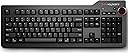
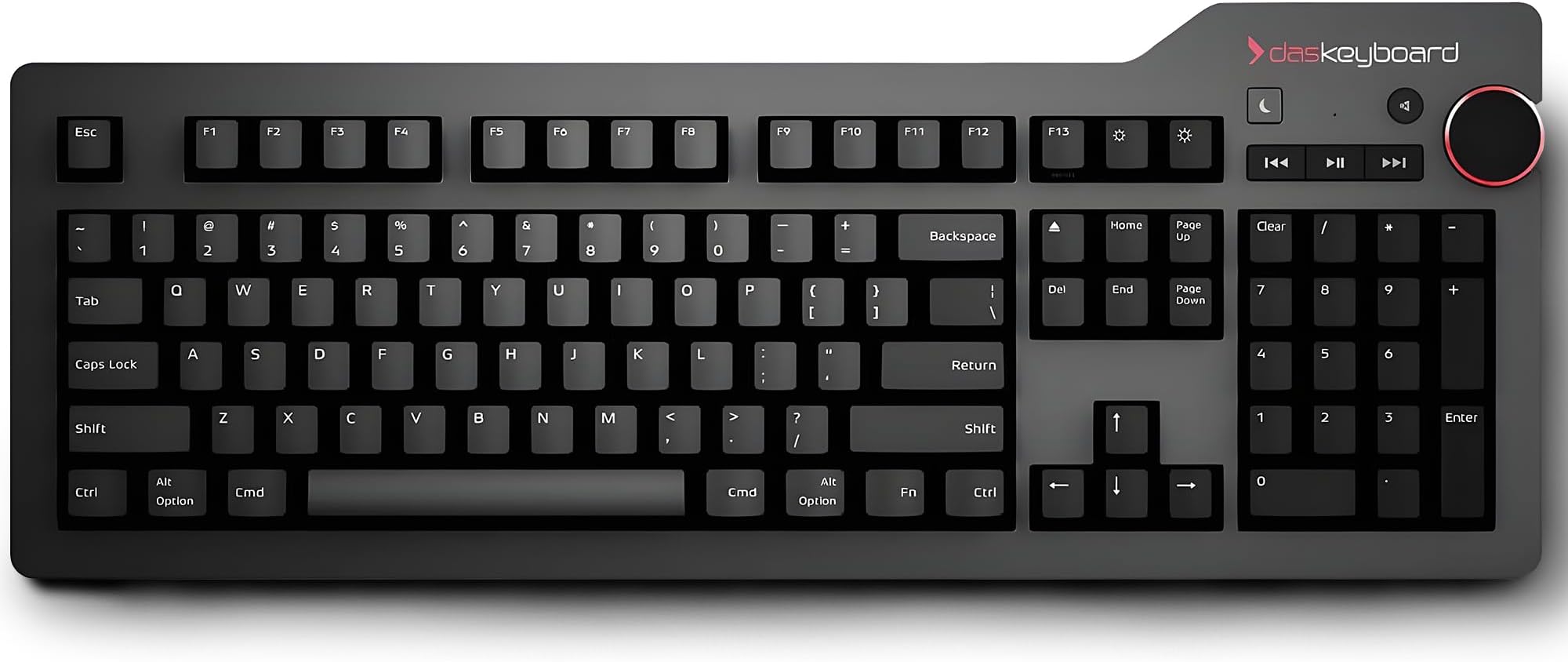
โจ๏ธ Elevate your desk game with the keyboard that means businessโand wins it.
The Das Keyboard 4 Professional features 104 Cherry MX Brown tactile switches housed in a premium aluminum casing, offering a perfect balance of quiet precision and durability. With n-key rollover, dedicated multimedia keys, and dual USB 2.0 ports, itโs engineered for seamless productivity and gaming. Its elevated design enhances ergonomic comfort, making it the ultimate choice for professionals who demand both style and performance.


| ASIN | B00TU7UA86 |
| Additional Features | Multimedia Keyboard |
| Antenna Location | Office |
| Best Sellers Rank | #27,338 in Computers ( See Top 100 in Computers ) #634 in Computer Keyboards |
| Brand | Das Keyboard |
| Built-In Media | USB Cable |
| Button Quantity | 104 |
| Color | Soft Tactile - Cherry MX Brown Switches |
| Compatible Devices | Laptop |
| Compatible Operating System Family | Windows |
| Compatible devices | Laptop |
| Connectivity Technology | USB, USB 2.0, USB 3.0 |
| Connectivity technology | USB, USB 2.0 , USB 3.0 |
| Customer Reviews | 4.3 out of 5 stars 424 Reviews |
| Enclosure Material | Aluminum |
| Global Trade Identification Number | 00855800001654 |
| Hand Orientation | Ambidextrous |
| Item Dimensions L x W x H | 45.7L x 17.3W x 3.3H centimeters |
| Item Type Name | Professional Soft Tactile MX Brown Mechanical Keyboard for Mac |
| Item Weight | 1.32 kg |
| Keyboard Backlighting Color Support | Single Color |
| Keyboard Description | QWERTY |
| Keyboard Layout | AZERTY |
| Keyboard description | QWERTY |
| Manufacturer | Das Keyboard |
| Mechanical Keyboard Switch Model | Cherry MX Brown |
| Mfr Part Number | DASK4MACSFT |
| Model Name | 4 Professional for Mac Cherry MX Brown |
| Model Number | DASK4MACSFT |
| Number of Items | 1 |
| Number of Keys | 104 |
| Power Source | USB |
| Recommended uses for product | Office |
| Special features | Multimedia Keyboard |
| Style Name | Professional Mac w/ USB 3 Hub |
| Switch Type | Tactile |
| Theme | technology, computing |
| UPC | 855800001654 |
| Unit Count | 1 Count |
M**.
Premium Keyboard - Long Winded Review
Initial impression, The keyboard is what I hoped for. It's a good typing keyboard. WHY I BOUGHT DAS KB A guy in an Apple Store indicated Das is what he uses, that may match what I described, to upgrade from the wireless Apple Keyboard. First time I heard of the brand. I went to a local electronics store to try different Cherry MX switches (on game-oriented mechanical keyboards) and decided I wanted brown switches. Not a gamer but their market uses this brand of switches, so it was an easy way to try-before-buy ... at least this aspect. (If this option is not available locally, enter " Cherry MX Switch Tester" as Amazon search and you can consider one of those switch type testers. Das currently offers blue or brown. Other vendors offer other colors/types of switches). Researched online reviews for impressions, build quality, and touch typist evaluations ... the PC version. (Search "Das Keyboard 4" on YouTube, to find some recorded reviews). After the research I decided to invest in this specific keyboard. Note: This keyboard does not use Cherry switches. They feel similar. The browns for this are a bit harder (the resistance increases by 100% instead of 33%) but seem very similar as the ones I tried. This change is a bit controversial in the Das community. Followup 1: Visited store where I first tried Cherry MX switches, after buying and using this DAS keyboard. Did some typing with Cherry MX Browns, to get a better comparison (closer in time). Including the Logitech G710+ model with Cherry MX Browns. The softer initial force of Cherry MX (vs the Greetech brand used in this DAS product) lowers the momentum because less force increase to peak ... seem less likely to bounce at the bottom. For me. Cherry switch would be less of a learning curve (sorry for bad pun). Does not mean I will not get there with Greetech. Generally, Das shouldn't have made this change to tactile force/distance and switch maker without more notice, and perhaps should not have done this at all given existing user expectations. But I'm new and will keep refining (restoring) my typing. Web page that defines terms: http://deskthority.net/wiki/Force DAS SITE I strongly recommend visiting the Das site for more info on these keyboards, including the specs on Greetech Blue vs Brown switches (force vs. distance, and the "trip" points): http://www.daskeyboard.com/daskeyboard-4-professional-for-mac/ ORDER TO KB ON DESK A pre-order. 4 week wait. Was to arrive before Saturday ... arrived the Wednesday before ... so on time. Large box with packing pillow taking more volume that the product box. Generally good packing inside product box. Two parts: keyboard with USB 3.0 cable attached, and the tilt bar (that is also a ruler I never expect to use for measuring). Attach bar to keyboard - magnet - and plug cable into USB port. KEY FEEL The feel is old-school keyboards from decades ago, but better and more refined. Soft, and then resistance. Push through resistance and see letter appear, can immediately release and then press again. It is a little bit "clicky" to start. With practice and learning the feel (I think it will take me a 10hr of typing to get fully in the groove), the clicks become less pronounced. I tried with full focus on just this and it can be done. If press beyond the resistance the key can bounce at bottom ... lighter touch, less click noise, just the switch and not the bottom bounce. (Can check out another solution: enter "Cherry MX Switch O-Ring" to search for a way to soften the bottom part of pressing a key. I might try this if needed. These switches are shaped similar to Cherry switches so the o-rings should be similar). Also, there is a slight wobble to the keys. This helps me, and probably some other touch typists. When moving quickly it is good to know if on a key or between keys. A little extra feedback. If between keys the wobble is generally on one side of the finger (keys are independent). If on a key the wobble matches on both sides of a finger (key is solid so whole thing moves). Will generally know a fraction before really pressing. ALL BUT THE KEY FEEL The product is solid. The aluminum top plate looks and feels very nice. Honestly a textured plastic could look similar, but for me the feel is a bit better than plastics. The volume knob feels like something a good stereo would have, including the tactile steps ... each step corresponds to a bar on the on-screen volume visual feedback. The board has weight (~3 lbs) and a steady grip on the desk. The USB cable is permanently attached to the keyboard, it's thick (more than other USB 3.0 cables, but it's OK for me), and the join with the keyboard has firm support to minimize bending at the join. I plugged the cable into a *powered* USB 3.0 hub which connects to the Mac. After recognizing the keyboard (very simple per most OS X configuration sequences) it worked. No driver, no restart/reboot, no switches, no actions relative to the Apple keyboard being replaced ... nothing more. ADVICE (slight CONS): 1. Move the sleep button away from the keys and other buttons. Maybe on the front side next to the cable. Avoid accidental presses. The length of time pressing the key helps (bounce press has done nothing; I need to press and hold to put equipment to sleep). Better to not associate sleep control with audio-visual control. 2. USB ports (any electrical ports) usually ship with a plastic film cover that can be peeled off ... suggest doing this. And a plastic cap for male end of cable. 3. Sometimes ergonomic situation should tilt keyboard forward. Would be a good option to connect tilt bar on lower part, and work through design for front so it is firm on the surface (away from typing, where the cable is attached): rubber feet, allowing for the cable support and the extended edge (housing the USB ports available on the keyboard). 4. The volume knob should be solid metal with same color, texture, and reflectivity as the board. Followup 2: The brightness keys do work on the iMac display. The keys do nothing for attached, external displays (not supposed to). [[Was: The brightness keys have no effect on the Mac's monitors nor added monitors. Not a big deal for me but I am sure it will be for others.]] 6. The eject key is close to backspace and del keys. A slip and the disc drive is ejecting. This has occurred twice. Suggest positioning the this key in the audio-visual area. 7. Of anyone finds a use of fn - for any purpose, or if it has any effect - a few of us would like to know. FINAL WORD This is a quality product. The money I paid is apparent in the product. This is priced as a luxury, premium product and seems to be just that. Das has gone through earlier editions and they've learned things that have been incorporated. I believe I won't look for a new keyboard for a while, probably until this one fails or Apple makes this not work with new products. Shipping with Greetech switches for a product line known for using Cherry switches may make a difference for current Das users. If I have updates I will add to this review.
S**C
Buenas teclas y controles por
La resouey de las teclas es muy buena. Todos los controles sirven sin problema, solo tuve que instalarme un software para volver a mappear las F keys. Algo caro por ser se Mac pero lo recomiendo
D**Y
Probably the world's best keyboard for typing
As a media professional, I have been using various keyboards for the past 25 years. These include cheap ones at office to membrane ones and even the famous "Cherry" TVS keyboard - which was quite good in my opinion. Windows based keyboards are available a dime a dozen and even a basic keyboard would do. But ever since I bought a Mac recently, I forgot the joys of typing and that's because the keyboard given by Apple (big misers) has many issues. First is the small size, then comes the soft touch which is non-tactile and finally the absence of the Delete button and half-size up/down cursor keys - all of which make the keyboard a delicate device more for show and design and meant only for occasional typing and certainly not for workhorse-like operation. After going through various websites and Amazon, I zeroed in on Azio Mk Mechanical Keyboard (white) which was costing me over Rs 11,000 when imported from the US. With much trepidation I placed the order only to wait for several days in vain. Finally the product didn't come and I got the full refund. It is then that I discovered Das Mechanical Keyboard and ordered for this and I am happy to say that I took the correct decision. (There were others too which got good reviews like Corsair, Steelseries, Aukey, Macally etc, but they were made either for gaming or were Windows-based). The Das keyboard not only has all the necessary Mac OS keys like Cmd, Option, Eject etc., but also has a delete button like a regular full-size keyboard (Apple should learn from them). The keys have a tactile feel and typing on this is a absolute joy. The keyboard itself is solidly built. On the right hand corner are media control buttons like fast forward, backward, skip back/ahead, play/pause and also a big rotary dial for controlling sound volume along with a separate mute button. However, the best thing I like is the one touch Sleep button which I use when taking a small break from work. Options like a detachable 16-inch ruler which sticks to the underside with magnets and 2 USB 3.0 ports for plugging in other devices are big value-adds to the keyboard. Overall I would say that even though the price is high (mainly due to steep import fees), this keyboard is the best keyboard I have used till date. Adios!!
I**T
Love my daskeyboard
This is my first mechanical keyboard. I have to say that I'm very impressed and quite happy with it. I love the tactile feedback from the mechanical keys and the clickity clack sound that comes from the Brown switches is satisfying as well. One observation that I've made after a several weeks of use is that I've had to relearn to type somewhat. Sounds crazy, but I found that the key positioning is somehow different than I've become accustomed with mac and typing speed and accuracy is diminished - I chalk that up to the user and not defect or design flaw of the product. At times it feels as if the keys are slanted away from me even though I have the keyboard propped up with the ruler attachment. The quality, fit and finish of this keyboard are excellent. Although I don't listen to a lot of media on my Mac, the volume knob is a great feature and not "backwards" (at least to me) as others have reported. My only two "complaints" are as follows: Price - It's a quality keyboard, no doubt, but it's quite pricey. USB Connection to desktop - I would have expected at this price point that the cord would be braided and detachable. I would give this 4.5 of 5 stars if I could. I would recommend and buy again if I needed another one.
K**S
Outstanding product. Exactly what I anticipated and needed.
It is everything everyone says --simply outstanding. I have just this week landed my first book contract (with MIT Press) and want to make certain I can get the words from my brain to the screen as efficiently and effectively as possible. While I have typed 8-12 hrs a day for some two decades, I felt it was time to take typing seriously. I did a lot of research, looking at Filco (Cherry keys), Realforce (Topre keys), Das Keyboard (Cherry keys) on-line and testing a number of keyboards in stores (Best Buy, Fry's). I read about Cherry keys to understand which is right for me. The reviews for this product were the highest, the least complaint of failure or product return. Now that I am typing on this keyboard, I know it was the right decision. The shipping box is well constructed, with the keyboard fully protected in transit (in fact, going to keep the box for future moves). The solid aluminum construction says this will last a lifetime. It is not bulky nor any bigger than my former HP Elite wireless. The volume knob is perfect--smooth and functional out-of-the-box. Mute, Next/Previous are responsive to a light touch. Very nice. And as I do not want my keyboard to glow like a low-rider Honda Civic, I am pleased with the simple design, elegant shape, and lack of illumination. It is difficult to explain, and almost sounds silly, but from the first word typed it is as though someone turned up the speed of my fingers. It really feels that way. The brain relies on force-feedback at the bottom of a stroke, which is true for any keyboard, but the brain also relies on audible feedback. The 'click' is punctual, more exact. It tells you, "that key stroke is done, move on". For anyone who recalls keyboards from decades ago (read the Wiki entry on the IBM M series keyboards), they all made a clicking sound and were exceptionally fast. With the advent of laptops and the desire for thinner profiles, keyboards too have gotten thinner, resulting in a lower profile key, shorter keystroke, and ultimately, no "click". With the latest MacBooks, the click is back. But if you have the luxury of a desk, and the laptop is set to the side, then give yourself the gift of a keyboard that is designed to help you get work done, not get in the way. As an aside, I was tempted to purchase the Ultimate model with NO keycaps, as I am a touch-typist, but the concern is for those keys which I do not use on a regular basis (Function keys, Home, Page-Up, etc.). As I intend to switch to dvorak before I write this book, I will simply pop and replace the keys into the new order, one of the benefits of a keyboard designed to have its keys replaced. Perhaps I will purchase blank keys for the letters, leaving all Function and accessory keys labeled? As a minor caution, give your fingers a chance to get used to the depth of the keystroke. They will repeatedly bump against the sides of the adjacent keys on the rebound, until your fingers are fully reprogrammed. Either way, this is the right keyboard for anyone typing more than Facebook updates.
Trustpilot
1 month ago
1 month ago