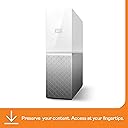
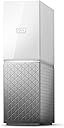
☁️ Your digital life, centralized and always within reach.
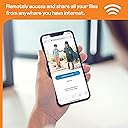
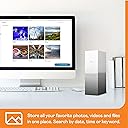
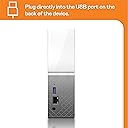
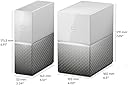
The WD 6TB My Cloud Home is a sleek personal cloud storage device that plugs into your Wi-Fi router, offering massive 6TB capacity for automatic wireless backup and syncing across phones, PCs, Macs, and cloud accounts. With easy smartphone setup, mobile and desktop access, and no monthly fees, it’s the ultimate solution for professionals seeking secure, centralized, and accessible digital storage.
| ASIN | B074DXNT7V |
| Additional Features | Easy and quick setup from your phone, Automatic backup of phone photos and videos |
| Best Sellers Rank | #58,615 in Computers ( See Top 100 in Computers ) #32 in Network Attached Storage (NAS) Devices |
| Brand | Western Digital |
| Built-In Media | Power Adapter, USB Cable |
| Cache Memory Installed Size | 6 |
| Color | White |
| Compatible Devices | Computer, Smartphone, Game console |
| Connectivity Technology | USB |
| Connectivity technology | USB |
| Customer Package Type | Standard Packaging |
| Customer Reviews | 3.8 out of 5 stars 1,849 Reviews |
| Data Transfer Rate | 625 Gigabits Per Second |
| Digital Storage Capacity | 6 TB |
| Digital storage capacity | 6 TB |
| Enclosure Material | plastic |
| Form Factor | Tower/Desk |
| Global Trade Identification Number | 00718037848259 |
| Hard Disk Description | Mechanical Hard Disk |
| Hard Disk Form Factor | 2 Inches |
| Hard Disk Interface | USB 3.0 |
| Hard disk form factor | 2 Inches |
| Hard disk interface | USB 3.0 |
| Hard-Drive Size | 6000 GB |
| Hardware Connectivity | USB 3.0 |
| Hardware Platform | WD My Cloud Platform |
| Installation Type | mobile_app |
| Item Type Name | My Cloud Home 6 TB External Network Hard Drive 3.5 Inch |
| Item Weight | 1.11 kg |
| Manufacturer | Western Digital |
| Media Speed | 625 MB/s |
| Mfr Part Number | WDBVXC0060HWT-EESN |
| Model Name | WDBVXC0060HWT-EESN |
| Model Number | WDBVXC0060HWT-EESN |
| Number of Items | 1 |
| Read Speed | 625 Megabytes Per Second |
| Special features | Easy and quick setup from your phone, Automatic backup of phone photos and videos |
| Specific Uses For Product | Personal |
| UPC | 718037848259 |
| Warranty Description | 3 years warranty |
ع**ي
جيد.
جهاز ممتاز لعمل ماي كلاود المنزلي.
J**.
A disappointing product
I owned the previous version of this product, so I upgraded it thinking this will be better than the previous. But it is not. Many features in the previous version are missing in this one. It doesn't serve as a media server - if you want to see the content (videos, photos) on your Smart TV, you won't be able to do that. All you can do is access them through the specific app on your phone and laptop.
J**R
excellent
good product. served it's purpose for me to serve as media server for my Android TV
S**T
Serve some purposes
Good for personal use in pc and mobile's back up. Not possible to use as media server in smarty tv / Roku / firestick apps for files stored directly in my cloud.
A**B
Power Issue
The first unit I purchased worked well... during 24h. It seems there was an issue with the power board. I returned it to the seller and I am still waiting for the refund. However the products is easy to use and works as expected (on line back-up 3 people devices = 3 partitions with for each, one Mac, one iPhone and one iPad, and able to share or not access to some of their files ). Then I bought another one expecting this one to last longer.
A**I
I recommend this
I love
A**L
يجب ان يكون في كل بيت
ممتاز علامة محترمة
A**I
Piece of Trash
1. NOT an SSD drive (very slow) 2. Keep disconnecting frequency 3. Sometimes, it takes a day to reconnect again 4. Files missing; after completing copying the files 5. 90% of the time can't be accessed out of network. What do you want more...
A**R
👍
Good product.
R**.
Verkar bra o enkel.
Skönt att a eget cloud i egen regi, och smidigt att kunna komma åt allt från alla enheter och varifrån som helst oavsett märke etc......, kan inte lova fler stjärnor direkt...., måste ju använda en tid men gissar på att den kan både bli en stjärna till som en enhet till med tiden....
T**D
A chaque produit son usage
Comme le dit le titre à chaque produit son usage... Installation: C'est ce qu'à voulu faire WD, l'installation est un jeu d'enfant, brancher, aller sur le site, créer un compte (nom prénom suffise) un mot de passe et c'est tout. Vraiment royale Usage : Ce qui est dit nulle part, c'est qu'un serveur dépend de votre connexion internet... dans ce cas où j'ai qu'une simple connexion ADSL oui c'est très lent si vous utiliser le WiFi, encore plus si vous passer par un repeater. En connexion LAN (l'ordinateur brancher sur la box ça va). Donc pour résumer : -si vous avez une petite connexion prenez un volume de stockage faible, genre 1-2To. Mettez vos fichiers en sauvegarde en LAN et après faite des synchronisation en wi-fi. C'est particulièrement adapté pour les photos et autres documents. Pour l'extrême sécurité, prenez le 2 baies qui a un disque de sauvegarde. Le top : une sauvegarde sur votre PC, une sauvegarde sur le home qui l'a double!!! Impossible de perdre nos précieuses photos! C'est consultable sur un téléphone et de n'importe quel PC. L'appli mobile propose même de sauvegarder vos photos, vraiment bien quand on arrive proche des 128go et 256go de stockage de nos téléphone actuel. Après si vous avez la fibre et une grosse connexion ben même si le système n'est pas optimisé comme un NAS pour les transferts il vous permettra de sauvegarder des films par exemple. Pour ma part j'ai pris Le 8To, beaucoup trop pour ma connexion mais en reconditionné ça vallait le coup !!! Dans tous les cas qu'elle que soit votre connexion ce produit est parfait pour les photos et/ou document genre d'une petite PME. Le rapport qualité/prix/prix de Mo est tout à fait correct.
S**T
Gayet stabil calisiyor
Oncellikle bu bir nas cihazi degil, bir cok sınırlamasi var nas cihazlarina gore ancak bu sebeple de cok stabil calisiyor, otomatik yedekleme, telefondan yedekleme, plex vs isler icin kullanacaksaniz cok uygun bir tercik olur bu fiyata nas in ancak kendisini disksiz alirsiniz.
M**.
Will not connect
I was on the phone with WD for over 2 hours trying to get it to connect.
Trustpilot
2 weeks ago
2 months ago