Desertcart purchases this item on your behalf and handles shipping, customs, and support to UK.
📸 Scan big, scan fast, scan flawless — your creative edge starts here!
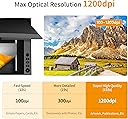
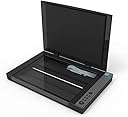
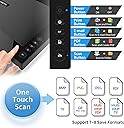
The VIISAN 3120 A3 Flatbed Scanner delivers professional-grade scanning with a 1200 x 1200 dpi CIS sensor, capturing large documents up to 11.7" x 16.7" in just 8 seconds. Designed for libraries, schools, and SOHO environments, it features a frameless design, energy-efficient RGB LED lighting, and an intuitive auto-scan function. Compatible with Windows and Mac OS, it supports high-resolution color depth (48-bit) for stunning image fidelity, making it ideal for digitizing artwork, photos, books, and CAD drawings with ease.
| ASIN | B08DQYSNGQ |
| Best Sellers Rank | #65,611 in Office Products ( See Top 100 in Office Products ) #8 in Flatbed Scanners |
| Brand | VIISAN |
| Color Depth | 48 |
| Connection Type | USB |
| Connectivity Technology | USB |
| Customer Reviews | 3.7 out of 5 stars 134 Reviews |
| Greyscale Depth | 16 bits |
| Item Dimensions D x W x H | 21.65"D x 24.8"W x 5.12"H |
| Light Source Type | Three-color (RGB) LED |
| Manufacturer | VIISAN |
| Media Type | USB |
| Minimum System Requirements | Windows 7 |
| Model Name | VF3120 |
| Optical Sensor Technology | CIS |
| Product Dimensions | 21.65"D x 24.8"W x 5.12"H |
| Resolution | 1200 dpi |
| Scanner Type | Receipt, Photo, Document |
| Standard Sheet Capacity | 10 |
| Wattage | 24 watts |
N**K
Excellent tool for artists, illustrators
This scanner is quite the gamechanger (if I may use the hackneyed phrase)! The illustrations I draw are generally 11x14", on 14x17" paper; to scan them on an ordinary 9x11" scanner requires four passes that must then be stitched together in Photoshop or GIMP. The results are less than satisfactory, with ghostly "tiling" where the brightness levels don't match. The VIISAN scanner reduces this to a single scan! The cover art is often done a bit larger, requiring multiple passes. However, the brightness level issues are far less noticeable when using this scanner. (I recommend, for stitching multiple scans together into a single image, scanning a larger area than required and cropping the edges to remove light leakage. Also, GIMP does a better job than Photoshop's Photomerge.)
J**L
Durable, easy to use, and a great value
My son was looking for larger scanners to scan large books and projects. This one is a great value for the money and works well and is very easy to use. Durable, with a quick scanning speed. The image quality is great and is compatible with his Dell desktop computer and laptop.
J**S
Expensive Paperweight, ZERO stars
Bought this new in May 2022 because it advertised being able to scan photos with exact color matching etc... Purchased this to scan my art so I could make copies digitally. However, every scan looked washed out and dull, not vibrant in any way. I tried every configuration offered within it's software and no results changed. Reviews were very positive so I figured I just didn't know what I was doing. I contacted their "customer service" with image attachments to ask help in how to resolve my issues. They kept reply with "return to default settings", which was what I had sent them in the attached files. Never got any help further than that. I put it away for a long time and decided to try a new computer and give it another go 2 years later. Same results. What had changed was the customer reviews. Suddenly, SEVERAL negative reviews matched my issue without any satisfaction. After having an expert look into my scanner, it seems an overseas maker is putting out dysfunctional versions at an alarming rate and possibly uploading fake positive reviews to attract buyers. At this price, I had hoped perhaps my particular model was a bad one and considered buying a replacement. But after having a professional look into it, it seems this is not a safe purchase to gamble with. I've chosen to donate this hunk of junk.
L**1
5-star in some respects
Not so much in others. It’s a good scanner. Very large base to be able to scan large portraits and legal documents. However not sure how to scan as a pdf instead of constantly scanning as an image. And also no help on scanning multiple page documents. It’s always just one page documents and have to name each one individually. Portraits are super clear.
D**E
Quite pleased with this
I agonised over whether I needed to own and store an A3 scanner and whether it would be good enough quality at this price. I've now scanned many documents at 600 and 1200 dpi and am quite happy with the results. I use Linux Simple scan most and it just works.
V**Z
This can scan typing or legal paper, blus scan art for artists. Has lots of special auto features.
I recently got it. I tested out just to see it works. I am impressed at all the features it has. I am an artist and I needed a scanner that folds open at the short end not the horizontal sides. This will be easier to scan sections of large artwork I do to peace back together in Photoshop. I read the instructions and it is a feather where it says it can scan sections together. If this is true I won't have to open up Photoshop to piece together scanned sections of large art. This scanner is about same width as typing paper but longer then 11" typing paper. So it will easil scan legal paper. I am very impressed with all the features this scanner has. It is amazing. I hope they all work.
E**Y
Work well with a few quirks
As others have noted, this scanner does not register fluorescent colors at all. Not even their hue. Which is interesting. It comes with a CD for the scanners - who has a CD drive any more? Once I found the software online and got my computer to play nice, it was fairly easy to use. For a 12 inch bed and 1200 dpi it works well and us a reasonable price
W**R
Scans my large and small format artwork
Great large format scanner so far. The quality of my scans are very nice. The colors are always perfect. My only beef is that the editing tool does not give me the option of cleaning up the margins on my work. Using a mouse-directed pointer for the “erase” function is awkward. I have to jump thru a few hoops to get this accomplished. I do it by cropping the pic and saving it. Later I can resize the pic and have clean margins. It would be nice to have an easier way. I have also scanned my 11x17 inch pics and they also have great color. Just scan at the highest resolution and you’ll be fine. I paired this scanner with a the Canon Pro-300 large format printer and I’m off to the races. Don’t think I’ll be paying a professional printer for copies anytime soon.
F**R
Detalle en boton de encendido o en la fuente de poder
Devolucíon completa
Trustpilot
4 days ago
2 weeks ago