Buy anything from 5,000+ international stores. One checkout price. No surprise fees. Join 2M+ shoppers on Desertcart.
Desertcart purchases this item on your behalf and handles shipping, customs, and support to UK.
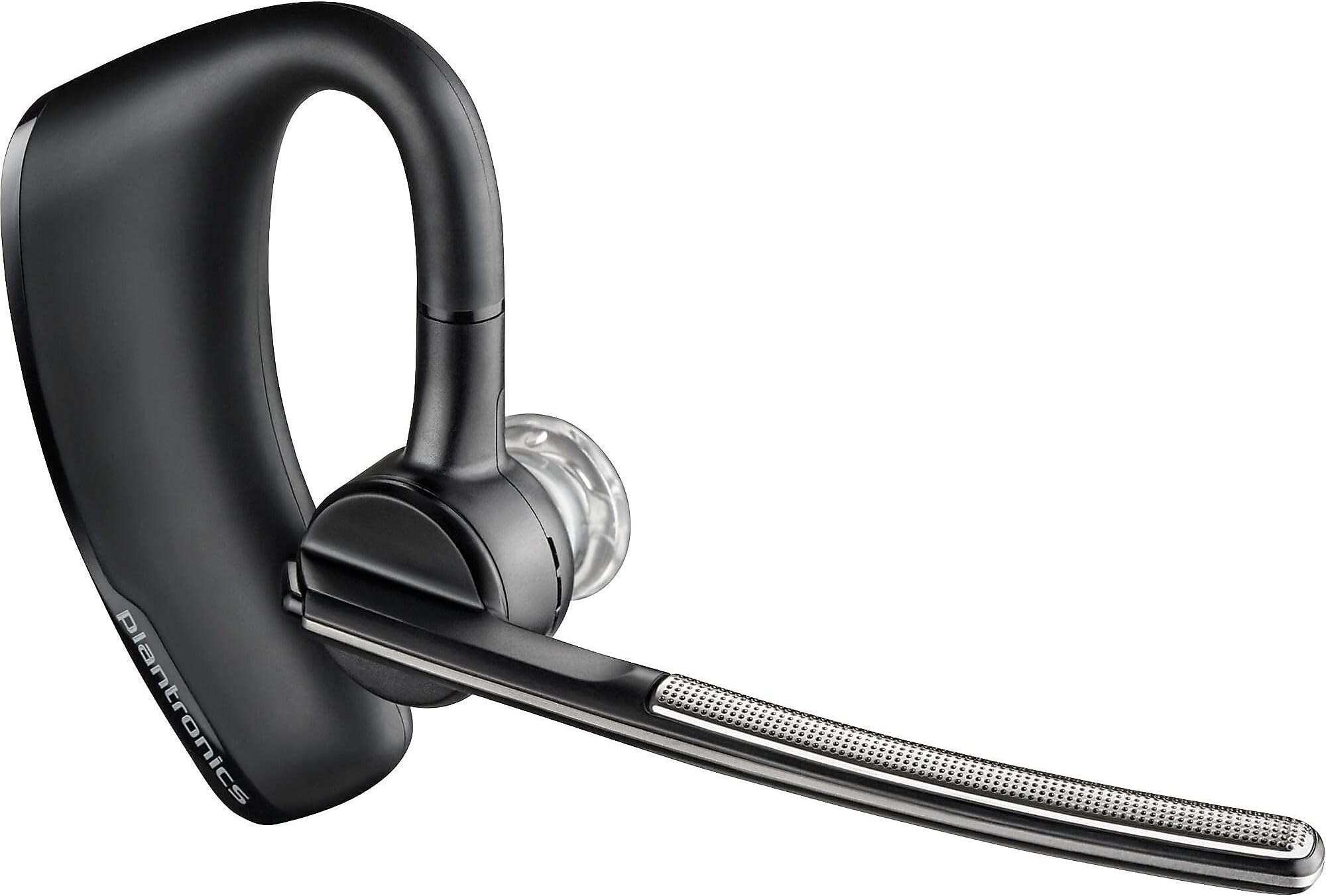
🎧 Stay Legendary: The Bluetooth Headset That Means Business
The Plantronics Voyager Legend is a professional-grade Bluetooth monaural headset designed for mobile managers who demand crystal-clear calls and all-day comfort. Featuring triple-mic noise cancellation, a robust 7-hour talk time, and a 98-foot wireless range, it seamlessly connects to PCs, Macs, tablets, and smartphones. Its magnetic charging system and multipoint technology make it a reliable companion for multitasking pros on the move.

| ASIN | B0092KJ9BU |
| Additional Features | Echo Cancellation, Microphone Included, Noise Cancellation, multipoint_technology |
| Age Range Description | Adult |
| Antenna Location | Calling |
| Audio Driver Type | Balanced Armature Driver |
| Battery Average Life | 7 Hours |
| Best Sellers Rank | #11,069 in Cell Phones & Accessories ( See Top 100 in Cell Phones & Accessories ) #47 in Single Ear Bluetooth Cell Phone Headsets |
| Bluetooth Range | 10 Meters |
| Bluetooth Version | 3.0 |
| Brand | POLY |
| Brand Name | POLY |
| Built-In Media | Voyager Legend Bluetooth Mono Headset |
| Cable Features | Without Cable |
| Carrying Case Material | hard plastic |
| Color | Black |
| Compatible Devices | Compatible with iPhone, Android, and Other Leading Smartphones |
| Connectivity Technology | Bluetooth, Bluetooth 3.0 |
| Control Method | Voice |
| Control Type | Call Control |
| Controller Type | call control |
| Customer Package Type | Standard Packaging |
| Customer Reviews | 4.2 out of 5 stars 7,584 Reviews |
| Ear Placement | In Ear |
| Earpiece Shape | In Ear |
| Enclosure Material | Stainless Steel |
| Form Factor | In Ear |
| Frequency Range | 20 Hz - 20,000 Hz |
| Global Trade Identification Number | 00000030339408, 00017229137615, 05033588038801 |
| Headphone Folding Features | In Ear |
| Headphone Jack | No Jack |
| Headphones Ear Placement | In Ear |
| Impedance | 32 Ohms |
| Is Autographed | No |
| Item Type Name | Earset |
| Item Weight | 0.04 Pounds |
| Manufacturer | Poly |
| Model Name | Voyager Legend |
| Model Number | 87300-101 |
| Noise Control | Active Noise Cancellation |
| Number of Items | 1 |
| Number of Power Levels | 1 |
| Series Number | 87300 |
| Specific Uses For Product | hands-free calling, commuting, and remote work |
| Style Name | Retail Packaging |
| Subject Character | 1 |
| Theme | Communication |
| UPC | 803982768186 017229137615 031112246819 803982734662 132017739830 646444159210 033587269959 702215876899 780320064172 645871533334 078667401867 017229141094 000030339408 807320385516 017229137585 641438027544 |
| Unit Count | 1.0 Count |
| Warranty Description | Comes with Manufacturer Warranty. |
| Water Resistance Level | Water Resistant |
| Wireless Technology | Bluetooth |
N**S
This is a copy of the review for the FFP model
(Copied and pasted here) Update (2023-07-02): I'm leaving my previous review intact below and adding a few thoughts. Most of it still applies to some extent. But ... this is the best headset I've ever had for my purpose, and I still can't find anything better. I don't talk on the phone any other way. Better? Noise cancellation and sound quality has been good on most of the 11 I've owned (yes, 11). I think some were counterfeits. Everyone can understand me on the other end, and many I've talked to had no clue I was going down the road (even with the windows down). The last one I bought was in December of 2022. I have two that still work fine. I don't know if the most recent failure is one of the more recent purchases, or a very old one. It literally wore out. The last two that failed lost their skins. I bought my first one in April of 2016. I only have one reason for not upgrading to the 5200. I despise micro-USB. I love the magnet connector for these. I can just reach up and pull it off the charge cable and put it on my ear while driving with minimal distraction. I carry two on the truck within reach so that when one battery gets low the other is right there. I can even snap the charger on the headset without having to see it. Try that with micro-USB. So, if you have time and patience to fiddle with micro-USB, by all means get the 5200. It's a better headset in every way, except for that. Poly seems to have migrated this headset over much better than they had at the beginning of 2023. There's a new app, and it works. I haven't tried to update the headset online with a PC since the end of 2022. If Poly would update this headset's internals, and leave the size, shape, and charger intact, I'd pay more for that one than another one of these. If I knew that they had, I'd be buying one from their website. There are numerous SKUs of this headset. There's no way for us mere mortals to know what the differences are, if any. I suspect that one or two of the FFP models were counterfeit, but I'm going to gamble again. The warranty will be out long before any problems become apparent. Then I'll buy another one ... or the Voyager Legend 2024. I am buying another one so I'll have two spares. Only 2 of the 11 are left. I started keeping one at home too. My wife is still using a 5200, but she has a couple of these ... somewhere. Previously (circa January 2023): I think I've purchased my last Legend, even though I haven't tested it yet. It's time to find something better, and that's going to be hard. My ear fits these too well. Be aware that this headset appears to no longer be fully supported online. Plantronics is now Poly. I just downloaded the latest version of Plantronics Hub from Poly's support site, which appears to be the remnants of Plantronics support site. When I run the Plantronics Hub and try to update the headset I get, "Plantronics Hub is unable to connect to the server." I suspect that the update server no longer exists, though I can't be sure. The most recent firmware version is v.109, and may be the last one. That doesn't take away from the quality and usefulness of the headset at all. It's still the best noise-cancelling headset I can comfortably wear. Driving a truck I wear one all the time. Having said all that, I have had issues with some of the ones I've purchased more recently, and my wife has too. Some of them don't cancel noise as well as others, though they all come up as the same product, and the same firmware version. Early on, they were all flawless. Lately, they're not. We've had a couple that failed before we managed to destroy them ourselves. And it's possible that more modern devices don't connect as well to the older version of bluetooth these support. This is a very good legacy product. Last note: My wife has one of the newer 5200s, and didn't like it nearly as well as these.
E**I
Serious iPhone 5 issues? Update firmware to v44 or higher!
I have been a very happy user of the previous Voyager ProHD headset, but sadly I just lost it. I was buying a new one and found this updated model. I had faith that this would be even better and the specs say yes, longer run time, even better noise cancelling, great! I received the 1st one (foreshadow), packaged in a padded envelope, half crushed. It seemed OK, I paired it with a new iPhone5 and started my day. I tested the streaming audio capability, very rich audio. Physical construction and button placement are great! While I have mixed feelings about the mag-connector, it is very easy to use, but micro-USB is a standard! The optional accessory micro-USB to mag adapter should be included in the box. I did order the new charger case, and must say that it's really nice, looks and feels very high quality. Back to the testing, I placed and received several calls. I really like the hands free answer feature, but it could use a bit of work as it sometimes misses the command, causing a scramble to answer before losing the caller. Audio outgoing is very good according to my co-worker, incoming was mostly good but some occasional "clipping/distortion" literally sounds like a torn speaker cone. This is during calls only, the streaming audio sound is full and rich. Now the bad stuff. I had several random events when talking for several minutes where my voice would just quietly mute. I could hear the party but they could not hear me, a few hung up before I could scramble and change audio source on the phone. Also, I could hear a subtle "clipping" distortion of the incoming audio, somewhat annoying! I went to the Plantronics website and updated the headset to the latest firmware. Problems persisted so I returned the headset for exchange assuming that it was defective. New one arrived in good condition, I updated its firmware and this time I disabled the sensors that detect if you take the headset off and re-direct the audio to the phone to eliminate this as a possible issue. I talked with a customer for about 20 minutes when suddenly all of the audio was gone again. I then paired a Jawbone ERA headset to the iPhone5 and used it the rest of the day without any issues at all so I believe the iPhone5 is OK. I called Plantronics support and they had nothing to add or to try, the rep is researching any reported issues with the iPhone5 and will get back in a day or so. I love this headset and it's 7 hour specs but will sadly be returning it as random muting audio is pretty much a deal breaker if it can't be corrected. Edit 9/29/12, support did not get back to me as of this date regarding my issues. I have now used the headset a lot to stream A2DP podcasts and iHeart radio, which has been flawless for hours at a time. This 2nd headset absolutely FAILS on almost every incoming call within 1-3 minutes. I answer the call, we are talking and then at some random point all audio, in and out mute. I have to open audio source on the phone and select phone or speaker to continue my conversation. Currently this headset is un-useable with this iPhone. The phone works flawlessly with Jawbone ERA and BlueAnt ST3 BT Speakerphone and Plantronics Voyager ProHD. It seems to have a BT Headset Profile conflict with the iPhone5, the A2DP streaming audio profile is OK. Edit 10/16/2012 - After testing now 3 New Legends, I give up. On the Plantronics "Sound Board" forum, there are now many of us with the same issues with iPhone5's only it seems. Plantronics is apparently blaming Apple, though every other BT device we've tested, including the previous Plantronics ProHD work great with the iPhone5. Plantronics support is aware but they have no information on if or when they will have a fix for this issue, too bad! Edit - 11/07/2012 - After returning 3 Legends, I waited 4 weeks until a new firmware (v44) was released to address "some" of these issues (Plantronics hasn't come right out and said that this is "the fix for iPhone5's", but it seems to be as reported by many others as well). I purchased Legend#4 updated the firmware to v44 and it seems to have solved most of the issues that have been reported, specifically the muting issue which was a show stopper for most iPhone5 users. This now is back to being the best BT Headset that I've ever used, the apps, button locations, audio quality, and run time make this my current best headset ever and I've had a bunch! Hats off to Plantronics!
L**G
That's how technology should progress
I had a Bluetooth headset several years ago (a pretty expensive one at the time, but not Plantronics). When it was being charged, it was not paired (even if it's on). By the time I took it off the charger, waited for paring to finish (while putting in on my ear) and clicked to answer, the caller would have hung up. This one, even if it's turned off, I could turn it on, take if off the charger, by the time I put it on my ear, it's paired and has recognized my intention and answered the call. I just have to say "Hello" -- no more than two rings. My old headset had horrible user interface. This one is totally intuitive and more functional at the same time. Transferring calls between headset and handset simply by taking it off or putting it on my ear was seamless. I even used the dual connection feature once. I was trying to use Skype on my iPad at a busy place. When Skype dropped out, I would switch to an actual phone call. Since the headset was paired with both the iPad and the phone, I was using the headset all the time without any trouble. I was most impressed with the noise cancellation power. I purposely tested this functionality by making a recording of my self in the car as I accelerated with the windows down, then closing it, then opening it suddenly while I was on the highway. Then I showed the recording to my colleagues and "wow" was the universal reaction. I was concerned with the short charging line. But I had planned a location for the charger close to the resting place of the headset. I can't tell you how much I appreciated the ability to put it on charge and to take it off the charger all with one hand. I just charge it while driving. The pairing range was extremely impressive too, although I don't see much of a point there. I would hope the thing fits in my ear a little better -- it doesn't fit like a glove. I would also hope that there is some more resistence to moving away from either the left ear or right ear configuration. You can rotate a couple things and go from a left ear usage config to a right-ear config. One time, I took it out of my pocket and found it in between the two configurations and paniced for a while before finally figuring out how to put it on. Other than that, I'm glad somebody progressed technology in the right way, bringing me useful features executed to perfection!
B**L
Best Bluetooth device I have ever used!
To start let me say this Plantronics Voyager Legend Bluetooth Headset has been the best device I have ever purchased! I must preface my review by saying. I have purchased many bluetooth devices over the past few years trying to find one that would work for me. I commute a good distance to work and I wanted a device I could use in order to use my cell phone hands free. I have some trouble hearing and every other bluetooth headset that I purchased before I had trouble hearing clearly when I was talking with anyone. Some of the trouble I believe was due to background noise plus the device volume would not go high enough for me. With this Plantronics Voyager Legend I experience none of those issues. I works great! It is comfortable and I don't even notice the part that sits behind my ear. My ear opening is small so I use the smallest ear piece. It comes with three different sizes so most people will be able to find one that fits into the ear comfortably. The sound quality is great and I don't get any noise interference. The volume level goes up plenty high enough for me and I don't even have it turned up to the highest level! People tell me that they can hear me clearly and they did not know I was talking on a bluetooth headset. It was very easy to pair and connect with my Galaxy Note 2. When I power it on it announces how much battery talk time you have left and tells you it has connected to your phone. I and I really like the voice command features. When a call comes in the Plantronics Legend announces the callers name and then asked if you want to answer or ignore. This feature works perfectly for me. Some reviewers complained about the short magnetic charging cable but it does not bother me at all. And it included two of these charging cables so I keep one at home and the other at work just in case. Overall it is a great unit. The cost of the unit is a little higher than I have paid for these devices in the past but in this case you get what you pay for. I would definitely highly recommend this device. It is a keeper!
S**R
Very nice except apparent range and stutter issue
Very nice except apparent range and stutter issue. It seems to be very well built and thought out. The optional case is a great idea as well. The following is from my writeup on using the Voyager Legend with the Samsung GS3 which includes other information which may help purchasers who might otherwise return the unit due to common misunderstandings. In particular... RE: Voyager Legend specific issues... 1) Voyager periodically disconnects. However, I suspect it's a power saving feature? It connects again at the tap of the Call button. I did not find this bothersome. 2) I think the Voyager has a range issue. Sound can "stutter" at times, especially if not right next to phone. It's range seems more limited than it should be. Other than that it appears to be a well designed product. I plan to ask the Plantronics folks about it before I decide if I keep it. This is the only thing keeping me from giving it 5 stars at this point. 3) At first I had major voice command issues with it that almost made me return it until I realized the cause and fixes. The issues appear to be either or both of the following... a) As discussed below the software installed on the Galaxy S3 phone, and what app is the default to act on bluetooth call button actions. I strongly feel this would be true of other bluetooth headsets and some other phones as well! b) Operator misunderstanding of the Voyager Call vs. Voice Command buttons as well as the fact that the call button depends on the phone whereas the Voice button is more the Voyager itself or the optional Plantronics Vocalyst app on the phone. (I did NOT install or test that app.) I had the same strange number issue others reported until I understood the 2 buttons. If you hit the voice command button you can only make 2 call commands... 1) "Call Vocalyst": If the app is not installed, it appears to call 831-480-2388. 2) "Call Information": This calls 866-949-1784. I am not sure what these are. (In a blog comment someone mentioned Bing Business Search but I am not sure.) ---------- Below is my full 6/15/13 writeup: "Samsung Galaxy S3 and Bluetooth Voice Commands" (Tested with Plantronics Voyager Legend, Sprint GS3 (SPH-L710), Android 4.1.2 MD4, NOVA Launcher Pro) I have found quite a few issues with the GS3 using voice commands via a bluetooth device. I believe Samsung has some work to do on S-Voice and Google on their Google Now Search! On the GS3, Samsung S-Voice is the default responder to voice commands received from bluetooth devices (such as the Voyager Legend). I will try to explain the issues along with fixes via alternate voice recognition applications and settings. All tests were performed with a Plantronics Voyager Legend. However, I would expect similar issues with other bluetooth devices. In the process I also found a Voyager Legend issue unrelated to voice commands. What follows are the results of my hours of testing and note taking... 1) Default Samsung S-Voice (v10.1 (1000) system app)... This default application does not appear to "play" well with bluetooth voice commands. If the contact has more than one number, it calls default without asking. Does not even confirm it got the correct contact and you may dial the wrong number! It also does not play well with PIN Lock Screens! Who wants to enter a PIN while driving! (Pattern Lock may be OK? I can't recall what I found.) My experience is with the Voyager. I have seen other blog entries confirming this for other bluetooth devices! (Hint: If you insist on using S-Voice, turn OFF missed events announce in its settings. I have seen complaints about that feature.) What Next?... After my conclusion that S-Voice was not really practical for bluetooth use I wanted to try other applications as the default bluetooth voice command provider. Doing so requires that you remove the default setting to use S-Voice as the provider. The normal method of going into Settings / Manage Applications / S-Voice and clearing its defaults does not seem to do the trick. I had to Disable S-Voice completely (from that same menu)! After you disable it, the first time a bluetooth device asks for voice command support you will be given choice of defaults. This will only offer Google Now Voice Search if you have not installed any other such apps. At this point I will discuss voice commands with Google Now as well as a couple of 3rd party voice assistant applications. Note that if an app is set as default "Always" rather than "Once", some apps seem to have fewer problems. Even though you may just want to try an app, it is better to set the app as the "Always". If you later want to switch to another default app, you will have to clear the current default app's "Defaults" (Settings / Manage Applications / [Current Default App] / Clear Defaults). To go back to S-Voice you will first have to re-enable it. ---- 2) Google (Now) Search (v2.5.8.675703 system app)... First open Google Now. Select Settings / Voice and be sure "Bluetooth headset Records audio thru headset if available" is checked then close out Now. Next, press Voyager call button and select "Google Search" as the default Always. Now the Voyager call button brings up a grey "Voice Dialer" screen and prompts audibly to say Call [contact name] and the mic icon goes red. However, it does not hear the audio and the screen disappears! (If bluetooth audio thru headset is then turned off then it does not appear to hear any audio via phone mic or Voyager bluetooth EVEN if opened via a Voice Search icon! It takes exiting then a second try of the icon to get a response. (At one point Now also hung until first reboot after set as default. This might have been due to a Dragon setting? Not confirmed. See Utter section below.) Basically, using bluetooth control seems to totally confuse Google Now Voice Search on the GS3 to the point of being totally unusable! ---- 3) Dragon Mobile Assistant (v3.1.0 build 86 from Playstore)... Dragon generally works great via bluetooth just like when manually triggered. Setup: First set it as the default. (However, it does appears you can test Dragon even using the Just Once answer to the default prompt.) Next be sure to set "Auto Enable Driver Mode to Bluetooth"! How it responds to bluetooth Call button: It prompts for a command. Respond with Call [contact name]. If the contact has more than one number, it asks which one to call. If only one number it at least tells who it is calling, but does NOT audible ask for a confirmation of the correct contact. The screen gives a visual Cancel option. It even dials with a PIN screen lock which S-Voice apparently will not do. HOWEVER, if the screen is locked WITH a PIN, and you hit the Voyager Call button to cancel the call, it does not cancel, the screen goes blank and can't bring up the lock screen. The call stays connected for a bit? and then the phone reboots. When it came back up, the PIN lock screen would not respond to the keyboard. Had to hit power button and select restart to do a true restart to fix it and get back into the phone! The above is NOT an issue with a PATTERN screen lock. It dials OK and the phone call screen displays over the lock screen. If you hit the Voyager Call button to cancel the call, it cancels OK. Also a slight issue if only on battery and not charging: Dragon stays over the lock screen which never goes off. I did not try any of the other lock options. ---- 4) Utter! (from Playstore) Utter! also seems to work great. If the contact has more than one number, it asks which one to call. However, if only one number for the contact, it does NOT ask for a confirmation of the correct contact. (At least with settings I tried.) I need to review Utter settings. It is an awesome app with lots of choices and customizations that should be ideal for custom mobile commands. It even dials with a PIN screen lock which S-Voice apparently will not do. It does NOT open in foreground when responding. I suspect this means it will not interfere with Navigation apps and require screen action to bring them back to the foreground? Awesome! Minor Issue solved!: If driving mode turned off/on by Utter command while bluetooth was connected, Utter seemed to hang. After a reboot it had other problems until I opened settings then exited. Then it seemed fine until I ran into an issue where it verbally said it had an issue. (I forget what it said.) It only had problems when connected to bluetooth. If I turned off the Voyager, Utter responds OK to the phone mic. CAUSE and FIX: It was NOT Utter! Dragon was not default but its Auto Enable Driver Mode setting still had Bluetooth checked! Unchecked that Dragon setting and the Utter issues were gone! I believe the apps were competing to handle the bluetooth commands. MY CONCLUSION... 1) I believe Samsung has some work to do on S-Voice and Google on their Google Now Search! 2) Utter! has awesome command capability! It also has the best detailed audible feedback response I have ever seen and seems to be best suited of the apps I tested with a bluetooth headset (Voyager)! I recommend it to solve the GS3 bluetooth command issues. However, it has many options which some may find overwhelming. The defaults may work OK, but I recall a few settings tweaks made it even better. Be sure to set its speech output for a good voice engine. I recommend Ivona Voice with British English add on even for Americans! Its inflections are more natural last I tested. I also use it for my default text to speech on the whole phone. 3) Dragon Mobile Assistant would be my second choice if you do NOT use a PIN screen lock. However, you are more likely to call the wrong person. 4) There are other voice assistant apps available which might work well but I did not test any with bluetooth. ---- RE: Miscellaneous Voyager Legend specific issues... 1) Voyager periodically disconnects. However, I suspect it's a power saving feature? It connects again at the tap of the Call button. 2) I think the Voyager has a range issue. Sound can "stutter" at times, especially if not right next to phone. It's range seems more limited than it should be. Other than that it appears to be a well designed product. I plan to ask the Plantronics folks about it before I decide if I keep it. 3) The voice command issues with it appear to be either or both of the following... 3a) As discussed above, the software installed on the Galaxy S3 phone, and what app is the default to act on bluetooth call button actions. I strongly feel this would be true of other bluetooth headsets as well! 3b) Operator misunderstanding of the Voyager Call vs. Voice Command buttons as well as the fact that the call button depends on the phone whereas the Voice button is more the Voyager itself or the optional Plantronics Vocalyst app on the phone. (I did NOT install or test that app.) I had the same strange number issue others reported until I understood the 2 buttons. If you hit the voice command button you can only make 2 call commands... 1) "Call Vocalyst": If the app is not installed, it appears to call 831-480-2388. 2) "Call Information": This calls 866-949-1784. I am not sure what these are. (In a blog comment someone mentioned Bing Business Search but I am not sure.) It took hours to test and write this up. If I got something wrong, I apologize and welcome correction! As I said before, I believe Samsung has some work to do on S-Voice and Google on their Google Now Search! In the mean time I hope this helps some GS3 owners. This might apply to the GS4 and possibly some other phones as well? = END =
K**X
Great headset, MUST GET CHARGE CASE!!!
Bought this nearly 2 years ago, use it every day on my train ride and anytime I drive. Love it! Only under extreme conditions does my listener say they can't hear me or hear an annoying sound on my end. Like when I'm driving with my convertible top down... can't talk then, which is understandable, any other time people think I'm sitting in a quiet room. Battery life: On a full charge upon start up the headset tells you it has 7 hours talk time. I've been on the phone for long road trips even recently. Took a 5-hour trip and stayed on the phone for the majority of that trip. Only on the trip back about an hour in did it say "battery low" but still lets me talk for a little while. I highly and I mean highly, highly, recommend getting the plastic charge case sold here on amazon with it. They work great together and I have never used the charger that comes with this headset. I've been so many places and fallen and climbed and sat and squatted with the headset in the case in my pocket and nothing has ever been damaged! The case not only keeps it super protected but it also keeps it charged and I love it all! Behavior: It has its moments with me. There are time I power it up and it doesn't say anything in my ear. This is when I know it's paired, but it's going to be stubborn today. I can answer calls just fine, but when I make a call, it doesn't automatically use the headset it goes to my phone, and I have to grab my phone and manually switch it to Bluetooth. This is especially annoying because I may do the switch while I'm dialing the number, then when they pick up, it's switched back to the phone and I have to remember to switch it again. Otherwise, when I power it on and it tells me the battery life and what devices are connected, I know everything will function as it should and I don't need to babysit it. Also that's another thing, you can pair it to multiple devices at once! At any given time my phone and my tablet are both paired at the same time. So I can get an alert on my tablet then get an alert on my phone and I will hear both through the headset without touching anything. Durability: Again, get the case! By itself this headset seems very vulnerable because the neck that goes over the ear is very soft and flexible beyond its allowance. Meaning if you bend it too far something inside will break but it will for some reason easily allow you to. So handling it wrong like expanding the ear section past maybe 1 inch will certainly break it internally. I've seen one on the ground broken this way once. If you dedicate yourself to placing it in the case after every use, you'll never have a problem. It's been 2 years and the only physical damage I have is the back of the plastic where the switches are, has mysteriously cracked and slightly caved in... not sure how, but everything still functions the same, even the switches all feel the same, no complaints here. Still going strong after nearly 2 years of use! I think the battery life may be dwindling a bit but not so much that I need to get a new one just yet. Overall, great product! I highly recommend getting this device, best headset I've ever owned and I have had my fair share!
W**A
Simply the best - not anymore - see update
BE SURE TO READ MY UPDATE BELOW - HERE IS MY ORIGINAL REVIEW: Check my other reviews - I don't give 5 stars often. If I don't like something I'm not afraid to tell it like it is. But I really LIKE this headset! First - ignore reviews that say it won't work with an iPhone 5 - it does - I'm using it. But you have to connect to their web site and update the firmware on the device. And you know what? Even THIS process is a great experience! Everything is driven from a web page right from your browser. Detects your device is connected - updates the firmware - allows you to change settings - all from an easy to understand web page. No downloads to install. Nice. The device is comfortable to wear - but I will admit I have worn MORE comfortable devices. So for comfort I'd have to give 4 stars. Not perfect - but not horrible after 6 hours of wearing it either. But everything else on this headset works like you would expect. The sound is crystal clear. And people I'm talking to don't even know I'm on a headset. Every bit as clear as a phone handset. NOTE: The first one I bought had a slight problem where it would occasionally BEEP in your ear while you were talking. Not often. Maybe once a day. I called tech support and they said it sounded defective. So I returned for an exchange but the place I bought it at was out of stock on Legends. The salesman talked me into a Motorola. So I took that. But it was horrible - all day long customers kept asking "what?" and "huh?" because they couldn't understand me. So returned the Motorola for a refund - and came to Amazon to buy another Legend. This new one is working fine (no beeps) and I have not had a single "huh?" or "what'd you say?" since. For sound clarity both directions - *THIS* is the headset to buy. **** UPDATE: OK this is now the THIRD Voyager Legend I've purchased. This is hard to write because I love this device so much - but it appears they are not long lived. Every unit I have purchased over the past 3 years has each had the EXACT same problem. That being what I listed above. The problem where the microphone volume fades in and out. I can't tell anything is wrong as the speaker volume in my ear sounds fine all the time. But I know when it happens because customers start saying "huh? I can barely hear you". This problem seems to be related to age of the unit (or amount of use I don't know which). When I buy a new one - it works FLAWLESSLY for about a year. Then, this problem surfaces and there is no way to fix it. It's not the battery because this will happen fresh off the charger in the morning and all day long. Multiple calls to tech support fail to resolve it. Updating firmware. Connecting to a different phone. I started using these units on my iPhone 4, then got an iPhone 5, now have an iPhone 6. Problem is the same after a year's use. It's definitely a problem with the ear piece. Only fix is to purchase a new one. Which also then works PERFECTLY - for a little over a year. Then - this problem surfaces. Sadly, it always conveniently breaks right after the warranty expires (this current unit expired in June, 2017 - I'm writing this at the beginning of August, 2017). So while I just love this ear piece I just can't give 5 stars to a device that apparently has a 1 year lifespan. And remember - I've gone through THREE of them (each with the same lifespan). So it's not like I just got a bad one. Or even a bad couple. Time to try something else. Any recommendations?
M**T
Light years ... (from a 4 to a 5 - for design, and customer service!)
Why not five stars? After a few days with an HD, and before that a Motorola that seemed great until it decided when it was on or off, I became a little skeptical. Just returned an HD. THIS seems more than worth the few extra bucks. True, the charging cable is a tad funky ... but it's also de-fumble-ized. No right-side/wrong-side. It just snaps on magnetically. An extra cable is 6 and change, and who doesn't have 4 or 11 USBs lying around? Or USB extension cable ... This is NOT an etyBLU-2, which I really like. This is more versatile, but for pure comm in a noisy environment I'll go with the etyBLU, an in-ear/boom design. The first noticeable difference ... you can wear this and forget it's there. And it seems ... seems ... to have eliminated the problems of its predecessors. I have high hopes. I love having something that answers when I say "Answer." And it this unit lets in most ambient sound, so you don't feel like you have swimmer's ear. In-ear (a-la-ety) can tend to upset equilibrium slightly, and certainly affects external sound location --- like that bus coming this way ... As for streaming, music, etc.... the LG "horse collar" is still THE one, with really good comm. But if you just need good (maybe, maybe) great comm, with a little stuff addled in, this is good. Real good. I liked the Motorola at first, but it started zipping out. For the price, the Moto is sort of ok. THIS one really seems to raise the bar: comfort, voice command, caller ID, two-way toggle volume, toggle on-off, and a call button that someone finally designed so that it's NOT on axis with your ear --- read, "push it into your ear." This button is located on the rear of the ear button. Takes a little getting used to, but a better design. Additional voice command features are via yet a separate button on the boom. If the extra buttons and switches throw you, take the time to give it a chance. No push-and-hold (finding out later the thing was on all day), no traversing the entire volume range to get where you want, no redialing when you wanted a status call-out. I've been keeping the etyBLU in the car (with the Moto as a backup in the console). I HATE car phone systems, especially with people with convertibles who think it's funny that YOU have a problem. The ety started migrating into the house because I hate having my hands tied up. Now, ironically, I tend to leave this on and get into the car. I just forget it's there. Now, if they could only get Vocalyst to speak Humanese ... EDIT 1 Well, after a couple of months it has starte trying to pair with Planet Orgon. It isn't staying with the phone ... maddening. Plantronics is replacing it ... the tech I spoke with was super. I should point out that I also use an LG stereo on the phone and a Fire HD, and an EtyBlu2 ... and don't have the same problem. Keeping my fingers crossed. I really, really like this ... EDIT 2 WOW! Talk about customer service! As mentioned, great tech on the phone. Returned mine, and POF! ... Fedex next Day ... a new one appeared! AND ... it's great. Not for the "fashion conscious," but very, very worth it as a practical comm device. I really do forget it's there. And apparently, Plantronics does NOT forget that YOU are there! Up to 5 Stars.
O**L
Ease of use
Works well. Battery life lasts about 6-7 hours. Clips neatly to the ear.
A**R
Excellent Product Highly Recommended.
Works very well. I have the previous generation for several years and it was working well. I needed a second one and bought a different product, but was harder to fit on the ear and was not as good. So i found this was the latest and it works just as good as the previous generation. No complaints. I can hear well, very easy to put onto the ear, easy to answer the call and also to hang up. I also noticed an improvement in that when I talk, the GPS talks in a low background voice, the previous generation spoke over the conversation so it was annoying. Easy to charge, very fair price for the quality. I am not sure if there is anything better but this is a solid product and strongly recommend it.
A**Y
Just what I needed
(Writing this review after almost 2 months of daily use) As an AirPods pro user, did feel the need for a dedicated work BT earphone Pros The battery life is adequate, even with extensive usage it lasts an entire day Can comfortably attend longer calls without the ear hurting No earwax accumulation in the ear bud Pairs with 2 devices (iPad & phone) in my case Easy paring no hassles experienced The voice command & physical buttons make it extremely functional & dependable Cons Proprietary charging pins require me to carry the charging cable around Charging Case is to be bought separately Verdict Excellent product, despite being slightly expensive. Sails through a work day easily While I use an AirPod for working out or media consumption this is the perfect daily remote work setup.
T**N
Good and cheap
Great quality product, easy to use, good sound quality, comfortable.
A**L
Una excelente compra
Estoy encantado con el Voyager Legend. Es súmamente cómodo. Ya puesto, no se siente, y es frecuente olvidar que lo traigo puesto. Después de vincularlo (vía BlueTooth) por primera vez con mi teléfono (un Motorola X-Play, Andriod), se conecta automáticamente cuando prendo el Legend. La calidad de sonido es excelente. Normalmente lo utilizo con el volumen lo más bajo que permite el dispositivo, y se escucha excelente. La cancelación de ruido es excelente para todo aquello que no sean voces (los ladridos de perro, lamentablemente, se clasifican como voces, y no bloquea dicho sonido). Pero otros ruidos, los elimina (al parecer) por completo. Es muy fácil de usar, con una interfaz muy intuitiva. Tiene función de "mute", lo cual es indispensable para quienes trabajamos mucho con el teléfono. La parte que tiene contacto con la oreja es de una goma suave y con buen agarre. Se puede utilizar en la oreja derecha o izquierda, según tu preferencia. Viene con su cable cargador USB, que se acopla magnéticamente al dispositivo (y lo hace prácticamente solo; basta acercarlo y se acopla muy bien). Carga bastante rápido (se supone que en 2 horas está completamente cargado, aunque yo no he dejado que se le termine la carga aún). Permite hablar durante hasta 7 horas cuando la batería está completamente cargada. La verdad no le puedo poner ningun pero. Funciona excelente, y la calidad es insuperable (por el precio; hay modelos más caros con más características, pero la verdad con lo que ofrece este modelo, no necesito más). Estoy fascinado con mi compra, y lo recomiendo ampliamente. Anticipo que me durará años, cuidándolo bien. =)
Trustpilot
2 weeks ago
1 month ago