Desertcart purchases this item on your behalf and handles shipping, customs, and support to UK.
🚀 Elevate your workspace, elevate your game!
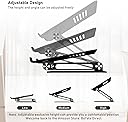
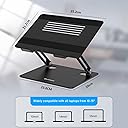
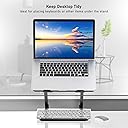
The BoYata Laptop Stand is a premium adjustable metal riser designed to improve posture and workspace efficiency. Crafted from sturdy alloy steel and aluminum, it supports laptops up to 20kg and 17 inches, featuring anti-slip silicone pads and ventilation slots to prevent overheating. Its sleek Z-type design offers customizable height and angle adjustments, making it a must-have ergonomic accessory for professionals seeking comfort and productivity.


| ASIN | B08GFRKQ23 |
| Antenna Location | Laptop |
| Best Sellers Rank | #273 in Laptop Stands |
| Brand | BoYata |
| Color | Black |
| Compatible Devices | Laptops |
| Compatible Phone Models | Laptop up to 17 Inches, Laptop Holder Compatible for MacBook, Laptop-Black |
| Customer Reviews | 4.8 out of 5 stars 7,031 Reviews |
| Enclosure Material | Aluminum |
| Fastening Type | Bracket |
| Form Factor | laptop |
| Included Components | Laptop |
| Manufacturer | Boyata |
| Mfr Part Number | N21 |
| Model Name | BoYata Laptop Stand, Adjustable Laptop Riser with Slide-Proof Silicone and Protective Hooks, Laptop Stand for Laptop up to 17 Inches, Laptop Holder Compatible for MacBook, Laptop-Black |
| Model Number | N21 BLACK |
| Mounting Type | Tabletop |
| Number of Items | 1 |
| Other Special Features of the Product | Adjustable |
| Style Name | Sturdy |
| Theme | Electronics |
| Unit Count | 1 Count |
| Warranty Description | 1Year Warranty |
E**R
LIFE & NECK SAVER! You CAN'T GO WRONG buying this one!!
This laptop stand is PERFECT! I spent many years with a headache & pains in my neck from using my laptop. I don't even know how I found this stand, but after careful research, I bought it. And oh my!! If only I'd had one back in '02, my doctor bills would have been close to nil. I can now use my laptop in any room.. at any table (even the coffee table in front of my couch.. with NO pain! It's sturdy as heck & adjustable into many positions! You have to use a little strength to adjust it, but I'm a 67 year old woman who had a stroke that did a job on my right side. My right hand & arm are weaker than they used to be & of course I'm right-handed. But reaching through the middle, I grip the back of the base with my right hand, & use the top of my forearm to push up to open it more, & pretty much the opposite to close it. The "closing" explanation is a little iffy.. you kind of just have to study it first & decide which way is best for you. The sturdiness of the joints definitely feels like it will take what could be years of adjusting to make it loosen up (which is really the way you want it to be). It looks like the only way it could become a little shaky is if you have the stand wide open then push the monitor open all the way. BUT- I set a heavy seashell on the base to remove any possible wobble. My stand is sitting as tall as it will go right now & my monitor is set as far back as possible - I'M TYPING ON IT RIGHT NOW and it's absolutely fine! PLEASE DON'T let this influence your decision on buying! My set-up is unusual, & is just my preference ... most people will not have the stand & laptop set wide open anyway. But if you do, just place something with a little weight to it on the base. Some people have asked about the prongs getting in the way of comfortable typing. The bottom half of my comp is 9/16" and the prongs stand just the *smallest* bit above it. I set my metal ruler down flat on my comp, & the difference isn't even enough to keep the ruler on board. It slides right off. The prongs make no difference to me while typing.. most times my wrists set just outside the prongs - but that's me. Your laptop will NOT slide off - there is a rubbery substance on the stand surface (and on the inside of the prongs!) which stop things from moving. You have to raise the comp straight up to remove it - it just will NOT slide. Your laptop will also NOT overheat while sitting on this stand. There are 5 good sized slots running across the 'bed' so that heat is allowed to dissipate. This, to me, is the definite BIG plus! The best part is I can now use my laptop in while in a sitting position or while laying down on my couch or bed - and be COMFORTABLE while doing so!! No eyestrain, neck ache or headache!! And with a little ingenuity, I found I can read books on my Kindle while my Kindle is sitting upright on this stand. A lot of people will laugh at this, but hey.. at least duck tape isn't involved. I inserted a wooden kabob stick into a 7/16" (OD) by 9" long thick rubber straw - the kind you get with re-usable jumbo size plastic glasses - taped the ends closed, & set in on the 2 prongs that stop the computer from falling off the stand. My Kindle sits on top of this straw & is perfectly sturdy. I turn pages with a light finger-tap at the edge & have NO problem with it moving around. None! The rubber of the straw sticks to prongs & my Kindle & the kabob stick makes the straw sturdy. Nothing rolls. This is just to give an idea if someone wants to use both laptop and an e-reader on one piece of equipement. Am sure others can/will find some other kind of "something".... I just didn't have anything else to use. :) Bottom line is ... you won't go wrong buying this stand! It's great!! (The shipping by this seller was extremely fast, too!)
E**D
Well‑built stand that frees up desk space and matches MacBook perfectly
This is a great desk accessory that lifts the laptop to a comfortable and safer viewing height. It’s fully adjustable, feels solid and tight, and doesn’t wobble once set. The build quality is excellent, and it doesn’t look cheap at all — the space gray finish matches a MacBook Pro very well. It also helps free up desk space by raising the laptop off the surface. A well‑designed and very useful stand.
N**5
So useful I bought two!
Bought this a couple years ago during the pandemic for my laptop and then bought another one for my son for his iPad during remote learning. I mostly use this with a laptop on the stand and wireless keyboard below, but frequently also with my iPad Pro either laying on the stand (stand tipped down) or standing on it (stand horizontal). Recently it has also been on my nightstand as a de facto shelf, holding a lamp, a personal fan, phone and other nightstand miscellany. Pros: —Very stable, only wobbles or tips if you try to extend the arm virtually straight, but that’s not a fault of the product, just physics. —Very sturdy, the hinges are strong and won’t buckle or sag. The whole unit had a solid weight without feeling heavy. —The rubber pads keep things from slipping —Versatile, as stated above I’ve used them with laptops, tablets, and as a shelf to create extra space on my nightstand, also as a book stand and phone stand (each hook is wide enough to keep a phone stable). —Great value for the money. Cons (kind of): —I’ve tried it on my bed for watching movies, which it is not designed for, so it was naturally less stable. But combined with a lap tray, it was workable. It works best on a flat, hard surface. —Some people might find it harder to adjust at first, but if you follow the instructions about adjusting it from the middle you’ll be fine, and quite frankly, that’s more than an acceptable trade-off for the stability and almost infinite positionability. In short, I love this well-made and versatile stand and may even get a third one for work!
M**S
Solid Build, Easy Adjustments, Noticeable Comfort Upgrade
Simple, solid, and does exactly what it should. Easy to adjust, holds the laptop steady, and improves posture right away. The build feels sturdy, not flimsy, and it doesn’t slide around on the desk. One of those small upgrades that actually makes a difference.
S**G
Recommend: great value and sturdy compared to most
Recommend. I ordered five laptop stands $20-$80. I found this one to be more sturdy especially if you need to raise higher. The physics works better. So far it maintains position and doesn't tip, give or slide. Venting good, no problems with heat. For the price point and what you get it's a great value, sturdy, clean and modern looking, matches my silver laptop, you can keep papers underneath and I like the placement of rubberized grips. One comment on all of these cheaper stands is that the front "legs" that the bottom of the laptop rests against (so doesn't slide towards you) are higher than the laptop so when typing your hands may rub against them and it's annoying/can hurt. This was the case with all. Since laptops come in different thicknesses it has to be this way.. suspect high end stands don't have this.
A**E
Strong, Sturdy, Great for Big Laptops
This laptop stand has plenty of strength in the arms that it takes quite a bit of force to move it into the desired shape and position that you want. Which is great if you don't want a weak stand that will lose stength over time. The base has a large footprint, so the chance of it toppling over accidentally or even intentionally is zero to none. The base also has anti-slip pads that prevents the stand from sliding around the desk surface, prevents scratches of the desk, as well as provides anti-vibration. The surface of the stand which holds the laptop is also quite a large size compared to other brands, which is great for laptops between 10 inches up to 17 inches, maybe even larger. Other laptop stands had much smaller surfaces, close to half the size. The large size is suitable for non-laptop devices like portable DJ turntables, audio gear, or midi controllers if needed. The air vents are great, but I was still concerned that my Lenovo Legion Slim 7i would not have adaquate cooling. So to be sure, I purchased clear adhesive anti-slip rubber bumpers/stoppers and stuck them to the top surface that the laptop sits on. This provided an extra two to three millimeters of air gap between the laptop and the surface to allow for more airflow into the laptop's underside air vent intake. I can confirm that after running benchmark tests to stress test the CPU/GPU in order to generate heat and ramp up the fans, thermal performace was phenomenal. I highly recommend this combination of products (the laptop stand + anti-slip rubber bumpers) to anyone else looking for a sturdy laptop stand that also needs to ensure cooling performance of their laptop.
H**K
Sturdy and effective for a small desk
After about a month of working from home with my work-issued laptop, I began having bad headaches four to six days a week and realized that my posture was probably to blame. My desk is small enough that an external monitor would take up a ton of room, so I decided to buy this stand and a small wireless keyboard instead. The stand holds my bulky Dell laptop firmly without any slipping. It's honestly a little hard to adjust the height of the stand, which is a good thing! It takes up very little room on my desk, and set my keyboard under the laptop when I'm not working. It's as space-saving as I can probably get with my setup. I get fewer headaches now and am glad that I bought this stand. I recommend it for anybody who has a small desk and doesn't want to deal with a monitor. Just make sure you also get a wireless keyboard so you're not awkwardly reaching up to your laptop's keyboard! ***UPDATE 3/6/23: After nearly three years of use, this is still a five-star product! I've adjusted the angle a few times to keep up with changes to my WFH setup (needed to rethink things after getting a new chair), and it still holds my laptop without sagging or drooping. The little soft pads at the front came a bit unstuck, but they're easy to smoosh back down and don't really affect the way the stand works. Wonderful product!
M**Y
MacBook Pro 16 inch very stable. Holds position. No wobble. Strong. Grips laptop well.
My title says it all. This fits my 16 inch MacBook Pro. Nothing slides. When you position this stand, for angle and height, it stays right there, even with the pressure of my wrists/hands on the keyboard. It's also nice looking. Lightweight and folds down quite flat if you need to carry it. I have one in both locations where I use my computer. I'm very pleased. I've used one for about 2 years now and it still holds its position precisely as placed. In fact, it requires a bit of effort to change the position, not too much for me, but you can't just give it a light push to change it. I change the height and angle both every few hours when I'm doing a long computer project. This way I do not get muscle aches and kinks in my neck. I also balance it on my lap quite often, and at other times, use a lap board or lap desk, they all work fine. Recommend.
S**U
Solid, attractive and a great value!
This stand is definitely worth the money spent. I've been using it daily for several weeks now and remain impressed by it's utility. It is very sturdy with very stiff joints and flexible so you can set it to the height and angle that meets your needs and maintains its setting even with constant use. I use the keyboard on the laptop and haven't had to readjust the setting yet. It doesn't slide on the table and my laptop sits firmly on the arms. I have a 16" black Acer Nitro and it fits perfectly and looks good with the silver stand. I am comfortable highly recommending this stand.
A**K
Good product
Good product
M**M
Fast arrival, good quality
Good sturdy material. Arrived really fast. It has the logo at the base which I would have preferred hidden, but it’s in the photos- I just didn’t notice.
M**L
Very steady! Very good quality!
Arrived in good time. Bought at for using my laptop when I am standing. The adjustable height is just right for me. The stand is made of metal, feel very steady, good quality and well made. Good discounted price, bought two on black friday weekend. Happy with my purchase.
P**L
Solid product, good price
I have had this for almost a month now and am really happy with this purchase. I use it every day to raise my laptop screen to my eye level. Since using it I have avoided back/neck strain from constantly looking down at the laptop screen. It is a solid quality build and minimal design that does the job without any hassle. I put my laptop on it and use a wireless mouse and keyboard. Sometime I use the laptop keyboard while the laptop is on the stand and while there is a small amount of wobble, the wobble is not enough to annoy me. However, I wouldn't recommend using the laptop keyboard for regular typing while on the stand, this is because the stand raises the keyboard to a height and angle that is not comfortable for me. I like that the size of the base is small, so it frees up space on my desk because the base of the stand is smaller then the base of my laptop. Also I can place things on the base of the stand, like a notebook or my wireless keyboard. It is very lightweight and portable. I move it around the house often, such as taking it to the kitchen to watch recipe instructions while cooking, or place it on a table to have a quick video call.
Trustpilot
3 days ago
1 day ago