Buy anything from 5,000+ international stores. One checkout price. No surprise fees. Join 2M+ shoppers on Desertcart.
Desertcart purchases this item on your behalf and handles shipping, customs, and support to UK.
⌨️ Elevate your workflow with comfort and wireless freedom — because your wrists deserve the best!
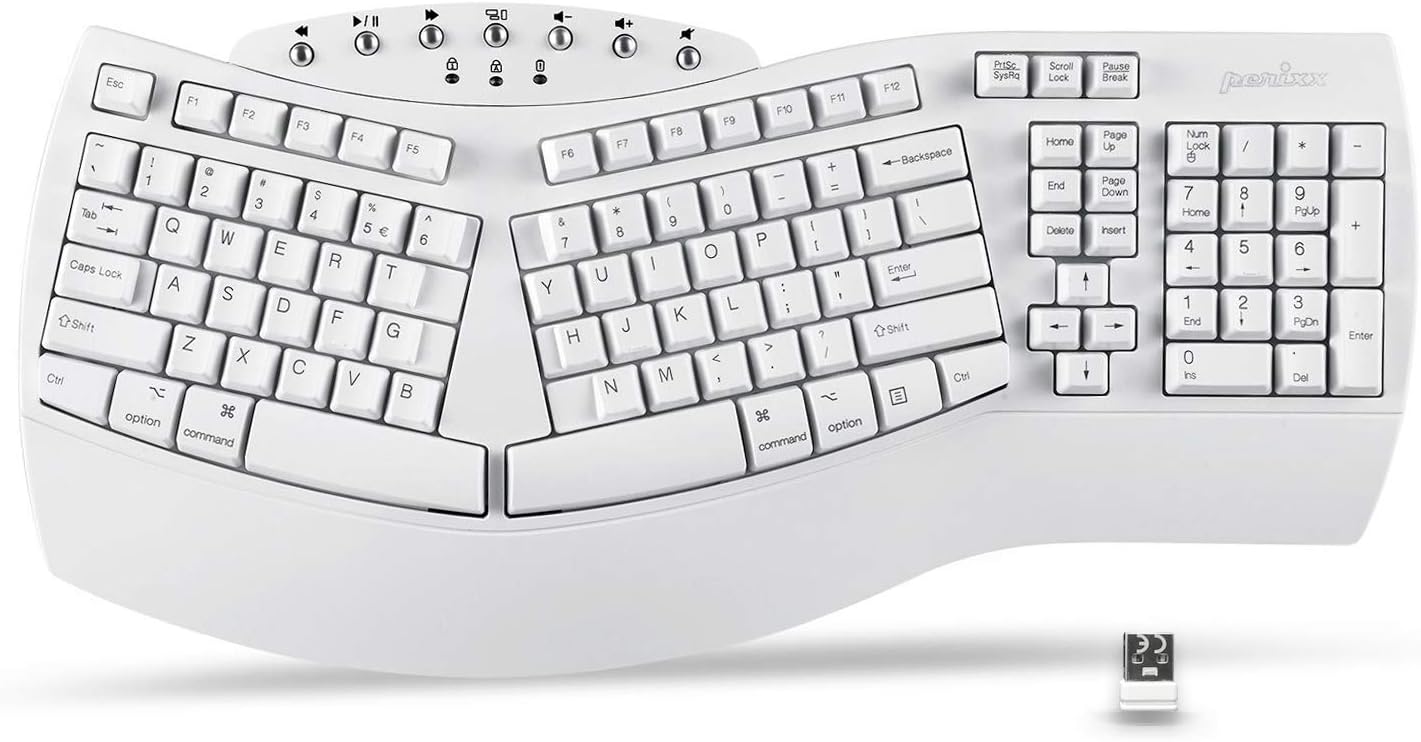
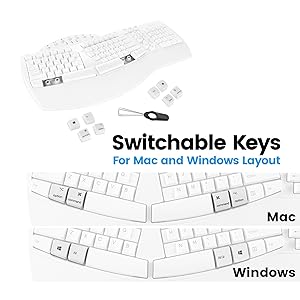
The Perixx Periboard-612 is a wireless ergonomic split keyboard featuring 111 tactile keys with long travel, designed to reduce wrist strain and prevent RSI. It offers dual wireless connectivity via 2.4 GHz nano receiver and Bluetooth, compatible with both Mac and Windows systems including switchable key layouts. Built with durable ABS material, it includes an integrated palm rest, a 12-month limited warranty, and a key puller for easy maintenance, making it ideal for professionals seeking comfort and productivity.


| ASIN | B07TJHDBD1 |
| Additional Features | Ergonomic, Split Keyset Design, Wrist Rest |
| Antenna Location | Office |
| Best Sellers Rank | #32 in Computer Keyboards |
| Brand | Perixx |
| Built-In Media | Keyboard |
| Button Quantity | 2 |
| Color | White Wireless |
| Compatible Devices | Laptop, PC |
| Connectivity Technology | Wireless |
| Customer Reviews | 4.0 4.0 out of 5 stars (513) |
| Enclosure Material | Acrylonitrile Butadiene Styrene |
| Generation | 1 |
| Global Trade Identification Number | 04049571002675 |
| Hand Orientation | Ambidextrous |
| Item Dimensions L x W x H | 19.09"L x 8.98"W x 1.57"H |
| Item Type Name | PERIBOARD-612 |
| Item Weight | 1000 Grams |
| Keyboard Backlighting Color Support | Single Color |
| Keyboard Description | Ergonomic |
| Keyboard Layout | QWERTY |
| Manufacturer | Perixx |
| Model Name | PERIBOARD-612 US W |
| Model Number | 11615 |
| Number of Keys | 111 |
| Power Source | Battery Powered |
| Style Name | Wireless |
| Switch Type | Tactile |
| Theme | Ergonomic Typing |
| Unit Count | 1.0 Count |
| Warranty Description | 12 Months Limited Warranty |
G**N
Answers for Common Issues
This is my favorite keyboard that I've been using since like 2017. I've had 2 in that time. Here are some things I see in the 1 star reviews that are easy fixes. "After a few months the keys started stuttering like thissssss sometimes" It does that when the batteries are low. Change the batteries and it will stop doing that. "Ew it's making me use mac shortcuts even though I have a windows computer!" Flip it over. There's a switch on the back that says "WIN OS X". Switch it to WIN and it'll act like a windows keyboard. Switch it to OS and it acts like a mac. Idk what X is for... linux? The reason I have had 2 of these keyboards (and need a third) is that if you spill a single drop of water into the keys, they will stop working. And warranty doesn't cover spills. I had my second one for two days before I spilled water into the number pad and now the 8, 5, 2, and / keys don't work over there. But this is the most comfortable keyboard and I love the clicky clack noises it makes. I have grown attached and won't use another one, plus it's pretty cheap.
D**D
Love this keyboard
In the past, I have had trouble getting a wireless ergonomic keyboard that would be fully compatible with my Mac. This one works perfectly. Initially, I had trouble with connectivity. However, when I purged the old keyboard driver from the Bluetooth files, it worked perfectly and has ever since. Perixx could have saved me a headache if they had included this step in their setup instructions. But after overcoming that problem, I have been delighted. The keyboard is great, with excellent keys and a great ergonomic shape. Love this keyboard. Best I have ever had.
T**M
LOVE IT! Great product!
LOVE IT!!! (edit - My review stands, this is a great product-I want to point out that this is not backlit, the description states it is 'one color' backlit, which I thought meant it was backlit. Still LOVE IT though)! This is second one I have bought, first one has wire but works great in office. Bout this one for home. It is a (mechanical) noisy clickity clackaly keyboard, which is what I was looking for. Some may feel it is too big, but could not be any smaller for what it is. I do not type well at all (a little more than two fingers looking at the keyboard) - this keyboard has made me type more efficiently and effectively. Did I say - I LOVE IT!!!
C**Y
Very disappointed in the quality
I purchased this key and from the beginning it has had problems. Within 1 month of purchaisng it, the keyboard on the right side stopped working. I don't use that feature routinely so it was fine and I did not complain. Since that time, it has been difficult to keep it connected through bluetooth and I have to reconnect it multiple times a day. This has been an on-going problem. Now, it will not connect at all. I changed batteries and tried to troubleshoot but it just won't work. I replaced it with another brand and am throwing it in the trash after only 4 months of use.
R**J
Comfortable and Efficient to Use
I have used ergonomic keyboards for many years and I find it is definitely the most comfortable way to type. I replaced my computer recently and needed a new keyboard that works with Mac. The thing on this keyboard I am not happy with is the small stand on the bottom that adjusts the angle of this product. One of them keeps falling off and this was a problem I never experienced on the old Microsoft keyboard I have used for fifteen years.
G**U
Best price-feature trade-off ergonomic keyboard for the Apple ecosystem.
Excellent ergonomic keyboard for Mac. In my humble opinion, it is one of the best price-function trade-off ergonomic keyboard for Mac. I have one for work and one for home.
F**L
Died after 2 years
Great keyboard while it lasted. I bought this in July 2022. Today is 11/6/2024 and the keyboard would not connect to my MacBook via BT anymore no matter what I do: changing out batteries, turning it off/on, pressing on the Connect button. It just died for no good reason at all. Keyboard has never been abused or dropped on the floor and one day it just would not connect anymore.
C**N
Poor light functions and absence of Windows keys
Nice keyboard, but there are a couple of quirks, notably inconsistent illumination of the caps lock/number lock lights. Frequently, even when you're in an all-caps or number lock mode, the lights do not illuminate. Conversely, they're sometimes lit when the caps lock or number lock mode is not engaged. The other thing that may bother Windows users is the lack of the Windows key with appropriate logo — both the left-hand and right-hand Windows keys are replaced with keys labeled "Start". Perixx includes "command" and "option" keys (two each) for Mac users, but no Windows keys that can be swapped for the "Start" keys. A key pulling tool is also provided.
井**ス
■いいところ ・エルゴノミクスで一体型のパームレスト付き。 ・シンプルな英語キーボード(ローマ字での日本語入力可能) ・メンブレン式でうち心地もよく、メカニカルより静か。 ・レシーバーはUSBとBluetoothの両方に対応。 ・WindowsとMacの両方に対応(キートップ、取り外し器具付) ・音量調節などのマルチメディアボタン付き。 ■悪いところ ・英語キーボードのため、設定が必要(Windows10では設定画面の出し方がわかりにくい) ・記号の配置が日本語キーボードと異なるため慣れが必要(特に丸カッコと鍵カッコの位置が少しずつ違うため押し間違いが多発) ・Enterキーが縦長ではなく、横長のため慣れないと押し間違えが多発する。 ・日本語入力の切り替えも左上のキーとaltキーのため漢字キーひとつというわけにはいかない ・Homeキーなどが文字のキーより小さく押しにくい。 ・矢印キーの配置が縦長で独特かつ小さい。 ・なぜか標準のキートップがMac(optionキーとcommandキー)のため、Windowsユーザーは最初にキートップの変更が必要(なのに、キーボード裏のOSの切り替えスイッチはWindowsが初期設定) ■英語キーボードの設定 ネットで調べても最近のWindows10での設定がなかなか出なかったので備忘録で書いておきます。コントロールパネルのキーボードからではありません。 1.コントロールパネルの「時刻と言語」を開く 2.「言語」をクリック 3.「優先する言語」の「日本語」をクリック 4.「オプション」ボタンが表示されるので「オプション」をクリック 5.「ハードウェア キーボード レイアウト」の「レイアウトを変更する」ボタンをクリック 6.「英語キーボード(101/102キー)」を選択して「OK」をクリック ■購入の経緯 15年ほど前にマイクロソフトのMicrosoft Wireless Laser Desktop 4000を愛用していたが、レシーバー部分がケーブルのため断線して受信感度が悪くなって泣く泣く手放した。それ以来エルゴノミクスキーボードを探し続けたが、現在のエルゴノミクスキーボードは他社も含めてほとんどが薄いパンタグラフ式のため、以前と同じメンブレンを探し続けていた。 ■総合的な感想 このキーボードはメンブレン式のため、大昔のPC98キーボードを彷彿させるうち心地になっている。入力音も静音ではないものの、メカニカル式より静かに打て、想像していたよりも静かに打てる。
C**N
Me gusto mucho el diseño, se siente tal cual pensaba. Me recuerda mucho al primero que tuve ya hace bastantes años.. el color muy bonito...
R**N
This is a great option to the more expensive keyboards, it does exactly what I want it's ergonomic and easy to use with little training. Ok, yes it's not fancy and the keys are not weighted but it works great, and really isn't all that really matters your fingers and shoulders and wrist aren't getting sore and tired anymore.
A**R
When I first set up this keyboard, I thought OMG I hate this! But I pushed myself to use it that whole day and now I love it. It just takes some getting used to after using a straight keyboard for so long. It positions my arms in a way that I'm able to press my shoulders back in a better posture position. I have a very "light and airy" set up with lots of whites on my desk, so I was REALLY happy to fine this white ergo keyboard option. Also, it paired with my Mac perfectly, which was my main concern. Great product!
A**ー
キーボードの高さが高い エンターキーが小さい 日本語キーボード配列にしても 配列が変わらない?
Trustpilot
1 month ago
1 month ago