🎮 Game On: Where Style Meets Performance!
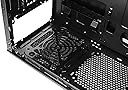
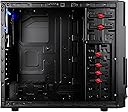
The Thermaltake Commander MS-I Mid Tower ATX Gaming Computer Case is designed for gamers seeking a blend of functionality and aesthetics. It supports M-ATX/ATX motherboards, features advanced ventilation with dual 120mm fans, and offers tool-free drive bays for hassle-free installation. With a sleek black design and a transparent side window, this case not only keeps your components cool but also showcases your gaming setup.
| ASIN | B0056IZDP8 |
| Antenna Location | Gaming |
| Brand | Thermaltake |
| Case Type | Mid Tower |
| Color | Full Black/Metal Mesh |
| Cooling Method | Air |
| Customer Reviews | 4.3 4.3 out of 5 stars (523) |
| Enclosure Material | SECC & Plastic(Front Bezel Material) |
| Fan Size | 120 Millimeters |
| Global Trade Identification Number | 00731215286179 |
| Hard Disk Form Factor | 3.5 Inches |
| Internal Bays Quantity | 5 |
| Item Part Number | VN400A1W2N |
| Item Weight | 13 Pounds |
| Manufacturer | Thermaltake USA Direct |
| Mfr Part Number | VN400A1W2N |
| Model Name | VN400A1W2N |
| Model Number | VN400A1W2N |
| Number of Fans | 2 |
| Other Special Features of the Product | Advanced Ventilation |
| Power Supply Mounting Type | Front Mount |
| Supported Motherboard | ATX |
| Total Expansion Slots Quantity | 7 |
| Total USB 2.0 Ports | 2 |
| Total USB 3.0 Ports | 3 |
| Total Usb Ports | 2 |
| UPC | 151903624210 191120060248 707975217586 014445067863 168141424922 088020847836 021111232388 999996645114 012300467933 731215286179 807320212867 763616021844 115970712584 112840026246 872182642367 841163041833 803983007338 809385165164 172304225400 809185315851 069060237443 |
| Warranty Description | 3 years |
J**S
Bottom line -- It's different than your buddies, and he'll know it.
I got this case because of the obvious. Firstly, it's white. Its design looks like some sort of mech-like paneling, and I find it extremely attractive. The inside of my build has very few lights (PSU, and a fan or two) and older, mid-level gear, so the smaller window was perfect to give just a sneak peak and not spill too much. Its cost. It is CHEAP. For what you get, this case is a bargain, but it does have its 'flaws' or.. rather, characteristics. The paneling is thin and the case is really light. It is not sturdy when in pieces, but when it's pieced together I'd feel comfortable lugging it around for a LAN party or two. Oh, and it's good to note I'm reviewing it on Amazon and not NE because it's CHEAPER here! OK. Things I'll try to clarify: Depending on your motherboard, you CAN fit a regular sized 120mm fan into the top, front-most fan slot. My mobo (Asus P5KC) has just barely enough clearance. The fan literally is pressed against the RAM clip ins, so really I'd have to take this top fan out to change my RAM. It is possible, but if the clearance looks like it's any less than my MOBO, you'll have to get a slim. I CANNOT use the top, back most grill because my LGA775 Freezer Pro (pushing air towards the back) does not give enough clearance. This is fine since the holes most likely don't line up. A fan absolutely can fit in the front of the case. The case comes with 4 longer screws just for this. It has 4 screw holes after you take off the front panel, but I found with a 120mm fan I can only secure it with two screws. I padded the bottom of the fan where it would touch the metal with its own cable, thus eliminating any vibration there might be. I also see that I was able to mount a 120mm fan on the side panel through the holes in the side. I was only able to use two screws, and it's a bit cockeyed so that I could find the fans screw holes, but it was possible. I have two 120 mm fans pushing in (front and bottom) and two pushing out (Top and back) with an additional 92mm side fan, and my PSU put in upside down the suck hot air out. This case runs HOT and if you're a gamer, invest in some fans. (Look for the 4pack Rosewill fans here or on NE, it's only about 10 bucks.) If you had to choose where to put fans, I'd say in order from most important to least, probably front, top, then bottom. The side (if you can fit one) pumps air right on the GPU, pretty useful. Small thing that kind of bugs me, the blue LED kind of floods into the red HDD light and makes it look pink. This can be fixed. The case is a pain to take the front panel off. Also, the snow version has the USB 3.0 MOBO attachment and not the lame-ass run through. I don't like you have to pop out the rear brackets for your cards. I do like the cable management, but when I take the other side off it gives birth to bundles of hidden wire. The toolless design WORKS, but I felt more secure actually screwing them in on the opposite side. WIth a few extra fans, the heat from this case gets pumped out -- against its will. This case won't be cool AND quiet, you're going to have to put in at least one more fan, especially if you're OCing. Okay. That was pretty much a vomit of information, I hope it's useful and can help somebody on the fence with this case. I give it five stars, but was very tempted to give it four. But for the simple cost of this case, it's amazing for what you pay for. CHeap, looks that can KILL, and that's all I was going for -- and this case delivers. tl;dr: put in a fan or two, and don't complain about the case when you only paid 50 bucks.
Y**A
A versatile multi-fan-ready case that's as sexy as it is fully-featured - TRULY EPIC!!!
The Thermaltake Commander MS-I Epic Edition truly is EPIC! I wanted a case that would be as future proof as possible. It had to be full-size yet support multiple motherboard form factors. This one supports to standard ATX and mATX (micro, not mini) form factors, which is great! The included cables will cover you for older and newer motherboards, too. There's even an AC97 cable for the non-HD sound cards out there. Working with this case is a pleasure. The side panels come off easily. The main panel is accessible via thumbscrews but the other panel has to be unscrewed with a tool. No biggy. There's tons of room to work with in there. If you're one of those folks that has to have all their cables out of the way, there's room to work with under the motherboard "floor", with a few different distribution points to snake cables to. I haven't done this and probably won't as the benefit to air flow is not significant enough to warrant the effort.. Plus I like the look of all the cables. If you do want to do this, be sure to get longer cables. Flat cables may be safer but they won't give you as much play with placement so try to go for braided cables, if possible. There's enough room back there to work with. This case fits the OCZ Fatality splendidly, which is a feat in itself. That PSU is huge. It's got room to breathe now - YAY! A word of warning: there's a clip you'll want to remove before attempting to slip large PSUs in there. In all my excitement, I did not notice this and scratched my PSU a tiny bit. Not a big deal but if I think about it the OCD kicks in and bad stuff happens... =ox This case is built with air cooling in mind. I don't know if I'd go with liquid cooling here; heck, it's not worth it unless you're overclocking, IMHO. There's spots for four aux fans in addition to the standard case fan, which is included. The stock fan is rather quiet and puts out a nice bit of CFM. I went with the red and black because 1) Georgia Bulldogs 2) Chicago Bulls 3) it was the cheapest color. Actually, the cheapest color was a black and white case with a high piano gloss. It looked very Star Wars Stormtrooper to me.. Almost went with that but then I'd feel compelled to follow the theme and change my keyboard, mouse, monitor, etc. ANYWHO, the standard all-black case is the most expensive and popular, it seems. The down-side to this case is that it does not fully support USB 3.0, which is weird. You get a cable that you could connect to a USB 3.0 port to activate the front port. Rather strange that it does not use the pin-outs on the motherboard. You'll also need a mounting solution for your SSDs, unless you only run one. There is a spot to mount the SSD on the bottom of the case, which felt rather strange as well. If you're sticking to mATX (micro-ATX), consider the Xion Performance Meshed mATX USB 3.0 Tower Case XON-560_BK Black/Blue: http://www.amazon.com/gp/product/B00B19L8LO?psc=1&redirect=true&ref_=ox_sc_sfl_title_27&smid=A346RFEUAYAD0Q I almost went with that case because it has trays for SSD drives and, at the time, was around $10-20 cheaper. The case seems to be growing in popularity price so I expect a price increase.
S**O
Ziehmlich dünnes Alublech. Aber man hat sehr viel platz für die Festplatten.Das ATX Mainboard ist meiner meinung ziehmlich hoch angesetzt denn man hat kaum Platz für den Radiator der Wasserkühlung denn wenn das Board eingeschraubt ist und eine Wasserkühlung am Luftgitter oben anschrauben möchte kommen Lüfter und Ramriegel sich ins Gehege also muss man den Radiator leicht versetzten . Was bei mir nicht dabei war ,waren die lüfter vorne und hinten obwohl in der beschreibung stand das sie dabei sind . Alles in Allem trotzdem ein schöner Tower.
N**O
Come sempre i case thermaltake sono ottimi... Ho montato velocemente la motherboard e tutto e filato liscio... Quando montate l'alimentatore in basso togliete spostandola la griglia per filtrare l'aria e dovete togliere due viti che fissano un "angolo" che vanno rimesse dopo aver posizionato l'alimentatore... Con i ganci e facile montare i lettori DVD nel case inoltre si può mettere un disco SSD nel vano floppy disk. Molto bello da vedere con l'apertura laterale ed il plexiglass per ispezionare i componenti interni... Ultima chicca si possono aggiungere due ventole nella parte superiore per aumentare la portata di aria e abbassare le temperature per chi fa del modding spinto...
S**O
comprato a febbraio e pagato 44euro, quindi meno del prezzo attuale (55), ma sempre spedito e venduto da Amazon. Come dicono dalla descrizione, lo spazio interno permette di alloggiare schede video e dissipatori cpu di dimensioni generose, io dentro ho montato una 7970gigabyte windforce e un enermax ets-t40 senza nessun problema. la ventola preinstallata in estrazione al posteriore è molto silenziosa e gira stabile a 1000rpm. Consiglio però di installare una seconda ventola in immissione sul fronte per migliorare l'aerazione, soprattutto se in estate la temperatura della stanza non è delle più fresche! La paratia posteriore permette il cable management, non c'è moltissimo spazio ma con un po' di impegno e fascette si riesce a fare stare tutti i cavi di alimentazione dietro. in dotazione c'è tutto il materiale che serve per monate le componenti. A cercare il pelo nell'uovo, lo smontaggio della maschera anteriore è un pelo macchinoso, ma una volta capito il trucco (ci sono due viti per parte con un supporto "a ragnetto" in metallo da smontare) si tira via in 2 minuti. Per 44euro non si può chiedere di più! A febbraio poteva tranquillamente competere con case che costavano anche 60-70euro!
P**R
I bought this case as I was looking to setup a new desktop pc, and also because I was looking for a white case. I'm happy to say that this is a brilliant case. Positives: -Quick delivery -Well packaged -Brilliant build quality (doesn't feel cheap)/ (solid metal & plastic) -Brilliant white paint quality -Sleek design (I love the front design) -Good space inside (very easy to get optical drives and HDD's in place, you don't even need screws!) -Comes with everything you need to fit in your motherboard, psu, drives etc... -Brilliant cable management (I was able to hide excess cabling under a raised platform) -Good quality mesh (over the front intake, drive bays and psu area)/ (I would recommend that you buy more fan mesh covers!) -Plenty of areas to add fans (There's space for around 6 fans overall, all of which are 12cm fan areas) -Nice sized viewing area on the side of the case (Shows enough of the inside and enough illumination if you use internal lights) -Already comes with a rear exhaust fan -It looks epic when illuminated! (Blue or red internal lighting look amazing with this case, I used blue) Now onto a minor few issues.... (Not enough to bring it down to 4 stars because this advice will help overcome these problems) Negatives: -A bit of a pain installing the front intake fan as the usual fan screws you use are quite 'fat' whereas the fan holes provided on the case are really 'thin'. If you buy this then use the four 'very long' screws provided with the case to get the front intake fan in (took me a while to figure this out as no other desktop case I've setup has had this problem). -You might see a slight accumulation of marks/dust if it's put through heavy use but if you use it well and keep it clean then this potential issue can be prevented. Overall, this is a brilliant case which earns every penny you put in for it. This is exactly what you would expect for the price you pay (and probably more); I'm very impressed by the build quality and the ease of installation of other internal parts. If you're looking for a nicely styled, cheap, solid, white and easy to setup pc case then this is it! Lastly, I have fully setup this desktop case with all internal parts, cable management, fans and internal lighting. If you want to see some pictures of this case with all its parts and lighting then I can upload some pictures upon request! Thanks for reading, enjoy..... =)
P**A
The case is much as I expected. Only downside it is a little tight in some parts, but installed pieces can be placed with mild movement of fixtures. I have worked with metal in heat and cold so I am familiar with expansion and contraction movement. All in all, happy with purchase.
Trustpilot
2 months ago
2 days ago