Desertcart purchases this item on your behalf and handles shipping, customs, and support to UK.
📊 Own the classroom and the boardroom with HP Prime — the ultimate math sidekick that means business.
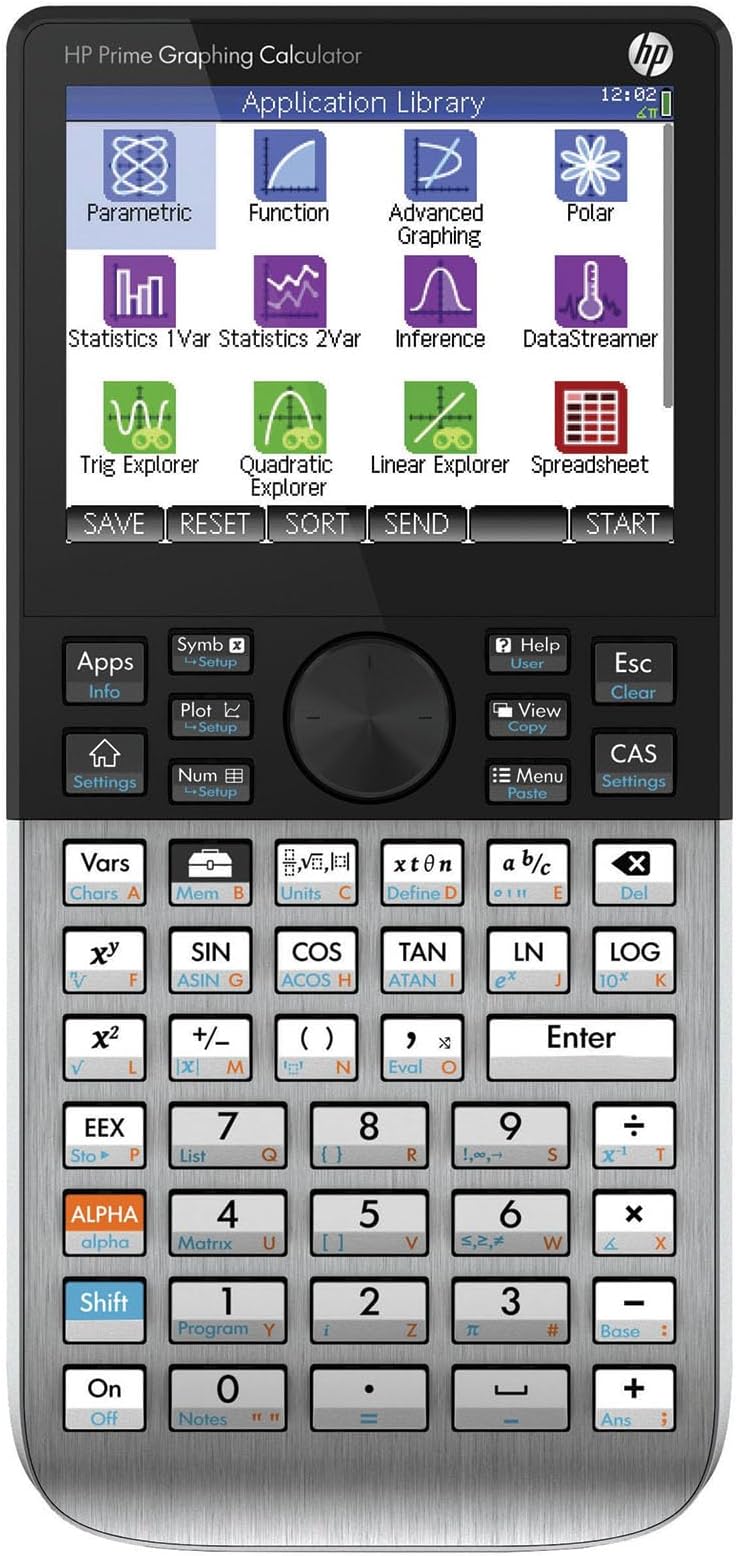
The HP Prime Graphing Calculator features a vibrant 3.5-inch multi-touch color display and a powerful Computer Algebra System (CAS) that supports advanced graphing, dynamic geometry, and spreadsheet applications. Designed with a durable brushed metal faceplate and rubberized keys, it offers a premium tactile experience. Its cross-platform compatibility includes virtual versions for Windows, Mac, and mobile devices, enabling seamless workflow integration. Powered by a replaceable CR2032 battery, the HP Prime is a versatile tool ideal for high school to college-level math, engineering, and professional use.

| ASIN | B07HF6RXGG |
| Best Sellers Rank | #32,399 in Office Products ( See Top 100 in Office Products ) #205 in Basic Office Calculators |
| Brand | HP |
| Calculator Type | Graphing |
| Color | Silver |
| Customer Reviews | 4.5 out of 5 stars 1,857 Reviews |
| Display Type | LCD |
| Enclosure Material | Plastic |
| Global Trade Identification Number | 00191628030088, 00191628030118, 00191628030149 |
| Item Dimensions L x W | 7.25"L x 3.66"W |
| Item Weight | 8 ounces |
| Manufacturer | HP Inc. |
| Mfr Part Number | 2AP18AA#B1S |
| Model Name | Prime Graphic Calculator |
| Model Number | 2AP18AA#B1S |
| Number of Batteries | 1 CR2032 batteries required. (included) |
| Power Source | Battery Powered |
| Screen Size | 3.5 inches |
| UPC | 191628030156 191628030125 191628030101 191628030163 191628030088 191628030132 193424872961 191628030095 191628030149 191628030118 |
| Unit Count | 1 Count |
| Warranty Description | limited warranty |
A**R
Unlock Your Calculator’s Power
Set Amazon search category to Books. Type “HP Prime Calculator”. Find textbook quality Arithmetic, Algebra, and College Math resources for the cost of a fast-food meal. Don’t let the inexpensive prices fool you. These are great resources that help you unlock your calculator’s power. Best Math Tool in Today’s Classroom. Most powerful Math assistant allowed in today’s classroom. With phones and other Internet electronic devices being banned, the HP Prime Calculator will give you a virtual assistance that allows to acquire and become proficient with any math skill from arithmetic to advanced calculus. HP Prime Calculator is a real sleeper, the usefulness of Matlab or Wolfram Mathmatica in a tool that is easy to use. Textbook style input by templates with vibrant color touch screen allow for easy entry of math problem, plus flyout popup menus and soft key tabs make work a pleasure. Its textbook output with built-in power functions and applications is easy augmented by your functions. Start your understanding of your calculator by using your familiarity with Arithmetic to concentrate on the Prime’s interface and textbook style input and output feature. After the quick review of your Arithmetic, use the Algebra and College Math textbooks to learn advanced features of your calculator be viewing their hundreds of applications. The same applications can serve as invaluable aid for High School Algebra, Advanced Algebra, and Statistic courses. Let the eBook listed serve as a handy reference. It can be viewed on your phone, tablet, or computer. Note that the Arithmetic and College Math paperbacks found includes references to YouTube videos using screenshots and virtual emulator. These screenshots and emulator allow you to see your calculator in action. A web reference is given in the paperbacks for free parallel web-based material that is digital linked to all the paperbacks’ references and their YouTube videos. See Amazon Book HP Prime Calculator. Search listing for explanations of the shown screens in this review. HP Prime Calculator has a download identical virtual version for Windows and Mac and plus HP connectivity program that allows you to use your computer for work at home and then easily transfer your work to your handheld HP Prime Calculator for classroom use. To augment your HP Prime handheld classroom Calculator, there is a free/lite version of the HP Prime Calculator for iPhone and Android phones and tablets. Plus, a paid Pro version with programming. The phone and tablet free/lite and Pro version allow you to have a HP Prime with you at all times. Using variables for functions and nested functions you can accomplish limited programming but extremely powerful programming tasks on any versions of HP Prime, free/lite, Pro, virtual, or physical calculator. Below, we give you some possible starting points for variable creations in math courses. We like programming through variables as it works for handheld, virtual, pro, and free/lite versions. Search the internet for text and video instructions on how to use these powerful variables. You can easily add these variables to your handheld. Using copy and paste highlight the desired collections of functions you wish to add. Transfer them to your virtual Window or Mac HP Prime Calculator. Next backup the virtual and use this backup to restore your handheld HP Prime Calculator. Remember to rename handheld as it now has virtual name. Note for copy and paste are in computer form but will show in calculator in textbook form. College Algebra Plus Algebra of Calculus Lines slopeln(x1,y1,x2,y2):=((y2-y1)/(x2-x1)) lineptm(x1,y1,m):=(m*('x'-x1)+y1) linept1pt2(x1,y1,x2,y2):=lineptm(x1,y1,slopeln(x1,y1,x2,y2)) (line for two, points, linept1pt1, requires slopeln and lineptm) Rational Expressions - Algebra of Calculus msec(a,h):=((F1(a+h)-F1(a))/h) mtan(a):=limit(simplify((F1(a+h)-F1(a))/h),h,0) mtan2(a):=limit(simplify((F1(x)-F1(a))/(x-a)),x,a) secline(x1,h):=simplify(lineptm(x1,F1(x1),msec(x1,h)))) tanline(x1):=simplify(lineptm(x1,F1(x1),mtan(x1))) (all functions use F1) (secline requires slope of secline, msec) (tanline requires slope of tanline, mtan) (secline and tanline requires Finite Math line point slope, lineptm) Algebra Absolute Value and Distance distrnl(a,b):=ABS(b-a) dist(d,r,t):=solve(d=r*t,x) arithn(d,f,n):=(f+(n-1)*d) arithsum(f,l,n):=(n/2*(f+l)) arithsum1(d,f,n):=(n/2*(f+arithn(d,f,n))) Trigonometry Complex Numbers P_to_R(r,a):= (r*COS(a)+r*SIN(a)*i) R_to_P(x,y):=(CAS(collect(ABS(x+y*i)))+"∡"+CAS(collect(ARG(x+y*i)))) Finite Math Finance sint(a,p,r,t):=ROUND(solve(a=p*(1+r*t),x),2) cpint(fv,pv,r,m,t):=ROUND(solve(fv=pv*(1+r/m)^(m*t),x),2) loan(pv,pmt,r,m,t):=ROUND(solve(pv=pmt*((1-(1+r/m)^(-m*t))/(r/m)),x),2) ira(fv,pmt,r,m,t):=ROUND(solve(fv=pmt*(((1+r/m)^(m*t)-1)/(r/m)),x),2) Linear Programming - Step by Step to check manual work pivmat(m,r,c):=CAS(pivot(CAS(mRow(1/m(r,c),m,r)),r,c)) Sets and Probabilities prsubL1(a,b):=DIFFERENCE(a,b) prsubL2(a,b):=DIFFERENCE(a,b) complement(a,b):=DIFFERENCE(a,b) For these added powerful programming examples, there are free text/screenshot webpages and YouTube videos with emulator instructions to get you started with these. The internet search function is your friend. Lastly, we not that the HP Prime Calculator is two calculators in one. A quick startup would be to use the simpler HOME calculator arithmetic side. The other calculator is the CAS, Computer Algebra System, an algebraic, calculus, and advanced math calculator that requires more time and resources to master. With Covid-19 and the use of virtual schooling students have fallen behind. As there are two calculators in one with the HP Prime Calculator the HP Prime HOME side can be used to learn the calculator for students in Algebra and Advanced Math courses but can also be used as a bridge to help upper elementary middle school student with gaps in their arithmetic knowledge. Search Amazon and the web for resources on using the HOME HP Prime Calculator side for these younger students. Giving them a crutch to temporarily plug their gaps while preventing them from falling further behind is valuable use of the HP Prime physical Calculator.
P**R
Quality Calculator, but use third party sellers at your own risk.
I am in college for engineering and needed a calculator for complex math and calculus. So far I only used some basic functions like the linear equation solver and the graphing function. I also tried CAS mode but found it easier to plot my function and find the intercepts on the graph. It's nice that the screen is a touch screen and the processor keeps up when you pan and pinch to zoom in and out of the graph view. This is a really powerful tool. It's like basically having a baby version of Matlab or Wolfram Mathmatica on you at all times. My professor even complimented me on my calculator. All the other students in my class have either the ancient Ti-84 or Ti-83 with the black and white screen and AAA batteries or the Ti-84 plus ce with color screen and rechargable battery in compact size and the HP Prime helps me to stand out from the crowd and gives me capabilities on par with some of my computational computer programs. I also have some experience with the Ti-Nspire which is one of the comparable models from a competing calculator company. I'd say the Prime is alot easier to use than the Nspire becasue of stuff like the touch screen, the better processor, and the nicer build quality. The build quality is also really nice. The buttons are basically hardened rubber and the faceplate is made of brushed metal. The device feels dense and sturdy. The footprint is also a nice size. It will easily stow away in a book bag or a desk drawer. I had a problem however with the right arrow button and the 1 button being unresponsive to clicks. I would feel the button actuate and hear a click but the calculator didn't register the input. I would then have to go back and push th ebutton again harder this time to get the button to register. Hopefully this is something that will resolve itself after I break in the keypad. The battery life is okay and will easily last a day or two. I do wish that the calculator had usb type C instead of micro B but it isn't that big of a deal. I heard that the calculator also takes the same batteries as an old Samsung Galaxy phone so maybe I'll look for some replacement batteries to hotswap them when they die. This might also be a good plan for test taking becasue you dson't want your calculator battery to suddenly die so it might be good to get a few backups. I bought this from a third party seller becasue they offered the fastest prime shipping. However when I recieved my the transparent plastic blister packaging was already opened. However the product and accessories looked brand new. The protective plastic film was still on the screen. This might have something to do with the unresponsive button issue I brought up earlier.
J**N
Wonderful CAS Graphing Calculator
I used TI calculators my whole life, so this was quite the learning curve for me. As an Engineering student in college, this calculator has been a great help for helping me check my work, as well as get numerical answers. The touchscreen helps a lot with graphing, as you can just swipe around rather than slowly move around with a cursor, or arrow keys. The battery life is far worse than my TI-84 Plus CE, but the processing power and the touchscreen will do that. It does charge relatively quickly. The only issue I've had with this calculator, is registering the SN for warranty. I had to call HP, and get transferred multiple times, as the online registration would not take the SN. The person on the phone did say that the warranty was manually registered for me, so I'm assuming all is well with that. Also, the SN will scratch off of the back, so I would take a picture of it before it inevitably becomes unreadable. Another slight issue was with charging while asleep. When you plug the calculator in, it automatically powers on. If you turn it off, then turn it right back on, the charging symbol take a couple seconds to show up, as if it's not charging while powered off. However I have figured out that it will in fact charge, it just takes it a second to register that it actually did charge. I also wish they would be on USB-C by now, but I can forgive that.
J**N
The Strongest of Today
Best graphing calculator PERIOD, at least until it was *technically* un-allowed from Collegeboard exams. Still, pro tip: your proctor- whether AP or SAT- is extremely unlikely to look up the model!
N**L
Great calculator
The only problem I have with it is it seems to lock up when I charge it with my computer. Once, I charged it with my computer and unplugged it without looking. Plugging it in must have turned it on and disabled auto-off. It was dead when I grabbed it for school. The reset button won't delete the time or settings or anything that I saw. Speaking of which, the time is always displayed and the battery indicator will show percentage if you tap on it. I've read you get about 24 hours to a battery, I'm not certain. I've had it a few weeks and I've had to charge it twice not counting the initial charge. I use it quite a bit as an engineering student. I wish it had an engineering button, but you can set it to engineering notation, or scientific notation, and set the number of decimal places displayed. CAS works great and indefinite integrals work great. This calculator will perform matrix operations with complex numbers natively, so you don't have to download other software to analyze AC circuits. You can even create matrices from the home screen and preform operations on them without using a menu. It has the Laplace transform if you're doing differential equations, and I'm sure it has a gigantic library of functions I've yet to scratch the surface of. The notes app allows you to use a ridiculous number of characters, so if you need omega or mu, etc, you're set. The only problem is subscripts revert to normal text when you exit the program. Not sure why. It's the fastest calculator on the market to my knowledge. 3D graphs are instant and you can zoom/ scroll with the touchscreen. RPN is supported and you'll try it to see what the hype is, then get hooked. Unfortunately, it uses a language I'm not familiar with and Python only works on the computer as far as I know. You can upload to the calculator after writing it. I believe you can program functions without the program app, just creating it and saving it. I don't like that you can see the screen better when it's upside down. You don't notice it looking at it while holding it, but set it on the desk in front of you and the pixels dim quickly. Turn it upside down and you can see it fine from shallow angles. In my opinion it's the superior calculator on the market and thanks to TI's strangle hold on schools, it's cheaper than a TI84 Plus CE. To put it in perspective the TI84 Plus CE is three times faster than a regular Plus at 48MHz. The Prime has a 528MHz clock.
J**B
The One Calculator to Rule Them All
After doing a hell of a lot of research on graphing calculators, and also having a bit of experience with Wolfram Mathematica and Desmos, I decided to purchase this calculator. I'm not going to lie, I was very nervous in making such a large investment in a graphing calculator. And it wasn't exactly aided by the fact that a desktop (with the right software) and the Desmos mobile app could do everything a TI calculator could do and so much more and so much faster. Would this graphing calculator also be a waste of money, even with its CAS? Well, after using it for about a month, let me just put it this way. Mathematica may be a mathematical beast, but learning it is VERY akin to learning an entire programming language, so the learning curve is very steep. The freeform input makes it better for sure, but even then, that won't handle everything, and sooner or later, you're going to have to take the time to really learn the language. Desmos is light and powerful. It will graph anything in a second and do simple calculations as well. It's also dead easy to use. Type in a function or list and boom, you got a graph. It will of course also tell you precise x and y intercept locations and other intercept locations (with one or two exceptions). But... Therein lies the issue. That's all it really does. No CAS. No anything else. Oh, and no saving functions or really anything whatsoever without an online account. (Booo... ) This is why, at the end of the day, the HP Prime (especially the G2) is still worth its weight in gold, even though graphing calculators are quickly becoming obsolete. Not only can it do almost everything Mathematica does (seriously, in terms of features, it's like having Mathematica Lite in your pocket), it's also very intuitive. You don't need to learn an entire language to use it. Unless you want to! The HP Prime is also completely programmable just like the TI calculators. And even further, it even allows you to write in super quick functions without ever having to touch the editor, and it will check the code for you right on the calculator. I could go on and on and on, but I don't want to sound like some television commercial so I'm just gonna stop here, but I really can't say enough how impressed I am with this piece of tech, not only as just another graphing calculator, but as a general mathematical tool, period. HP KNEW their stuff when they made this calculator. So is there anything bad about it at all? Unfortunately, yes. The biggest issue by far is that, if you mistype in a command or equation for it to work on, more often than not, it will fail and NOT EVEN TELL YOU WHY. Even the TI calculators will tell you where it went wrong. Now don't get me wrong. Sometimes the error message is descriptive and there's no issue, but it seems like a 50/50 thing. In that vein, it also has an idiosyncrasy of sometimes needing "4*x" instead of just allowing you to put in "4x". The (very) good news is that the HP Prime has a built in Help system that, most of the time, will get you out of your particular issue. Beyond all that though, if you're going into any sort of advanced math subject at all or if you really need a light and easy-to-use version of Mathematica, then get this calculator. Hands down. It's definitely nuclear overkill for anything in High School or lower, but anything else... Worth it.
G**T
Totally outclasses any TI calculator; higher quality in every way.
I had been a long time owner of prior HP calculators, but when my HP 48g went on the fritz after many years, it was time to get a new plotting-type calculator. I thought I would give the TI-84 Plus CE Color Graphing Calculator a try.. I believed that whatever preferences I had for past HP models would have been by this time matched by Texas Instruments. Furthermore, there was not much advertising or review comparisons of HP calculators out there, so I kind of skipped over initial consideration of them. After a number of availability and shipping snafus, I finally got a T-84 CE -- Apparently it is a popular calculator for students, and is considered a standard, so it is everywhere. I was rather underwhelmed. I found out later that they disabled some prior functionality in the firmware updates, it was sluggish and the keys were wobbly, and it felt cheap. My anticipation and enthusiasm for it quickly waned, and I downright did not like it. I returned it, and put more effort into finding out HP's latest offering. And I am so glad I did. This calculator is like a breath of fresh air, it is a 5 times faster processor speed, 8x more memory, it has higher resolution color display, and it has A TOUCH SCREEN. It has a dozen dedicated apps, a spreadsheet, 3D rotational displaying capability, a programming language and Python (although I don't know how to program in that yet). It has computer connectability, with entry of data/programming from the computer. It also has selectable RPN or Algebraic entry modes, and a full help menu on any of the buttons or functions. It has a full complement of functions, statistical entry, matrix math, differential math, number base calculations, the list goes on comprehensively covering all math/physics calculations and presentation of data. The keys are so much better also, very similar to the classic shaped and positive click tactile feedback upon pressing them, not the mush that the TI-84 had. The unit is tight and solid and comes with a cover to slide into and protect the front of the unit. It has a rechargeable battery which is charged via micro USB plug -- generally it needs to be recharged once a week. It is priced similarly to the TI-84CE, but is a quality product that is under-estimated, and is many times better than the TI84CE. Other than the bullet proof lexan bubble packaging, which will ensure someone getting cut trying to open it up with tin snip shears, the other beef I have is the lack of a comprehensive user manual, hard copy OR pdf. There are a lot of implied functionalities here, and not-well-documented shortcuts; I can't even find a good third party user's manual. Those latter issues notwithstanding . . . This is probably THE best programmable, color graphing scientific calculator on the market today. Added Addendum 2 years later: I still love this this calculator, which really is approaching more like a handheld computer. Just wanted to mention I did find a comprehensive pdf User Manual from HP. It is about 700 pages long, and there is a shorter 'quick user' guide, only 50 pages long. I still haven't found a hard copy source, so I am printing my own hard copy, double-sided and spiral binding. That will serve me, but I still haven't found a third party book or reference on it.
Y**Y
Zero Quality Control
A good manual, good firmware, good hardware, some good software and hardware engineering went into this calculator. But zero.zero quality control. My first calculator out of the box had a bad key. The #3 key would fail to register 1 out of 3 presses and could not feel that it did not register I had to watch display check to make sure the keystroke registered. To make things more frustrating the calculator had a built in hardware functional check route. And when I ran the check routine it said key 3 was bad. Either the manufacture did not run the check route or did run it and saw the bad key and shipped it anyway. I sent it back and asked for a new unit and they accepted it, no questions asked and sent a new calculator. The new calculator out of the box would turn ON, but it would not unlock. Bad touch screen. As they say, fool me once shame on you, fool me twice shame on me. I'm going to buy a Casio. The HP is on the way to dump. I would note that I also have a new HP-35S and it is the quality of my old HP-45. Ser #91628 03xxx. Security ID 7375459xxx Product 2AP18AA
R**H
Rapidité à couper le souffle
De nombreuses fonctionnalités comme une partie de la concurrence. En revanche, au niveau rapidité de calcul, elle est incomparable avec le reste de l'offre. Un effort particulier a été fait sur l'ergonomie avec notamment l'aide en ligne. Le seul défaut assez surprenant est la très mauvaise visibilité des caractères oranges sur le clavier, pourquoi ne pas avoir opté pour du rouge par exemple.
A**A
Fantastic
I couldn’t be happier about my choice! It’s obviously an extremely powerful calculator, but what I love the most about it is how intuitive it is. The touch screen makes it so convenient to use — any possible symbols you might need for your calculations are just a tap away I did have quite some trouble updating it via connectivity kit on a MacBook, but it somehow worked after many failed attempts, and everything is perfect now I really recommend it!
T**I
Bardzo kiepski
Funkcjonalność jest ok, ale wskutek tego że bardzo często podczas obliczeń nagle resetuje się do zera tracąc wszystkie dane, programy i zmienne które sam stworzyłem, uważam że można traktować go tylko jako drogą zabawkę. Owszem jest coś takiego jak backup, ale trzeba by to robić co chwilę bo nie wiadomo kiedy się wysypie. Zmiana softu jic nie daje.
A**I
As described
As described
M**A
Ótimo produto
A calculadora chegou no tempo estabelecido, super embalada e funcional, a priori quando o produto chegou achei que estava com algum defeito, pois só ligava conectado na tomada e não carregava, porém contatei o vendedor, e o mesmo me atendeu super rápido e resolveu meu problema, não passou de um engano meu, pois não sabia que pra carregar o produto deveria remover a proteção da bateria, enfim ótimo produto, estou usando nos meus estudos e ela vem se mostrando bastante útil e prática em tudo aquilo que se propõe.
Trustpilot
1 month ago
3 weeks ago