Buy anything from 5,000+ international stores. One checkout price. No surprise fees. Join 2M+ shoppers on Desertcart.
Desertcart purchases this item on your behalf and handles shipping, customs, and support to UK.
🎉 Level Up Your Game with Dual Connectivity!
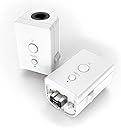
The MAYFLASHGC Controller Adapter allows you to connect two GameCube controllers to your Wii or Wii U system, featuring customizable Turbo buttons and compatibility with all supported games, all in a compact and lightweight design.


| ASIN | B00YH3NWTW |
| Brand | MAYFLASH |
| Color | white |
| Compatible Devices | Gaming Console |
| Connector Type | Proprietary |
| Customer Reviews | 4.5 out of 5 stars 341 Reviews |
| Finish | Matte |
| Item Dimensions | 3.54 x 1.38 x 2.76 inches |
| Item Weight | 0.07 Kilograms |
| Item dimensions L x W x H | 3.54 x 1.38 x 2.76 inches |
| Manufacturer | MAYFLASH |
| Mfr Part Number | W0142 |
| Model Number | W0142 |
| Number of Items | 2 |
| Number of Ports | 2 |
| Package Quantity | 1 |
| Power Plug Type | No Plug |
| Smart Home Compatibility | Not Smart Home Compatible |
| Specific Uses For Product | GameCube controller connectivity with Wii and U systems |
| UPC | 717520922902 |
| Unit Count | 1.0 Count |
| Warranty Description | 2 year manufacturer |
K**N
I bet you would rate it 5 stars too after trying it out
It works perfectly. Zero complaints. Easy to put together and worth the money. I used to play Mario kart Wii on my Wii but my Wii doesn’t work any more. After upgrading to Wii U, I realized the hard way that I couldn’t use a GameCube controller until I found out that this product existed. The mixed reviews had me skeptical but I’m glad I took the risk. Now I can play Mario kart Wii on my Wii U with a GameCube controller like I used to instead of being forced to use the classic controller. If you are on the fence, don’t be. Everything fits and is fully compatible. If the product fails in a short amount of time, I will be sure to update but so far so good. Highly would recommend. If I could give it 10 stars, I would. I’m not even getting paid to praise this product hard. It’s just genuinely a good product
B**)
Works with Mario sunshine using “nintendon’t” on Wii U and also functions with wireless controllers.
Works as intended. Using a Wii U with “nintendon’t” loader. Using two controllers like in my photo works pretty decent. The wireless “retro fighter” controller works 99% of the time. It sometimes randomly start inputting control stick movements, but I assume that’s only because it’s a 2.4Ghz dongle connected to a Bluetooth controller (Wii mote).
E**O
Fools wii mote into thinking gamecube controller is a classic controller
These things are great. It fools the wii mote into thinking the gamecube controller is a classic controller. Why would you want to do this? So you can get a somewhat wireless experience with a gamecube controller. rather than having to plug the controller into the wii console, you can use this adapter to plug gamecube controllers into the bottom of the wii mote. This adapter only works with classic controller compatible games. Unfortunately if you have a wii that is backwards compatible with gamecube games, you have to plug the gamecube controllers directly to the system. Wii motes don't work on gamecube games. Other than that its great for virtual console games as well as wii games that have classic controller support.
C**T
Good with some caveats
Been on a bit of a Gamecube kick. I use my modded Wii to play these games. However, since the modern living room doesn't lend itself well to wired game controllers, I needed a solution that wasn't a Wavebird. I considered the 8bitdo G Bros., but was not sure on the compatibility on the Wii. So, I gave these a try. These work really well with some caveats that aren't well documented on forums. The first is vibration. These do not transfer vibration to the controller. If you are using Nintendont on the Wii, it treats it like a classic controller and vibrates the Wii remote instead. Personally I don't like that, but it seems to be difficult to transfer vibration to Gamecube controllers wirelessly. The next consideration is the way that it handles button mapping and the start button. Since the idea of this is to use the Gamecube controller as a classic controller, it has to make due with the button differences. Since there is no Select or - button, the number of times you hit the Start button changes what it does. The manual documents that, but I am having trouble getting it to function in practice. In addition to the start button confusion, it takes it a second to register the start button so pausing games take a second. Also, if you press it several times, it does something funny with the button mapping that causes the A button to not work. Requiring me to unplug and replug the controller in to the Wii remote. Thankfully, with some learning curve, these issues are avoided. All-in-all this is a great solution for using Gamecube controllers wirelessly. Just bear in mind the quirks!
L**N
Nicd
Todo bien 🙂
A**R
No S/NES classic, and extra buttons are poorly implemented.
ZL has a ton of delay. The implementation of Select and Home make the Start button annoying to use. For Home, you just hold it until it's pressed. For Select, double press. But for start, you have to press it and then wait. Sometimes I'm not sure I even pressed it, so then I'll press it again only to unpause the game unintentionally. Delay is kept to a minimum with all other buttons. If this had a way to remap the extra buttons to button combinations (ex. L+R+Z+Start = Home) it would be perfect. For it's intended use, it's okay. As long as the game you're playing doesn't require ZL, and pressing Start and Select at the same time, it'll be fine. Most games use Start and Select the same way, so a double press is easy to get used to. It's also not intended to be used on the classic consoles, and that's because it doesn't work on them. It won't fit, and with an extension cable, it still won't work. This came out the year before the classic consoles, and before people found out about the hidden high resolution mode, but I'm surprised that after 7 years they still haven't made another or at least updated the firmware. I intended to use this for a project combining this and a GC+ 2.0 (some products won't recognize the GC+, but will with an adapter like this one if it supports Nintendo Classic controllers), but I can't signal that the start button is being held for more than half a second, so it's not usable for it. It's impossible because the start button signal is a set duration due to how they implemented it. This was the main reason I bought it, and I'm disappointed. Raphnet seems to be always out of stock, and this was the only other option aside from Mayflash's old version, which is slightly worse. Overall, if you can, get the raphnet one instead. It supports remapping, and while it's technically unsupported, it can work with the wavebird receiver. Or get the 8bitdo retro receiver if you play on a fast monitor so the delay is tolerable.
A**D
Works perfectly as advertised for OEM controllers but my arcade sticks seem to have issues
I have 2 arcade sticks from my gamecube and i cant get any of them to work on this adapter. It seems like maybe they are drawing to much power for the wiimote. One is a Pelican real arcade gamecube specific model and it seems to turn on and it switches modes base don the led but i get no inputs. The next one is a Pelican real arcade Universal so it has ps2, gamecube and xbox cables on it. That one as soon as its plugs in just shuts off the wiimote and doesn't power the arcade stick. They both work on my gamecube perfectly fine i think its just drawing to much power for the wiimote. But when it comes to using an oem controller on these things they work perfectly. We played a bunch of Mario kart 8 with them on wii u and noticed no issues at all. If that's your goal they are definitely worth the money.
K**.
Better version than the black wired one.
This adaptor is actually great. I can understand why people would want to stick with the previous black wired one, even I was hesitant, but after checking out mayflash's own website, it turns out this adaptor was legitly theirs. The black one has the model number of W010 or W012 i think, but this one is W014. I actually purchased the black one before I even knew about this one, but then one day I go to play with it and it didn't work. I literally hadn't used it for about 2 weeks, and it suddenly stopped working. I had it inside a case which was itself inside a drawer. So when i bought and received this version (way more cost effective to buy the dual pack), it was much better, other than the white plastic as my wiimotes and wii u are black. This one has the extra button of ZL to compensate for the gamecube controller only having 3 shoulder buttons. Since it has no cable, the likelihood of it breaking is way less. Also, the programmers switched the method of using all three buttons of the classic controller layout. On the black adaptor, to use start(+) you need to double press the gc controller's start button, for select(-) is a single press, and for home you just gotta hold it. Having to double press start is way counter-intuitive. With this adaptor, they swapped it by having start(+) be a single press and select(-) be the double press. (I'm going to repost this on the single adaptor purchase as people are missing out.)
G**R
Funktioniert! (Auch mit Wave-Bird)
Also beide Adapter funktionieren tadellos und es ist kein Input-Lag oder andere Fehler zu erkennen. Gerade für Leute, die den GameCube-Controller als den besten Controller aller Zeiten ansehen, ist dieser Adapter ein Muss. Da der GameCube-Controller als Classic Controller eingesetzt wird, kann man ihn nun bei sehr vielen Spielen einsetzen (z.B. Mario Kart 8). In der Beschreibung steht, dass keine WaveBirds unterstützt werden, jedoch funktionierten auch diese, als ich den Empfänger an den Adapter angeschlossen haben, problemlos. Man sollte aber beachten, dass man die Schutzhülle der Wii-Remotes nicht benutzen kann, da der Adapter direkt unter die Fernbedienung gesetzt wird, was die ganze Konstruktion aber auch kompakt macht. Ich werde später die Rezension updaten, wenn die Adapter mal über längere Zeit in Anspruch genommen worden. Bisher aber einfach super. PS: Wer wirklich nur Smash Bros. mit GameCube-Controllern spielen möchte, der sollte jedoch zum offiziellen (kabelgebundenen) Adapter greifen, denn dort werden direkt vier Slots unterstützt.
M**O
ESTA MUY BIEN
FUNCIONA PERFECTO
I**N
Non lavorano bene in modalità vWii di WiiU
Funzionano benissimo per i giochi Virtual console di WiiU ma purtroppo andando in modalità vWii con alcuni emulatori funziona e con altri no ma questo lo si potrebbe imputare ad una mancanza dei software non dell'adattatore in questione, quello che mi lascia perplesso però è che alcune volte (non sono riuscito a isolare la causa) fa impazzire il WiiMote plus, rendendo impossibile controllare la vWii. In pratica conviene in base all'utilizzo che se ne vuole fare...
H**R
Great little adaptes
Bought these for my lad to play Smash bros on Wii U with a GC controller. Works perfectly and MUCH cheaper than the official adapter. Also works with quite a lot of other games too. No problems at all.
D**Y
These are pretty neat and worked well for my purpose
I always seems to try using devices like this in ways they aren't intended. I really had no interest in using this on a Wii or Wii U, I wanted to use them on my PC with Dolphin. Luckily for me they did indeed work for this. It took a few attempts to find a working solution but in the end I did come up with something that works fairly well. At first I tried syncing the wiimotes with an 8bitdo USB adapter. This does somewhat work, but the triggers are not analog this way and only trigger as the left and right bumpers once they're fully pressed in. I then tried connecting them to some Mayflash Magic-NS adapters, and to my surprise the triggers were actually fully analog where they acted as the triggers and then once they were fully pressed in, they trigger the bumpers. However, using them this way, now the z button doesn't work. Well I had one more idea to try and this actually fully works. Using a Windows program called Touchmote, I'm able to sync the wiimote and then full customize the controls. So like before, the triggers are fully analog and become the bumpers when pressed in, and then I mapped the z button to the select button since a GameCube controller doesn't have a select button. From there it's just a matter of mapping the controller in Dolphin and now I have semi wireless GameCube controllers
Trustpilot
1 week ago
4 days ago