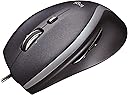
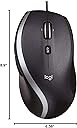
🖱️ Scroll Smart, Work Sharp — The Wired Mouse That Means Business
The Logitech M500 is a wired USB mouse designed for professionals seeking ergonomic comfort and high productivity. Featuring hyper-fast scrolling with an easy toggle to precise click-to-click mode, programmable buttons, and plug-and-play simplicity, it delivers reliable laser tracking and customizable controls. Perfect for office or home use, it combines durability with a sleek dark gray design to keep you ahead in every task.
| ASIN | B002B3YCQM |
| Additional Features | Ergonomic Design |
| Antenna Location | Laptop |
| Are Batteries Included | No |
| Are Batteries Required | No |
| Best Sellers Rank | #1,602 in Computer Mice |
| Brand | Logitech |
| Button Quantity | 6 |
| Color | Dark Gray |
| Compatible Devices | Laptop, Personal Computer |
| Connectivity Technology | PS/2, USB, Wired |
| Customer Reviews | 4.3 out of 5 stars 2,867 Reviews |
| Enclosure Material | Rubber |
| Global Trade Identification Number | 00041114169269, 00097855057099, 10097855057096 |
| Hand Orientation | Ambidextrous, Right |
| Hardware Platform | PC |
| Item Dimensions L x W | 8.9"L x 6.38"W |
| Item Weight | 144 Grams |
| Manufacturer | Logitech |
| Mfr Part Number | 910-001204 |
| Minimum Required Operating System Version | Windows 1 |
| Model Name | M500 |
| Model Number | 910-001204 |
| Movement Detection | Laser |
| Movement Detection Technology | Laser |
| Number of Batteries | 2 AAA batteries required. |
| Number of Buttons | 6 |
| Operating System | Windows 10, Windows 7, Windows 8, Windows Vista, Windows XP |
| Power Source | Corded Electric |
| Range | 5.0 meters |
| Special Feature | Ergonomic Design |
| Style Name | M500 |
| UPC | 041114169269 803982776563 097855057099 643810800448 999992765489 777787372254 778888132990 |
| Unit Count | 1.0 Count |
| Warranty Description | 1 years limited hardware warranty |
S**G
Great mouse, very good price for this quality
Logitech Corded Mouse offers great value, awesome precision, at a very attractive price. I am a retired gamer and I take my mouse precision very seriously. Let me just start by saying that if you are a serious gamer, look somewhere else! This mouse does not offer enough laser precision for FPS games. But I'm assuming the rest of the review for the office workers and infrequent light gamers. Comfort - win! the shape of the mouse is very good for maintaining good grip and lessen tension in your hand. I generally like mice with a bit of depth to it that helps with the grip. The thumb area also offers rubber grip, which is awesome! This is small on paper, but really annoys me when other mouse do but pad grip area with rubber to add friction. Precision - amazing precision at this price point. The precision is adjustable with software. Again, this is no gaming precision, but for regular day to day tasks, this precision level is perfect. I never quite feel that the pointer is not going to the spot that I had intended. In comparison, I tried to use a wireless mouse from Logitech (M510) and I cannot stand how imprecision that mouse is! I just had to deal with the fact that if I want good precision level without breaking my bank I should stick with wired mouse. Buttons and scroll - you can customize what the buttons do and the scroll affects. They work very well. And the clicks feel comfortable, the feedback level is nice. You feel the actual click, and don't have to guess whether the click went through. And you basically never accidentally click with these buttons. For the scroll you can turn on infinite scroll, but I personally find that rather annoying. Setup and software - just plug and play! I use a 15-inch retina macbook. Mouse worked perfectly the second I plugged it in. For the average user, I think this is pretty much all you need to do! I'm sort of a power user so I installed the logitech setpoint software to customize the buttons and the mouse acceleration. These software are intuitive and work like a charm. Weight - the mouse is pretty light weight. This is a matter of personal preference. I actually think this mouse is a bit too light that it causes me to overshoot sometimes. But I think this came from the fact that I used to have a heavier mouse and I just need to adapt to a different weight. I think if you never used gaming mouse before, this weight is probably gonna be perfect for you. Overall verdict - this is an amazing mouse at <$30. I'm definitely keeping this mouse for my day-to-day tasks. I recommend a buy.
R**N
One of the best mouse I've ever used!
I'm giving this mouse a 5 star, not becuase its perfect, but because its a great value! I was using the Logitech Mx-510 for more than 2 years, and that was a great mouse. Recently needed a new mouse, and purchased this one. Pros: - I am just loving the free mode of the scroll wheel. Its really great. I didn't find this great until I went back to my older mouse. Its true what they say, once you use it, you can never go back. - Its really ergonomic. The shape is a little larger than what I would liked, but it fits my right hand perfectly - All the buttons are customizable and works / feels really great - The pointer is extremely precise. You'll notice that even more, if you're coming from an optical mouse or you work with software like photoshop a lot. Both are true for me. - The smooth scrolling on websites feels great! Its a software touch from Logitech though. Cons: - You cannot zoom using "Ctrl + Scrool Wheel" in the free wheel mode. I used to use that a lot, but now I have to go back to normal scrolling mode just to zoom. Its one click away though. - Pressing the middle button requires a lot of force. I actually can't use that at all. I reconfigured that buttons in another one. - A little larger maybe, but I don't feel it after using less than 30 minutes. Despite these cons, this is a great mouse, probably the best corded mouse you can find on the market. I was a little confused between this mouse and the Performance Mouse MX. The later one was more expensive at $70, but I really hate the wireless thing and particularly for the MX, where you have to charge it the every other day. Cord just works fine for me, and without any charging/battery changing hassle. I am using the mouse for 1 week now, hope my experiences so far helps you decide.
J**N
Solid corded mouse, but might not be good for gamers
I bought the M500 to replace my G7 which started to have problems left clicking after I dropped it while moving apartments. I got tired of swapping batteries so I decided to go with a corded mouse and so far, I've been very happy with the purchase. The M500 is a bit curvier than the MX and G series of mice, which makes it fit even better underneath my hand. I've never really had any ergonomic issues with Logitech mice, and the M500 keeps up that tradition for me. The top of the mouse and the left/right buttons are made of a textured plastic and the sides are a rubbery grip. It's a small touch, but it really gives the mouse a quality feel to it. Both the back and forward buttons are placed on the left side of the mouse, which is my preferred placement. Some mice put the forward button on the right side and I find that my pinky isn't really trained well enough to use the button. The scroll wheel feels like it's weighted, but it's still very easy to rotate. Below the scroll wheel is a toggle switch that will turn on and off the stepped scrolling in the wheel. When off, you can spin the weighted wheel and let it go on its own momentum for a while. The stepped scrolling mode feels a bit looser than what I'm used to, but it still works great. My only complaint with this mouse is that the looser scrolling causes me to accidentally scroll while I'm pressing the middle button. It really only bothers me when I'm playing first person shooters because sometimes I'll accidentally switch weapons when I click the middle button. The scroll wheel also tilts left and right if you're looking for that functionality. Pros: + Feels as solid as any Logitech mouse that I've ever owned: MX 500, MX 700, and the G7. + The curvier design feels a bit more ergonomic to me. + Good button placement with back and forward buttons on the left. + Wheel tilts left and right for those who are looking for that extra functionality. + Scroll wheel has a free spinning mode. I'm not sure what it's good for, but it's kind of fun to spin the wheel and watch it scroll long documents. Cons: - The scroll wheel is a bit looser than what I'm used to. There's a tiny bit of play in between each click of the wheel. Unfortunately, that little bit of movement is enough to register in games so when you try to middle click in an FPS game, it's very easy to accidentally switch weapons too. Overall, it's a great mouse for desktop and office use. Gamers would probably be better served by Logitech's many gaming mice though.
S**Y
Comfortable mouse, great scroll wheel, perfect button sensitivity
Got this mouse and have been using it for a few days. The shape and layout of the mouse are just about perfect. The side thumb buttons are easy to press and have crisp action, but positioned in such a way that you won't accidentally click them with your thumb when mousing around, since there's ample space below the buttons for the thumb to rest when not active. The left and right buttons have a long active zone, extending effectively to about the position of the wheel-mode button, letting you click with any part of the finger. The wheel, omg the wheel! It is the best thing since sliced bread. Love the inertial hyper-scroll mode, give it a flick, and it flies through the document like nobody's business. I find that I don't use the step-scroll mode at all, keeping the mouse always on the free-scroll mode. I got used to it very quickly, and now keep missing it when using regular mice. The wheel side-scrolling action is very good as well, very light action, no need to apply much side-force at all, and makes a satisfying click. It could be a tiny bit crisper, but quite good as it is. The one thing is, it takes a little care to do the middle-click with the wheel when in hyper-scroll mode, if you want to avoid scroll-drift. Since both the scrolling action in free-wheel-mode, and the side-scroll action is very light, you have to be careful to press directly down on the wheel. The best way to do it, I find, is to not use the tip of the finger to middle-click, but to extend the finger over the wheel and use the second phalanx. The mode-switch button is comfortably positioned, and is not likely to be accidentally clicked, both due to its positioning, and the relatively high resistance to click. All that said, I don't use it much at all, since I prefer to stay in inertial scroll mode. Tracking is good, both on mouse pad and a reflective table surface, and I find no trouble achieving high precision with very little effort. Mouse shape is very comfortable on the hand (for the record, I have relatively large hands), no issues using it for prolonged periods of time. Note that this mouse is for right-handed use only, due to its asymmetrical shape. Overall, I'd say it's a very good wired USB mouse. Since I only recently got it, I have no comment on the longevity - look for updates to this review in the future. EDIT: (2012-11-26) It is now just over 11 months since I got this mouse. It is still going strong, good as new. By now I've grown quite attached to the free-scroll mode. :) I only use the click-mode for google maps, since there one usually wants a precise zoom level.
X**R
Excellent mouse for Radiology, large documents and anyone with "mouse finger"
I just got this mouse and have been impressed thusfar. I have replaced a Logitech G9x with this mouse. The mouse seems ergonomically reasonable for a medium size hand (right handed). The mouse itself is relatively light (compared with the G9x) which for me is a downside, but may be a benefit for others. The thumb buttons for back/forward page are pretty reasonably positions. This is basically a no frills mouse, but I think I have found my mouse holy grail. Here's where is gets really good ... the flywheel option is awesome (called hyperscrolling by logitech). Reading and scrolling through many thousands of images daily has produced a subtle sensory neuropathy in my index finger (the one that I use for the scroll wheel). This is much akin to the "mouse finger" problems that gamers have related to chronic repetitive microstress injury. This flywheel allows you to flick once and scroll through the images with very little additional motion. It's sensitive to single image movement as well as larger movements over MANY images. This seems to be a massive ergonomic benefit for me and greatly reduces contact/impact time on index finger. This also works great for large documents (PDFs, Books, or large spreadsheets). So far, I have not seen a downside to this since you can simply press a button and move it back to standard "click wheel". THANK YOU LOGITECH. GENIUS DESIGN.
G**S
Unneeded "features" make this mouse barely usable
Yes, I hated this mouse and returned it to Amazon. I thought it would be the perfect mouse for productivity. That is, for browsing the web, my email, and doing other common computer tasks. I was wrong, as it was a bane to my productivity. I use a Logitech MX518 at home and a cheapo Logitech 3-button mouse at work. This mouse is notably worse than both. The side buttons are good. The left and right buttons are good. The wheel is terrible. Everything about it is implemented poorly. I get the frictionless wheel and why one would want it, but it just doesn't work. The toggle to switch between it and the regular, clicky wheel works surprisingly well. But regardless of which way you toggle, it stinks. The free-spinning, frictionless wheel is crazy. I guess it's possible that you might want this, but wow, it's hard for me to come up with real use cases. I spin it a little, do something else, next thing I know a document I'm trying to read is flipping through the pages 2 at a time. Or my email will be randomly scrolled to the bottom. Or my open tabs will go flying from one end to the other. The "feature" is seriously stressful. The regular, clickly mouse is below average. Its clicks are way too loud and it still feels too loose. As bad as all of that is, it's just about impossible to click the middle button without also clicking middle-left or middle-right (i.e., the middle button can be depressed normally and also pushed left or right). Using software, you can disable these functions. So I guess that is forgiven. But just middle-clicking in general is broken. You have to retrain yourself to depress very firmly, else the click won't register. But, the mouse physically clicks (subtle) once before it clicks again. The second, more prominent click is the only one that will register. Software can not fix this issue. Overall, unless you enjoy pain, I would suggest you avoid this mouse.
K**)
ABSOLUTELY PERFECT WITH MY iMAC!!!!!!
This mouse is exactly what I was looking for!! I have a 2009 iMac that is running Mountain Lion, and I've been having some issues with my Mighty Mouse. As I'm sure most of you know, the scroll ball on the Mighty Mouse is notorious for failing. However, I didn't want to go the route of the Magic Mouse because I've heard mixed reviews about it. I don't like having to turn my mouse off. I usually leave my computer on 24/7, and the wireless Mighty Mouse needs the batteries changed close to twice a month. THAT HAS BEEN A BIG PAIN! I thought about going with a wired Might Mouse, but then I knew I would encounter the same scroll ball problem after a month or so. Another thing I loved about the Might Mouse were the two squeeze triggers on both sides to automatically minimize and space the windows. Once I realized that F3 on my Mac keyboard can make this function happen, I thought it wouldn't be too much of a sacrifice. I was absolutely delighted to see that one of the little buttons on the Logitech Corded Mouse acts the same as the squeeze triggers on the Might Mouse! A click of that small button on the left side of the mouse activates spaces! I have killed two birds with 1 stone! I wont' have to replace batteries on my mouse anymore, and I can activate spaces with my hand on the Logitech Corded Mouse!! Also, I have a scroll wheel that is fully functioning! I am extremely satisfied with this purchase!! (By going to system preferences on your Mac and clicking the mouse option under hardware, you have the ability to adjust the following (on Mountain Lion): Scroll direction, tracking speed (speed of the mouse cursor), scrolling speed (speed the scroll wheel operates on your web windows), double-click speed, and primary mouse button (left or right). I would also like to add that pushing the scroll wheel into the mouse does, indeed, pull up your widgets screen!!! This mouse is awesome, and you can't beat the price - $19.99 with Amazon Prime!
G**N
Great for casual gaming, marginally OK for competative gaming.
This is coming from someone who uses their mouse primarily for gaming. Here's a breakdown: Cons: 1)no on demand mouse sensitivity change, I used this feature in previous mouses and I very much miss it. Instead, they replace it with this scroll wheel which has 2 modes: your free rolling mode, which essentially removes the friction on the mouse wheel so you can let it roll like a loose wheel, or with friction to make it more like a traditional scroll wheel. Useless for games, great for long web pages where you can't just use a search function. 2) Weight: It's not the heaviest mouse I've used, but it's not even close to the lightest. It's on the heavier side so if you're like me, and prefer your mouse to be lighter, this is definitely not a great one. 3) scroll wheel, when in friction mode, doesn't have a very satisfying or noticeable knock each time you switch it. I got used to it fairly quickly but i still occasionally overcompensate when a lot is going on. PRO: 1) Comfortable. Like many of the other logitech mouses with this ergonomic design, which is the best in all honestly, it's very comfortable. It doesn't have that really stupid modern look of the recent gaming mouses such as the G502. I have yet to try those to compare the comfort, though. 2) Accuracy. I have had no problem with it being just right. The weight makes me very slightly jumpy when i try to make fine tune small movements with the mouse, but that's a fault of the weight, not the laser or anything. 3)Price: My main point as to why i bought it. I was looking for a decent replacement for the mx518 (that wasn't made of stupid metal). This was a fairly safe purchase. the g400 is >60 brand new. Overall, this is a great backup mouse, or even a decent gaming mouse but there's a lot that I miss. But, with it being a good 20+ dollars cheaper than other gaming mice it's worth the price. I just kinda wish it didn't have that scroll wheel. This is definitely an OK mouse but now that I have less of a budget it's definitely going to be replaced by something much better suited for playing games where your mouse controls matter. If you play sims, or MMOs, or other things that don't require precise mouse movements, this is actually a perfectly fine mouse and I would recommend it.
S**N
It's very good as far as handling goes
have used this mouse for a few days. It's very good as far as handling goes. great design makes it quite comfortable to use. And the interchanging of normal scroll to hyperscroll using the small button below the middle mouse button makes it even more better to use for web browsing.
W**N
gute präzise
Maus mit sehr ergonomischer Formgebung . Gute Führung und präzise Steuerung, so wie man es sich wünscht. Das ist Technik heute.
B**5
A nice replacement for my old Logitech G500.
So far this mouse has worked very well with my Linux Mint system and has been a worthy replacement for my Logitech G500 corded mouse which I have very much liked. The G500 fits my hand well and feels well built, with soft, precise control buttons and a wonderful scroll wheel. The free-wheeling option is why I chose this mouse and I have not been disappointed. Since I am using a Linux operating system rather than Windows I am unable to test the special features made for that system.
J**Z
Muy buen producto para mac
Se pueden programar los botones para funciones específicas, facilitan mucho el trabajo y las tareas básicas del computador. Ampliamente recomendado.
A**M
Best laser wired mouse
Awesome wired mouse. Shares characteristics with the logitech performance mx wireless mouse.
Trustpilot
2 days ago
3 weeks ago