Desertcart purchases this item on your behalf and handles shipping, customs, and support to UK.
🔍 Unlock the unseen — because details matter.
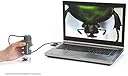
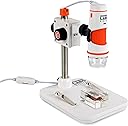
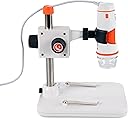
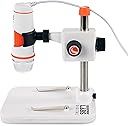
The Celestron Labs 5MP Handheld Digital Microscope delivers professional-grade magnification from 20x to 200x with a true 5MP sensor and 5-element IR-cut glass lens. Featuring an adjustable LED ring light, built-in polarizing filter, and one-touch snapshot button, it offers crystal-clear imaging for electronics, biology, and quality control. USB-C plug-and-play connectivity and an included adjustable stand make it perfect for both handheld and hands-free use. Backed by a limited lifetime warranty and expert US-based support, it’s the go-to tool for millennial professionals demanding precision and portability.

| Asin | B00CMJ1I08 |
| Best Sellers Rank | #785 in Camera & Photo Products (See Top 100 in Camera & Photo Products) #110 in Lab Handheld Digital Microscopes |
| Brand | Celestron |
| Built In Media | Built in adjustable light polarizing filter, Calibration Ruler, Plastic and metal adjustable stand with 1/4-20 thread clip holder, Quick Setup Guide |
| Color | Gray/White |
| Compatible Devices | Personal Computer |
| Customer Reviews | 4.0 4.0 out of 5 stars (980) 4.0 out of 5 stars |
| Global Trade Identification Number | 00050234443081 |
| Item Dimensions L X W X H | 1.3"L x 1.3"W x 4.44"H |
| Item Highlight | Up to 200x Magnification, High-Resolution 5MP Imaging, Capture Photos & Video, Adjustable LED Illumination, USB Powered |
| Item Weight | 0.65 kg |
| Light Source Type | LED |
| Magnification Maximum | 200 |
| Manufacturer | Celestron |
| Manufacturer Part Number | 44308 |
| Model Name | Celestron Labs Digital 5MP Handheld Microscope |
| Model Number | 44308 |
| Number Of Items | 1 |
| Objective Lens Description | Achromatic |
| Power Source | 2.0 USB-C 5V (non-removable cable) |
| Real Angle Of View | 45 degrees |
| Unit Count | 1 Count |
| Upc | 050234443081 |
| Voltage | 5 volts |
| Warranty Description | 2 Years |
User
Good image quality
I'm quite happy with how well this scope works. I have had it for a week now and I find that It is definitely worth the money. For higher magnification the subject must be close to the lens. As you can see from the picture I had to prop up the stone to get it closer to the lens. That is because the height adjustment only lowers the lens to about 1.5" above the base. No big deal to me. Removing the scope from the stand does not work very good because the best image is obtained by having the subject as stable as possible, which is difficult to do by hand. Lumpy objects such as rocks are best viewed at lower magnifications, but very satisfactorily.
User
Great value! High resolution.
I'm a professional Biologist and have many high quality very expensive microscopes. I needed something small and portable that I could transport even in airline luggage. This USB scope met my needs and exceeded my expectation for picture quality. Very easy to use and set up. My only complaint is that the mount that holds the scope to the base is a little loose and tightening the set screws did not help. This makes focusing a bit tricky because when you let go of the focus knob, there is a physical shift of the scope to out of focus. I've learned to focus very gently and work around this small problem. For the price, this USB scope can't be beat and its rated at the top of its price class in reviews for a reason. My CD manual was out of date and did not contain the proper method of calibration. I contacted on-line tech support, no wait time, and received chat instructions how to do the calibration. Now, the calibration is for those measuring the dimensions of the object they are viewing. Some have complained that the calibration needs to be done for each image, and that's pretty standard for almost all of these USB scopes. If you don't need precise measurements on objects, you don't need to bother with calibrating, just enjoy the clear images!
User
excellent but has longevity problem
LATER STILL: vendor DID finally replace the one that went bad and they do have good customer support --- i just got caught in a change of personnel at the company.It DOES have a longevity problem, however. After 3 years of use, it was on it's last legs. The color had pretty much faded completely to all shades of gray and the focus had narrowed from the full view field down to only the center with everything out at the edges of the view filed out of focus.Their tech guy said that their optical sensors do that after a lot of use, but I have been using the same digital camera for lots longer and for way more images and it still is as good as it was the first day I used it, so I don't get why they can't have an optical sensor that lasts longer.Anyway, 5 stars for performance and 2 stars for longevity. I had to buy a new one (at DOUBLE to old price; $150+ instead of $83) so as to get back to the performance I need.LATER: after 18 months it died in the way others have described. Totally dead. Software will not recognize it no matter what you do (different USB ports, restart computer, reinstall driver, etc) AND the company has apparently abandoned all pretense of customer support. I wrote them about 4 emails over 2 weeks and zero response.I do amateur wood anatomy analysis and this turns out to be just what a I wanted. I had a very good focus mechanism and a wide range of focal lengths. I can do a full-screen image of a wood sample's end grain at anything from .2cm to 2cm which is more than enough for my needs.Very pleased and recommend it.I DID have to build a special stand for it but that' because of the size / shape of the wood samples. The stand that it comes with is fine for flat objects
User
Software issues and then unit stopped working completely
I do not write bad reviews lightly and only after being sure that I am not the source of the problem. Sorry to say that I am returning this unit for refund. Not interested in a replacement.First issue was that I downloaded what I expected to be the latest version of the software directly from Celestron's web site. My expectation was incorrect. The version of MicroCapture Pro from their web site is 2.3. It would not recognize my Digital Microscope Pro even though my computer sees it fine. I tried three different computers with the same result. For giggles I installed the version on the CD that came with the camera. Turns out it is a newer version than what came from their web site. The newer version is 2.5. Go figure. That was my first major clue that I was not dealing with an outfit on top of their game.I managed to get the 2.5 version working on one of my laptops and obtained some acceptable imagery for a short time. Then while focusing in on a subject item, I noticed that the image on screen was not updating. First step in troubleshooting was to restart software. No help. The software did not complain that it could not find the camera as the 2.3 version constantly did. It just would not display any imagery on screen. I tried rebooting. No good. Tried reloading software. Nada. Tried other USB ports on computer. No go. Rinsed and repeated all the above on another computer to no avail. So the unit became completely worthless to me and thus the return.Congratulations to those of you who have no issues and I hope your product continues to provide value for years to come. I lost this particular lottery and am disinclined to give Celestron another go.
User
DOES NOT WORK on Windows 10 and Windows 11
I bought this about 5 years ago. It worked great and I liked it. But one day it just stopped working on Windows 10, after a Windows update. Celestron never updated the software. The software that comes with it, and the software on their website both no longer work with Windows.So basically, I paid 100 dollars for a paperweight. Don't take my word for it. Do a search online, many people talking about the same thing with this unit.
User
terrific for close inspection
this scope has revealed to us a significant pest problem in our hydroponic system. Mites so small that you would never see them easily with the naked or or even a hand help magnifier. The software is a hot mess though. There is no option to calibrate or set magnification in the windows version. To compensate I just lower the scope closer to the object I am inspecting and focus. At these magnification levels and the limitations of the scope you will have no depth of field: just focus through till you see what you want. The software will push your cpu to 100%, so use it and close it. Tech support is non existent via email. For the price the positives outweigh the negatives. Just do not expect best in class.
User
Good news, 'bad news'. You might consider buying one.
The 5 Mp capability is an absolute plus for this unit, in fact, the extra megapixels help make up for the shortcomings of this optical device ... to a degree. A few things stand out as problems (and this problem may or may not exist in other manufacturers devices):1) the image has permanent aberrations or digital noise in all unfocused regions of the image (and with the short depth of field, this may entail most of the image). Now this is either 'noise' or dust and debris on the glass elements of the lens or perhaps some protective clear plate between the final lens and the 'outside world'.2) there is no information provided about what magnification range you are at (ex: 1x, 50x, 200x) - this would be helpful.3) the point of focus shifts wildly as you change the magnification - sometimes the focus point is below the protective clear shrouding, then as you increase magnification, the focus point moves up higher and higher up into the shroud (not useable if the object is flat - if non-flat, you have to stuff the object up into the shroud); then as you increase magnification more, the focus point starts shifting back down towards the end of the shroud, but not necessarily all the way. WHAT would be helpful, at least, would be to have a magnification-vs-distance to lens chart or something similar.The image from the camera shots are good and clear, but not crystal clear (maybe due to the noise or aberrations mentioned above affecting what should be sharp and clear).The software disc was repeatedly rejected out of my MacBook Pro, so I had to load the software from online (the software online was several revs newer anyway). Once the software was loaded it worked fine, but all the software has a definitive lag-time for every action it takes - very sluggish, not typical for good software.But in spite of that, as I said, the 5 Mp output surely is better than having a crystal clear image at 1.2 Mp. Don't 'not buy' this item based on what I've written - it may be possible that this is the best thing you will get in the lower price range.
User
Great product. 10/10
This product has worked exactly as I expected it to. I'm using it in school to identify different types of grass and put together slideshows highlighting the differences, and compared to my classmates I'm getting higher quality pictures, with higher zoom rates, with much more ease. Even on the really hard to get pictures, lie the really fine leaf fescue's or grasses that I need pictures of the inside of the bud. I'm glad I spent the extra money(most everybody else spent in the forty dollar range) and I would recommend this microscope to anybody that had similar needs.
User
excelente herramienta educativa
lo uso para dar talleres de biología con niños y es un éxito total, muy fácil de usar, buena resolución.es una herramienta muy sencilla pero explotable como microscopio estereoscópico.Usando un poco de ingenio la herramienta se puede usar de modo profesional con resultados aceptables.
User
Ein tolles Gerät für den Einstieg in die digitale Mikroskopie!
Das Gerät und die Teile sind dem Preis entsprechend sehr gut bis gut verarbeitet. Die Software von Celestron ist intuitiv und ich denke der Support wird von dieser Firma (da es sich nicht um eine No-Name Company handelt) auch noch länger sichergestellt sein.Unter Windows 8.1 x64 läuft alles problemlos. Handheld Mikroskope gibt es auch günstiger und ohne Tischständer, dieser erweist sich aber beim Scharfstellen als sehr nützlich. Man kann kaum die exakte Entfernung zu einem zu untersuchenden Objekt gleich halten, während man mit der anderen Hand scharfstellt und dann noch den Auslöser für das Foto (ich mache es in der Software mit der Maus) betätigt.Man darf sich natürlich keine Wunder erwarten was den Schärfebereich angeht, umso höher die Vergrößerung ums geringer wird dieser (gilt für 3D Objekte wie zb Kaffeebohne etc.) Seht dazu auch meine Bilder, die ich hier hochgeladen habe. Ich denke diese geben einen guten ersten Eindruck wie weit man mit dem Gerät gehen kann.Die Vergrößerung hängt natürlich von der Entfernung zum Messobjekt, sowie den Einstellungen an dem Gerät (diese stellen das Bild Scharf und vergrößern teilweise noch) ab.Wer mehr will, muss gemäß dem Gesetz der Wirtschaft (you get what you pay for) auch mehr bezahlen, da ist eigentlich auch klar.Für den Einstieg in die digitale Mikroskopie kann ich es getrost weiter empfehlen! Trotzdem der Hinweis von "dnt" gibt es ein "ähnliches" (vermutlich das gleiche Produkt nur in Schwarz) zu einem günstigeren Preis.
User
un microscopio de buena calidad
Un microscopio imprescindible para localizar averías en componente SMD y comprobación de pistas electrónicas, muy buena resolución con opción de fotografía o vídeo de lo observado, un buen producto.
User
An excellent digital microscope out of the box
An excellent digital microscope out of the box. At 5MP the resolution is just what I need but don't be fooled by the advertised magnification because magnification depends only on the size you blow up the image. The better figure of merit is resolution. At closest focus, it compares to the resolution of a 30x magnifying glass. The software is pretty basic. Since this is just a simple webcam packaged as a microscope, any third party software will do. Since I am running Windows 7, you have to make sure you install the codex (that comes on the CD) so that the 5MP resolution can be realized. I tried three providers of free 3rd party software and all worked (again, the 5MP codex must be installed for them to run at that resolution). This third party software had more features than Celestron Capture Pro so I will probably use them often. For example, the Celestron software doesn't allow for adjustable exposure - it only auto scales so it can't be trusted for depth of field stacking. It also has no color balance controls. This is necessary since the 8 leds do not provide uniform lighting and I will need other lighting sources in certain circumstances. All third party software I looked at offers adjustable exposure and other features that make depth of field stacking easy. They also offer the full gamut of image control. Speaking of depth of field stacking, I will have to construct my own mount and optical stage for depth of field stacking since the Celestron mount is far too flimsy. The Celestron mount is good for just viewing objects on screen but if you need to make fine adjustments it is finicky. I love the quality of the images - an excellent price point for the optical quality - I will customize it to make it suit my needs.
User
A Great Microscope!
The firmware for #44308-B is not easily discoverable on the Celestron website. By Googling the information below from Celestron Support I eventually found it:-Windows OS - Microcapture Pro V2.5 for 44308-BI carefully deleted all my previous attempts and downloaded the correct software.Hey-Presto! Like magic, full functionality was achieved within seconds.As philately is my passion I found that by rotating the microscope thru' 180 degrees and securing it to a 2" block I was able to capture great pictures of whole stamps. Bringing the picture up enables fantastic variable enlargements.The LED's permit true colours without tinting as reported with some digital microscopesThis microscope has been rubbished by some, particularly stamp collectors. In fact, my experiences so far have proved them completely mistaken. It is a great piece of kit.
Trustpilot
2 months ago
2 months ago